





Frank1940
Members
-
Joined
-
Last visited
Everything posted by Frank1940
-
You might want to consider creating a post in the 'New Features Request' sub-forum.
-
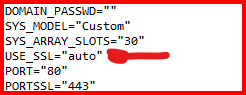
in ident.cfg in the /config directory, there is this setting: Changing it to "no" and rebooting should allow you to access the GUI using the IP address. (Or you could just wait for the Internet to come back up...)
-
Start here and read the next three posts: https://forums.unraid.net/topic/191221-some-musings-on-smb-and-samba-and-unraid-and-windows/#findComment-1561581 For the server not showing up in Windows File Explorer, see here: https://forums.unraid.net/topic/191221-some-musings-on-smb-and-samba-and-unraid-and-windows/#findComment-1561585
-
If you have physical access to the server, a quick push of the power button will start a clean shutdown. A long push (> 5 seconds) of the power button will force a shutdown. A reboot is 'short version' of a clean powerdown with a restart which saves you the necessity of push the power button to start the server. Reboot is intended when a total restart of the server is needed but server access is remote from the current console. (Basically if you watch and listen during a reboot, you will hear the power-off of the power supply before the auto-restart.)
-
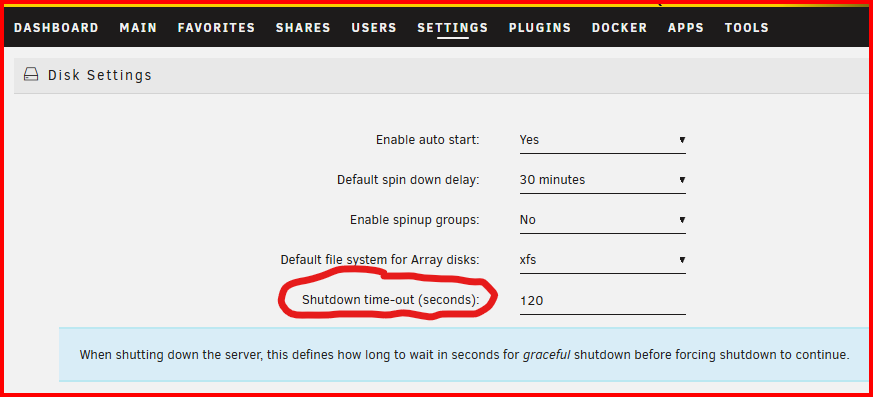
Stop the array manually. IF the array won't stop manually, then the shutdown commands will force a shutdown after waiting for a preset time (Thinking of pulling the power plug) and that results in an unclean shutdown every time. That predetermined time is set here:

-
Set up the syslog server (mirror to Flash) and post that up after it happens the next time.
-
First thing I would is to Click on this spot: And use the built-in File Manager to look at the contents of this share on your cache drive. See if you can figure out what generated the files. (I would be suspecting a Docker Container.) Once you figure it out, Look at the Variables in the container and see if one of the points to share backup_internal. It will part of a path like /mnt/user or /mnt/cache IF you can't figure it out, I would suggest looking at all your Docker containers and see which one has a variable pointing to that share.

-
I might ask, What do you want to do with that disk that you have removed from your Unraid server? Do you want to use (or install) it on your Windows computer? There are tools in Windows that will allow to reformat the disk for use with Windows.
-
No one can answer that question until the files have been examined!
-
That is a new one...🤔
-
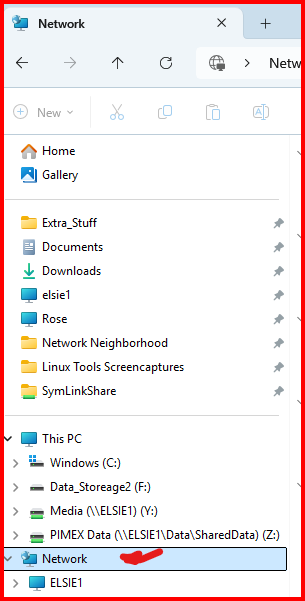
I have said for years that SMB appears to be controlled by witchcraft and magic. Ifd it is not showing up here: Then read here: https://forums.unraid.net/topic/191221-some-musings-on-smb-and-samba-and-unraid-and-windows/#findComment-1561585 (Right now, I am missing my second Unraid server-- on 24x7 --until I went to it and opened a share.)
-
I can't help with this issue but I would like to suggest that you post up the diagnostics file in a new post in this thread as it contains much more info about the network configuration.
-
Another way to clear/empty a reiserfs formatted disk so it can be reformatted to another file system: https://docs.unraid.net/unraid-os/release-notes/7.0.0/#using-mover-to-empty-an-array-disk And for a Uncast video showing the use of this command: https://www.youtube.com/watch?v=Kxs4cmP7eQs
-
BTW, you can repurpose that old 12TB parity as a data drive using the same procedure.
-
Read this section of the manual and come back if you still have questions. https://docs.unraid.net/unraid-os/manual/storage-management/#replacing-a-disk-to-increase-capacity If you just remove the drive you are replacing and set it aside until you are sure all is well, you will be protected from data loss. That drive is your backup! (Unraid array data drives are formatted with a standard Linux File system and the contents of that drive-- your data files --can be read by any Linux system.) PS--- I would buy two 24TB drives to begin with and get the next one (1) when you are again running out of storage space or (2) if you find a good sale price! And I keep a 'cold' spare drive...
-
In your case, I would being using the 'Mirror to flash drive' option. This is the ideal situation for this option. If I recall correctly, the syslog server starts recording with the next message after you activate it. Here is another set of instructions for setting it up: https://forums.unraid.net/topic/46802-faq-for-unraid-v6/page/2/?tab=comments#comment-781601 Don't be surprised if the syslog does not provide any insight to the cause of your problem. If this is your case, run a memtst for a long time--- like 24 hours. Then try a Power Supply swap. CPU and MB would be next. This is assuming that you have already opened up your server case and cleaned out the dust and verified that the fans are all spinning.
-
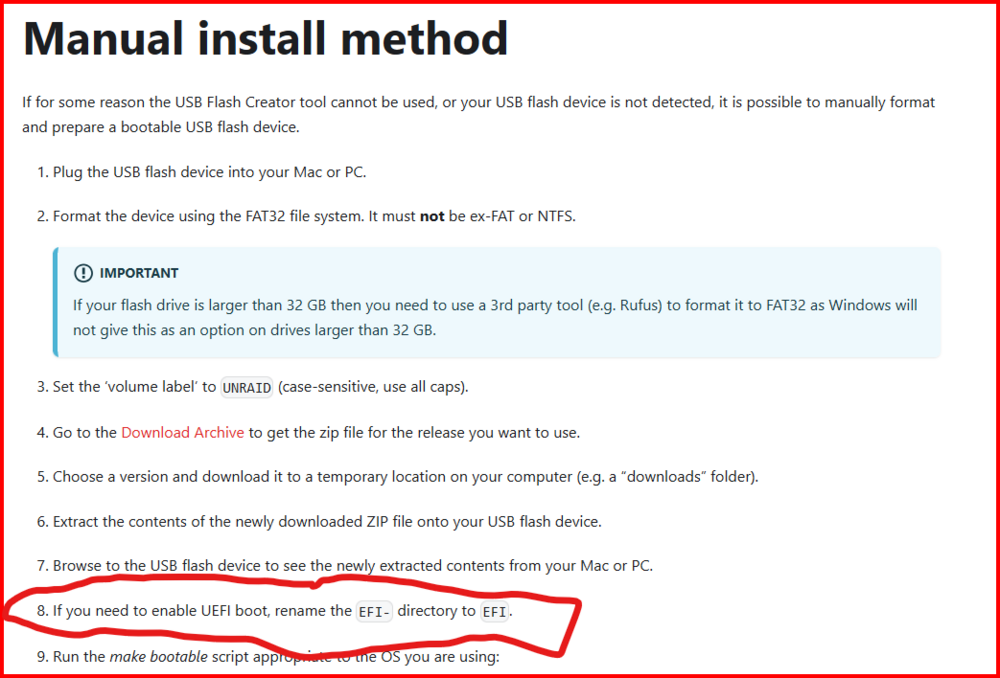
Coming from a 15 year old MB to a new one, you probably need to do this:
-
Does your Samsung Tablet even support SMBv1? (Most devices no longer do!) What the APP may not do is to support logging into a server using a user name and password.
-
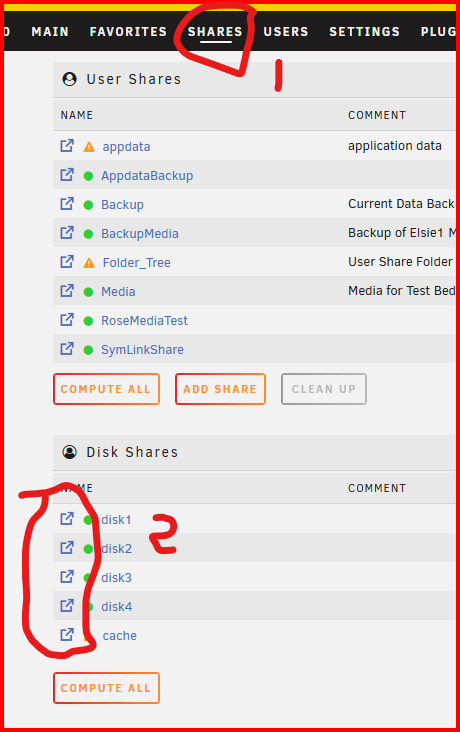
One way to check what is there is to use the built-in Dynamix File Explorer. Open SHARES (Step 1) and then (step 2) click on the proper icon in the circled area for the disk where you want to look for files.
-
@JorgeB I looked at his diagnostics and I think that the Title of the Thread is not an indicator of what his true problem is. His log file has way too much going on for it to be a simple file management issue. Could you have a look and see what you think.
-
That would definitely work. If I were doing it, I would say "Linux NFS protocol" and "Windows SMB protocol". (But that is because I am a bit anal about nomenclature. 😈 )
-
Please understand that I am not trying to be difficult. As someone who is reasonably knowledgeable about both Linux and Windows, I instantly recognized which one indicated the NFS and which one indicated SMB. But I have given a lot of help in solving problems and I realize that there are a fair number of users who have very little insight about either of these OS's. And I would even more larger percentage don't associate NFS to Linux and SMB to Windows! After all, I would imagine that many Linux distributions now contain Samba and Windows PRO has NFS included. (You do have to turn it on as the default is off...) The original poster in that thread that I linked to basically made that mistake. If I had not asked him to walk through the steps that he was using try to set things up, it would have a much longer troubleshooting process.
-
I discovered that AFTER I had posted up my request. But to see those tooltips you either (1) have to know it is there or (2) find it by dumb luck.
-
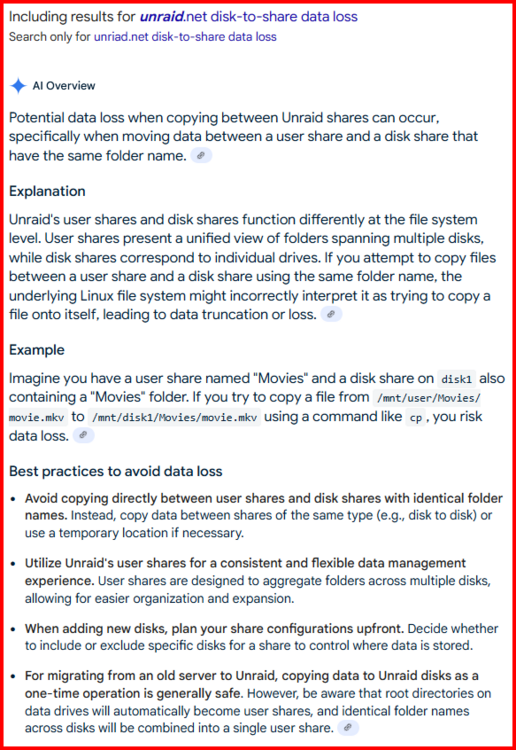
You can't copy if the file is in a 'Share' because you will then have two files with the same name in the share. By the way make sure that your copies are disk-to-disk and not disk-to-share! you risk data loss if you do!!! Even if you copy a file (say, Mash.mkv) from disk 12 to disk 5 cp /mnt/disk12/movies/Mash.mkv /mnt/disk5/movies/Mash.mkv You will now have two copies of that mkv file in the movies Share. This can cause real cockpit confusion later. You want a move operation which is often a copy-then-delete sequence.
-
Move all of the data from all of the drives you want to remove to the ones you want to keep. (You didn't say if you have enough space on the remaining larger drives for all of the data on the drives to be removed...) This will preserver parity until the move operation is completed. Then remove the drives and rebuilt parity. (Personally, I would run a parity check before I did this but I tend to be a believe in Mr. Murphy's laws regarding bad things always happen which cause the most damage...) If you don't have enough space on the larger drives then you need to plan a series of moves/drive_replacements to achieve that. A couple of personal observations. When done, I would want between 20 and 25% free space on the array. Otherwise, you will shortly be looking at how to expand the array. Next, I would question the leap from 6TB to 20TB for parity without indicating that you are immediately adding one or more 20TB data disks. I would look more on the order of 12TB and considering a second parity disk of 12Tb if the number of data disks in the array will be more than, say, eight disks. (With a 20Tb parity disk, parity check times will be well above 40 hours!)



