Frank1940
Members
-
Joined
-
Last visited
Everything posted by Frank1940
-
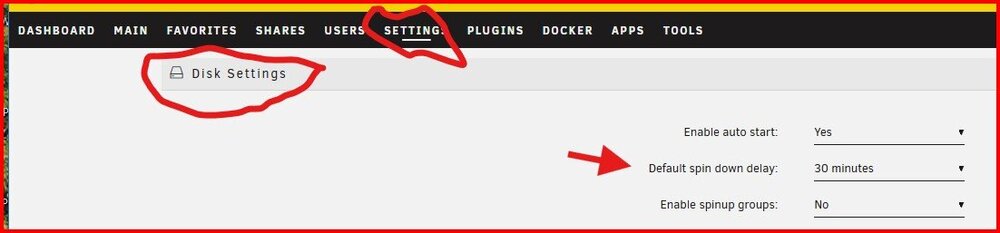
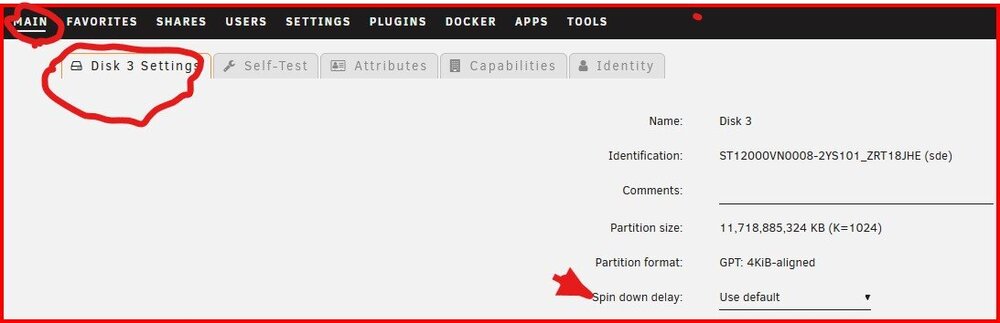
Wow! I just looked at your Diagnostics! You have 39 HD's and SSD's in your array and pools. And I saw one share that appeared to have files on 28 Data disks and one pool. The smallest disk that I saw was 10TB and the parity disks were 20TB. I would not ask that you say how much data you have stored on your server but it must be north of 200TB and the number of files must be in the tens (if not hundreds) of thousands! You do realize that you could be physically accessing every disk in your array to assemble all file metadata to construct the directory listing plus the time to sort it into the display format that you want to see it in. Unless, you were every careful on how you put that data on your server, I don't how to expect that a file manager can be quick as navigating through the resulting file morass. The spin down delay is controlled by two settings. The first one for all the disks is here: And for each individual disk from this page for that disk: The Performance setting is intended to allow you to select the tradeoff between CPU/GPU power consumption and performance. Both Intel and AMD provide for this choice in their chip sets. I am going to ping @JorgeB and see if he has any thoughts.
-
Did you try this? Most of the time, delay in displaying files and folders (and copying files), can be traced to conditions of trying to manage large numbers of files and folders in a single share. Plus, to generate the information to 'fill' the file listing pane of files/folders of your file manager is dependent on how many items have to be processed. Unraid does buffer some file data in RAM but often it has to retrieve it from the physical disks which requires spinning up any disk which contains files in the share. Most of the stuff, you did in the the Group Policy Editor won't help with this situation. (All you did was increase your security risk if you already had any access at all to the files.) The Diagnostics file (if it should be requested or you want to post it for completeness) can be anonymized when it is generated. Confusions reins around logging into Samba. Actually, it is more difficult to generate a login using MS account then with a local account. See this post and the next one in this thread to create a secure login to your Unraid server: https://forums.unraid.net/topic/191221-some-musings-on-smb-and-samba-and-unraid-and-windows/#findComment-1561582 Be sure that you see the rules in the 6-20-2025 Edit for creating a login name. These rules generally preclude the use of a MS account to do the login.
-
What happens if you use the default Windows File Explorer (aka, Windows File Manager)? EDIT: One more thing to try. Spin up all the disks in the array (MAIN tab of GUI) before you start file managing.
-
You might want to read this post. It provides information about the Docker container setup that that works for Unraid: https://forums.unraid.net/topic/188600-share-permissions-changed-to-owner-99/#comment-1540351 If they don't exist, you might have to create them. When you are editing the container, be sure that you open up the 'Show more .... ' at the bottom of the page. Hope this helps...
-
Yes--- They will auto revert back to the default configuration. You can find the defaults here: https://www.samba.org/samba/docs/current/man-html/smb.conf.5.html That is because the defaults are all defined in the Samba app. When the various Samba configuration files are processed, each one can changes any of the setting. (Each one of the configuration files can call another file to be processed.) The last change becomes the new setting that is used. (There could be two or three changes to a setting but it is the last one made that 'sticks'.)
-
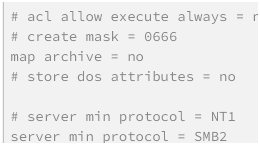
Just put a #<SPACE> in front of the line with the setting. That converts it to a comment which will be ignored when the file is processed! As I remember when you restart the array, Samba is restarted and the smb_extra.conf file is processed again that time. Example of both commented and uncommented lines shown below:
-
The file(s) probably have read-only permissions at the Linux file level. (Read-only = copy) Many Docker and Linux VM hve file generation masks of -rw-r--r-- amd Unraid requires -rw-rw-rw- to work properly.
-
This only works IF your Windows computer will allow 'guest' connections to a server...
-
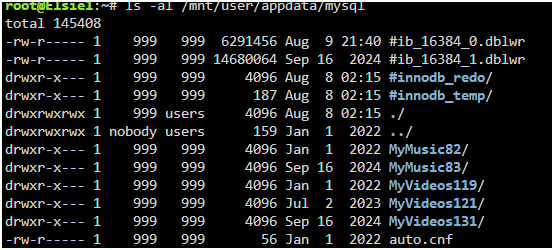
Start by reading this post: https://forums.unraid.net/topic/191221-some-musings-on-smb-and-samba-and-unraid-and-windows/#findComment-1561580 Notice the snippet of the permissions in the example. They area read-write for 'owner', 'group' and 'other'. Notice the group for all of the files is 'users'. Now run this command in a WebDUI terminal: ls -al /mnt/user/appdata Now drill down to the file(s) where you had the problem and look at the Linux permissions for 'group' and 'other' as well at the name of the 'group'. This will show why you don't have access via SMB which itself is restricted by the permissions/owner/group setting of Linux. (Samba is an application program in Linux and not a part of the operating system. It uses Linux file system calls to files to access them just like a word processor would. As such, The Linux file permissions are enforced!) As an example, have a look at this snippet of the mysql Docker:
-
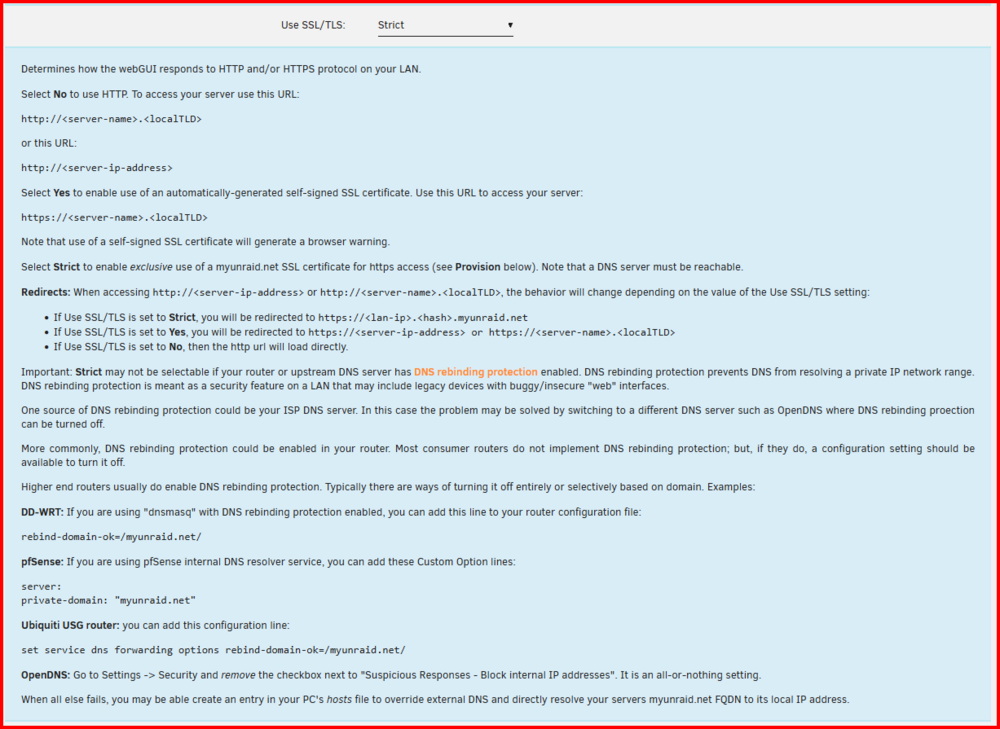
I can't advise you on this. It is a choice you have to make. It is a security risk to turn it off. How big a one is a matter of debate. Most consumer routers have it off with no provision to even turn it on. If you look carefully at the instructions, some of the router only allow it for specified sites. Probably the best solution of providing function with security.
-
Start by reading this: Then this section of the manual: https://docs.unraid.net/unraid-os/manual/security/secure-webgui-ssl/ If you pull the Flash drive, you can the setting for this variable in the /config/ident.cfg file. USE_SSL="yes" (I copied this from one of my ident.cfg file. You probably want to change it to "no"...)
-
I would suspect that you would need to confirm the hardware has been configured in the Access Point Mode rather than the Extender Mode. Google for the manual for your device if you don't already have it. You might also look at the Unraid 7.1 versions as they have added WiFi support to it. (If you are going to do this I would suggest that you also set up Tailscale VPN unless you want to potentially share your server with everyone in the park.)
-
Plus, you have some 'Public' Shares. If you don;t have a valid Windows Credential set up, you could be logging in using Unraid's 'Guest' account. Windows will only allow one log-in from any client computer to any server. See here if you want more info on what is happening in the background: https://forums.unraid.net/topic/25064-user-share-problem?tab=comments#comment-228392 I understand that If a Windows Credential exists for a server, Windows will always use it first (in the background) to log into the server. It then tries several other sets of credentials until one works. (This could result in a 'Guest' connection.) At last resort, Unraid presents a login windows if none of the previous attempts have worked. Unfortunately, Windows will not allow the connection if that client is already logged in as another user. And the error message provides no information as why it failed.
-
@scythe944 , there is a section of the Forum that is devoted to Active Directory (AD). You can find it here: https://forums.unraid.net/forum/102-active-directory/ (If you don't what I am talking about then make the changes that @JorgeB recommended. I, personally, have never used AD but I know it is a complex environment. Most Unraid users use peer-to-peer networking and the Workgroup setting gives that mode.)
-
You do have to be careful with Docker containers. If they are not Unraid aware, their settings may not be what is required to work with Unraid! You should be looking for one where the the user is set to 'Administrato'r and there is a group called 'domain users'. see this thread: https://forums.unraid.net/topic/188600-share-permissions-changed-to-owner-99/#comment-1540351
-
Don't bother trying to reset the permissions. A reboot will restore them to the defaults.
-
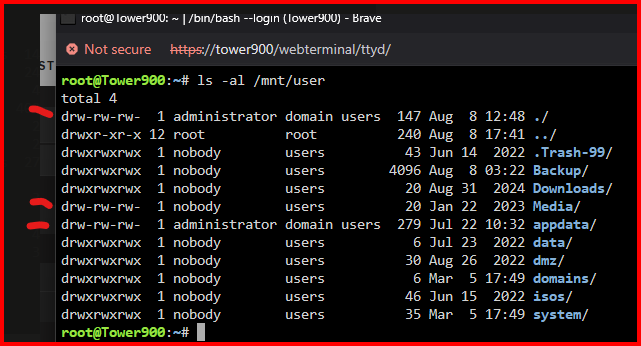
The directories marked with a 'tic' have definate problems! Unless the execute permission bit is set, a normal user can not see inside the directory. Plus, the two directories with the administrator/domain as the owners/group S/B nobody/users. You need to determine what is changing these permissions and resetting the owner/group. (These are set as I indicated every time Unraid is booted up.)
-
Open up the WebGUI terminal. Post up the output of this command: ls -al /mnt/user In your diagnostics, I count twelve shares that have been named but have no data stored in them. In the output of the command I asked you to run, do you see all the shares that you expected to find?
-
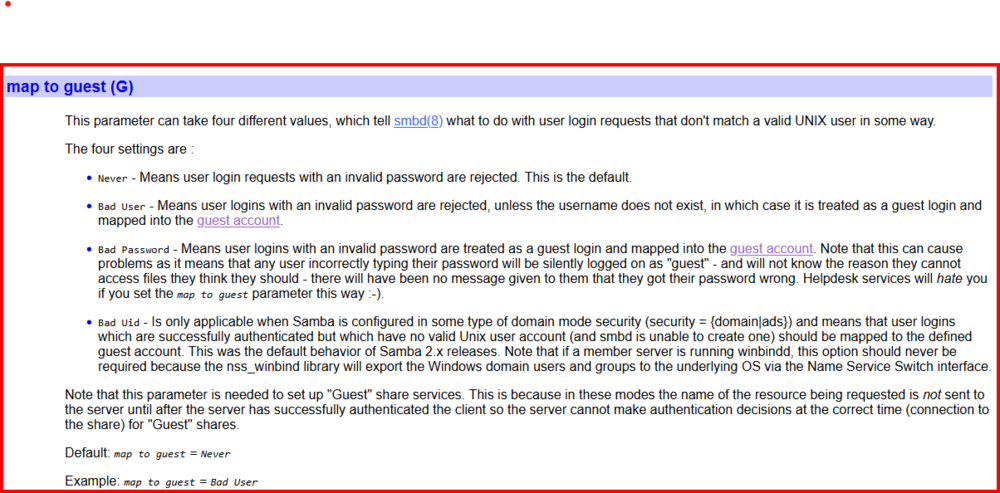
For anyone who is truly concerned about having a secure server, there is one point of entry that is exposed by LimeTech to allow guest access to user files on the server. This situation is discussed below. From the beginning, Unraid has been configured to enable a login to the server using a ‘guest’ account. As anyone with a security background knows, once a hacker has access inside a server, they will start to probe and test for ways to elevate the privileges of that login. To be fair, virtually all of the home NAS’s back before 2010 were using ‘guest’ logins as their default. It made it very simple for the end-users to setup a working network on their home LAN. Plus, it was just past the era of the dial-up Internet connection and there wasn’t the 24-7 online presence for most NAS users. If you wanted more security for your files and information, you were going to do some work to get there. At that time for the vast majority of Unraid users, the threats came from the folks (or the clients) who were already on the LAN! To enable guest accounts, LimeTech has changed a Samba parameter to allow them. This parameter is the ‘map to guest’ one which configured as follows in the standard Unraid install: map to guest = Bad User The present Samba default for this parameter is: map to guest = Never With this setting, a guest connection will never be permitted and you will be required to log into the server with a valid user name and password to gain any Share access even if it has a ‘Public’ share type configuration. (The figure below is a section from the smb.conf parameter table found here: https://www.samba.org/samba/docs/current/man-html/smb.conf.5.html
-
Start here: https://forums.unraid.net/topic/191221-some-musings-on-smb-and-samba-and-unraid-and-windows/#findComment-1561581 Read the next two posts after this. Before trying to 'map' a drive, first make sure that you can see it in Windows File Explorer. (IF you can not access it via Windows File Explorer, you can not map it!) It is also important to realize that you can end up with your Windows client being logged onto Unraid using Guest credentials--depending on you making changes to Windows to allow that --and Windows will only allow one login to each server. So anytime you want to try a new SMB configuration, you have to reboot your Windows client. So if you make changes as described in the above link, remember to do the reboot after you finish all of them You would use \\Tower in File Explorer to get to your server.
-
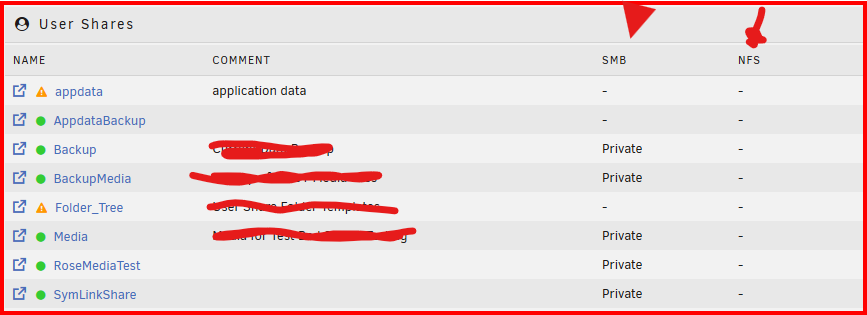
IF you look at the SAHRES tab, it will tell what is being shared via each sharing protocol. See here: If you see a '-' symbol the share is not being exported. If you don't see the protocol, it is not "turned" on.
-
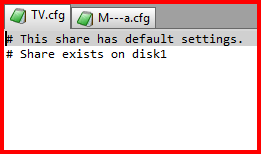
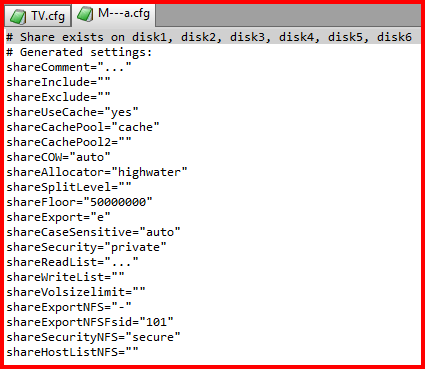
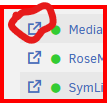
It looks like only Disk 1 has data on it. Next you have only share and this is it configuration info (from you diagnostics) And this what I would expect to be seeing: Open the SHARE settings and make sure you are exporting the share via SMB. (It is 'off' by default!) You can also go to the SHARES tab and click on this symbol to the left of the share and look at the files in that share. Clicking on the blue share name will take to share settings.
-
I believe he is talking about the browser cache... If you are still having problems, I would suggest that you open your own thread. Reviving one that is three years old is not a good idea.
-
Not sure where you are having problems. Are you able to open the WebGUI? I assume that you are at this point since you have attached your diagnostics and it showed successful user login. Did you use the /config folder from the previous install on the USB stick to assign the parity and data drives? Did you use a some other method to assign them? Does the GUI show the array is running? Could you provide a screenshot of the MAIN tab of the GUI showing the drive assignments and data usage stats? (obscure the SN of the HD's) Did you go to SETTINGS and make sure that SMB was enabled?
-
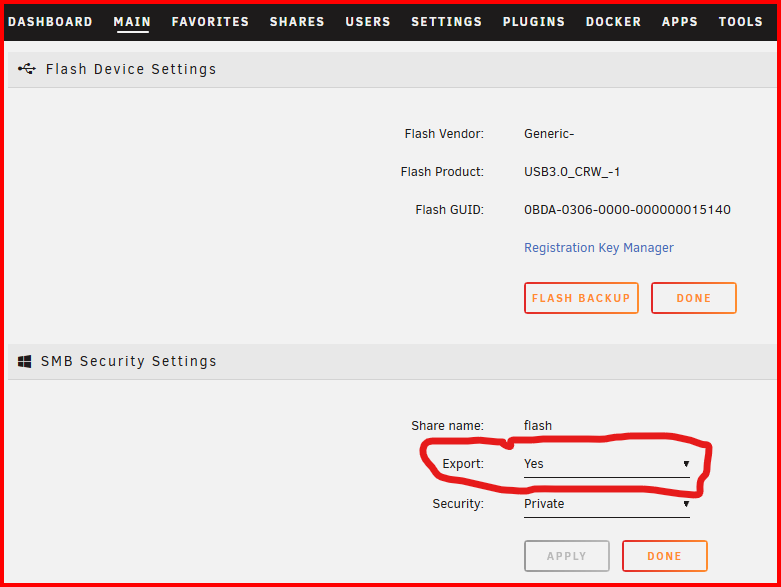
I share mine via the Flash Drive 'properties' page on the MAIN tab . Mine is configured to 'Private' and read-only. That allows me to get to easily access it to help people like you. 😉 (I don't like the concept of a 'Master' share. I want more control over who can do what to the contents of each individual share. Many of my shares are read-only even for me.) This was added to increase security for your Unraid server. Plus, it also keeps some browsers from 'complaining' about the link to your server being insecure because it does not have a proper certificate..