





Frank1940
Members
-
Joined
-
Last visited
Everything posted by Frank1940
-
TOOLS >>>> Diagnostics For complete instructions, click on the word diagnostics in any post-- including the one in this sentence!
-
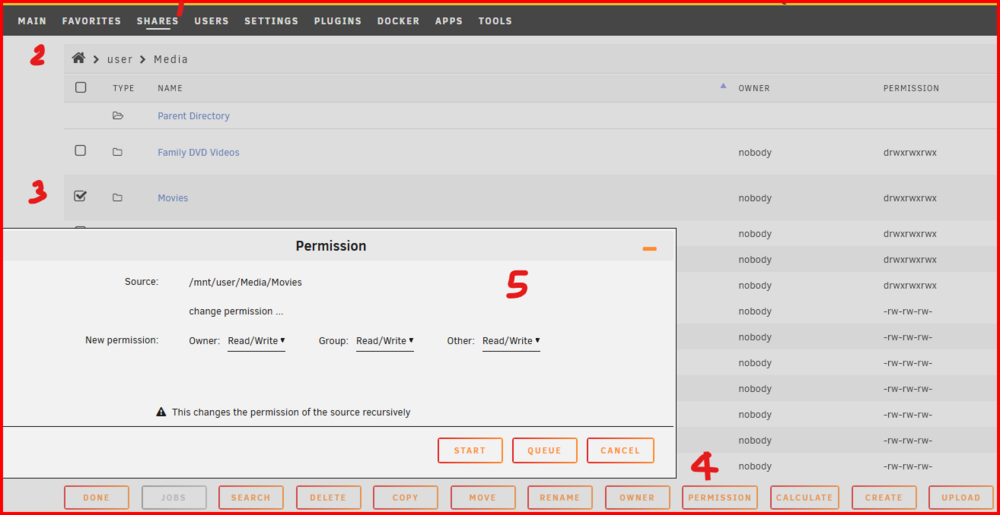
Click on SHARES Then look under User Shares for the share in which you wan to change the permissions on. Next click on the icon to the left of the share name. These steps are basically indicated on this screenshot:
-
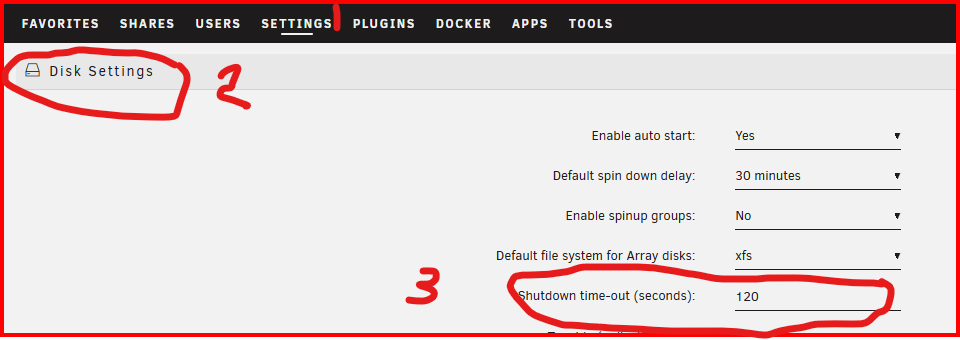
That is true. The quick power button push starts the normal Unraid shutdown script. This script will wait a predetermined time (determined by the setting below) before it forces a shutdown. If you are having problems with unclean shutdowns, manually stop the array and measure the time required. Then change the setting appropriately. If the time is exceeded, a force shutdown will proceed at that point. (This was added a number of years ago because there were folks (or a shutdown script-- think UPS) who would start a shutdown and it would never finish because the array would not stop!)
-
I am sorry I don't have time right now to work with you. Read this post again: https://forums.unraid.net/topic/193625-after-update-from-6129-to-714-folders-in-files-in-user-shares-are-only-accessable-as-the-user-that-created-them/#findComment-1579898 Any time your find permissions that are not 777 for directory (666 for files) and the group not being users there is problem with the process that is 'asking' Unraid to create the resource. ACL permissions are not required by Unraid Samba to work in the Workgroup mode and often cause problems. (I have never used the Microsoft Active Directory (AD) environment so I don't know what happens there.)
-
I would start with a memtst (run for a minimum of 12 hours). Second-- Next boot into the safe mode. Third-- Using a new flash drive, install a 'virgin' Unraid on it and see if that will boot.
-
Look and post here about your problem: https://forums.unraid.net/forum/111-tailscale/
-
What I would expect with setting KODI for use with Linux is that it will mirror what you have done for the Linux clients on your LAN except that the server has a different IP address. IF you are using a advancedsettings.xml file, you will have to change it to account for the new Location of your Unraid server. (There is a KODI users forum if you are having problems although I have found that the WIKI is very comprehensive IF you use GOOGLE to search for what you are looking for!)
-
Don't even try this! 'nobody' is a special user to to the Linux OS. (Don't ask me about this as it it beyond me. If you want to know more, Google is your friend to ask.) See these posts: https://forums.unraid.net/topic/71764-support-binhex-krusader/page/38/#findComment-1486740 and https://forums.unraid.net/topic/188600-share-permissions-changed-to-owner-99/#findComment-1540351 Sorry I am going to be an infrequent visitor to the forum over the next few weeks. So I will not be able to provide much more help than this. Real Life is coming for a extended visit...
-
Look here for the reason: https://forums.unraid.net/topic/191221-some-musings-on-smb-and-samba-and-unraid-and-windows/#findComment-1561580 And I believe the same thing will apply if you are using NFS with multiple users accessing the same share.
-
Look at these sections of the manual: https://docs.unraid.net/unraid-os/system-administration/secure-your-server/user-management/ and https://docs.unraid.net/unraid-os/using-unraid-to/manage-storage/shares/ If you are using Windows, it may require that you log into your Unraid server. (security issue.) See here for doing that: https://forums.unraid.net/topic/191221-some-musings-on-smb-and-samba-and-unraid-and-windows/#findComment-1561581 And the next few posts. (the entire thread will provide you with a lot of information...)
-
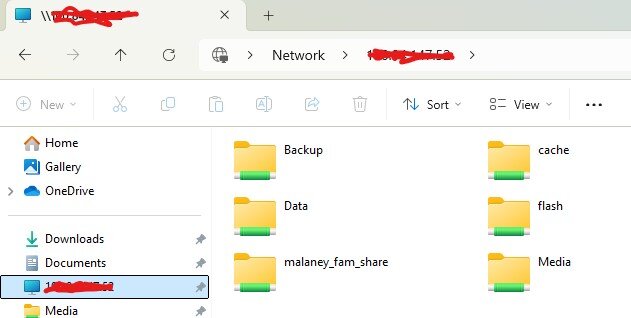
Very quick explanation. I am security conscience so I have all my shares Private. I have set up a Share User (kodi_vpn_user) and permitted that user to only have access to the Media Share. (My choice) I have mapped that share as a Drive on my Windows computer (Y:\ in my case) This is what I use for Kodi access since I use a common database (using the mysql Docker on the Unraid server) for all of the Media content so I only have to update and maintain a single KODI database. I also have pinned the IP address (consider this to be the Unraid server name on Tailscale) to Windows file explorer. See Below: With this setup, Kodi works identically as a it does on the LAN. (I have blocked out the tailscale IP address of my Unraid server because it is a public IP address!!!) BTW, I thought the instructions for setting Tailscale up seemed complicated when I first read them. But once I started to actually do it, it went very smoothly and everything worked the first time. EDIT: This screenshot was actually taken off a Windows 11 client that has access to my Unraid server only via Tailscale!
-
And here is a link to the Doc's https://docs.unraid.net/unraid-os/system-administration/secure-your-server/tailscale/
-
I have been using Tailscale to share Media remotely. It is fully integrated into the current release of Version 7. Google "tailscale integration into Unraid" for complete information to setting it up.
-
Post this query in the original thread describing your problem. And post a screenshot of what you are seeing.
-
It has been my experience (using workgroup) that if you have login for your Windows 11 pro clients, these are the permissions that you get: The user 'nobody' was a file written before I moved to a secured environment. 'user' and 'smbuser' are the two user profiles that I use for my clients to log into my Unraid server. Since these are actually Linux logins, LimeTech has set up these users as being members of the group 'users'. So all three (nobody, user and smbuser) have access to the files at the Linux level. Samba, of course, then controls the access via the SMB level. IF you have questions, see this thread for more information on how I see SMB/SAMBA working: https://forums.unraid.net/topic/191221-some-musings-on-smb-and-samba-and-unraid-and-windows/ EDIT: Just realized something. You can force the user to always be ;nobody' via samba-extras file. to check for this--- run testparm on the GUI Terminal.

-
You see that "+" in the permissions. That means that there are addition permissions on those files/directories using Access Control Lists (ACL). Here is a couple of links explaining what is going on: https://www.linuxquestions.org/questions/linux-newbie-8/what-is-in-drwxrwxrwx-915243/ and https://forums.unraid.net/topic/116389-access-denied-printer-unraid-share/?tab=comments#comment-1059803 You can find more information by googling "ACL permissions in Linux" I believe the permissions can be fixed on your Unraid by running the New Permissions tool against the share with the problem. But you will still have to figure why that client is setting the ACLs in the first place. (I believe that Clients using Active Directory can set ACLs... Basically, never use Windows to control permissions on an Unraid share to set permissions on a Linux file system you know exactly why you need to do so!) )

-
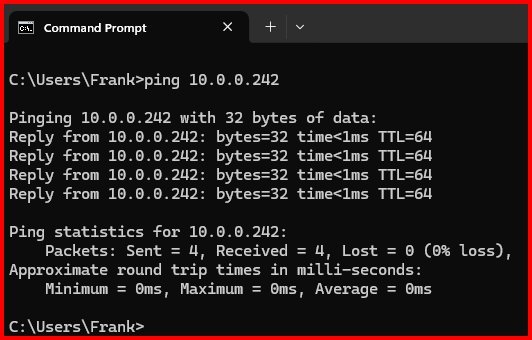
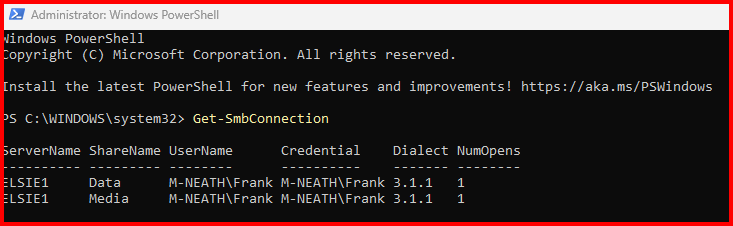
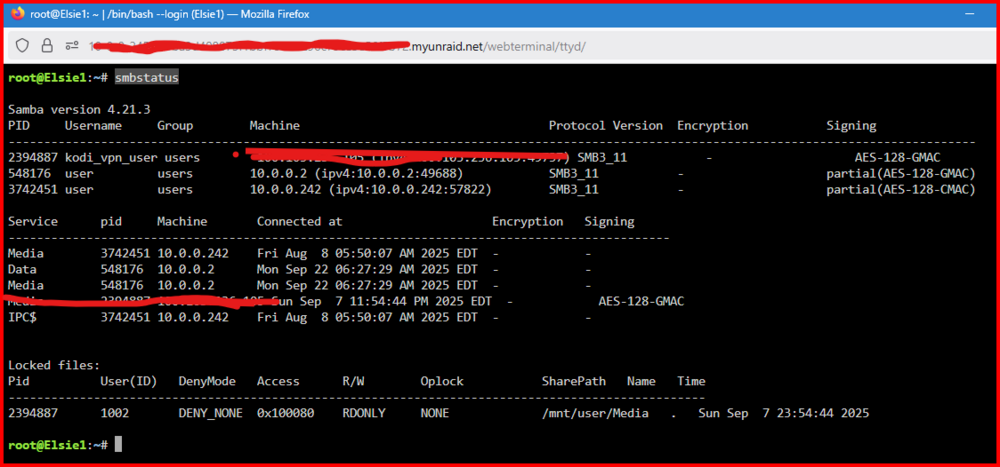
Using the 'Search' on the Windows taskbar. type 'command prompt' and open it up Then type ping ip_address_of_server If that works, try ping server_name You should get something that looks like this: IF you get both, Great! If not, use the one that works to access your server. (Both should work but that it determined by your router.) Now read this post: https://forums.unraid.net/topic/170027-smb-windows-settings-available-through-power-shell-and-linux-samba-tools-informational-posting/ Then try this, Again in search windows, type 'power shell', right-click on it and chose "run as administrator'. Enter this command: Get-SmbConnection What this command is showing is any connection that your Windows 11 computer has to any server. mine looks like this: (The two connections are the mapped drives to my server...) ,Now let's look at the Unraid side of the equation, open the Unraid GUI terminal and type: smbstatus On my server I get this: You can see the names of the users connected as well as their IP addresses. (I have redacted the VPN user info...) Remember that we can only assume that you are using a standard network configuration using a typical consumer router. IT should not. (Out of precaution for security, I have set mine as 'Private'.) You say that you are the only one. What do you do when you have visitor to your house? Do you share your WiFi? If you do, you have probably just given them access to all of the files on your server! But even if you are using 'Public' for your Unraid access (Which implies that there will being users accessing using 'guest' privileges-- no login credentials required), your Windows 11 computer will (probably) require a login using user name and password to your Unraid server or it will not connect! EDIT: Give up expecting to find anything under Network in Windows File Explorer. It working seems to be a roll of the dice and expecting a '7' every time. Just 'pin' the server to the 'Quick access' and forget it is even there...
-
Give us the screenshots of the output of these two commands: ls -al /mnt/user/BayerNAS ls -al /mnt/user/BayerNAS/bastian
-
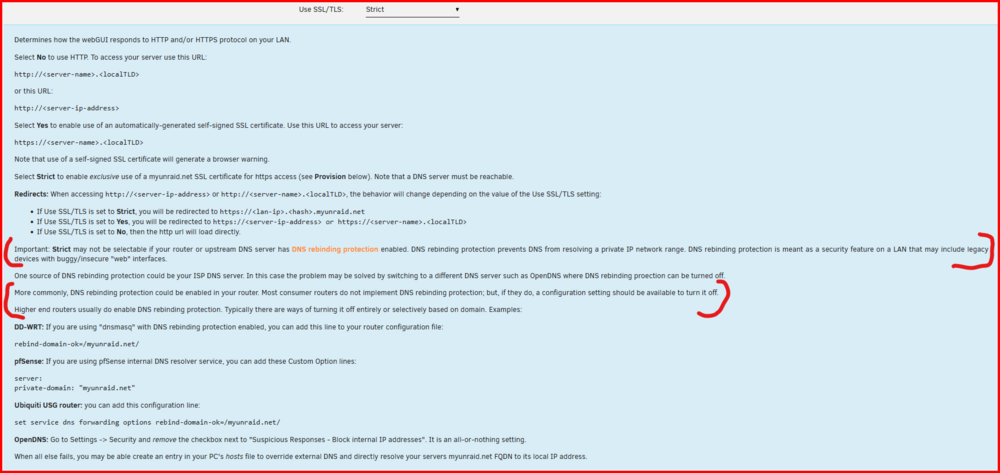
Be sure to note the post about the Windows network type needs to be 'Private'....
-
You might want to make sure that you are not getting bit by this issue:
-
@TopTrainer --- Read through this thread to gain some insight into how things work: https://forums.unraid.net/topic/191221-some-musings-on-smb-and-samba-and-unraid-and-windows/ One important thing to understand is that Windows allows only a single connection to any server_name. This in combination to this, the SAMBA parameter which allows 'guest' access to your Unraid server can cause issues that are difficult to troubleshooter. What that parameter does is if you enter an invalid user name in that credential box, you are automatically logged in as a guest. IF you then try to access a share that requires a valid user login, you will be present with a credential box and Windows will always fail to connect because you already have a SMB connection to that server. (That is the reason why I always suggest using Windows Credentials to login. Remember that Linux is case-sensitive and Windows is not!!!!)
-
From the PDF in this post: https://forums.unraid.net/topic/35815-re-format-xfs-on-replacement-drive-convert-from-rfs-to-xfs-discussion-only/page/40/#findComment-1454446 There is this paragraph in the instructions: This needs to be added into Simple instructions. By excluding the disk from being used in the Shares, you eliminate the duplicate file problem.

-
Have a look here: https://docs.unraid.net/unraid-os/using-unraid-to/create-virtual-machines/vm-setup/#gpu-passthrough-for-virtual-machines
-
I seem to recall that several years ago, there were a few MB's that were very 'picky' about the RAM used to populate the slots. Particularly, if you were using more than one slot (or two) slots. So you might want to do a bit of research and make sure that the MB manufacturer does not recommend/require the use of specific RAM (manufacturer + P/N). And beware of over-clocking anything...
-
Have a look through these sections of the Docs: https://docs.unraid.net/unraid-os/using-unraid-to/manage-storage/shares/#primary-and-secondary-storage and https://docs.unraid.net/unraid-os/using-unraid-to/manage-storage/array-configuration/ The Docs are not the strongest feature of Unraid. I have been around Unraid for about 14 years now and I find them hard to use when want to find material for folks (like yourself)who have questions.




