





Frank1940
Members
-
Joined
-
Last visited
Everything posted by Frank1940
-
You can also connect up a monitor and keyboard to your server as a local console. After logging in as 'root', you can get the diagnostics by typing diagnostics And look where it writes the file.
-
We try not to get that way. Most of us who help here are volunteers and we appreciate when folks seeking help understand that. All of us at one time were also nu-bees albeit Unraid was just a NAS product when I started (Back in late 2011) and anything beyond that was done with Plugins (like--- Plex). Those days things were a bit like the wild west at times. One plugin would replace a dependency file with one of a later version that another plugin could not use and things would crash and burn. Looking back over this (your) thread, it looks like you have a lot of technical background. I do hope you will consider becoming one of our 'volunteers'. You don't have to be a expert on everything but if there is an area where you are quite knowledgeable consider watching for threads about problems with those topics. Hope you can help out...
-
Make sure you have a current backup of your Flash Boot Drive... (Personally, I never reboot either of my servers unless the UPS shuts them down or I do an version upgrade.)
-
Can you be more specific with the details? The exact wording of the error message and where it is being generated. The exact name of the files with problems. (You do realize that using special characters in file names-- other than an underscore ( _ ) or a dash ( - ) --you are asking for problems when you transfer files between OS's. Even a space requires special handing in many OS's!)
-
Just let Parity do its thing. The next thing I would do is to transfer that data from the drive on your Windows machine to the server. That should be the next step in your lessons in how you do things on your Unraid server. (Some folks don't have problems with using SMB and others have fits. It depends on how familiar you in setting up users and servers...) If you are having problems, I will point you to a couple of thread that can help. (MS/ Windows has become a very security conscience environment and it is best to go along with what MS requires--- and usually easier in the long run.)
-
I would be more suspicious of USB motherboard adapter. Start by looking very carefully at the solder joints...
-
Might I suggest that you begin to forget all of the old terminology that you used with your Windows setup rather than trying to apply it to an Unraid server setup. Next, read these two sections of the manual to begin to understand Unraid's terminology: https://docs.unraid.net/unraid-os/using-unraid-to/manage-storage/shares/ and https://docs.unraid.net/unraid-os/using-unraid-to/manage-storage/array/overview/ You should read these sections not with the intent that you will be an expert and have a crystal clear of how to set up your Unraid server but with the intent of gaining an understanding of how things work. One more thing to realize is the cache pools are a very, very recent addition to Unraid. It is possible to use a cache pool to perform the same function as the array. (I know this is very confusing to the beginner but it is now a fact of life...) BUT you do lose a lot of flexibility if you choose the cache pool rather than the array. So be certain you know why you are going to use a cache pool for long term storage rather than the array before you do it!!!
-
Try Googling Fedora setting up connect via smb
-
Let me also say that you may have to dive down in the 'Properties' on these files on your Windows computer. You would be working under the 'Security' tab and looking at the 'Advance' permissions and see if there is something unusual about those files. (If I remember correctly, I seem to remember that I once saw a file where I could write to that file but could not delete it. In other words, I could delete the entire contents but not remove it from the file system!!!) Let me say, I am not a Windows permission Guru. I know just enough to make me really, really dangerous!
-
Try Googling Error 0x80070299 and trying those solutions. Do do some research as it appears that this is one of Windows errors codes that are a catch-all for a number of issues. These are not files with DRM (digital rights management) permissions on them????? In that google result was this one: https://forums.unraid.net/topic/125003-cause-of-file-transfer-failures-due-to-file-system-limitation/ You might want to try to copy the troublesome files to a flash drive formatted with exFAT. IF that works then copy the files from the flash drive to Unraid...
-
Also make sure that you have set up the Minimum Free Space setting on the Cache Drive itself. See Below: EDIT: IF the free space setting is correct for the Share, then your setting should be 100GB for the Cache drive....
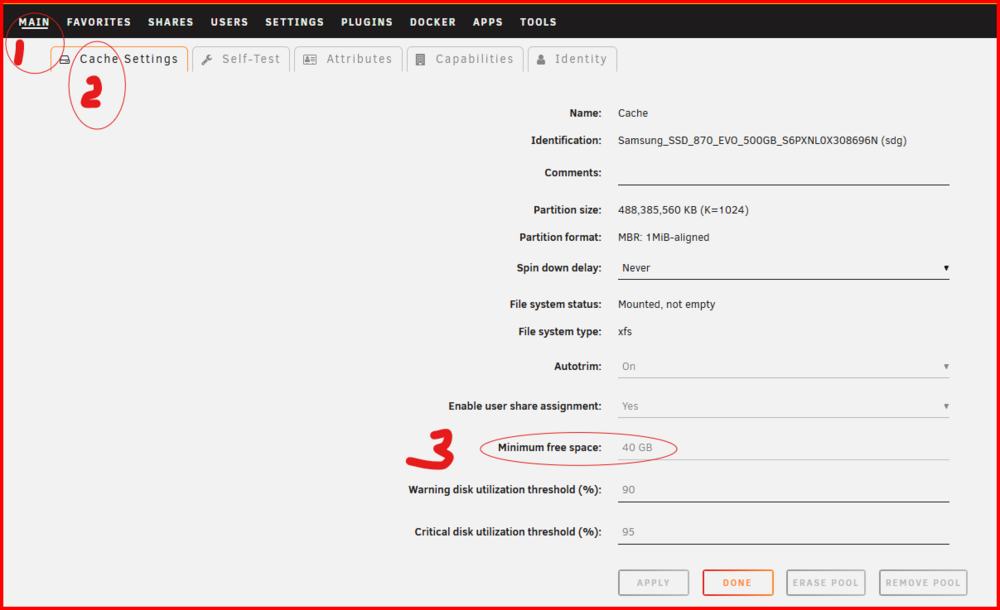
-
Watch out for this gotcha--- https://support-en.wd.com/app/answers/detailweb/a_id/15954 I don't know if anyone is making drives without the shroud but it is worth verifying that yours do have one. (As I understand it, the locking SATA cables do not have the internal nib to provide a force fit of the connector surfaces...)
-
Was that data cable loose or disconnected? If so, that is the reason that disk was disabled! Once disable, it can not be simply re-enabled. Unraid does not work that way. IF you think this is the problem, see here: https://docs.unraid.net/unraid-os/using-unraid-to/manage-storage/array/replacing-disks-in-array/#re-enabling-a-disabled-disk-rebuilding-onto-itself I would first try this procedure and see if you can get that disk back in service. (Oh, before you actually start start the rebuild, double and triple check that all the SATA connectors (data and power) are firmly seated. SATA connectors are prone to 'loosening' whenever they are 'touched'!!!) Then install one of the new 24TB drives as parity 2 and build parity 2. You will then have dual parity protection as you proceed onto the next step. Now replace the Parity 1 disk with the new 24TB replacement.
-
Absolutely, in the default configuration, Windows will not longer allow 'guest' connections to any server. You must have a login (and use it) to the server before it will permit a connection.
-
Nest thing. Go to SETTINGS >>> SMB and makes sure that You have Enable SMB; Second, on the SHARE page, you do have to Export: the share for it to be available via SMB


-
Let's start by requesting that you post up the diagnostics file in a NEW post in this thread...
-
Yes, plus there is an extra read when using read/modify/write which drops the transfer speed. You can also avoid this by using a cache type drive as the 'Primary' drive (and the array as the Secondary drive) as long as all of the files being uploaded are less than the available space on the cache.
-
It appears to me to be the normal slowdown of data transfer after the available RAM cache has been filled. and the that speed is about the normal write speed directly to the array. You could try using the 'reconstruct write' mode. You can fin this on the SETTINGS >>> Disk Setting tab:

-
From the SHARES >>> 'Add Share' button:
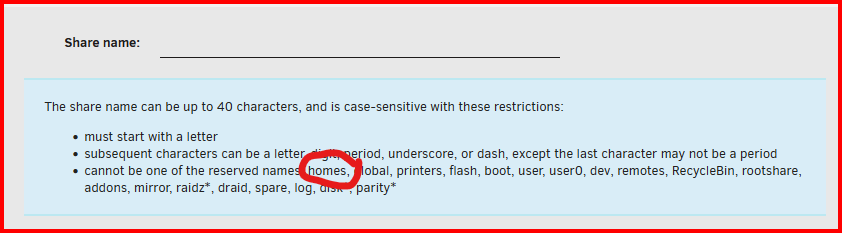
-
Have a look at the SEND feature of the Bitwarden password manager. BitwardenAbout Send | BitwardenBitwarden Send enables users to transmit encrypted plaintext and file attachments to anybody securely.You can also require a password entry by the receiver to further secure the transmission. I believe that it is a feature that is the premium package. (Only $10 per year for personal use.)
-
While reserving the IP address using the MAC address on the router usually works--- Assuming the router supports this 'feature' ---it is not bulletproof as @MAM59 has suggested. It is advisable to also setup your server to use that same static IP address. It may be a belt-and -suspenders arrangement but it is more foolproof. Back in the dark ages, before routers had address reservation as a feature, it was necessary to assign static IP addresses at the high end of the DHCP pool so that DHCP would never get around to using them. 😏 With so many WIFI devices these days, I am not sure this would even work...
-
IF you want to begin understanding how Unraid handles share access, there is a whole thread about I have have been able to discover. The post below explains how things appear to work: https://forums.unraid.net/topic/191221-some-musings-on-smb-and-samba-and-unraid-and-windows/#findComment-1561580 If you want even more information, read the entire thread. One thing not really covered is the user, nobody. This was a Linux contrivance to get around some messy permissions issues. Google if you want more information. But it was also found to have some security issues if I remember correctly but it remains there still because it allows certain things to just work. (In Unraid, guest users are mapped to 'nobody'.) EDIT: many problems arise because Docker Container and VM's write directly to shares without using proper permissions and user credentials. They should be setup to use nobody as the user and the group of users!
-
Let's see the output of this one ls -al /mnt/user/permission/ Note the forward slash at the end of the line...
-
Ok. At this point, I am assuming that you have run the New Permissions script on that Share. Let's get some configuration data on your server. Below, you will find three sets of commands to run on your server. You will be using the GUI terminal. Please provide a screen capture (screenshot) of the output of each one: ls -al /mnt ls -al /mnt/user ls -al /mnt/user/permission If you can't do screenshots, please format the inserted copied text by going to the ... in the edit line of the reply editor and format that text as </> Inline Code !!! Let me give you a little bit of an explanation of what appears to be happening. The permissions for a directory should be drwxrwxrwx and the 'x' makes the the resource 'executable'. While this makes sense for a file as it might be a program (Remember Linux does not use file extensions to indicate what a file is used for), it does not seem to make sense for a directory. What t he execute bit does for a directory is to allow you to browse inside of it-- e.i. to view the contents of that directory. (IF you want more information about what is going on, google directory permissions in linux. )
-
When you did the checking on my earlier about where to set up where things are stored, Change an item and click the 'APPLY' button to make sure they are actually set. If things are not working post up a new set of diagnostics and let's see what changed.




