





Frank1940
Members
-
Joined
-
Last visited
Everything posted by Frank1940
-
You seem to have Jumbo frames enabled. This has given problems in the past. Suggest returning to the default. (MTU = 1500)
-
When this fails, try typing \\server_name or \\IP_address as shown below and see if you can access the server that way.
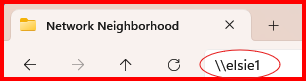
-
As I recall, that makes the disk bootable. (Makes the BIOS see the disk as bootable media...)
-
Post up the diagnostics file after the problem has occurred in a new post in this thread.
-
There have been cases in the past where the flash drive prep tool does not work properly. Try the manual install method detailed here: https://docs.unraid.net/unraid-os/getting-started/set-up-unraid/create-your-bootable-media/#manual-install-method
-
One possibility is that a temporary file is being created in the Share. Then, the process that creates it deletes the file when it is finished with it. (That's what well-behaved programs are suppose to do... 😉)
-
It is an option in the boot menu as the server is coming up. Note that it is conclusive only if it finds a failure. Run time should be on the order of 24 hours...
-
I think what the problem is that LimeTech decided to 'grandfather-in' settings when changes to the security restrictions were made. For example, SMBv1 was not blacklisted/deactivated when the decision was made to disable SMBv1 for all new system installs. It was left for each individual to actually turn it off in SMB settings. (I completely understand why this choice was made as I have provided a lot of assistance over the years and I know that there are still a goodly percentage of Unraid users who are still using SMBv1 in 2026! IF LimeTech had been turned it off like MS did a few years, the Forum would have exploded with requests for help in fixing the problem. ) So Yes, LimeTech has implemented a lot of these changes but the final actual action to implement them was left to the Individual user. One item that MS has initiated recently to block guest login from Windows clients to any server. I would assume that they have take the same action on their server products. I would hope that LimeTech would at least provide us with a setting to do the same thing on Unraid. I am well aware that you can easily add a line to SMB Extras section of the GUI to accomplish this but the setting would be a more proactive approach.
-
I believe the current Linux security recommendation for permissions is now 755 (directories) and 644(files). I would suspect that these recommendations are now finding their way into the various Linux distributions and are showing up when the Docker containers are updated with the newer distributions.
-
@z0ki , make sure that you had the UMASK set to 000 when these new directories were being created.
-
I did try this option, unfortunately it still gave me 'You do not have permission to perform this action' when accessing it via SMB. Understand that changing the UMASK will only change things for directory/files written after the change! Anything written before the change will not be affected. To correct those items you can run the "New Permissions" tool found under the TOOLS tab. Run it only on the Share that has the problem. (Read the warnings before running!!!) Note that it can take considerable time to complete depending on the number of items in the Share. My earlier suggestion was to allow diagnose of the problem to make sure that the problem is fixed permanently.
-
That would be my assumption. Many corporations want to restrict the servers that they allow their 'road warriors' to be able to connect. Remember that these road warriors often use access points that are not secured and it is easier to put restrictions on the PC than to expect that a road warrior after a couple after-dinner drinks is going to exercise the best judgement! So they block any method of network access that is not required to get on their corporate network. (And, needless to say, they have already blocked any protocol that is not secure there!) The refurbisher generally reinstalls the OS but who knows where they got the image from or what settings were already 'cooked' into it.
-
Open up a Terminal session for the WEBGUI and run the following commands: ls -al /mnt/user/media/data/music ls -al /mnt/user/media/data/music/artists Then capture screenshots of the output. Quick observation: you should have 777 permissions directories/folders and 666 permissions on files. If you want to know why see here: https://forums.unraid.net/topic/191221-some-musings-on-smb-and-samba-and-unraid-and-windows/#findComment-1561580
-
One thing to realize is that after you finishing copying one disk, you have a window of opportunity to permit family viewing of 'their' movies and shows. Then start on the next disk. (I also believe you can speed up copying by going to SETTINGS >>> Disk Settings and change this parameter as shown:

-
Read this: ** If you are running rsync with these switches, it should be able to resume the copy if you have to interrupt it to allow family viewing . ** Personally, I would stop Docker unless you are sure that Emby will not touch any files on the disk being transferred. Stop the transfer and start Docker to allow for family time. If you do interrupt the transfer, rsync will do the initial scan once again to determine what now has to be transferred. (previously copied unchanged files will not be transferred again!) ** These screenshots came from a 'mark-up' PDF of the original Mirroring instructions that I made when someone was going to include this procedure in the revised WIKI. It never quite made it onto that WIKI.
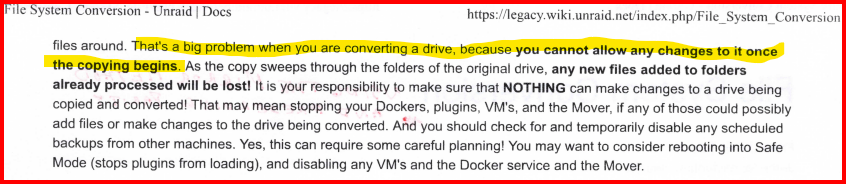
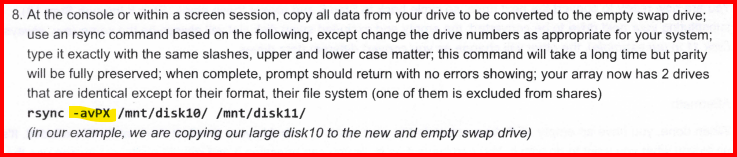
-
I just checked on three Windows 11 PRO (25H2)— All that I had quick access to this morning —and none of them had 'Block NTLM (LM, NTLM, NTLMv2)' enabled. It appears that using NTLM is a security hazard but turning it off on a client can cause problems as you have discovered. But after doing come googling, it appears to completely turn it off, one must first verify that is is not being used by any devices on the network. (MS has been trying to get rid of part of it since 2010 and I gather they are proceeding down that path on their server products. But that is an entirely different proposition to turning it off on a client computer. If the server allows (or requires) NTLM, why would one want to prohibit a client from using it? — Now, this is where the Corporate and Government IT security people get really involved...) Do you know why it was enable on your particular client? Is it a brand new one, you just purchased? Is it an old refurnished corporate one?
-
Agreed that your solution does work. But I would only recommend using it for one specific problem—the one where \\Server_name typed into the Windows File Explorer does not find the Unraid server but \\IP_address does. When the problem is this: Where the Unraid server (or even a Windows peer-to-peer client-server) does not appear under the Network section! Observe that in the case that I am showing the server ELSIE1 is available and being used in mapping a network drive. Yet, it does not show up under the Network section. In this case, typing \\ELSIE1 will find the server but that can be a real nuisance if you have to do several times a day. Pinning it to the 'Quick Access' section is a very simple solution and it will always be there for instant use. See below:
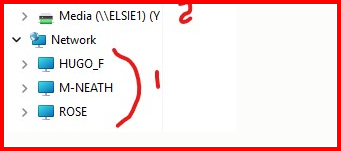
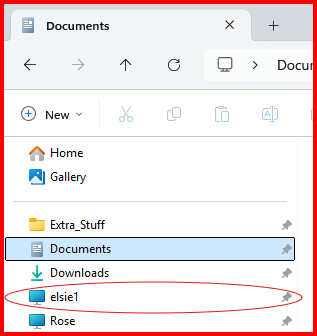
-
Yes, this does work but it is a bit of a hassle to explain how to do it. Plus, you have to have Administrator privileges** to edit the hosts file. The other thing is that the hosts file was used in hacking Windows computers a number of years ago so permissions blocks were added by MS to attempt to block that type of activity. (Basically, adding an entry to the hosts file to set a browser request for, say, cnn.com to a spoofing site in Bulgaria or some other third world country.) I can remember when it was suggested that the Windows host file should be read-only even for administrators! I know I don''t want to have to explain how to get around all of these road blocks to a neophyte who has never done anything even remotely similiar. I know that there are a some number of people who have had problems with \\server_name and \\IP_Address works. For those folks, just set the IP address as static and use that. (I have a suspicion that it is often a Router/LAN problem and that is another hair-ball that I don't want to get into.) ** While some Windows client users are set up to have administrator privileges, it is not a recommended practice. I don't know if Windows has a sudo command like Linux. Doing things down at the Windows system level is not something that many of us have much experience at. (I have done Regedit stuff but I am much more comfortable using the Group Policy Editor!) I know just enough to make me realize that I could be really, really dangerous... And I, personally, have a problem telling someone how to do something that I am not comfortable doing myself.
-
@trurl , not quite sure where this question is coming from. If you have multiple users set up on your Unraid server, you can access the 'Private' shares on the server according to the permissions (none, read-only, read-write) that you have assigned for each user for that particular share. You mind want to read this thread for my insights as to how things work with Unraid: https://forums.unraid.net/topic/191221-some-musings-on-smb-and-samba-and-unraid-and-windows Now one thing to realize is that a 'user' for SMB purposes is just a set of rules to permit access to the various SMB shares on the server. Multiple Windows Clients computers can actually login as that 'user' login name. (The Windows client computer Network Name is prefixed to the 'user' name to keep things straight as to which client wants what action performed.) OH, yes, that set of rules might be tailored to a specific person but in the end it is still just a set of rules. As an example, you might set up SMB users named 'parent', 'kid' and 'visitor'. You can see where just three rules could cover a household. (On that 'visitor' one, remember that a read-only permission permits copying the files so be careful there!) Other important thing is that Windows allows only a single SMB connection to any one server. This is a real world problem as Unraid permits guest logins. If a Windows client computer is granted a guest login, you can not login a second time using valid user credentials! . (It can happen easily as there is a standard protocol exchange requesting a connection before Samba (Unraid) requests login credentials.) And the error message never even gives a hint as what the problem really is! That is why I recommend using Windows credentials rather than depending a 'fall-through' to a credential request. Windows credentials are always the first exchange done between the client and the server.
-
This type of problem (where \\server_name does not work and where \\IP_Address does) may be the result of this setting on your Windows 11 client: https://forums.unraid.net/topic/191221-some-musings-on-smb-and-samba-and-unraid-and-windows/#findComment-1561581 I suspect that in the 'Public' setting WSD is off and the client will not 'discover' servers using their Server_name. Things are now very complex on the Windows side of the networking equation now that MS is vitally concerned about security. Another factor is that there are so many different versions of Windows (Home, PRO, etc.) and each one targets a different type of client class with different security needs. I suspect that there may be differences in the initial settings of for each version to meet those needs. Plus, they may also decide that a security requirement that previously was only used in PRO and/or Enterprise versions should also be become one for the Home version and implement that change via the monthly security update.
-
??? — Did you try the login that you use for your Unraid GUI. Login is 'root' and you should know the password. Since you are a beginner, I will point out that logging in at the console (monitor and keyboard) gives you a command line prompt to type commands on– not a GUI. And where did you get the 'black screen' (Remember you have to describe accurately what you are seeing and what you are looking at when you describe it to us. We are NOT clairvoyant!) Did you you make a backup of your Unraid boot drive before all of this problem occurred? Did you have a lot of data on the server and are you willing to lose that? Have you looked at your router to see what IP address your router has assigned to your server?
-
Attach monitor and keyboard to your server. See if you can login on the terminal. Then type diagnostics at the command prompt. Read where Unraid wrote that file. Then shut down the server by a quick push on the power button. Then post up the diagnostic file in a new post in this thread. If you don't have a login prompt, get a good clear photo of the monitor screen and post that up.
-
Have you considered that you should probably run periodical parity checks so verify that all disks and their store data are readable. If you don't do this, you can find yourself in a situation where you have a known failed disk that you are trying to rebuild and then discover you have a second disk with issues that prevent the rebuild from finishing. While very large hard drives are available today, there are penalties that must be considered in deploying them. One of them is the very long times required for any parity operation. I would imagine that 24TB drives probably require about two days (~48 hours) to perform a full parity check, rebuild of parity or rebuild of a failed data disk.
-
I don't know where you are on your conversion journey but I put together some very basic instructions while Unraid moved from version 5 to version 6.0 back in 2015. Basically, Unraid moved from a 32bit kernel to a 64 bit kernel of Linux. No 32 bit support libraries were included so it broke basically all plugins! As I recall Version 4.X to Version 5.X was a much simpler procedure. (Point of disclosure— I never run 4.X but started using the beta versions of version 5.0 so I never actually did the version 4 to version5 upgrade.) There is one other gotcha, you will have to run the 'New Permissions' tool in the TOOL menu of the version 7.X GUI. Run it on the 'Shares' not 'Disks'. Read and observe the cautions of the shares not to run it on. As I recall in version 4.X, the owner of all array files was 'root' and, as I recall, the group was not 'users'. The New Permissions tool will fix this issue. I am attaching that file for your review. Upgrading from Version 5 to Version 6 of unRAID-rev2.pdf
-
In this thread, start here and check to see that you have the next three posts covered: https://forums.unraid.net/topic/191221-some-musings-on-smb-and-samba-and-unraid-and-windows/#findComment-1561581 If you want more knowledge on how SMB works, read the entire thread... PS— if you make any changes on your Windows client, reboot it before testing!


