





Frank1940
Members
-
Joined
-
Last visited
-
Currently
Viewing Topic: /mnt/user drops offline "Transport endpoint is not connected" & Shares missing
Everything posted by Frank1940
-
It depends on where is was corrupted. If it was corrupt in RAM, it is not detected. If ECC RAM is used, it should be detected before written to disk. (I believe ECC Ram is detect only...) If the HD finds an error, it will try to fix things. (Correctable read errors are not that uncommon. You only need to look at the drive specs to find that occurrence rate.) If it is fixed, it is a 'normal' read. If unfixable, the drive throws a read error. Unraid may to able to reconstruct the original data using parity. (I am not sure what error it displays at this point.) (Quick thought here... If there actually is bitrot on a HD, you should be able to recover the original data by pulling the disk and allowing Unraid to emulate the disk. If the data is fixed, you had bitrot. If not, you wrote corrupted data to the HD in the first place.)
-
I didn't see anyone address this. You seem to want to use your Unraid system for long term storage of data that will not be modified. Why is performance even an issue? For the most part, 'write' performance is the most impact parameter compared to other system. 'Read' performance is impacted so far as it is limited by the read speed of the individual hard disk on which the data is actually saved. (In the case of 1Gb LAN speed, the LAN is the limiting factor.)
-
and Personally, I believe that bitrot on a hard disk is virtually impossible in this day and age—a hard disk either returns the data as originally written to the disk or it returns a read error. (But let's not go there...) IF you do consider bitrot a true problem that you must be planning then you need system hardware that supports and you use ECC RAM. It is more more likely that data will be silently corrupted while in RAM than on a hard disk!
-
If there is more than one, upload the one that covers the time period up to the time when the server went missing.
-
You might also set up the Syslog server to capture the syslog activity leading up to the problem.
-
Well, let's consider Voyager I. That computer has been running for fifty years now! You can read a bit about it here: https://medium.com/towards-generative-ai/voyager-1-what-computer-system-it-has-that-is-still-running-strong-a269aaea316b IF you want to know more Google is your friend.... I would not just replace a working MB, CPU and RAM because it is old. Yes, it may fail tomorrow or it may last another twenty years. I would wait until the system can't do what I want it to be able to do, (Plus, at this point in time, Components costs are rapidly increasing due to the demand being created by AI. Hopefully, this is just a hiccup and prices will drop again as more capacity comes online.)
-
This is possible hack to address the problem. Try using the key combination of CRTL_plus_Minus Key to size the font size back to a more acceptable size. (This is a true hack as it would also impact the Browser tab from which you opened the GUI Terminal!)
-
Please post your Diagnostics file in your next post in this thread.
-
Look here: https://docs.unraid.net/unraid-os/system-administration/maintain-and-update/changing-the-flash-device/#registration-key-replacement-frequency This is Christmas Eve and it may take a while to get a response. Normally, it is a hassle-free experience if you provide the required info and the reason that you need a replacement.
-
I would be checking the cabling very carefully! SATA connectors (both power and data) are very susceptible to loose connections. Inspect and re-seat every end. There should be a perceptible amount of friction as the connector is seated (and unseated). Then double check/inspect your work as even a very slight pull on a cable can unseat it slightly.
-
Just getting rid of the credentials by editing them will (should???) remove them from the database. However, SMB is running using those parameters which it retrieved earlier. Deleting/changing a credential after that has occurred does not change that fact. You must force a restart of SMB to force it to access that database again and the simplest way is to reboot the Windows machine. (That is one thing that makes fixing SMB/Samba issues is frustrating is that changing something does not result in a instant change in the way that things are working. You have basically restart everything to make sure that your change has propagated through the entire chain.)
-
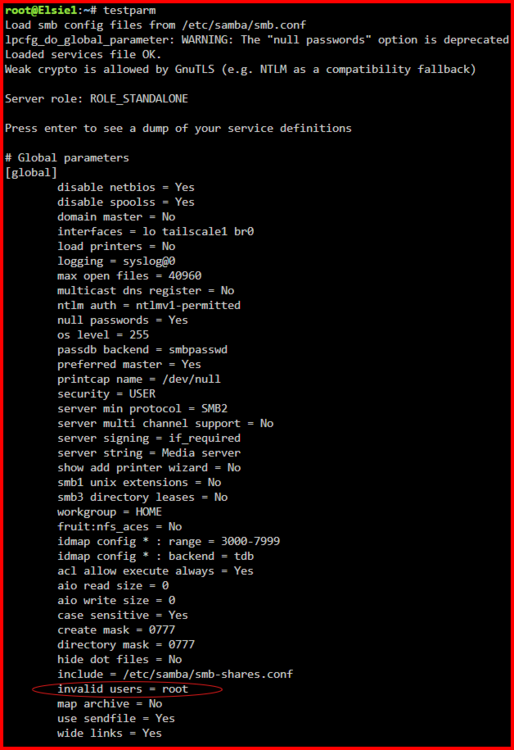
https://forums.unraid.net/topic/191221-some-musings-on-smb-and-samba-and-unraid-and-windows/#findComment-1561580 Because Unraid Samba usually provides access for Share Access users through the group permissions, permissions for directories/folders should be 777 (drwxrwxrwx) and for files 666 (-rw-rw-rw-). IF you are using Samba, root is not allow to be a Share Access user!!! It is a security issue. And this restriction is enforced: Here are the settings required for things to work properly with Unraid: https://forums.unraid.net/topic/71764-support-binhex-krusader/page/38/#findComment-1486740 Here is how to set those settings: https://forums.unraid.net/topic/188600-share-permissions-changed-to-owner-99/#findComment-1540351 Note that the recommended default 'user' of choice for Dockers is "nobody". (This is a special user that was created for use in Linux for situations where the user had to have access to a resource but every little permission to really do anything dangerous. It is my understanding that it is not often used these days for these situation, but it remains available and the Unraid developers have done so in this instance.) PS---- If the Docker was actually setup to be used with Unraid, these parameters should already be configured properly with Unraid. But there are a lot of Dockers out the world, some them are configured for use in that larger universe and they may have to reconfigured if they are going to write to the Unraid array.
-
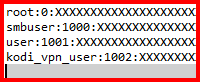
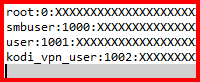
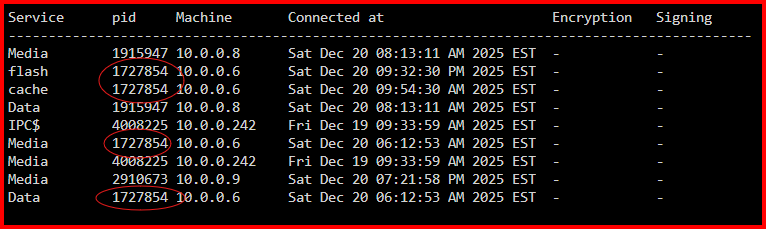
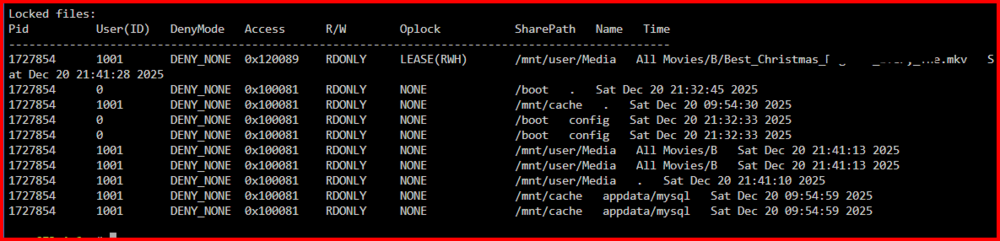
OK---- Look at the /config/smbpaswd file on your flash drive. (It is a standard text file so any text editor can open it.) Typical below: The number 1000 for smbuser is the User (ID) in the smbstatus output. That tells you which Unraid Share Access user is accessing the file. Lets stat here with this part of the output: I know that the IP address of my Windows 11PRO PC is 10.0.0.6. (I looked it up in Settings on the PC.) This also shows that I an logged as "user". The User (ID) for "user" 1001. And the PID for this login from my PC is 1727854. Let's go on: This section shows the Services that are running. By looking at the pid numbers I can determine what computer is using that service. (Remember that 1727854 is pid for my PC) The final section-- "Locked files" is probably the least helpful. The 'R/W' column is always "RDONLY" in my experience. It also seems to show every connection made since the PC started up. The listings seems to disappear when the PC is actually logged out of the server. (The top line with any actual file listed is the capture when I was actually playing a file.) Please understand that if you have two or three computers actively using your server, the output from this command output becomes quite busy. (Lots of lines of information to review and figure out what is assigned to which PC.

-
My post above was being written during the time when you posted this post... Yes, Windows allows only one user from each client computer to log onto each server. (This has been true for many, many years now!) Don't be afraid to permit your 'test' user to have read-write permissions from Windows. The only bad thing that can happen will be done by you. (What the airlines call 'cockpit error'!) I am going to point to an thread that may help you understand what is required to set things up and addresses most of the problems. https://forums.unraid.net/topic/191221-some-musings-on-smb-and-samba-and-unraid-and-windows/ How, I suspect that English is not your first language and I am not sure how well you can comprehend things. I do want to say one thing about Windows networking. IT is difficult to make changes to the windows SMB setup because there is no easy to stop and restart the the SMB service. So my advise is reboot the Windows Computer any time you make a change to the SMB settings. Don't post any questions in that thread I just provided. Ask them in this thread.
-
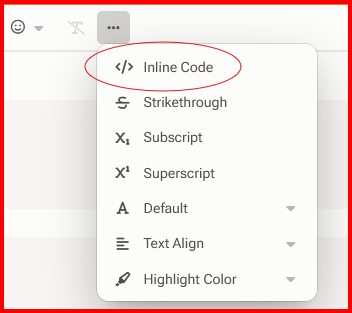
OK. Quick comments: This share is 'Private'. These three shares are 'Secure'. This means that there is read only access via the Samba "Public' permission to them I would be checking to see that you are actually logging onto this server using Share Access users. On Windows 11, setup a Windows credential to do this. (Otherwise, it can be very easy to accidentally gain access the server using a guest account (Public permissions in 'Secure'). The fact that you have no access to the 'test' share supports this presumption since there is no guest access in 'Private'. We can verify this if you access the server from your computers and then run this command in the GUI terminal: smbstatus Please capture the output using a screen capture if possible. If you copy-and-paste the text, please formatted the copy as in-line code. See here for how to do this in your reply:
-
Did you reboot the Windows PC? Sorry, I missed where you did that.
-
OH . One more thing, The eight bit is masked. so Windows sees MediaNAS the same name as medianas as is MEDIANAS. I just tried this and it is still as trues as it was in DOS-3.2! Everything is still treated as through it is all caps. (Which is how DOS-3.2 stored file names as you may remember.)
-
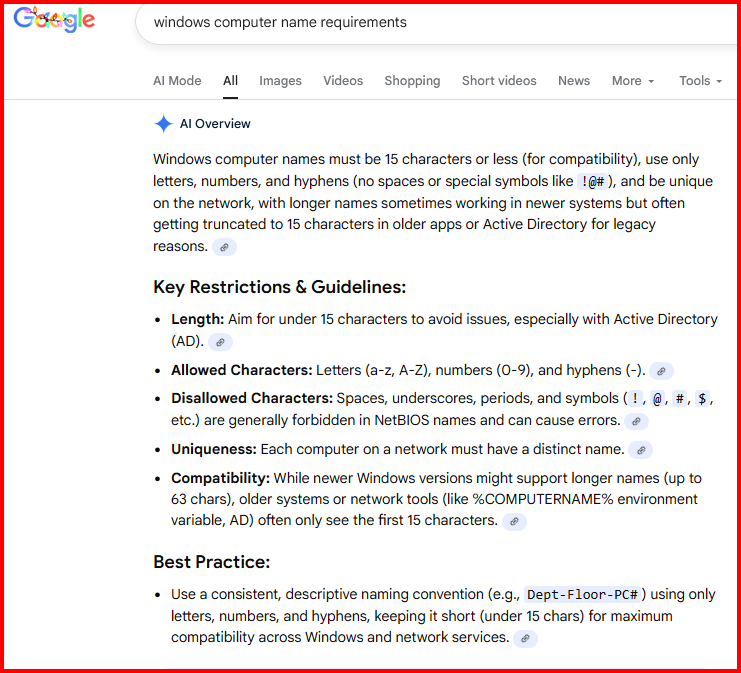
Whoa! This is a big issue. You can't have two computers with the same name and below is the AI take on restrictions: I would suspect that the only the characters up to the first space (a DISALLOWED character) are being used for the computer name. Everything after that is ignored! So yes, you can get there via the IP address but \\server_name has 50% chance of failing! (I suspect one of these is the management port for the server's motherboard.)

-
Look at your Router from the PC with the problem. There should a table of attached devices and you should be able find that server's IP address and what the Device Name is for that address. Then look at the same info using one of those PC's without the issue. This all just some ideas but trying to figure why that PC has an issue and the other two do not. (Many long years ago I made the remark that solving SMB problems was more like Witchcraft than Science. And I still believe that when cases like yours crop up!) I am not completely sure what use Windows makes of that information but it seems to find a lot of stuff to populate the Network pane on Windows File Explorer. And the router would be the point where it is probably starting from.
-
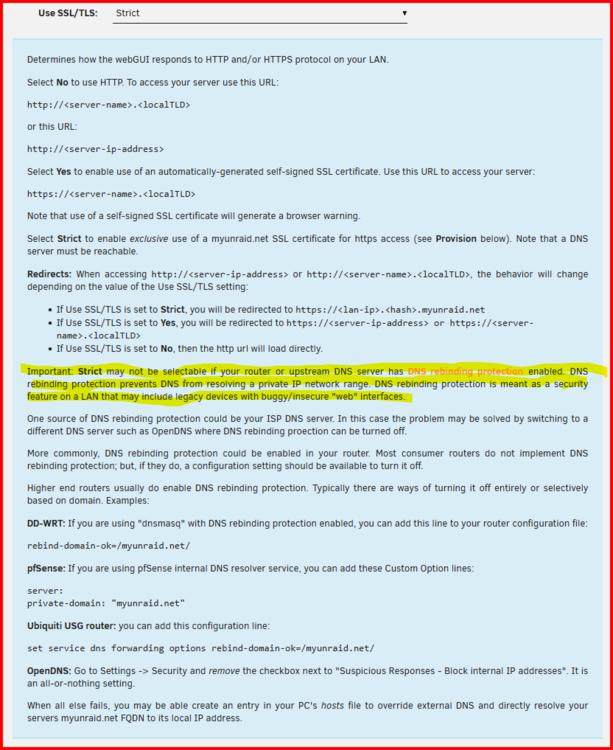
Be sure that you have read the help for setting the usage of SSL/TLS. There are a few gotcha's....
-
This looks like everything is normal from a Samba standpoint. You can see the connection from your Windows computer and the user_name is correct. I am only mentioning this next part because of something I remember from a while back. Someone had a similiar problem and resolved it by doing a Windows reinstall using the method that preserves the installed user programs and data. (Problem is that I am getting older and my memory is not as good as it was five-to-ten years ago and I can't remember the more pertinent details.) IF you decide on this approach, do some research first as the Windows install program has several avenues that you can use when running it. Look for advice from the Microsoft site as there is a lot of Windows 'help info' that is pure crapola! An other option is to roll back the most recent Windows updates on this computer and see if that fixes it. (In fact, I would try this first before I did a reinstall.)
-
Start here and make sure that the network type is Private: https://forums.unraid.net/topic/191221-some-musings-on-smb-and-samba-and-unraid-and-windows/#findComment-1561581 If you still have problems let's go on.... What version and release of Windows are you using on this PC? (Example answer--- Windows 10 PRO 25H2) This one is harder to resolve as it is a networking problem. Begin by reboot the all routers and switches. Setup Windows credentials for both the server name and the server's IP address. Now let's use Windows File Explorer rather than a third party File Manager for testing purposes. 1--- Am I correct in assuming that you are are typing in \\server_name and \\server_IP_address on the File explorer title bar and not getting to the server? 2--- Or you you looking for it under "Network" in the left Panel. And it does not appear or appears only inconsistently. Number 2 is easy. As Far as I am consider, Network Discovery is basically broke since SMBv1 was turned off. Use this method and ignore "Network" completely! https://forums.unraid.net/topic/191221-some-musings-on-smb-and-samba-and-unraid-and-windows/#findComment-1561585 Number 1 is a bigger problem to resolve if my earlier suggestions did not fix it. So let's leave it for your next post. Added before posting: This is showing that computer 192.168.1.115 is actually connected to this server. And it currently looking at the 'Pictures' share. (I believe Samba always uses the IP address rather than the server_name. It is the job of the router to resolve the server_name to the IP address.) From the Pid, it i s actually your Tailscale connection looking at the Pictures share.
-
IF you are convinced that it is a program in the computer running Windows, go to the Motherboard manufacturer's website and see if they have an updated Windows driver for that MB. (I prefer going to the manufacturer as if an update will address an issue, they will will most likely have the update first and plus you know it has been tested on your MB and that it fixes the problem.)
-
A very quick google found this: https://www.techradar.com/pro/major-raid-targets-counterfeit-fake-hdds-from-seagate-wd-and-toshiba-in-malaysia-but-is-it-too-little-too-late Could you be a victim?
-
How many SATA ports do you have? (I notice you currently have no parity drive.) Can you add the both the 2tB drives. Format them to a currently supported Unraid format. Copy the data off one of two exFAT drives onto those two drives. Format the now empty drive and copy the data from the other 4TB exFAT drive on that newly formatted drive. Now format the newly emptied drive. Now decide what you want to do with the data on the two 2TB drives. A complete aside, you do realize that the files on the disks on the Array are formatted using a standard Linus file format. Each file is on only one disk. In fact, you can pull that disk out the Unraid server, plug it into any Linux computer and read all of the data on the disk.




