Frank1940
Members
-
Joined
-
Last visited
Everything posted by Frank1940
-
This is the reason I feel that the Add Share tab needs the work. The restriction on share name is overly restrictive ONLY in that location! IT is not rocket science to fix it there...
-
It is my understanding that is NOT ZSF formatted drives that are the problem. It is ZFS pools that have the restriction. (If it was ZFS formatted drives, this board would probably have been lit-up long ago with folks who have shares with not-illegal names. )
-
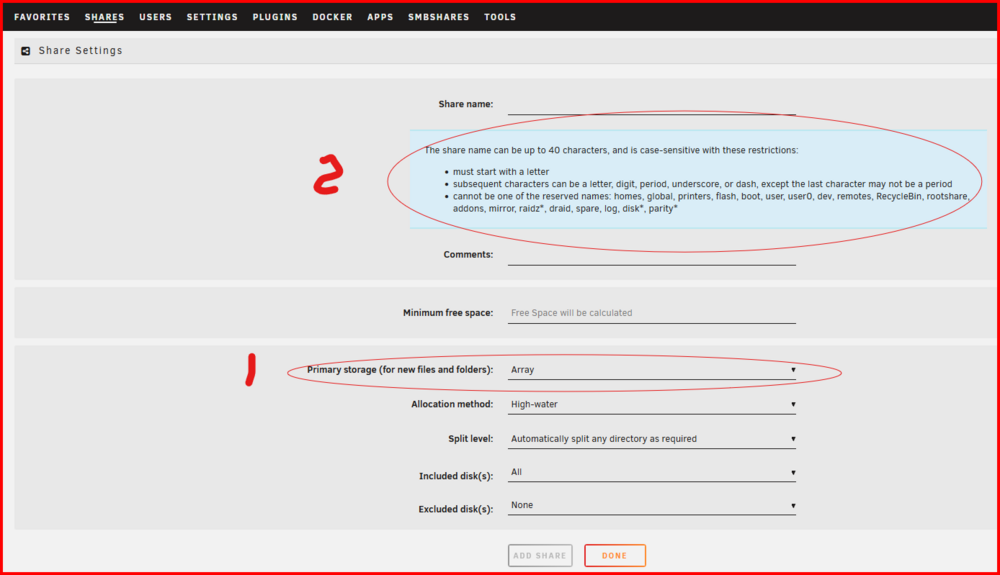
@eliminatrix2 , I have been aware of this situation for a period of time now. I believe it exists because of the 'noise' that ZFS fans are making about their 'desperate' need for ZFS. In this frenzy, those of us who will never use a ZFS anything have been sidelined! One solution would be to add logic to the 'Add Share' tab to check for illegal characters in a share name if a ZFS pool is being selected (#1): I feel that this is the point where this requirement should be imposed. At the same time, the 'Help' text should be reworked to specify the restrictions of ZFS pools as to legal characters allowed (#2) Since you are the one for this who has a 'horse-in-the-race', I would suggest that you should be the one to request some action. Perhaps the best thing would be to create "Bug Report". (That is the only section that the developers look with regularity!!!)
-
Thanks for this. I updated the post to indicate that the user name does not have to "smbuser".
-
For a one-and-done solution, see this post and the next two: https://forums.unraid.net/topic/191221-some-musings-on-smb-and-samba-and-unraid-and-windows/#findComment-1561581
-
Connect a monitor and keyboard to the server. Check to see if it has fully booted. (You will see a login prompt. If no prompt, you probably have corruption on the boot drive. ) IF it has a prompt, login, get the diagnostics file and upload in a new pst in this thread.
-
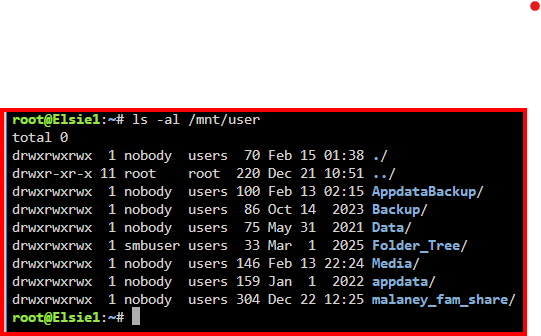
I am not a Linux Guru. And mv is one of those dangerous Linux commands since it runs silently and, like many of the "two-letter" commands, it provides no warning when it is going to reek total havoc! If moving the files is the only option, let me caution you to test the paths you are going to use. Use the command to first verify every path: ls -al Its output will look like this: Note that I have started from the root of the Linux file system with the full path name. Once you are sure you have the proper path name, use copy-and-paste operations to build the mv command.
-
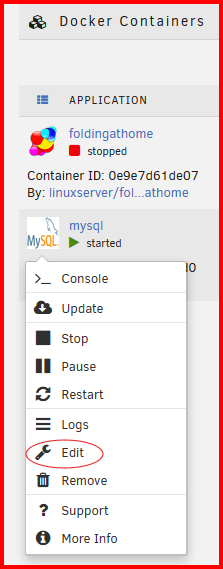
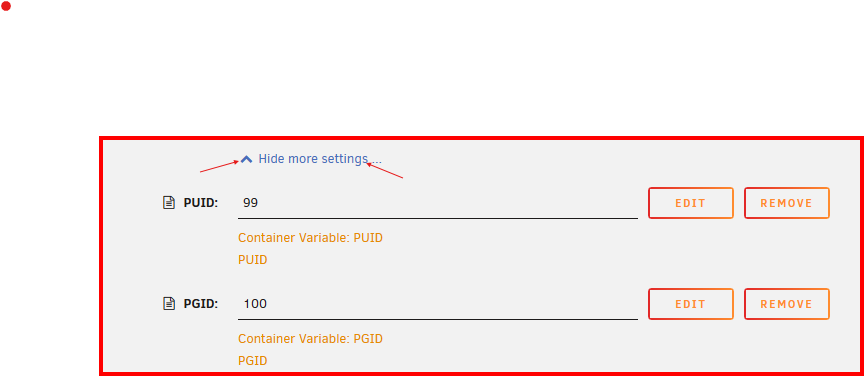
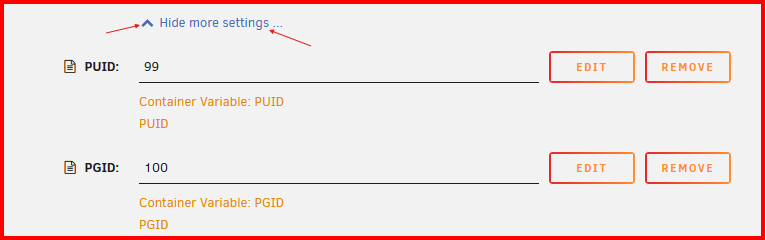
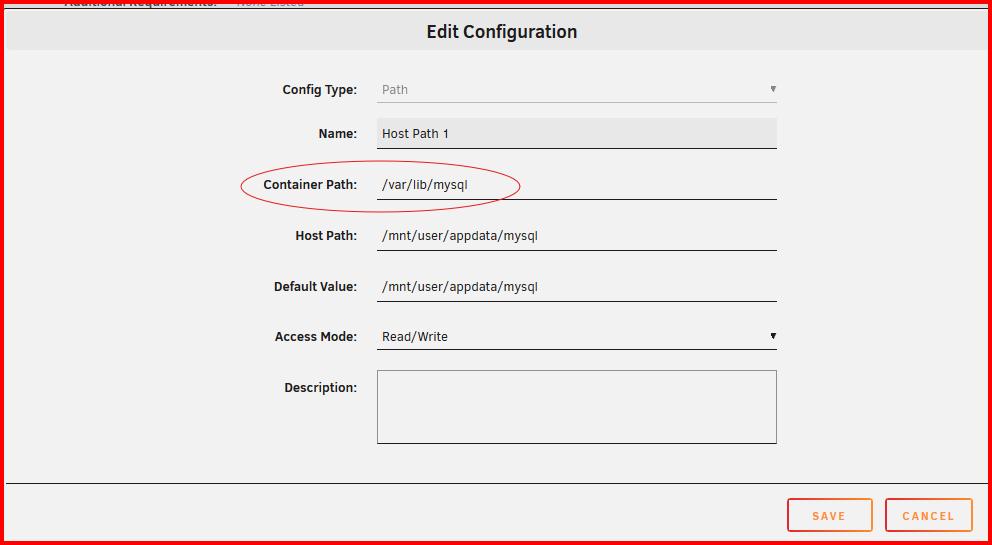
Here is a setup for a Docker container that I have running. You get to this by right clicking on the Docker icon: Then select 'Edit': Open up 'Show more settings'. You will have to add these three. The one circled is the one that is most confusing. First click on the 'EDIT' button. The 'Container Path' is the path that where the Docker container would normally store any files that you want on the Unraid array. You enter that path under that. The 'Host Path' is where you want the files to actually be stored on the Unraid array/server. Obviously, it will be a User Share in virtually all cases. As you can see, you work in the Docker container to set things up so that you don't have to looking for the files. With the proper setup and a bit of planning on your part, the files will be stored in a known location in a User Share. (Since this is an SQL container, what is being stored on that Host Path is the SQL database. That database is being accessed via a port (3306) by a Kodi client computer to retrieve data via a SQL query. This means that the database within the appdata Share is never accessed as a regular share but it has to be stored on the array because it is so large that it requires physical storage space on a hard drive or a SSD. The appdata share is intended for exactly that type of use. )

-
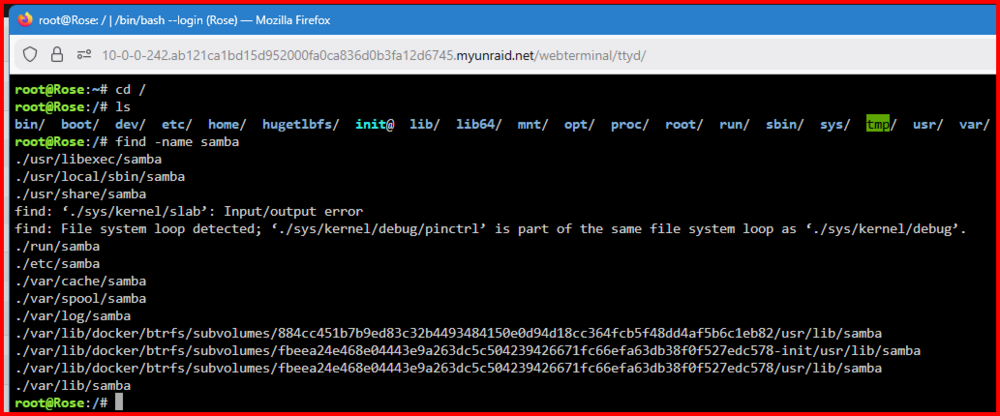
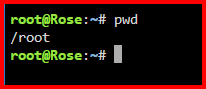
Here is a terminal sequence that will help you locate files any place on the Linux file system: The ls command is not really needed, but it shows you where you are in the file system. You can get the 'manual' for all Linux commands by googling linux command_name manual Linux has all the tools that a good Linux Guru needs to completely diagnose the system. It is a matter of study. (These guys just love writing shell scripts combining simple commands using 'pipes' 'redirection' into tools that can do anything required. When I was working in the old Bell system, I was told that the white pages for all of the Bell Operating Companies were all generated by a Bash Shell script.) Just to give you some basics– begin here: The command pwd displays the 'present working directory' which is your user's home directory. In the first screen shot, the cd / (change directory) changes that starting point to the root directory for the complete files system. The ls (list) lists the contents of the pwd. The find -name samba does all of the work. The -name switch tells 'find' to locate every occurrence of 'samba' in the entire file system down the directory for the pwd. When the cursor returns the job is done. (Be a bit careful as it is possible for you to have thousand of lines of output depending you are looking for!) PS--- I am not a Linux Guru!!! I know just enough to make me really dangerous...
-
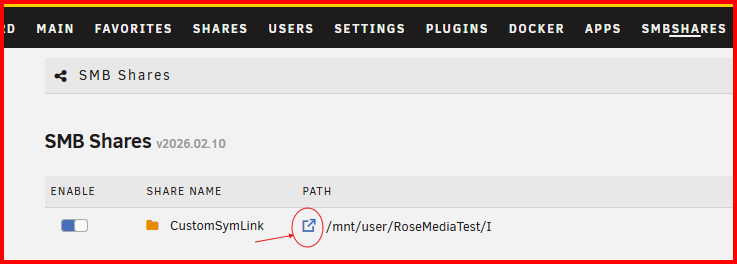
@zapbranagann has created an Unraid plugin that will handle all of details of creating and maintaining a 'User Share containing a portion of another User Share'. You can find details here: https://forums.unraid.net/topic/195826-plugin-custom-smb-shares/ I would suggest using this plugin rather than following the steps that I detailed in this thread as @zapbranagann has covered all of the steps and details to creating, setting permissions, and managing this type of share. Plus, it is integrated into the Unraid GUI which makes it no-brainer to setup and manage even for the neophyte!
-
Any progress on getting it added to the APPS store? That would increase its visibility.
-
@zapbranagann, Nice update to add in the link to the Unraid File Browser: Everything seems to work fine.
-
This approach goes entirely against this statement: It suggests changing the Windows client configuration so that it will basically allow 'guest' access (a potential security risk) and SMB signing (Another security problem). Choosing this approach will put one into that area of having to make potential future changes to the Windows client every time MS plugs another security hole.
-
Thinking about this, in the back of my mind is this glimmer of a memory that sometimes a quick double-click on an uncooperative link (when a single click should work) will result in the desired action. (This recollection is from that state of frustration that often occurs when something that should work– doesn't...)
-
As a service man from the Tube-era of TV, take both with you when you go!
-
The standard answer has always been: SOON™ 😁
-
That was always my problem. A solution would work for a while and then the Unraid servers and/or Client-servers would go missing again. Plus, if any of these devices are not online 24-7, it can take a period of time before they would even show up. (A real b***h if a computer is booted up and you need to access it immediately to transfer a file!) I think AD has fewer problems along these lines but remember that peer-to-peer is the 'ugly stepchild' of networking as far as MS is concerned! I have never had a failure using with a 'pinned' server in the Quick Access panel of Windows File Explorer or using the "Network Neighborhood' Folder— which can be also 'pinned' to Windows File Explorer. Think of it as just putting it in a different location in Windows File Explorer. I have been using the alternative so long that I never even look under "Network" for a server. (I only know that it still has issues is when I am checking while responding to requests for help with the problem of missing servers!)
-
You can try this work around: https://forums.unraid.net/topic/191221-some-musings-on-smb-and-samba-and-unraid-and-windows/#findComment-1561585
-
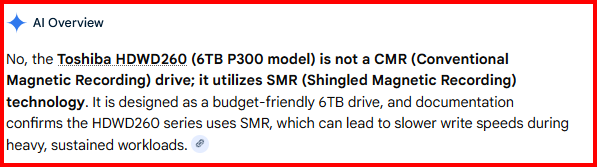
Another item— From Google AI when queried if this disk was CRM:
-
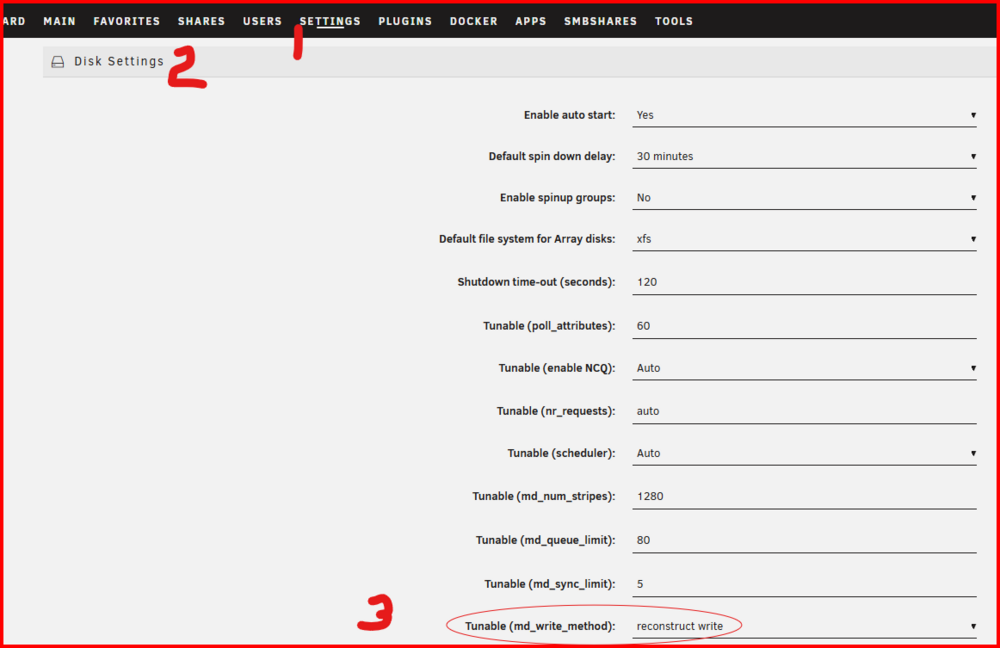
Two things stand out. None of your shares are using cache when writing to the array. Using an SSD as cache for a share will speed up moving only 300GB of data as your cache should have upwards of 1TB free. Second thing. If you are not (or can not) use a cache for the array, turn on reconstruct write as shown below: It will speed up writes made directly to the array substantially. Another item, it is not completely clear how many laptops are accessing the server simultaneously. Another item is that software that LimeTech uses for saving to shares has a lot of overhead. This situation is really evident when copying large numbers of small -size files. Copying from two different computers adds to this problem by increasing the amount of disk thrashing as data storage, files tables and parity are being updated.
-
IF you want it to run automatically, I suggest that you have an look at the "CA User Scripts" and "User Scripts Enhanced" plugins in the Unraid App Store.
-
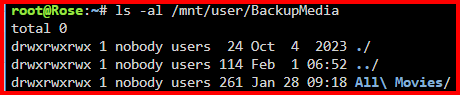
I have been using rsync for a couple of years to copy from my Media Unraid server onto a backup Unraid server. While it requires a bit of effort to get the command line right, you can then save it in a text file for future use. One important feature of rsync is that it will copy over any new or changed file. Files that are identical are automatically skipped. It is brazing fast in operation. Speed is almost always limited by some other factor (Disks peed, network speed, etc.) outside of the program. (PS--- rsync is an old tool that is in the public domain and has a proven track record for reliability and is vitally bulletproof in use! It is available for virtually every OS used today. It does have to be installed on both ends if you transferring between computers. Oh, it can be run from either end if you are transferring between computers.) Here is a link to a tutorial that you can use to gain a decent knowledge of how things work": https://blog.pair.com/rsync/ This is the command that I use to copy all new and changed file from my Media server to the backup server. It is invoked on the backup server with this source and destination. (I could have just as easily set up the command to be run from the Media server!) You should also note that I have also used the Unassigned Devices plugin to mount the remote 'Media Share' on my backup server. rsync -avhPX /mnt/remotes/ELSIE1_Media/All\ Movies/ /mnt/user/BackupMedia/All\ Movies/ switches <- Source (via Unassigned Devices)--> <-- Destination (local Share)--> Above breaks things down as what parts are what. Another thing. I always use a complete path from the root of the file system. This way, it does not matter what the 'present working directory' (pwd) is. I also test the path prior to its inclusion in the script/command by using an ls command like this: While this is not the complete path that I use in my command, you can see how to build and verify the path using baby steps in getting there.
-
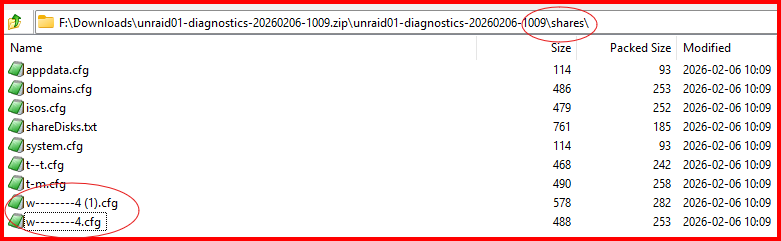
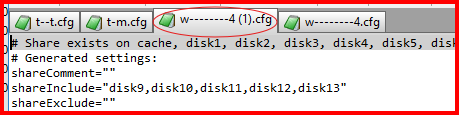
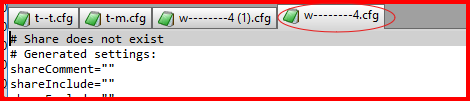
OK. Looked at the Diagnostics file and found this when looking a the 'Shares': Now looking a the two configuration files in a test editor: I am not sure which share you are try to access (The anonymization of the diagnostics files finds some useful info from us but I would suggest that you may have to clear up this situation.) There should be a 'CLEAN UP' button on the SHARES tab. Try that first and see what it does to resolve this situation. Each share should have a first level directory on some disk on the array of one of the cache pools. Point of disclosure: I am not a Linux desktop user but much more a Windows client person so I am not really much help when it comes to resolving Samba-to-Samba problems...
-
Skip this step if you want to go here: As I recall, if you stop the array, physically remove a parity disk and restart the array, Unraid will automatically become a single parity system. (PS-- It is better to remove Parity2 than Parity1 as the math for Parity2 is a very complex math operation!)
-
Did you try this?