Frank1940
Members
-
Joined
-
Last visited
Everything posted by Frank1940
-
On the client side, run the following command on each client: smbstatus And post the samba version for each client and whether it was connecting or not.
-
Post up the diagnostics file from your Unraid server on a new post in this thread.
-
It looks to me like the right hand plug is not seated. (SATA power connectors are notorious for working themselves loose when subject to any force on the connector. It looks to me like you need to 'form' those wires between the two connectors to make sure that it can not occur...)
-
Post your Diagnostics file in a new post.
-
We have all said that at some distant point in the past... 😁 (See my server descriptions below in signature! )
-
The Gurus for Linux security have 'recently' (apparently) suggested that directory permissions be 755 and File permissions be 644. Since then some(?)/many(?) Linux distributions have implemented these recommendations. Unfortunately, these permissions do not work with Unraid! This is how one addresses this issue when dealing with Docker containers: https://forums.unraid.net/topic/188600-share-permissions-changed-to-owner-99/#comment-1540351 Notice that virtually all Docker containers use Linux and write directly to the Unraid file system using the Linux API's. If the Linux distribution that the container is using the new permissions, it has be told not to use them when writing to the Unraid file system. With a free standing client, the Linux client that is using NFS to write directly to Unraid shares is going to be using the defaults defined for that distribution unless it is told to use other permissions. I am not sure if how you have to set up other OS to have proper access to Unraid shares using NFS but you will have to make sure it is using 777 and 666. If you are using Samba from any client (Windows, Linux, Unix, Android, etc.), you definitely do not want to be setting any permissions from the client side. Let Unraid's Samba configuration handle that. Remember that you need to log in using an Unraid 'Shares Access' user that you have previously setup on Unraid.
-
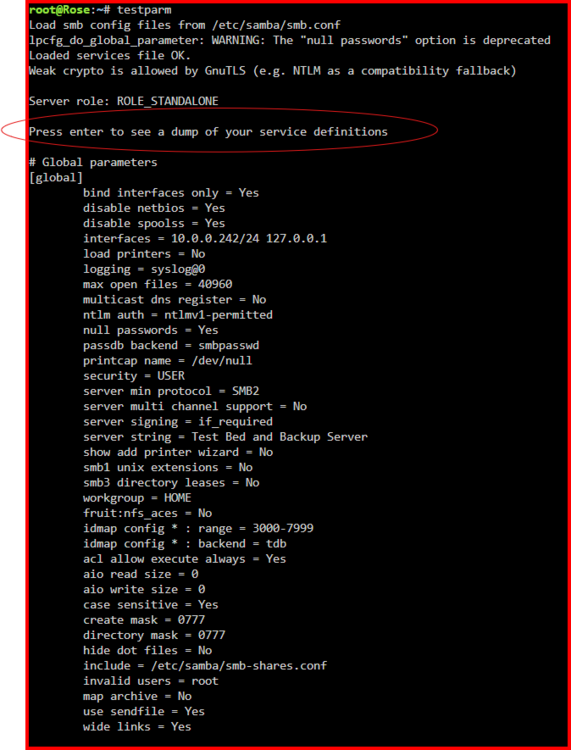
First for some information for SMB/Samba, read this thread: https://forums.unraid.net/topic/191221-some-musings-on-smb-and-samba-and-unraid-and-windows/ Next thing-- Post up a screen shot of the output of this command testparm This part is needed as it shows the options/parameters that have been changed from the Samba defaults: Note that you have to press <ENTER> to get the listing. (If you copy-and-paste the output, please format it it as " </> Inline Code" before posting. It is a option listed under the '...' in the posting entry toolbar. )
-
Remember this: So basically no output if everything went smoothly. The command line prompt simply returns. One more thing. IF you were not using tmux than if the terminal window was terminated, the rsync process was killed when the terminal closed! IF you had to login into the terminal again, you can be almost certain that the terminal program was terminated by something. To check, rerun the rsync command again. Read your post on switches and use that info... If the copy was completed sucessfully, it will finish in a few minutes. If it was terminated early, rsync will pick up where it left off.
-
I use these switches -avhPX (From years ago when I first used rsync to convert my two systems— Those were the switches that the author of the guide that I used suggested.) The -v makes it verbose and the -h improves the readability of that output. You do get a lot of display on the screen but you can see where and what is going on. (The old Unix/Linux guys never wanted things to be verbose because they were often using teletype machines as terminals and the printing noise drove everyone within a fifty yards crazy!)
-
Did you read the reviews on this item? There were several where there were issues with cables not having four working connectors... General Note about Amazon. They have become a store front for other companies. It often says shipped from Amazon but in small print sold by another company. (I buy a lot of stuff from Amazon but I am very careful these days. I looked carefully at the listing to determine what I am getting, what return policy is, and warranted by whom. For this type of stuff, I prefer E-bay and I buy the vendor and not the price. A vendor with a good reputation who has been around a few years usually means he has quality product and good customer service.)
-
AFAIK, when the terminal window closes, the rsync program is killed. Not to worry just start rsync again with the same parameters and it will pick up right where it left off. Rsync was designed to be bulletproof on unreliable connections even between continents. It is designed to be able to recover gracefully from this type of situation with a minimum of hassle! That is, if you were not using some program like screen or tmux. If you have all of the components of the Unassigned Devices plugin installed, you have tmux. Google tmux cheat sheet pdf for instructions on using it. These programs run permanently once started and you just connect to them when you want to. (Think of it like the Unraid GUI...) For more info on rsync, see here: https://en.wikipedia.org/wiki/Rsync
-
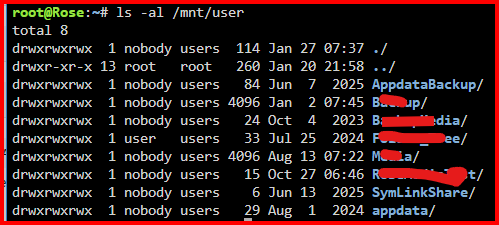
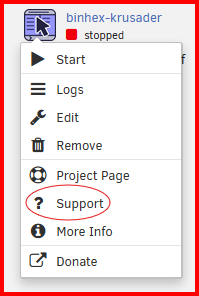
Depends on your definition of a valid path. All 'user' shares are mounted on the Unraid path of /mnt/user/share_name as shown below: Any location that is not under /mnt is actually on the RAM disk that Unraid uses for system files. Since it is a RAM disk, anything written there will lost when the server is rebooted! You probably need to go to the support thread for the Plex distribution that you are using for instructions on how to map from the distribution to the Unraid file system. IF you are using a Docker Container— most Unraid Plex users use one of the Plex Docker containers, click on the container icon and look look here: What you will be doing is mapping a 'container path' to a Host path. (The container path is inside the container and the host path is on the Unraid server. What happens is that the container writes a file to its container path, Docker will actually redirect the file to the location on your Unraid server defined by the 'host path'.)
-
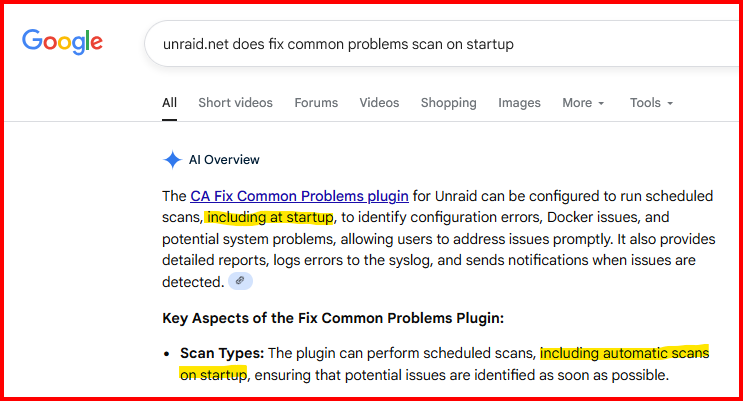
Found this in the AI response from Google: I believe that one of things that Fix Common Problems scans for is out-of-date plugins...
-
Yes, all the disks on the array have to be spun up rather than just those actually involved— parity disk(s), source disk and destination disk.
-
You should really stop all Docker containers and VM's while doing this process. I have the feeling that you have a fair number of large capacity disks to convert and I know this may be painful due to WAF, It really causes a problem when the disk you are copying from gets updated after rsync has finished that part of the directory tree on that disk. If you can't do this, run rsync again after the copy has finished and see if it has had to update/add files to the destination disk. (If no action is required, this only takes a couple of minutes.) Obviously, you have to repeat until no action is required!
-
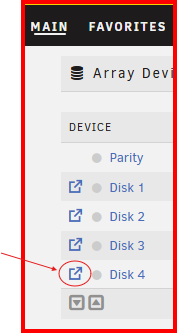
Rather than looking at it from Windows, Use the built-in File Manager. You can open by clicking on this icon in from of the disk. Next thing. When you format a disk, the process adds the file system overhead onto the disk. This takes up disk space...
-
What you are doing by making the checklist is what I did when I did the conversion. I actually had a table which listed the actions and parameters needed for each step. I then checked off each step as it was completed. Checking was my way of keeping track of where I was in the conversion of each disk. Many of the steps require hours to complete and the table with its checked off steps verified exactly where I was in the process at all times.
-
rsync is the premium copying/backup tool for both Unix and Linux and it has been ported to virtually every other OS there is. It is virtually bulletproof in its operation. It can be configured to do about any type of copy or backup job. If the transfer is interrupted, it will resume flawlessly on restart. And it is freeware. The only downside is that is has to be run from the command line. If you want to do the conversions with a minimum of risk to your data, you do NOT want to move the files. You want to wait until you are sure that the copy operation has successfully moved all the files to the new Drive. Then when you change the format to XFS, the files will then be 'deleted' as a result of the formatting operation.
-
You should only have to clear this drive that you just added. Patience is the key when you have to do a file format conversion. When this is completed, you might want to go to Settings >>> Disk Settings and change this parameter to 'reconstruct-write' It can significantly increase the write speed.

-
You have to make sure that the 'execute' flag is set in permissions for the tool. Permissions are -rw-rw-rw- for non executable files. They are -rwxrwxrwx for files that can be executed. (This requirement is for all files— shell scripts, binary, etc.)
-
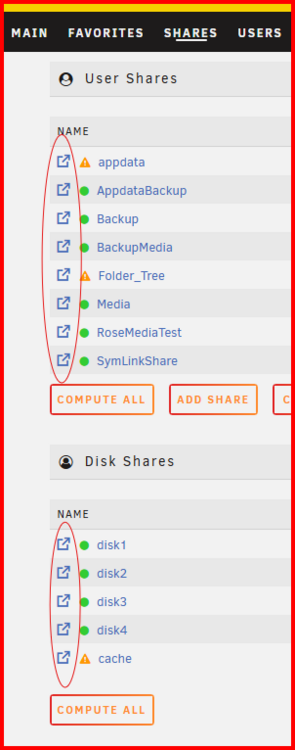
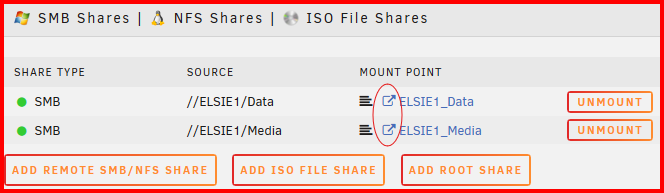
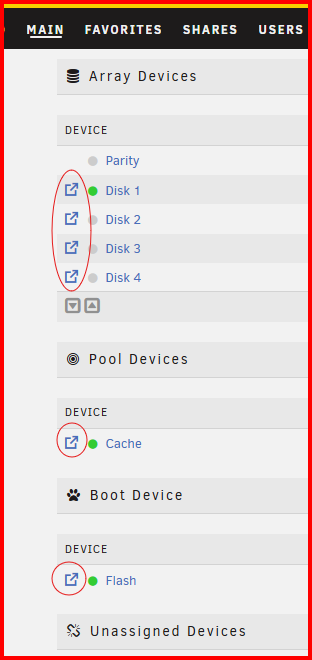
One more observation. There is no link to the built in Unraid File Browser. Let me give you examples. For User and Disk Shares (Oval shows link to File Browser) : For Mounted Shares: For Array Devices: I have no idea how difficult it might be to add in the link to the Unraid File Explorer but it would be a very nice addition if it could be done.
-
I downloaded the new release. I reset the 'user' drop-down field to 'None– use connecting user' and it worked just fine. I did notice that the drop-down option lists are long and include every user and group on the entire system. This may prove to be overwhelming to many folks but lets wait and see what happens. I am assuming that you have made the defaults using the "None– using..." entry. That will probably work just fine for 99.999% of all users!
-
I got it to work. I ended up stopping and starting the array. This, of course, forces a complete reboot of Samba. I could swear I had used your RELOAD SAMBA button BUT perhaps I didn't. I only remember that it seemed to happen in a fraction of a second.
-
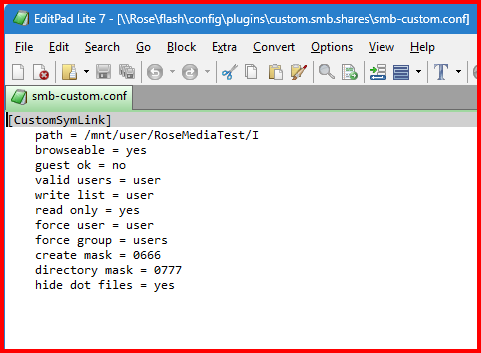
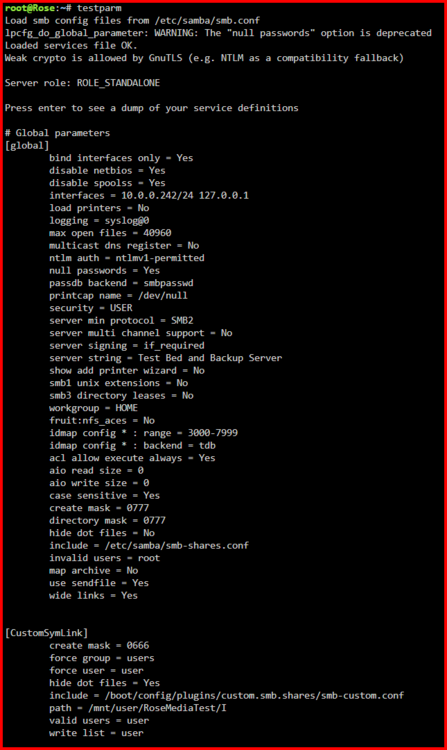
Not sure what is going on.... Here is the output from testparm In case you are not familiar with this tool, the [global] section is a list of parameters which have been changed from their Samba defaults. (If you run this program with the -v switch, you will get the output from every Samba parameter and its setting. Interesting to do if you want to see how configurable Samba is!) Here is the output of the smb-custom.conf. (I have my Flash drive shared out– read-only –so I can look at the files on it from my Windows computer.)
-
I found a problem. Forcing a user does not change a newly written file's owner to be what the 'Force user:' setting is. It still remains at 'nobody. (I tried two different valid Share Access users to verify this problem. I even restarted Samba...)