





Everything posted by Frank1940
-
Was struck by a wild thought. If you have a static IP address for the Unraid server, I think you can use the Windows 'Hosts' file to link the IP address to the Server-name. You will have to Google and research this one as my memory is very foggy on all the steps involved. Here is an example of someone who did this: https://forums.unraid.net/topic/191224-smb-on-windows-and-different-usernames-followed-by-a-rookies-random-questions/
-
Could your CMOS battery be bad? Check and see if that MB has BIOS settings for sleep intervals. (I imagine you pull the power plug when you upgrade the CPU...)
-
Look at the power switch on the case. Does it have a light behind it? Do you have a pet that might be attracted to that light and paw at it? Does a quick push of the power switch power-off the server or put it in the sleep mode?
-
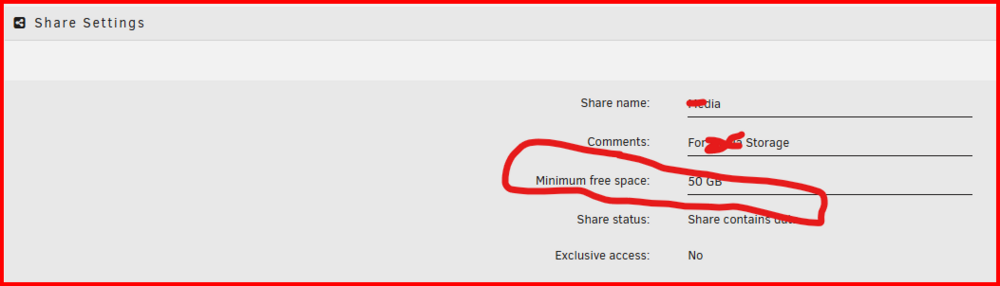
It should be larger than any file you expect to write to the share. How much is up to you. I have mine set to 50GB because that is the max size of a Blu-ray disk. An argument could be made for making it, say, 10%, 20% or 30% larger. Watch out for Image backup files of Windows OS disks. Depending on what is on that OS disk, they can be humongous if that disk contains all the data as well as the OS!
-
Here:
-
I have had this similiar type of problem happen in the past with Win11. BUT I don't have the problem at this time. I don't know how to reproduce the problem. I have no clue as what happened to fix it. (I am using WIN11 PRO version 24H2 at this point in time.) Here is my suggestion. Access it via the IP address. I would set up a Windows Credential to the server using the IP address. Now look at this post: https://forums.unraid.net/topic/191221-some-musings-on-smb-and-samba-and-unraid-and-windows/#findComment-1561585 You can pin the server to the Quick access portion of File Explorer but the Quick access link will be the IP address. If you use the "An Approach for the more Complex Network" section and rename the Shortcut to the server's DNS name, you will have two clicks (the second one being the server name) to get to the server. Unfortunately, File Explorer refuses to be tricked by our attempt to rename the IP address and displays the IP address on the address bar. BTW, Windows could care less whether you use DNS name or the IP address. It will use either. And, apparently, WIN11 considers each one to be a different server so you can login with a different set of credentials with this trick. (I thought for a long time that my failure to be able to use an IP address was because I was already logged in using the DNS name and Windows was preventing a second connection to the server via the IP address. )
-
You might want to start your own thread/new-topic about your problem. It is highly unlikely that your problem has the same cause. And it is very difficult for GURUs to keep two problems separated when responding.
-
Post a new reply in this thread, a copy of your diagnostics file. It is needed for anyone to make an intelligent response to your question.
-
Not real sure what files have the wrong permissions on them. Is it the files in the appdata share? These are controlled by the Docker containers and the Unraid user should have no reason to even look at them. Is the files in the User Shares where the Docker containers are writing data to be used by other applications and shared via SMB and NFS. If that is the case, here are some instructions on how to set up owner, group and permissions for these files. https://forums.unraid.net/topic/188600-share-permissions-changed-to-owner-99/#comment-1540351 Hope this helps...
-
Upgrade the Backup Server. No problems encountered. (To be fair, both of my servers are basic NAS boxes with a single NIC so there is nothing unusual about either of them!)
-
One more free thing to do. OPen up the case. Clean out all dust and dirt. Check that all fans are running.
-
I would try a memtst first (Min 12 hours) as it is free to perform. (Remember memory tests are conclusive only if they find a bad memory) Next thing I would do is to swap out the power supply. PS's have been the culprit in several cases similiar to this one. (Sometimes this can a free test if you can obtain a spare one (Yours or a friend) or using a thirty-day vendor return window.)
-
I would suggest that you use the File Manager built into the recent versions of Unraid. Not sure if it will be that much faster but it will then be a completely background process and the time to completion should not be that big an issue. With it, you can also delete at the disk level which will totally bypass FUSE. The built-in file manager will tell you which disks contain files for each Share so you know which ones you have to check and delete as required. Remember that you also have to update parity during a delete operation which also takes time. (To be fair, so are Windows File Explorer operations. I am pretty sure that Windows OS assigns a pretty low priority on file managing processes. [I know that I don't want video playback stuttering so a file deletion process will be a bit faster!] The disadvantage with using File Explorer is that as the Windows client has to be on and it uses up a small bit of LAN bandwidth.)
-
If you want it to work with Samba/SBM, you need the 'Group' to be "users" and the permissions should be 666 for files and 777 for directories. (Your having the execute bit set on a text file is not a good practice from a Linux security standpoint!) See here: https://forums.unraid.net/topic/188600-share-permissions-changed-to-owner-99/#findComment-1540351 Your owner, debianuser, is fine for SMB access as Unraid as every Share access user setup using Unraid GUI is a member of 'users'. However, if there are files in these shares written by something besides your VM, you will have to make sure that your Debian user is a member of the Unraid group 'users' if you want access to those files via your VM. (In a secure SMB environment, SMB access to files is via the group permissions rather than through the owner!) I do not use VM's so I can not provide more information then this. One more thing, 'root' is is invalid user in SMB (security issues),
-
Most Docker containers write directly to the array down at Linux OS level without using Samba. So there is no way that Samba could even know that a write operation occurred!
-
You have to save it on the Flash/boot drive. Then either run by using the full path to the script or put a line in the go file to copy it to the appropriate location on the Linux file system where Linux can find it when you call it. (Sorry it has been so long since I did much work that far down in inner workings that I have forgotten all the proper terminology. I still have the old, old preclear-disk shell script in the root of my flash drive...)
-
From the manual https://docs.unraid.net/unraid-os/manual/storage-management/#checking-a-file-system Read carefully.... Start a new thread on this line of concerns n the General Support area if anything is out of the ordinary. or if you are confused...
-
Because the UPS communicates with the Unraid UPS software! That is how it 'knows' how much battery remains as well as the nominal power being used by the load connected to the UPS. So the mains power is interrupted, it sends notification to the UPS software that the shutdown timer can start. If the timer elapses without a signal from the UPS that the power is restored, the shutdown sequence will begin! If your UPS will not communicate properly with the default UPS software in Unraid, you can install the NUT plugin which has support for more UPS's. You connect your UPS with a USB cable to your server. Then go to the UPS setting and turn on 'Help' by clicking on this icon on the Toolbar of the GUI.

-
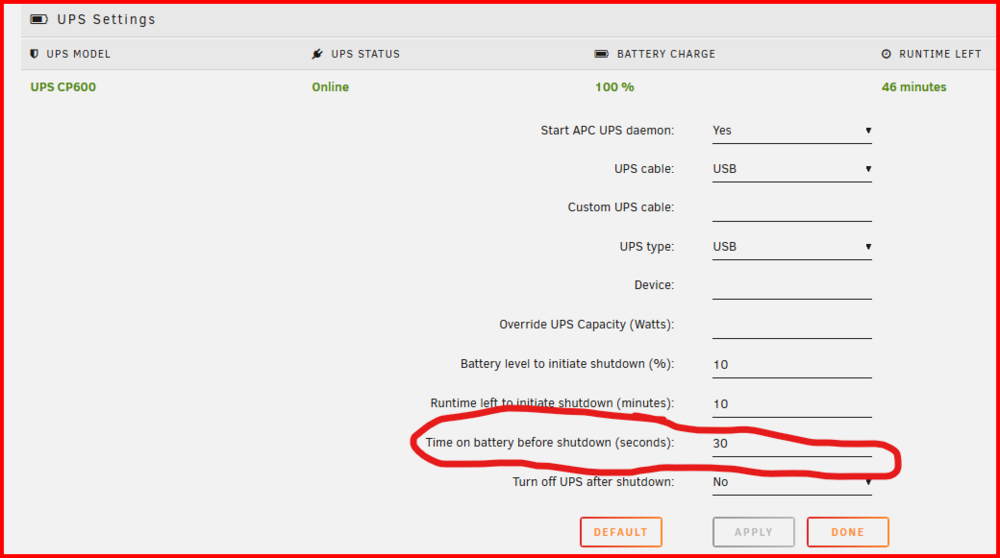
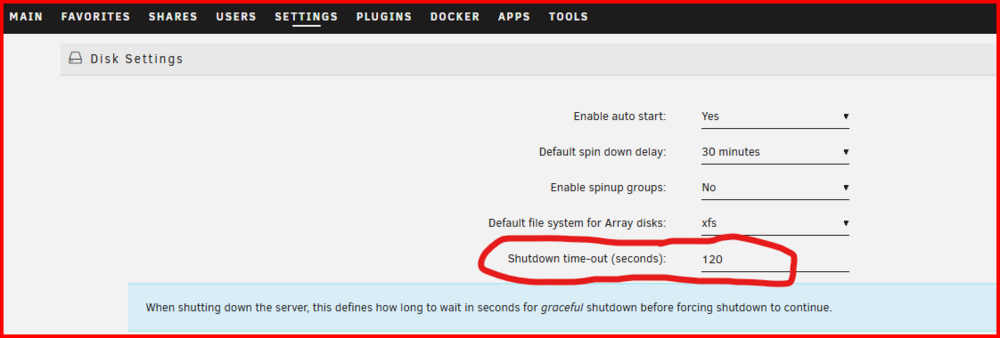
These are my settings: The circled one is the one that actually does the shutdown. (I have determined that if a power outage last thirty seconds, it will be hours before power is restored.) I have nothing else connected to my server UPS so this provides battery reserves if after power restoration, there is a second outage, there will be enough battery to make a second clean shutdown! One more setting. Determine the time required to stop the array and set this variable to make sure that the array is stopped before a force shutdown is force by this timer. Sometimes, a Docker container will refuse to release a file lock and the array can not be stopped. If you find one of these you will have to figure out a way to deal with it.
-
Generate the diagnostics file and upload it in a NEW post in this thread.
-
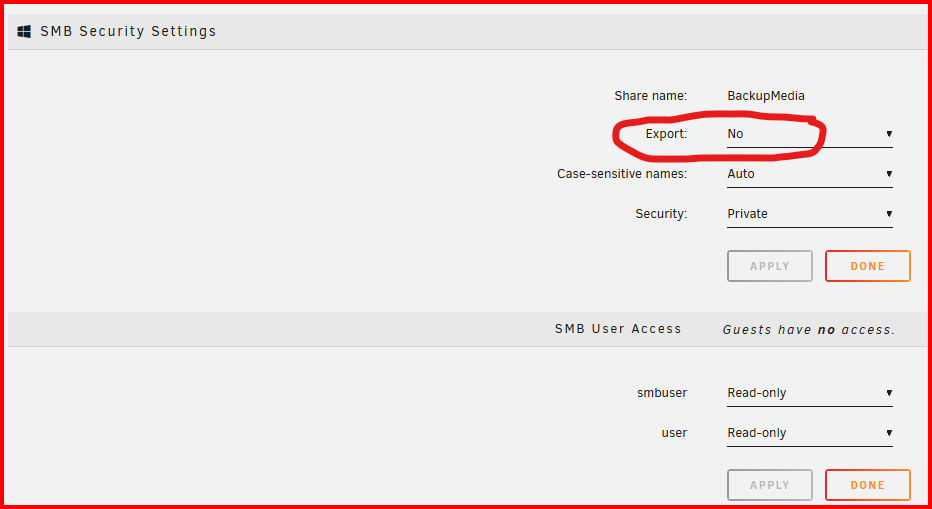
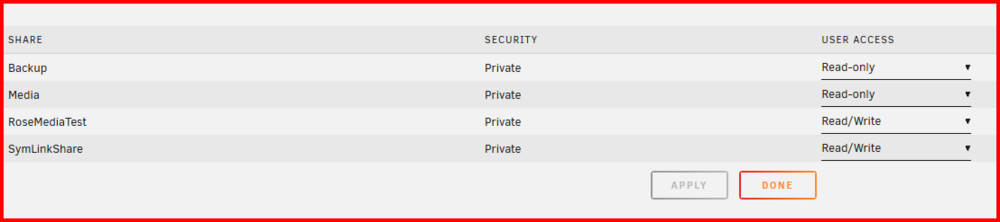
This condition can result if Export: is not set to 'Yes" in the SHARE-name settings. I can tell you that this share does not show up under the User as shown here (Notice that BackupMedia is not shown in the list):
-
You can try but I don't think it is going to fix it. It is designed to work more at the /mnt/user level. There is no reason for any Docker container or VM to have to modify the permissions at this level of the file system. I n fact, they should not even be looking this far up the file system. I would be looking for something in a shell script or in the go file that is changing these permissions. I would also being suspecting some mischievous/malicious going-ons. I can not recall anyone else having this problem that a simple reboot would not fix it! As a piece of information, the permissions on directories do not do the same thing as they do on files. Some similarities but some significant differences. A proper Google search should be able to find this information.
-
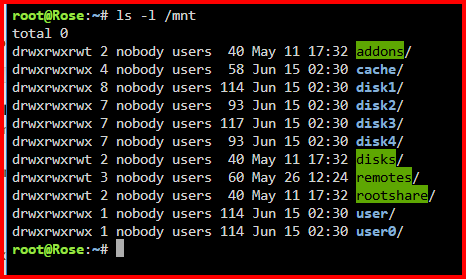
This is what your permissions should be: The absence of the execute bit on your user and user0 directories means that neither one is accessible! Something is modifying their permissions because these directories are created during the boot process of Unraid. The permissions for your disk1 and disk2 make no sense.
-
Mover speeds can never exceed what copy straight to the array can achieve. Cache is intended to speed up writes from the client to the Unraid server. (Moving large numbers of small files directly to the array can slow to single digit speeds at times due to the File overhead cause by Unraid's Share handling software.) Mover by default runs in the middle of the night to move files from the cache to the array when most folks are not using the server. (That is what is considered to the normal setup!) IF you need a protection for cached files, then you should be looking at a multi-disk pool with parity protection. (That was partially the reason why pools were added. BTW, most folks are looking for the opposite of what you are. They want active files in the pool and the dormant files moved to secondary storage (array). That feature is not currently available...)
-
Then look at the Windows client with this command: https://forums.unraid.net/topic/170027-smb-windows-settings-available-through-power-shell-and-linux-samba-tools-informational-posting/#findComment-1441603 and at the Unraid server connection with smbstatus as described in this post: https://forums.unraid.net/topic/170027-smb-windows-settings-available-through-power-shell-and-linux-samba-tools-informational-posting/#findComment-1545332







