





Frank1940
Members
-
Joined
-
Last visited
Everything posted by Frank1940
-
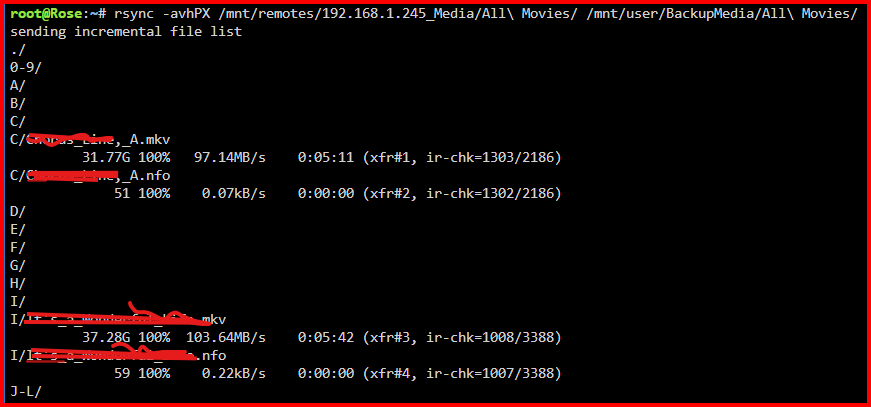
What do you mean by the word "complains"? Is it merely listing that it changed the timestamp or is it an actual error statement. Are you using rsync in a script? If so, how are you handling the command's std out. I use rsync in a Command Line command and std out goes directly to the Terminal screen. My directory times are updated but I have never seen any notification of that event. But I only have about fifteen directories. This is what a portion of my typical output looks like: HAve you tried the -q switch to silence the output?
-
Give us the switches you are using for rsync. I mount the 'source' server using Unassigned Devices as a Samba share and I have never seen this error. Here are my switches: rsync -avhPX
-
This is hard to believe. There are folks here using USB boot Flash drives that they have used for years. Have a look at the number of reads and write on your Flash device on the MAIN tab. I have two servers. The first server has 13,606 reads and 805 writes in 20 days of operation. The other server has 11,077 reads and 1799 writes in 30 Days of operation. Understand that writes will shorten the life of USB Flash Drives as will high temperatures. That is why the recommendation is for USB2 drives that are physically large. (USB2 speeds require less power and a large physical size helps dissipate heats better.
-
A 'second' for a backup strategy of non-replaceable data. Duel parity makes data restoration much easier if you monitor your array for problems. But there are other ways to lose data than through drive failures. Think of events like fire, flooding, theft of equipment, and, yes, even Malware. Offsite storage should be a part of your planning. EDIT: For a look at the statistics of drive failure, look at this post: https://forums.unraid.net/topic/50504-dual-or-single-parity-its-your-choice/
-
You can edit the smb-extra.conf file in the /config directory/folder on the Flash Drive. Be aware that this file uses Linux line endings so you have to use an editor that is aware how to handle this formatting requirement. (I use EditPad Lite but I think the latest version of Windows Notepad is now format aware. Using the GUI as @itimpi suggested is probably the easiest way.
-
If you are concerned about security, look at this parameter in the Samba settings: https://www.samba.org/samba/docs/current/man-html/smb.conf.5.html#MAPTOGUEST Then run testparm On your Unraid server. I have changed this setting on both my servers to 'Never' several weeks ago and haven't had any problems.
-
No argument on my part. The problem has been that Unraid started out with full 'Public' access being the default. (To be fair, in those days that was pretty much everyone's approach on the home NAS level.) It was simple to use. After starting your Unraid server and setting up a 'Share' on it, you clicked on the Windows File Manager, enter the server name (or IP address) and you were connected to the share. Believe it or not, there are still people who want that simplicity today. Every time, MS closes a potential security hole, there are folks over on this forum wanting to know how to bypass it! They resist the idea that they could avoid all of this by simply setting up a Share Access user on Unraid and adding a Windows Credential for their Unraid server and Share Access user. From my standpoint, I see the beauty and elegance of the Windows permissions setup but I am perplexed at its complexity. I feel that if you are not trained and not dealing with it on a daily basis, you can quickly become lost in setting things up to work properly. (I still have to go back to your notes from 2021 when dealing with peer-to-peer Windows file sharing issues!)
-
@adrianedelen did say that he was using the 'move' option and not the 'copy'.
-
I don't have any good answers for you. (You did give me many insights into the workings of Windows SMB back in in 2021 when we worked together preparing a 'white paper' on using SMB , Unraid Samba and Windows OS in a secured environment.) I am going to ping @JorgeB as he is much more knowledgeable about the inter workings of ZFS. (What I feel is happening is the ZFS is being introduced into Unraid in small steps but that is conjecture on my part.)
-
Have a look at this: https://forums.unraid.net/topic/137806-creat-a-user-share-containing-a-portion-of-another-user-share/#comment-1251067 But realize that there are restrictions and limitations as discussed here: https://forums.unraid.net/topic/190727-creating-shares-within-existing-shares-directory-structures-in-the-array-subtle-issue/
-
I am posting this up as a bit of information about an earlier 'find' to a replacement for the Flash Drive as a boot device for Unraid: https://forums.unraid.net/topic/119052-psa-on-sandisk-usbs/page/6/#findComment-1378298 Followed by these comments starting with this post: https://forums.unraid.net/topic/119052-psa-on-sandisk-usbs/page/7/#comment-1384188 As you can tell, people are still try to find a reliable replace for the Flash Drive. Unfortunately, to date there has only been the old (and no longer manufactured) Kingston MobileLite G2 and G3 SD card readers. I have two of these that I have used for about 13 years. If an SD card were to fail, all you have to do is load a backup onto (which includes the the .key file) unto any new SD card and make the card bootable. Plug it into the card reader and boot. (Years ago, I use two or three SD cards and when any updated version of Unraid was released, I would upload the *.bz files onto one of my spare SD Cards, shut the server down, swap cards, and restart the server. I have never had an SD card fail! Currently, I have 16GB SD cards for each server. I hope those drives don't fail as I don't know if I can get an SD card as small as 32GB!!!)
-
I agree with you on this one. Since you are the one who had a problem (squeaky wheel), I would suggest that you make a 'Feature Request' (about four subforums below this 'General Support' one) and ask that this be done and point back to this thread. And while you are about it, Under the 'Share' setting, suggest getting rid of the 'All' option!
-
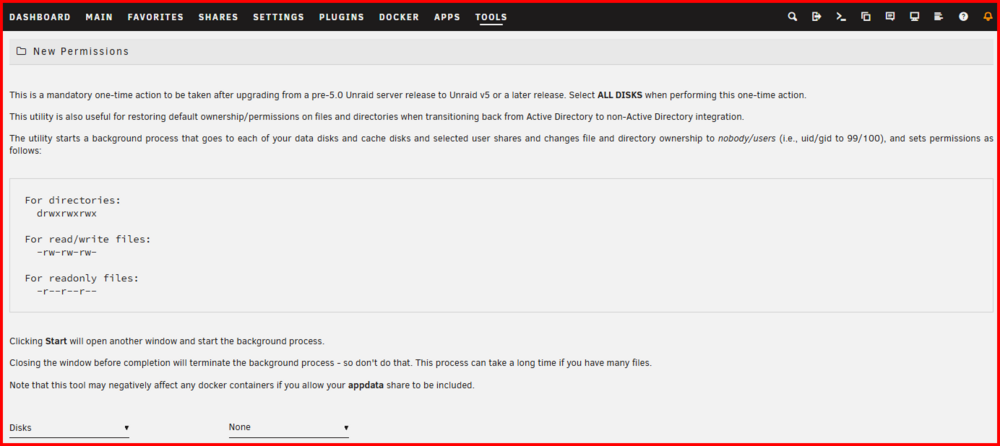
The tool is very useful for many situations. Misuse of the tool has been a problem since the addition of Dockers and VM's. BUT at the same time, they are also the cause of permissions problems in many cases. They are setup wrong to begin with (Usually Dockers) or are configured wrong by the Unraid user (VM's). The tool was intended to be used on Shares that are normally shared to Array users. (Basically those accessed via SMB and NFS) This does not include the appdata domains system and isos shares if they exist. (These are used by Dockers containers and VM's for their own purposes are not intended to be accessed via normal share access. The problem is that New Permissions does not always kill Docker applications. It only does that to Docker containers that require different permissions from the standard Unraid ones. So "may" is the proper term! I don't know what you thought was the reason that you needed to run it on appdata if you had a Window VM permission problem... Over the years, Unraid has changes. When this tool was first added (When Unraid moved from version 4.X to 5.0 when every owner, group was root/root which was a real security issue since any one with share access also had root privileges! (My gut feeling is if Docker and VM's had not been added in version 6, this tool would now be completely unnecessary as both of these have the capability to screw up the permissions for normal SMB and NFS share access! ) What should be done for a permission issue to find out what the problem is. Is it an owner/group issue or a file permission issue and what portion of the file system is affected. Basically you have to go down to the command line level and look at these properties. Once you find the problem, you can decide if the New Permissions tool will fix it and run it only on that portion(s) of the file system. You also have to correct the settings which caused the problem in the first place! About the tool. Here is the screen, what changes would you suggest to the wording? This section of the tool tells you what settings have to be to work. There should be no read-only files in user Shares today and I have no idea why that carried over. (One piece of minor information, SMB will often set the 'x' bit for 'owner'. This is relativity harmless in the greater scheme of things except to the Linux purist.)

-
Google rclone vs rsync I have never used rclone. A very quick look suggests that rclone is required on only one end and designed for cloud backup situations. Rsync has to be installed on both the source and destination. (BTW, it also appears that rclone does do hash checks on the files transferred. IF you are wanting to use the hashing function, you may want to check make sure it is the default and not switch option.)
-
Might I suggest that you contact Unraid directly and see if they have 'Alpha' tester program. Be sure to state what your qualifications are what areas you would be willing to test in.
-
It is not clear to me that the boot process is starting and then failing. I will admit that if I reread the original post, this could be the case... Let's wait until he returns and gives a clear picture of the problem. (I suspect that English might not be his native language.)
-
IF I remember correctly, several years back there were a few BIOS/MB combinations that wanted to boot from any new hard disk added to the system. The problem required entering the BIOS and resetting it to boot from the USB drive.
-
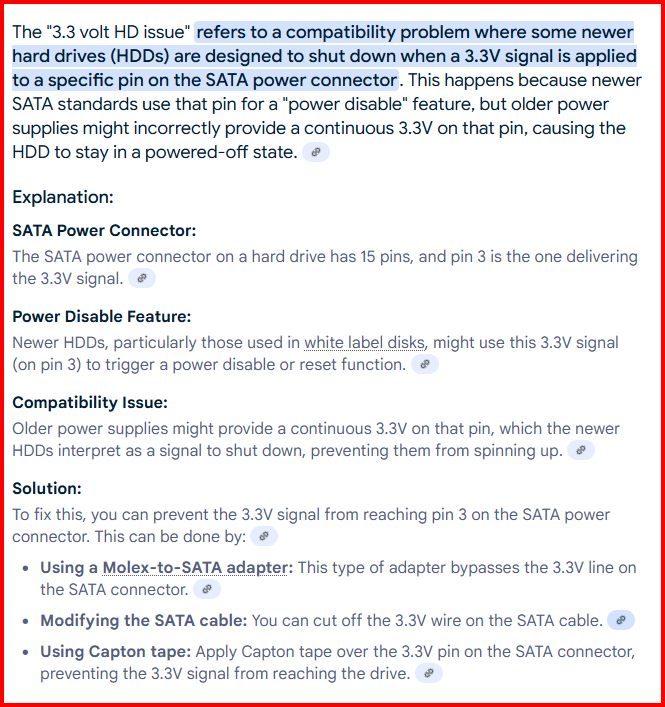
This crops up occasionally also:
-
You could use rsync as it does a Check during transfer. From the rsync manual: "Note that rsync always verifies that each transferred file was correctly reconstructed on the receiving side by checking a whole-file checksum that is generated as the file is transferred," I have used rsync to move more than 100TB of data over several years without an issue. (It was designed to able to move data between computers via WAN that could easily be on different continents!) I believe the " -c " switch could be used in a second pass to double verify the transfer but it would be time consuming.
-
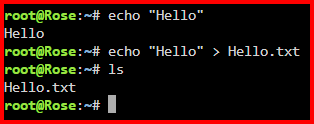
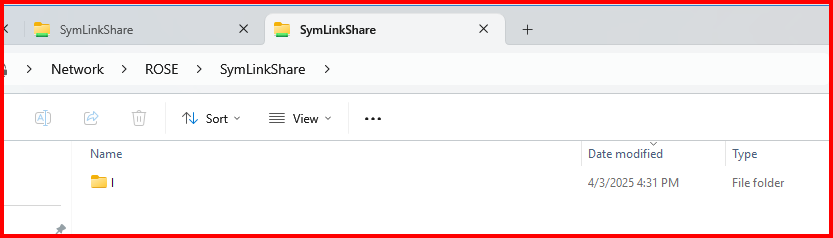
I think I see what you are troubled about. When you click on the 'images' share you only want to see the contents of the 'IMAGES'. Let's take a deep breath at this point... Going back 40+ years when I took an introductory course in UNIX from a guy who personally knew Ken Thompson, Dennis Ritchie and some of the other UNIX GURUs at Bell Labs, he started his course with basically this statement-- "There are only files in the UNIX Operating System! Even a line printer is a file. A Disk Drive is a file. A tape transport is a file. The reasoning behind this decision is simple. A user can send the output from any source to any destination using the same method." Now for a quick example. Look at this quick example: I have redirected the Output of the Echo command from stdout to a file. I could just as easily have sent it to a printer by specifying a 'printer file' rather than a file. (A complete aside, those early developers prided themselves on being able to do 'anything' using a Shell Script written for the Bourne Shell. There was a rumor at Western Electric when I worked there that they had developed a Bourne Shell script that started with a database of Telephone subscribers and produced the Telephone White Pages that every subscriber got in those days without any intervention!) Another big revelation was the fact that in UNIX (and thus, Linux), a directory is a file. Granted its contents are really a database and there is special flag that indicates that has special meaning to the UNIX and will be opened as used as required by the UNIX kernel, it is still just a file. Look carefully at the ln command. Let me grab a quote--- "The ln command is primarily used to create links for files in Linux, effectively allowing one file to reference another. Doing so allows you to manage files more efficiently without creating duplicates, making this command crucial for optimizing storage and managing files in Unix-like operating systems." Remember what I said about everything being a file. Well, while a directory is a file (and that allows us to link to it), there is nothing in the ln command switches that will allow one to see the contents of the file. The Link only shows us the name of the file. And the same thing is true if we use it to built a link to a directory. We will see only the name of the directory-file depending on how we come at it. For example, if we come at it via SMB on a Windows machine, we would see this: To see the contents of the Folder " I ", one would have to click on it. It seems a small price to pay to be able to share only a portion of an Unraid Share. Without this tool, there is no way to be able to do this in Unraid. In fact, until someone stumble across this workaround, anyone who asked about how to share only a portion of an Unraid Share was told it was impossible! At this point, I would like to make a small suggestion. Rather than calling the SymLink-- " IMAGES ", call it -- " IMAGES_FOLDER " or " IMAGES_DIRECTORY ".
-
What do you get from this command: ls -al /mnt/user/images and from this one: ls -al /mnt/user/images/
-
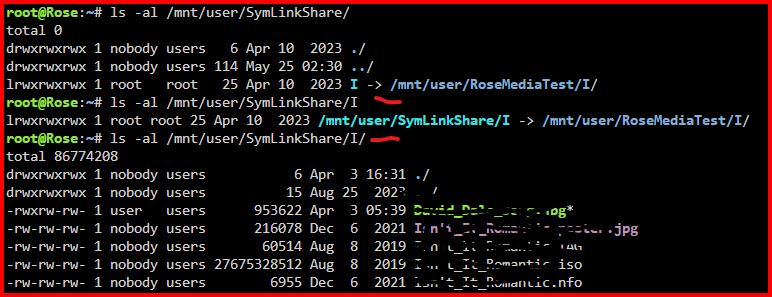
Look at the following screenshot: Notice that before the first tick, that there is no trailing forward-slash after the "I". Notice that before the second tick, that there is a trailing forward-slash after the "I". Many times it makes no difference whether it is there or not. But, in this case, it does! Without the trailing slash, the command displays the the Symlink path and the actual file location. With the trailing slash present, it shows the contents of root of the Symlink. (By the way, I always use the -a switch with ls because it will display everything. Unlike Windows, I usually use the complete Linux path starting from the root of the OS. It involves a bit of extra typing in some cases. I will point out that the Shell has a whole set of editing and the arrow-keys form the strating. Up and down will take you through the command in the stack. Left and right and delete will allow you to edit the command!
-
Point of Disclosure. I have never set up a VM under Unraid. Here is a link to a thread for setting thing up for a Docker Container that will be writing to the Unraid array: https://forums.unraid.net/topic/188600-share-permissions-changed-to-owner-99/#comment-1540351 Hope this helps!
-
You should probably consider looking for a case first. There are some threads in this section of the forum: https://forums.unraid.net/forum/9-hardware/ Have a look at these: https://www.amazon.com/StarTech-com-5-25in-Trayless-Mobile-3-5in/dp/B000KS8S9W/?th=1 You do have to find case with 5-1/4" bays which is very difficult these days.
-
@Snipe3000 (Also pinging @JorgeB For his assistance with this) , found these two entries in the syslogs in your Diagnostics file: May 29 01:59:06 Unraid01 rc.local: +============================================================================== May 29 01:59:06 Unraid01 rc.local: | Installing new package /boot/config/plugins/dynamix.my.servers/dynamix.unraid.net.txz May 29 01:59:06 Unraid01 rc.local: +============================================================================== May 29 01:59:06 Unraid01 rc.local: Verifying package dynamix.unraid.net.txz. May 29 01:59:06 Unraid01 rc.local: Installing package dynamix.unraid.net.txz: May 29 01:59:06 Unraid01 rc.local: PACKAGE DESCRIPTION: May 29 01:59:06 Unraid01 rc.local: Package dynamix.unraid.net.txz installed. May 29 01:59:06 Unraid01 rc.local: Restoring node_modules from '/boot/config/plugins/dynamix.my.servers/node_modules-for-v4.8.0+9485809.tar.xz' to '/usr/local/unraid-api/node_modules' May 29 01:59:06 Unraid01 rc.local: node_modules restored successfully. May 29 01:59:06 Unraid01 rc.local: Starting flash backup (if enabled) May 29 01:59:06 Unraid01 rc.local: Starting the Unraid API May 29 01:59:06 Unraid01 rc.local: [PM2][WARN] Applications unraid-api not running, starting... May 29 01:59:06 Unraid01 rc.local: [PM2][WARN] App unraid-api has option 'wait_ready' set, waiting for app to be ready... May 29 01:59:06 Unraid01 rc.local: [PM2] App [unraid-api] launched (1 instances) May 29 01:59:06 Unraid01 rc.local: ┌────┬───────────────┬─────────────┬─────────┬─────────┬──────────┬────────┬──────┬───────────┬──────────┬──────────┬──────────┬──────────┠May 29 01:59:06 Unraid01 rc.local: │ id │ name │ namespace │ version │ mode │ pid │ uptime │ ↺ │ status │ cpu │ mem │ user │ watching │ May 29 01:59:06 Unraid01 rc.local: ├────┼───────────────┼─────────────┼─────────┼─────────┼──────────┼────────┼──────┼───────────┼──────────┼──────────┼──────────┼──────────┤ May 29 01:59:06 Unraid01 rc.local: │ 0 │ unraid-api │ default │ 4.8.0+… │ fork │ 3270 │ 3s │ 0 │ online │ 0% │ 194.7mb │ root │ disabled │ May 29 01:59:06 Unraid01 rc.local: └────┴───────────────┴─────────────┴─────────┴─────────┴──────────┴────────┴──────┴───────────┴──────────┴──────────┴──────────┴──────────┘ May 29 01:59:06 Unraid01 rc.local: ✅ Installation is complete, it is safe to close this window May 29 01:59:06 Unraid01 rc.local: plugin: dynamix.unraid.net.plg installed And May 29 12:00:30 Unraid01 kernel: i801_smbus 0000:00:1f.3: SMBus is busy, can't use it! ### [PREVIOUS LINE REPEATED 927 TIMES] ### I am not sure what is going on or if it even related to your SMB problem.





