





Frank1940
Members
-
Joined
-
Last visited
Everything posted by Frank1940
-
Things look normal on the Unraid side. Have a look at your Firewall and Security settings on the PC. Which one are you using? Is it posting up any issues? Did you try turning it off and testing? Also check that your Network type is Private. See Here: https://forums.unraid.net/topic/191221-some-musings-on-smb-and-samba-and-unraid-and-windows/#findComment-1561581 I assume that you have normal WAN (Internet) connectivity. You probably need to describe your PC. I assume that you are running Windows. But what are the detail? Example: Windows 11 PRO, 24H2. Is it an Employer-provided PC? As you can tell, this is not the type of problem that we hear about so I am not quite sure what assistance we can provide. Google may be your friend in this case.
-
Connect a monitor and keyboard to the server. If there is a login prompt, login using your normal Unraid GUI user name and password. Then at the command line prompt, type diagnostics Shut the server down by a quick push of the power button. (If it fails to shut push it for more then five seconds. Pull the flash drive. See here if you need more info: https://docs.unraid.net/unraid-os/troubleshooting/diagnostics-information/ Upload the file in your NEXT post.
-
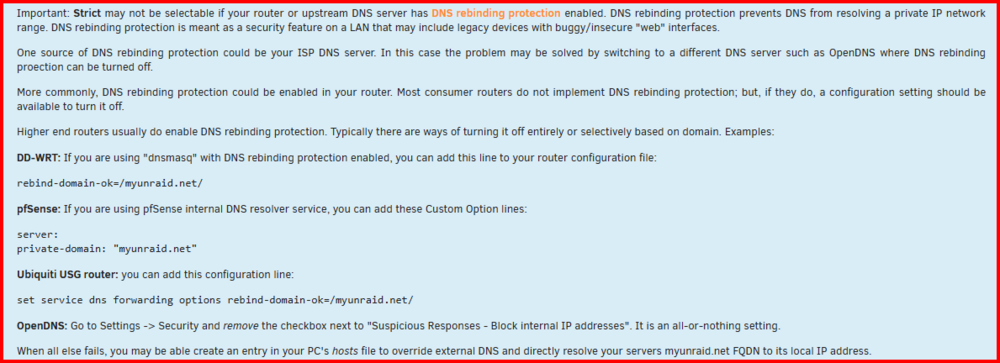
I see you are using a UniFi router. Back a few years ago, I was using a Ubiquiti EdgeRouter X and had DNS problems in setting up the SSL certificate. Here are a couple of posts back from that time: https://forums.unraid.net/topic/59845-unraid-os-version-640-rc8q-available/page/7/#comment-587753 and https://forums.unraid.net/topic/61265-what-router-are-you-running/page/3/?tab=comments#comment-637221 The problem is basically explained here: Hope this might help...
-
Basically no. When you log onto the GUI, you are logging on as root which is a 'Super User' which is all that implies. You can do anything to any file or directory without any restrictions. (This allows the 'Supper User' to fix those mistakes that other users with lesser permissions have created!) Unraid does not have any other type of user accounts except for those that allow for access to Shares. And they don't have access to anything but the Shares. If you would want to prevent deletion of a files/shares, you would also not be able to 'write' them using Linux permissions. ('write' = 'delete') (I remember that one time I was peeking into Windows file permissions and I saw a set of permissions that would allow writing to a file without being able to delete that file. I thought what a stupid set of conditions. I could empty the file of all content but I could not delete it...) Sorry if you thought I was angry. The problem is that when one is doing GUI operations, using Super User privileges, which have the potential for unrecoverable damage, great care has be exercised. Never do things in a hurry. Never do them when one is tired. Never do anything in a panic mode.
-
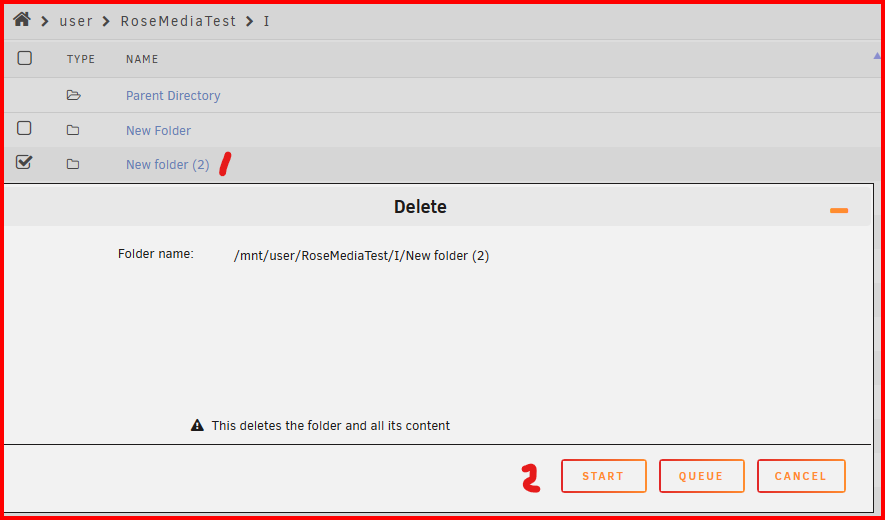
Perhaps I don't understand the problem. You already are getting a second chance to not do the wrong thing! See below: sudu is intended to allow a login to be handle as a user without administrative privileges but to be elevated to have them when necessary. What makes you think that that simple act would stop you from doing the wrong thing when you already have two opportunities not to do it. When you are in the GUI, you already are logged in as 'root' which is the ultimate Super User on any operating system! (I do a lot of file deletion management from the GUI and I always stop and make sure I have the right files/folder BEFORE I click on 'START"!!! And it that choice is not a default as I have to move my mouse to and click on it.)
-
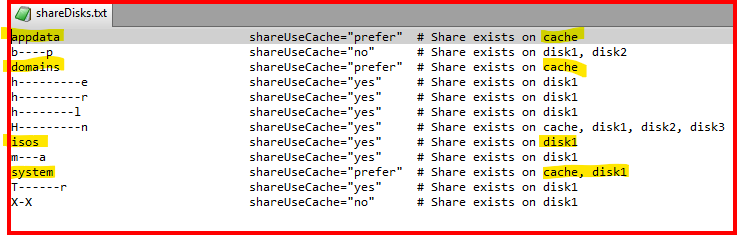
According to your Diagnostics file, the shares for types of files are stored as shown:
-
We can tell you more if you upload your Diagnostics file in a new post in this thread/topic. (New post will let us know that you have updated your information.)
-
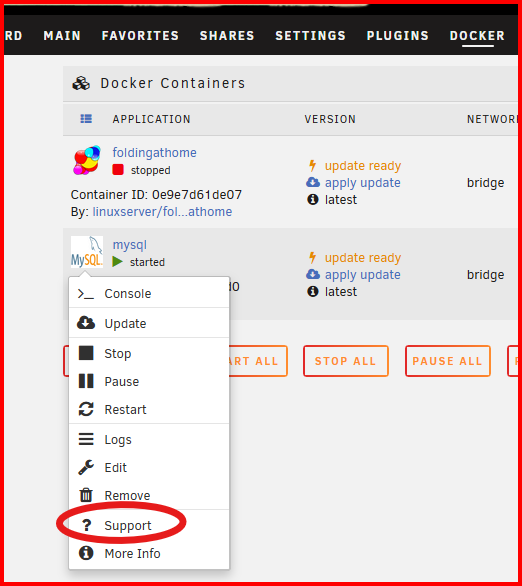
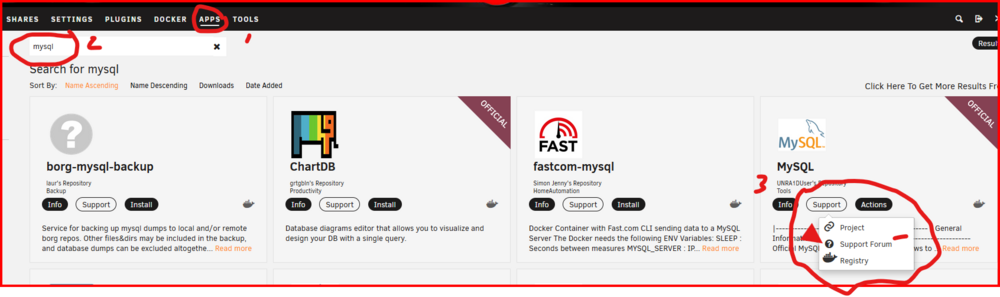
You should start here: or here: Docker containers are not a part of Unraid. There should be a support thread but it is not a requirement that an Docker has to be supported. If the thread doesn't not exist, try to find a container that has an active support thread. In the time I was putting this post together, I see you got some similar response. I am sorry about your problem with "Mealie admin password disappearing" but that type of question will have to be answered by someone who has solved the problem OR the maintainer of the repository for that container. If he is AWOL, you may be out of luck.
-
Set up a Windows Credential on each Windows client computer as shown here: https://forums.unraid.net/topic/191221-some-musings-on-smb-and-samba-and-unraid-and-windows/#findComment-1561582 That will automatically log you on using that credential. (Since you have at least one Share that is 'Public', if you first look at that share, you will be automatically logged in as a 'guest' unless you have a Credential. You can read that entire thread to gain an understanding of the SMB/Samba interaction. As you have found, logging off the Server is difficult. A restart of the Windows client will also work.)
-
I missed this!!!! You will see that the user name should be all small letters, no capital letters.
-
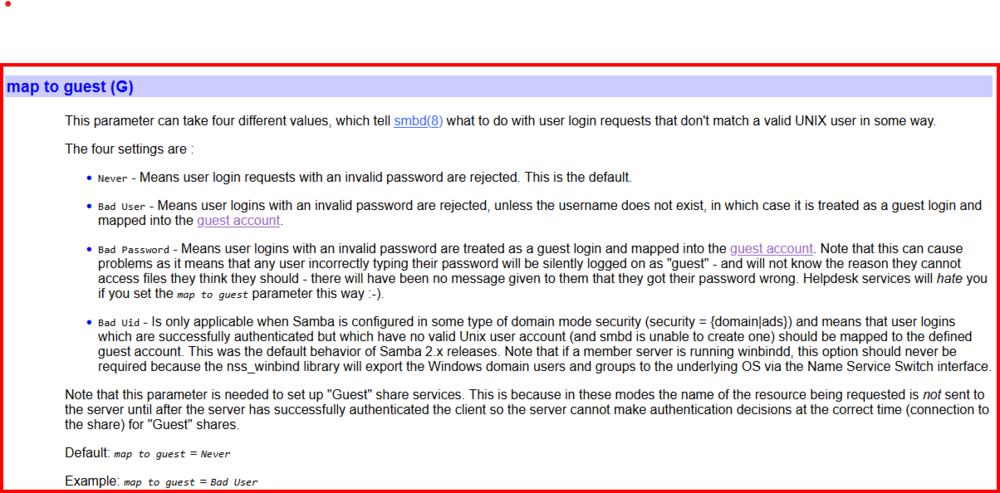
This is telling me that you are logged into your server using a guest account. ('nobody' is the default user name that Unraid assigns to all guests.) The IP address for the Windows client is 192.168.1.44. Does this agree with what is shown in Settings >>> Network & internet >>> Properties Of the three shares shown, one of them is 'Public' and the other two are 'Secure'. To allow guest connections, Unraid has set the Samba parameter map to guest = Bad User and you can read below what this means. I don't know exactly where your problem is at this point. It appears that your user name for this client does not match what is on your Unraid server which will cause the client to be logged on using a guest account. I refer to this post and the next one to setup your user for this client on both the client and the server: https://forums.unraid.net/topic/191221-some-musings-on-smb-and-samba-and-unraid-and-windows/#findComment-1561582
-
Log to the server with the GUI. Then start the GUI terminal--- the icon on the right side of the task bar. Now, connect to the share that you are having problems with. Then, use Windows File Explorer navigate to the share in question. Then run the following command in the GUI Terminal: smbstatus Post up a screenshot of the output. Also, post up the Diagnostics file from your server. Provide the 'user name' that you are using for SMB access and the IP address of your Windows computer .

-
Directories MUST have the execute bit set on them or they are not visible or 'enterable'! Run the New Permissions Tool/Script on just the Share with the problem. (If you need more information, you need 'Google' with a term something like Linux directory permissions This topic is never widely discussed as much as permissions on regular files so you might have vary the search parameters to find real good information on directories!
-
Joined forum in 2011 and started (as I recall) with a Beta 5 release. I don't think I ever installed the 4.7 release. Things moved at a much slower place back then and most releases were thoroughly debugged and all known issues resolved before being released. But, at that time, security, viruses, and malware were not the concern that they are today. (Linux/Unix was considered to be naturally secured unlike that Windows product!) No releases back for security issues! As I recall, version 6 was the first release where any consideration was being made to making Unraid more secure and most of that was baby steps.
-
Normally, Linux does not like 'spaces' in file path names as a 'space' normally indicates the beginning of another parameter being passed to the shell. Normally this would be handled like this: 3D\ PRINTER\ DOWNLOADS The '\' indicates to the shell that the next character is to ignored by the shell. This may not be your problem if the shell is never involved the process but it something to keep in mind... One more thing, capitalization is another issue. Windows File system generally ignores it and Linux files system enforces it. SMB/Samba tries to handle this issue but it is not always successful. Best general advice to always match the case that is on the Linux side. (NOTE-- If there are two Linux 'sides', you had best resolve this issue by making them Identical.)
-
Do you have a recent backup of your Flash drive with the current drive configuration?
-
Before you go any further, make a complete backup of your boot drive!!!! Here is a link to the download Achieve site: https://docs.unraid.net/unraid-os/download_list/ Here are the basic instructions for upgrading the OS (If nothing else works!): https://forums.unraid.net/topic/124417-update-unraid-manually/#findComment-1134406 The rest of that thread has some interesting information but the basic instructions are in that single post.
-
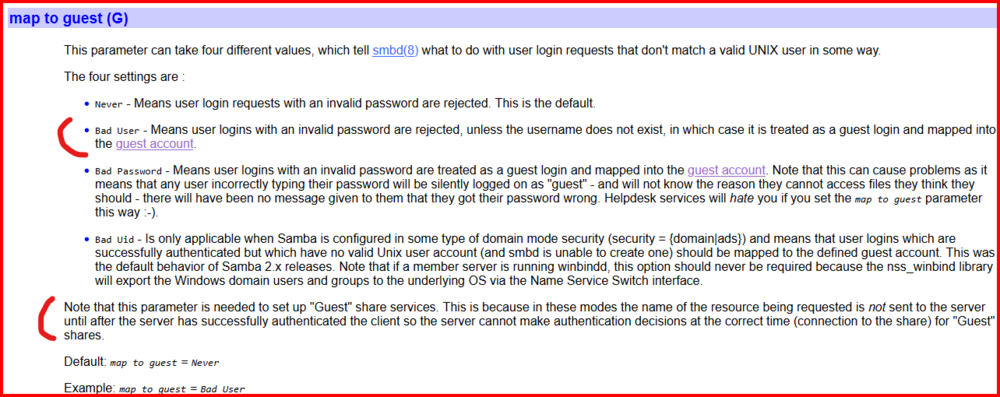
You have to read it very carefully and interpret exactly what a 'username does not exist' actually means. It seems to include the absence of a user name as special case. EDIT: After a bit of reflection, I am recalling that the Windows client will go through a series of steps to log onto a server. First it looks for a Windows Credential to use. If no credential, it will then use the user name and password that you used to log into the Windows GUI. If there is no Unraid Share Access user setup for that Windows user name, then Unraid (in the default mode) will offer a Guest connection to the Windows client. Now it depends on the SMB setup on the Windows client as to whether it will accept a guest connection.
-
If you stop and think about, the 'Bad User' choice allows the 'no login guest access' and the 'Public' Share access to work. (A fair percentage of Unraid users are still trying to maintain this status quo from 2010 by hacking Windows to force it to allow Windows clients to use guest access.) I changed the setting to ' Never' well over a month ago and have not problems with it to date. (I expected this to be the case!) But I also never intend on using a 'Guest' logon again. As I said (and if you look at the Samba site), the default is now 'Never' and apparently it is not causing problems in the larger Samba world. Plus, from a security standpoint, why would any system administrator want to give a hacker a free pass to log onto their server even if it is just the user file system?
-
There is because LimeTech has changed the map to guest variable to 'BAD USER' rather than the default 'never'. See here for more information: https://www.samba.org/samba/docs/current/man-html/smb.conf.5.html#MAPTOGUEST For security and a more Windows-like behavior, it should be 'never'! (For anyone who does not know, this can be changed by adding this line to the SMB Extras section of the GUI.) map to guest = Never
-
Try Googling Samsung 990 Pro NVMe issue Not sure if the issue has been completely resolved....
-
It appears that you only want it on the log-in to the GUI or via SSH. I will point out that the File serving side (Samba in particular) has no provision for 2FA. It is expected that (according to Google) that you will be using something like Active Directory to authenticate users beyond the simple-- but complex --password. (I worry more about the security of my data then I am worried about someone gaining access to the Unraid GUI. At this point, I can't afford, or do I have the expertise, to setup a truly secure Active Directory server.)
-
The problem is that you can have only one condition of these two as being primary. (1) all files below the split level are on one disk. (2) if the Minimum Fee space is not available on the drive initially selected, the file will be written on the next disk that meets this requirement. The two are mutually exclusive! Now a quick bit of background (as I remember it). The Split Level restrictions came about back in the days of much smaller hard disks (Think of 100GB!!!). DVD's can have space for 8.5 GB (Dual layer) of video on them. However the max size for any file on a DVD is 1.00 GB (1,073,741,824 bytes) . When a video (in the .VOB files in VIDEO_TS folder) requires more than than that amount of space an second file is started after that exact number of bytes is written to the first file! When playback occurs the two files are concatenated together seamlessly. What was happening was the folks were saving movies with the directory structure of a DVD on their Unraid server because that is what the media players needed back then. (If they use an .ISO format, no problem as it is a single file.) If, in the middle of the transfer of the .VOB files, the Min Free Space requirement was met, the next file was written on the next disk. Guess WHAT then happened??? Seamless playback was almost impossible. And the break could happen in the middle of a word! So the Split Level parameter was added to force all of the files onto one disk and it was made primary!
-
Why do you need Two Factor Authentication and for what what "sign in"?
-
Interesting! The 'restart' was of Windows???? Double check that the entry is still in the hosts file. I am going to ping @Batter Pudding and see if he has some thoughts...






