





Frank1940
Members
-
Joined
-
Last visited
Everything posted by Frank1940
-
Post up your Diagnostics file if @JorgeB's suggestion does not solve the problem.
-
You have one share that begins with an "M" and ends with an "A". You have another share that begins with an "M" and ends with an "e". Both of the "M" shares were 'Public' in your your first Diagnostics file but the M-----------e share was 'Private' in the second Diagnostics file. That share also had an indication that you had assigned read-write permissions to one of the Share Access users. Did you set up a Windows Credential (in Windows Credential Manager) for that Share Access user. You also have to reboot the Windows machine any time you make a change to SMB on that computer. EDIT Setting up a Windows Credential avoids most of the issues that are described by LimeTech in that link that @trurl provided.
-
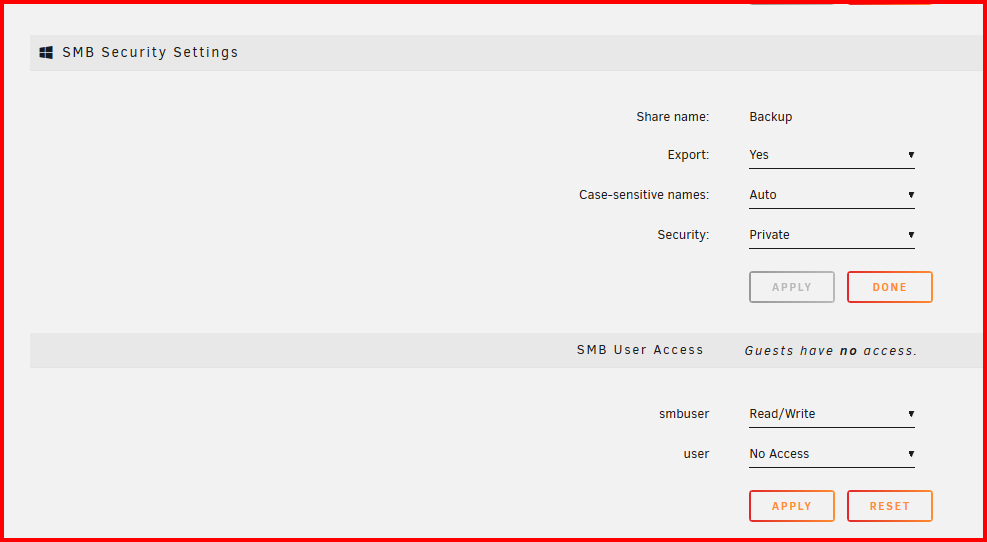
IF you set the security to Private for a share, you have to grant access to that share by setting the permission for each user. Example below:
-
I looked at your Shares that exist with files. I noticed that several of them were being exported as 'hidden'. Try removing that by changing that to a simple SMB export and see if that fixes the problem. (Since you now have credentials on your server, you can make those shares 'Private' and that will prevent access from unauthorized LAN users.) Also check your Minimum Free Space on the shares that you are using. If you are still having problems, please provide the first and last letter of the share name for the share(s) you are having problems with. (You have checked to verify that this problem exists on all shares???)
-
The Dynamix File manager does not have an pre-selected target for 'remotes' for a copy from a User Share. It does present 'remotes' as a target for Disk Shares. From a remote device, It also has the option to copy to other remotes, Disks Shares and User Shares. It should be a simple matter to add this to the File Manager. EDIT: I am running version 7.0.1. No Diagnostics file attached since this problem is evident on an otherwise perfectly functioning server.
-
Have a look at this Spaceinvader video for help with setting up Krusader: https://www.youtube.com/watch?v=MVSxiN2hr4I&list=PL6MCtOroZNDDIzeTPVxCqKtwdaFTF15AR&index=44 There should be a support thread for the Krusader container that you are using. Left-click on the icon for the Krusader Docker and pick 'Support' from the drop-down list.
-
It is usually set by the user who has access to ACL (ACL = Advance Control Language, if I remember correctly). One way to set these permissions is from Windows. If you right-click on a file or directory (that is on the Unraid server), pick 'Properties' and then change the settings under the 'Security' tab, you can set the ACL permissions on your server. This is more likely to happen when it is a mapped drive. If I remember correctly, the ACL permissions on Unraid can be removed by running the 'New Permissions' tool on just the share which has them. (Observe the warning about NOT running it on the appdata share!!!!) But I don't think that is what is causing your problem. To be honest, I don't recall ever seeing a problem where the action fails because it is prohibited and then succeeds on a retry.
-
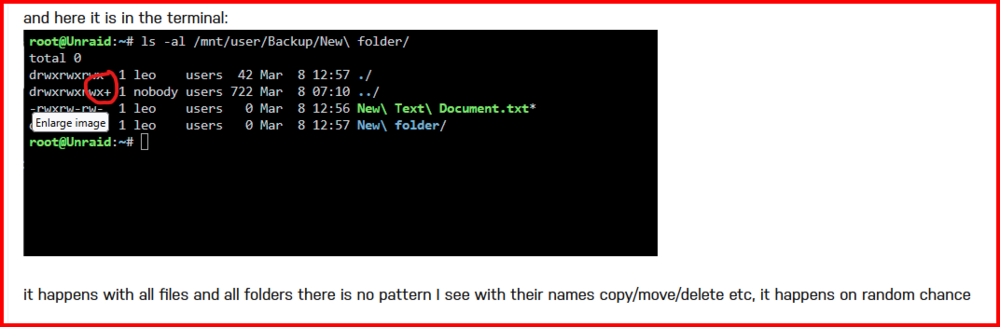
I don't like it when I see this in a Unraid share: This has caused problems in the past. See here: https://forums.unraid.net/topic/116389-access-denied-printer-unraid-share/#findComment-1058963 That having been said, I see that you are using a Windows mapped drive (P:) to do these operations. Let try it using a direct connection to your server from Windows File Manager/Explorer. To do this, type \\Unraid (or \\192.168.11.1 if that does not work) in the 'Address bar' of the Windows File Manager. (Ideally, you want to use the one that you created a Windows Credential for the Windows Credential Manager.) Then select your 'Backup' share and try the same kind of operations from there.
-
Find a file with the problem. Then open the GUI Terminal from the Unraid GUI. (It is the symbol on the right side of the tool bar.) Now type this command: ls -al "/mnt/user" Now drill down to the directory with the problem and get a screenshot of the file with the problem. (We don't need the file name itself UNLESS it has some unusual characters in its name!) Remember that Linux is case sensitive so you will have to observe upper and lower case letters as you edit/type the path. (Remember that the BASH shell has an editor built into it so the arrow keys will recall previous commands and allow editing of those commands.)

-
The appdata share has files on 13 array disks. What is going on here? Sorry about the confusion with M--a and B---p. In jumping around looking at settings in different files, I made a mistake. So is the permission problem with the appdata share or with the B---p share? (appdata is not exported by default....) Or are you moving files between them?
-
You have only one Share "M---a" that is exported. It appears to be a hidden share. If this is the share with the problem, try unhiding it. (There have been some issues at times with 'hidden' shares.) You are also sharing the 'appdata' Share. This is considered to be a system share is normally not to used by anything but Docker containers. If you are accessing it to get at information from one or more Docker containers, you should ask in the support thread for the container(s) as to how to map the files that it has to a standard Unraid User Share.
-
Post up your Diagnostics file in a new post. Now go to Shares, click on each Disk share and tell us if the Security on them is anything but 'Public'. Have you setup a Windows Credential to this server?
-
Were the files compressed on the Synology server?
-
You should really ask this in the support forum for the Emby Container. You can find this forum by left-clicking on the Emby icon and looking for the 'Support' link in the dropdown menu.
-
Setup the Syslog server and start the array. From your description, it could be software or it could be hardware. The syslog might provide the Gurus with a better starting point to help you figure out what the problem may be. Be sure to get a diagnostics file about eight hours after a restart. The syslog file from syslog server would be after the next crash. Post all files in a new post! (Editing old posts to add items/information confuses the very people trying to help you.)
-
From this website: https://blog.pair.com/2018/03/13/rsync/ That trailing slash is a bit of an anomaly in Linux commands. Many times it seems to be ignored. But other times, it changes behavior and results. In the rsync case, on the source path, it is is required if you don't want the directory created in the destination directory but only the contents copied over. Notice the --dry-run option/switch. You could use it to see what is going to happen before you actually commit to the operation.

-
One more thing for max performance. Upgrade to version 7 of Unraid. Under SETTINGS You will find one called Power Mode and you want to set it to 'Best Performance'.
-
As I understand, your appdata share will remain on the cache drive unless there is not room for it there. You have a 1TB cache drive. How much space is now free on it? You have three shares (appdata, isos, and domains) assigned to the cache drive as their preferred store location. How much bigger do you expect those shares to get? If you feel that the appdata share must absolutely always be on the share for performance reasons, then set the secondary storage location to 'None'. But be aware that if it should grow to the point where it does not fit on that cache drive, something is going to fail due to a lack of space. With your present configuration setup if you run out for space on the cache drive, this share could be moved to the array. If you increase the size of the cache drive so that all of the shares marked 'Array to cache' would fit. Then the shares be moved back to the cache drive.
-
This is a problem which I have had in the past. But mine was that the \\{server_name} was accessible but \\{server_IP_address} was not. But recently, both ways appear to work on my current LAN setup. I can't explain why except I think the router got a firmware update. I would say pick the one that works and use the “An Alternative Method to Network Neighborhood.PDF” to set up a Quick Access shortcut in Windows File Manager/Explorer. (You can rename the Desktop shortcut to show the Unraid Server name rather than the IP address.) My experience has been that if it is not showing up in Network in the file manager, it will after clicking on that quick access shortcut. Just in case, you think this is just an Unraid-Windows issue, I can tell that I have more problems with my Windows Clients computers setup in a peer-to-peer networking configuration not showing under Network heading in the file manager than I do with my Unraid servers!
-
If you still have some disks using the reiserfs file system, see this video from @SpaceInvaderOne:
-
It appears that you are trying to have the app on the smartphone store its data on your Unraid server in the share called doorbell. Is this correct? If this is the case, you should not require Unassigned Devices plugin. you want to connect to mtower/Doorbell (or possibly, mtower\Doorbell ) and note that the Unraid share name is case sensitive! You may require a Unraid Share Access user be setup with a user name and password. (I know nothing about the security of the smartphone you are using but it might prevent any connection to a server for which you do not have a login!) You would use this user name and password to set up the login from the smartphone app to your Unraid server. You may need to ask the Aqara APP developers for help. (I know I can't provide you any assistance on this.)
-
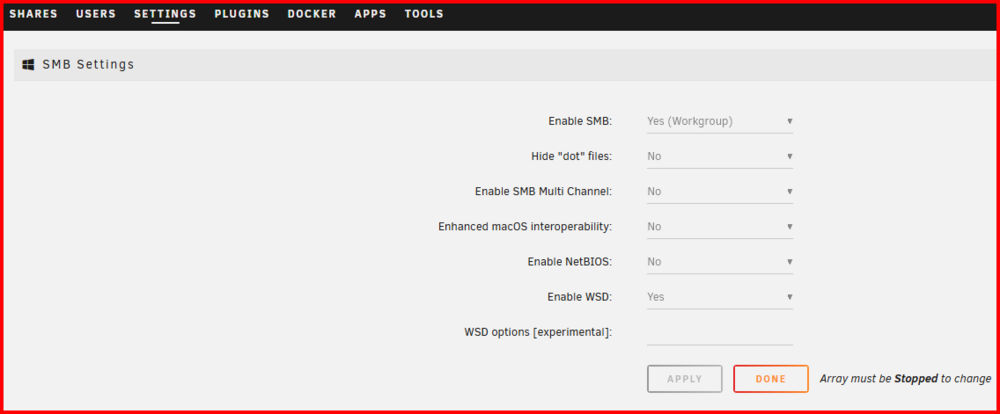
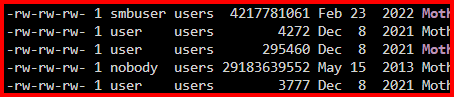
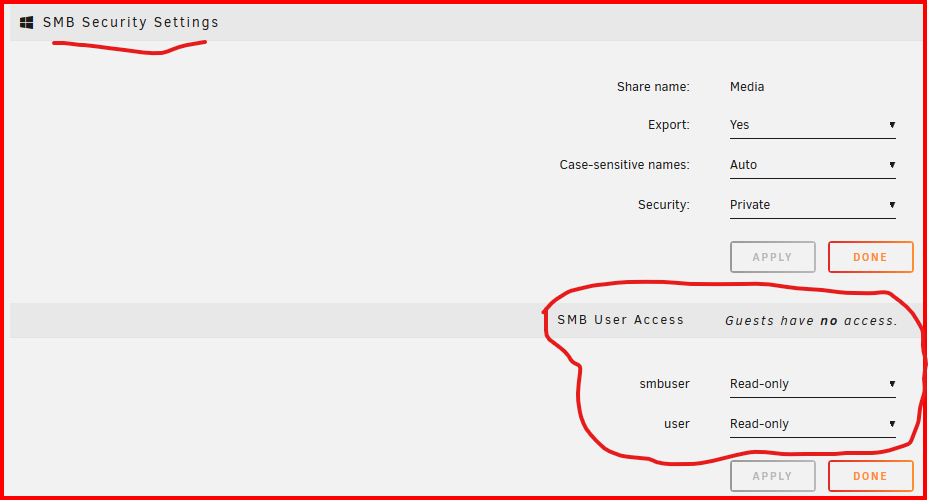
What is this all about? You should have a Shares Access user on Unraid-- say conner ---with a password. Then using Credential Manager in Windows, create a Windows Credential with a server name of MONOLITH and a user name of conner and the password that you created in Unraid. That should be the only entry for MONOLITH. Under SETTINGS >> SMB, make sure you have it setup this way: The Local Master and the old Microsoft 'Homenet' is basically gone. What has taken its place is a peer-to-peer arrangement. (In the big boy world, 'Active Directory' is the default and that takes a professional to get running most of the time!) SMBv1 is now gone from any new Unraid install BUT it was 'grandfathered' in if the server was using it prior to SMBv1 being removed. If you want a complete rundown of how (and why) to set up Windows 10/11 with Unraid in a peer-to-peer configuration, read this post and its PDF files: https://forums.unraid.net/topic/110580-security-is-not-a-dirty-word-unraid-windows-1011-smb-setup/#findComment-1009109 It attempts to explain what is happening (and why) with SMB/Unraid interaction. (I have seven Windows client computers and two Unraid servers on my home network. I have only two Unraid Shares Access users on both servers for these seven clients. I would only need one but I have some shares that I always want to be read-only but I do need occasional read-write access to those shares so I have one client set up to use that second user login. When I need read-write access, I turn on read-write access to that share(s) for just that user.) One more thing. From my forensic analysis of permissions on the Unraid Linux level file system, I can tell you that many times system level access to directory and files is provided through the group permissions ('users') rather than the owner permissions! Every Unraid Shares Access user is automatically made a member of the 'users' group! Look at the screenshot below: I can assure that 'user', 'smbuser' and 'nobody' can have full access to any of the files if the Permissions on the Unraid Share are set correctly. See below: (Since this share is set to 'Private', there is no 'Guest' access to the share!)
-
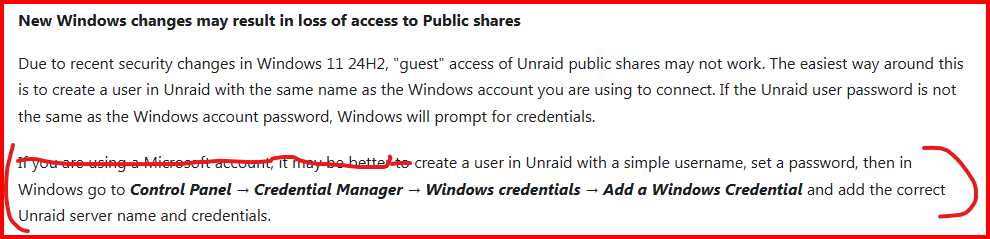
Try this from the Release Notes for ver 7.0.0: After you have set up the Shares Access user on your Unraid server and add the credential using Credential Manager to the Windows client, reboot the client.
-
And describe where in the boot sequence the problem occurs. As I recall, my LSI HBA card initializes first. Then the Unraid boot process starts. The boot menu appears and waits for any input from me. Then the automatic boot process starts with at least two .bz files being processed...
-
Hook up a monitor and keyboard, (having a camera ready) and watch the boot process when it actually fails. Take a photos if it fails before the Unraid login prompt comes up. (When that happens, your server is fully up and running.)






