





Frank1940
Members
-
Joined
-
Last visited
Everything posted by Frank1940
-
If the shortcut points only to the server ( \\{server_name} ), opening the quick access link will show all the shares that are being shared via SMB. See screenshot from Windows File Explorer/Manager below: They do not have to be mapped. In fact, none of these shares are mapped on this PC.

-
Go to 'PLUGINS' tab and look for the Unassigned Devices listing. Now click on the 'Support Thread'. Look for the answer there or post up what you want to do with the plugin.
-
Try the Unassigned Devices plugin...
-
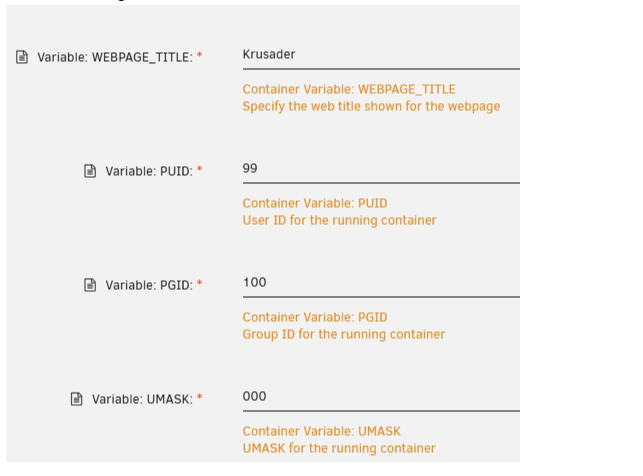
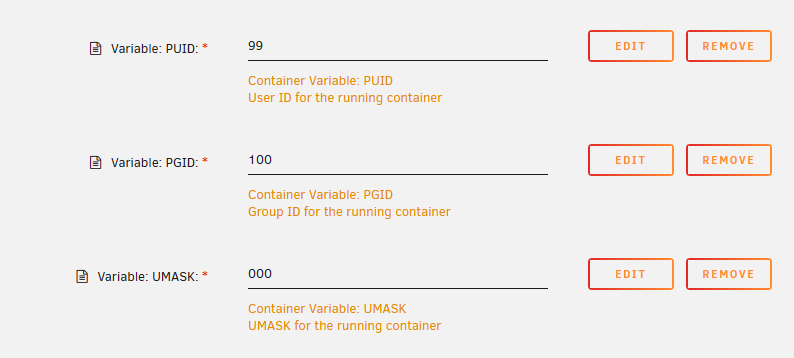
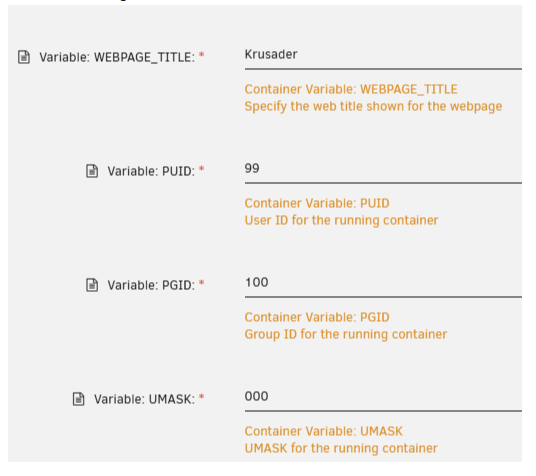
From this post: https://forums.unraid.net/topic/131730-update-from-69-to-6115-and-got-permission-denied/#comment-1219731 I am extracting this screenshot: For security reasons, many Linux distributions (including Docker containers that are not developed for the Unraid environment) are now setting the permissions for files to 644 and directories to 755. Unraid requires that for files to be shared via SMB that the permissions be 666 and 777 and the group is 'users'. Owner does not seem to matter unless it is 'root'. IF you need help setting things up, from this post: https://forums.unraid.net/topic/71764-support-binhex-krusader/page/38/#findComment-1486740 I am extracting this screen shot which shows how to add these three parameters (PUID, PGID, & UMASK) to your Docker Containers: When you are editing your Docker Container, be sure to open up the 'show more settings' dropdown to see everything that is defined before you start adding any new variables.

-
No real suggestions. But let me say that about a month (or so) ago, I could get in using the \\{server-name} but not with \\{IP-Address}. Today, I could get in either way. In fact, I had four tabs open in the new tabbed Windows File Explorer/Manager to both of my servers using both ways. (I was verifying what I would post up here before I did write this post. (I was actually expecting to have the reverse problem from yours!) Do you have your server setup with a Static IP address? If so, simply use the IP address rather then the server name. I don't think pi-hole would have any problem setting it up that way.
-
Personally, with over 180 reallocated sectors and 7 years of power-on time on that drive, I would replace it ASAP. A quick glance at the SMART report showed that errors are fairly recent. Not a good sign for the health of this drive...
-
I realize that you have a lot of very serious problems right now. Remembering passwords should not be one of them. If your location is reasonably secure, you could just write them in a notebook. If you think you require more security, you could use a password manager. While it probably won't auto-fill a SMB login, it will be available for lookup. Many people in your situation will use a a single SMB user with a common password for all SMB logins. Since you are complaining that Windows is now requiring a SMB login, you obviously don't care who has access to the data on your server. You could chose a password like "1234" (or a pet's name) and Windows would be perfectly happy. (I am elderly and I actually have a card with all of the passwords for that server pasted right on the server. They are there for when my executor will require them!)
-
Go to this post: https://forums.unraid.net/topic/110580-security-is-not-a-dirty-word-unraid-windows-1011-smb-setup/#findComment-1009109 Scroll down to the March 15, 2024 Edit and download the PDF file that it referenced in that section. It describes how to add a direct link to your server in the 'Quick access' pane of Windows File Explorer/Manager. This solution will always work! As far as I am concerned, The dependable appearance of servers under 'Network' in Windows File/ Explorer/Manager has been "broke" since MS removed SMBv1 from their SMB install. At least, this is the case for peer-to-peer networking which what most of us Unraid users employ. I am not sure what happens when the servers are using Active Directory.
-
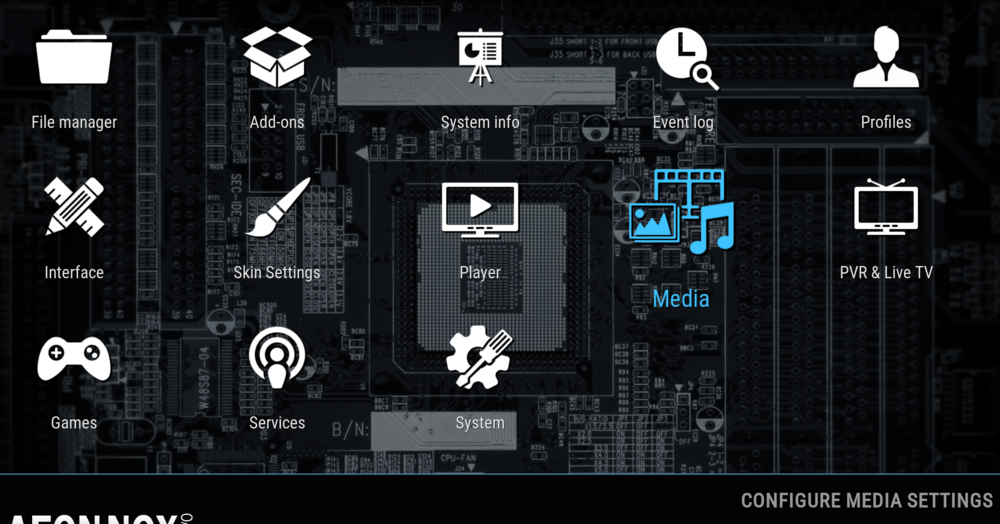
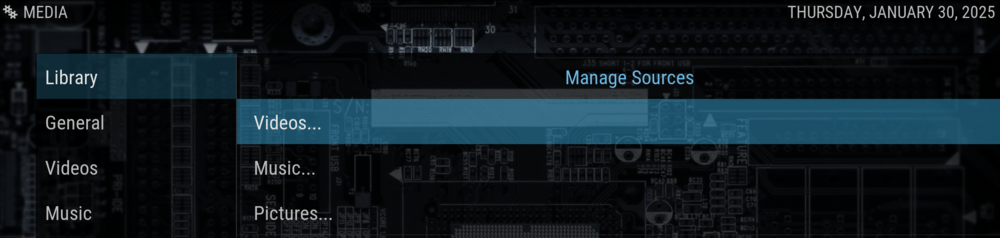
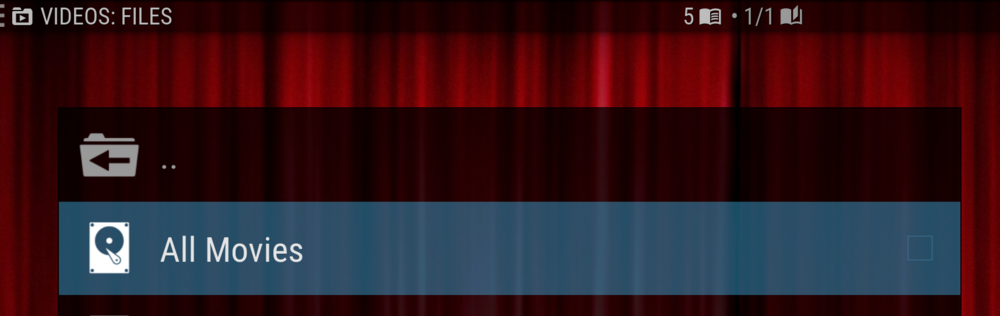
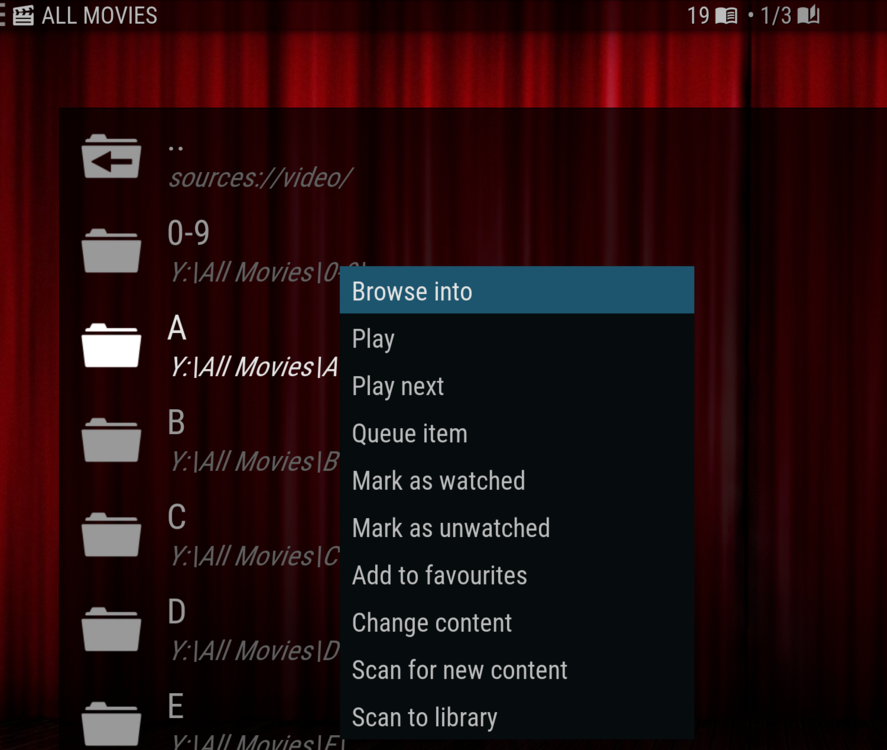
I was a bit afraid when I answered you that you would ask this kind of Question. I made my KODI setup back in late 2021 and I am now in my mid 80's. My memory is now foggy about what I did. I did use an lot of resources at the time and I have them bookmarked in my browser and I will post up those links at the end. First thing, mysql was not my first choice but I could not get mariadb to setup properly. I finally went back to trying mysql and followed the setup steps exactly and then that one worked. Case closed... You do need .nfo files for KODI to work. I have a semi-flat system for my media files. It looks something like this: |Media | All_Movies | 0-9 | A | B | C As you should be able to tell that the media is filed alphabetically. Basically, you require only the .nfo file and the media file (for example, .mkv) for each item. The scraper does the rest. My .nfo files are parsing files. For what I mean by this, read this: https://kodi.wiki/view/NFO_files/Parsing This is what the file ("Bad_Words.nfo") looks like for "Bad_Words.mkv" https://www.themoviedb.org/movie/209403-bad-words Please understand that I am not grabbing dozens of files each day so my process is almost completely manual. After I process the source into an .mkv file, I go to the themoviedb website to find the URL for the .nfo file. https://www.themoviedb.org/ I then copy both the .mkv and .nfo files to the proper spot on my Unraid server. I start KODI and add the new movie to the KODI database. (This is a one time operation as Every one of the seven PC in my home that have KODI installed use the same mysql data base!) The scraper grabs the poster, actors' name and photos, synopsis and any other information needed and adds it to the mysql database which is on my SSD cache drive. (It is not a separate Unraid share!) Now let me give you the other links that I referred to: https://androidpcreview.com/how-to-setup-kodi-the-right-way/ https://kodi.wiki/view/HOW-TO:Create_Video_Library https://kodi.wiki/view/Updating_or_removing_videos#Update_Library-_Manual Steps to add a new movie on my KODI setup: goto 'SYSTEM' Then Media: Library:Videos Then click on 'All Movies' Highlight the folder; Right-click on it and select 'Scan for new content'; now wait until it finishes. And you are done! Hope this helps....
-
I use KODI with the KODI database stored in the mysql Docker. The Docker is using my SSD cache drive to store the database on. That combination brings up the artwork for over 1500 movies within 5 seconds after I open up 'Movies'. Obviously, it takes several seconds to actually start the movie playing after finally making our selection. With KODI, I am using the AeonNox: SiLVO skin. In that skin, I have the 'View' set to InfoWall. With 15 posters on the screen and plus when a movie is highlighted, the synopsis and other details about the movie are displayed to the right of the poster field. When one has as many movies as we do, this combination is a big help in quickly selecting a movie.
-
If you can't get a replacement for a new drive (most vendors give 30day for a DOA drive) or replacement by the manufacturer under warranty, I would replace the drive. If the return is not possible for reasons you have not indicated, I would then use "Unassigned Devices Plus" plugin and run three full cycles on this drive to test it. If the count increases beyond what it started out at, I would trash it. If it doesn't increase, then your personal tolerance risk for failure will decide if you still want to use it at a later date. (Remember that general PC recommendations of disk sectors that can't be read do not apply for server disks. Failure to read a single sector of a disk during the rebuild of another disk will cause that rebuild to fail!)
-
Post up that entire syslog in a new post in this thread.
-
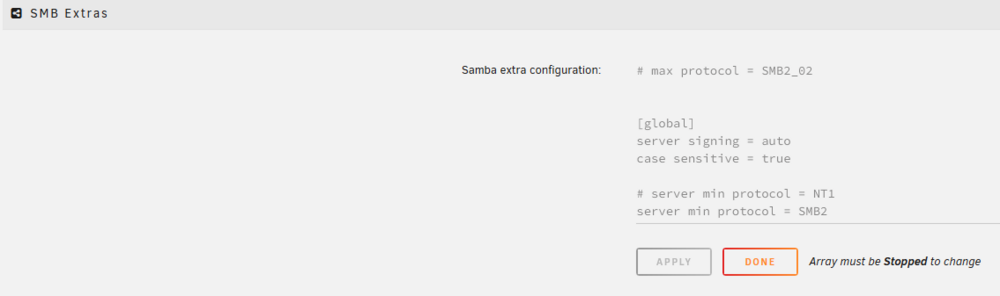
@JorgeB was referring to SETTINGS >>> SMB and then down to this section: (Some of mine are old settings that are now a part of the standard SMB configuration. Probably should remove them someday but I am lazy...)
-
Now see if you can rename "veda-2" on the router to "veda" . (You may want to read the router manual...) (You appear to be a native-speaking French person and my understanding of french is very, very limited as I try to figure things out from your screenshots.) Writing this reply to you before the Above post: (I hate to ask this question!) Is there another computer on the LAN named using just the letters veda (small, CAPITAL, or any combination of the two) in that order? ("Case" of the letters may be ignored by the router. This is an area of great confusion between Windows and UNIX/Linux and often causes problems.) You have made the IP address static on the server. Did you made it static on the router? (You appear to be a native-speaking French person and my french is very limited as I try to figure things out from your screenshots.)
-
Do you have an entry in the static routes on your router for 'name' and what is the MAC address for that assignment? Compare that MAC address to to one for the NIC in your server. (All computer "names" must be unique on the LAN or things usually don't work right.)
-
Set up the Syslog server (Under the SETTINGS tab of the GUI) and have it 'Mirror syslog to flash': Post the syslog file in a new post in this thread after a reboot has occurred.
-
Get a screenshot of the output of this command: ls -al /mnt/remotes/{remote_name} Then a screenshot of the 'Edit' window below the 'Show more settings' of the Krusader Docker--- this section is of particular concern: Midnight Commander runs with root permissions and the Krusader Docker (I believe) defaults to the ones shown above. You can change it to use root (PUID = 0) as user and root (PGID = 0) as group. Question--- Why are you not using the built-in (in ver7) Dynamix File Manager? I have not heard of anyone having permissions issues with it.
-
Get a UPS and go to SETTINGS >>>> UPS Settings. I have both of my UPS's set up to shutdown after 30 seconds on battery. (I know from experience that if the power is out for thirty seconds, it will be out for a minimum of two hours. The shorter the time on battery, the longer that battery will last.) Be sure and check how long it takes your array to stop by timing a actual manual stop. Then adjust the default setting--- SETTINGS >>>> Disk Settings >>>> 'Shutdown time-out (seconds):' to be about 25% longer than what you timed to allow for a graceful shutdown. (Read help for this setting for more details.)
-
See here for the info on setting Docker containers to write files to Unraid: https://forums.unraid.net/topic/131730-update-from-69-to-6115-and-got-permission-denied/#comment-1219731 and from this post, this table: https://forums.unraid.net/topic/71764-support-binhex-krusader/page/38/#findComment-1486740
-
I decided to try your suggestion. But I had already forced the 'missing' server to appear in Windows File Manager. So I powered down my PC, shut the power off at the power strip, and waited until the power supply capacitor has discharged to the point where the power locator light went out. I turned the power back on. I started up Windows File Manager and let it alone while I started up Firefox, logged into my password manager, loaded and signed into the missing server's GUI. I then looked at Windows File Manager. There were three servers there--- both Unraid servers and my Wife's PC. Just what I would expect if everything was working according to script. This entire issue has to be some sort of edge-case situation... It is just too random to be anything else. (Back, 15 years ago, I always said that getting SMB/Samba to behave was more witchcraft than science!) This was why I opt for (and recommended)--- using shortcuts to servers. It has never failed me! Somehow, I found out about using the quick access feature add-in to Windows File Manager and that really integrates things nicely. For anyone who has not seen this, I am attaching a screenshot: My two Unraid servers are pointed to and the circle is around that "Network Neighborhood" Quick Access points to a folder on my Desktop that contains shortcuts to both Unraid servers and all of the peer-to-peer Windows computers that have shared folders on them. So One click gets me to either of my two Unraid servers. Two clicks will get me to any other server on my LAN and the Quick Access section is relatively uncluttered.
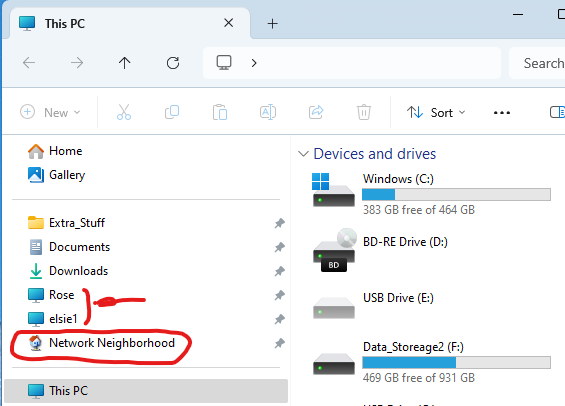
-
I then powered down my Computer. I went over to my Wife's Computer. Opened up Windows File Manager and clicked to 'Network'. After a few seconds both servers appeared under 'Network' I restart my computer. Open Windows File Manager and click on 'Network'. Again only the one Unraid server plus my own PC. (set up in a peer-to-peer arrangement and this is the first time it has ever appeared on its own). Again the 'insanity' drill works to bring the second Unraid server online! And I look over at my Wife's PC and see that my PC now appears under her 'Network'! As a point of information, my Wife's peer-to-peer does not appear on My PC.
-
OK, after reading your post, I opened up Windows Explorer. Only one of my two servers showed up under 'Network'. (This is the first time, I can ever recall this happening. Before either both servers show up or neither.) I decided to do some testing. I could get to the GUI. I could open both mapped drives (Y:\ and Z:\). I waited about a half hour. It does not appear on its own. I try to force Windows File Manager to rescan for servers. It did not seem to do so. (Scanning the network takes several seconds with a spinner appearing.) I now closed Windows File Manager. I reopen it. I click on 'Network'. Instant appearance of that single server. I now clicked on a shortcut to the server. The tab opens instantly showing the shares. For the first time ever, the server does not show up under 'Network'! I then opened a Share on the server. Now it instantly appears. Again, I close Windows File Manager. I reopen it. Only one server. Same one missing. I open 'Network' In file manager. I do a series of F5's and ctrl-F5's. So I try the shortcut. Server opens, showing shares. No server name under 'Network'. Click on a share, share opens and the server name appears instantly. (I know this is the definition of insanity--- trying something over and over expecting different results...) I also notice that I have a printer missing that is on my network-- it was there yesterday and is hard wired so no WIFI issues -- from the Network pane. At this point, I think there are some issues with Windows Discovery service. Quick Google search didn't show anything but I wonder how many people really use Windows Discovery Services on a regular basis.
-
Now let me toss in another thing that just occurred. I opened up File Manager on my main Windows Client-server(i.e., my primary PC). The other Windows client-server computer (I.e., my wife's priimary PC) was missing from under 'Network'. Remember it was there just few hours ago. This computer has been on since about 7:00Am this morning. It never sleeps. My wife's computer has been on since about 7:20AM and it never sleeps. Of course, clicking on a shortcut to that computer instantly restore it to its place under 'Network'. I don't quite what to make of all this. But I do know that it is not just a Unraid-Windows SMB problem because a virtually identical problem also exists on the Windows-Windows SMB side of the equation. (Let me the first to admit that we don't use the Windows-Windows SMB connections near as much as the Unraid-Windows SMB connections so that is a rather minor issue if I have to use an couple of next mouse clicks to get to those resources.) This problem (or one of its cousins) has been around for me for a number of years (> three). I first noticed it when I turned off SMBv1. I did that after I 'retired' some old Linux set-top media players that used SMBv1 only. (Their software had not been update since 2011!) But I also recall that this problem was around back before that. The 'solution' at that time was to leave you Unraid server on 24-7 and see that it was always elected the Local Master. Even then it could take up to 40 minutes for either a client or a server to be fully integrated into the network. (SMBv1 pooling times only occur about every twenty minutes or so. Remember this network scheme was designed and released as 'Workgroup for Windows' when the 80386 with 620KB of RAM was the king of the hill as far as CPU's and memory went!)
-
This is all assuming that the change that 'broke' things on the Unraid side of the equation. I have heard that there are problems in the 24H2 version of Windows File Manager that are suppose to be address in the February updates. Not sure if these issues affected any other versions. Samba was updated in this latest Unraid version. Unfortunately, most most people simply allow Windows updates to just happen. Unfortunately the release of Unraid 7.0 was January 9th and the January Windows update was January 14th... Good luck on the rollback. Let us know if it fixes things...
-
Do you mean nothing worked? Did creating a short cut to the server on the desktop not access the server? (If you need help creating one, download the "An Alternative Method to Network Neighborhood" PDF in this link.) https://forums.unraid.net/topic/110580-security-is-not-a-dirty-word-unraid-windows-1011-smb-setup/#findComment-1009109 After you open the server using the shortcut, doe it not show up under 'Network'? (If not be sure that you give details about your Windows-- Type and version.)







