





Frank1940
Members
-
Joined
-
Last visited
Everything posted by Frank1940
-
This the result of a security update to Windows SMB from Microsoft. It is how Microsoft wants Windows to be configured. They do not want to allow Windows client computers to be able to willy-nilly log onto rogue servers on public WIFI access points. It is not a workaround!
-
Read through this post: https://forums.unraid.net/topic/77442-cannot-connect-to-unraid-shares-from-windows-10/page/10/#findComment-1494021 While you are not dealing with a problem with a Docker Container, as I understand, most Linux distribution now use 644 and 755 as default permissions for files and directories. I do not run an VM so I am not sure what you have to do to set things up correctly for a VM. Run the Unraid Tool "New Permissions" will fix this temporarily... You can use the "Dynamix File Manager" plugin to do this type of operation. It has a built-in editor...
-
Have you used the Dynamix File Manager (installed on your Unraid server and accessible through the Unraid GUI) to look for these missing files? Have looked for these files using Immich?
-
Do not format. Data recovery is a possibility. Wait until one of the Gurus has a chance to see your thread. (May be tomorrow...)
-
I understand that either side can break the login but I have always done it from the Windows side as that one seems to be the bigger 'chamber of horrors' that defies understanding... 🤣
-
This is a good thing to do anytime you make a change to the network configuration on either Windows or the Unraid side. Windows does not have a convenient way to stop and start its SMB service which is a convenient way to force a logout. (Windows will only allow one connection to a server and there is no way to easily force it to a logout of a SMB login. With Unraid, you do it by stopping-and-starting the array.)
-
Thanks for pointing out that SMB signing is implemented in Samba for SMB2 and higher when using the 'default' signing option. There are still a few-many(???) folks still using SMBv1 on their Unraid systems. (That is a major problem with trying to provide help for SMB issues. So many users have hacked Windows in an attempt to avoid using any security on their Unraid server that you never know what type of setup you are dealing on the Windows client end. Plus, there are subtle differences in SMB between the various versions of Windows---- Home, Pro, Enterprise, Education, etc. And this doesn't include what MS does when they silently do their monthly updates on, or soon after, the second Tuesday. Most folks just let those updates 'happen' and then can't figure why things stop working.)
-
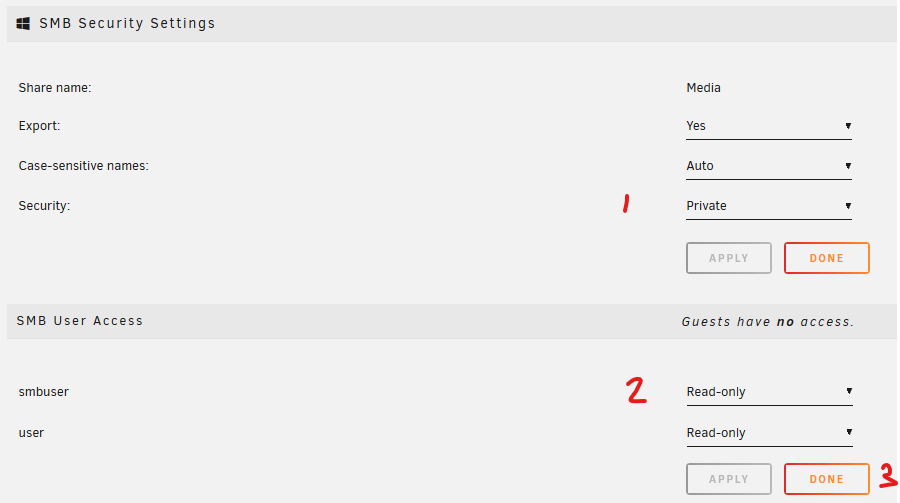
Use a password manager or a notebook. SHARES >>> {share_name} It takes about one minute per share to make things private: Don't see how Unraid could make it less simple! (Unless you have 50 shares then you made things complicated... 😊)
-
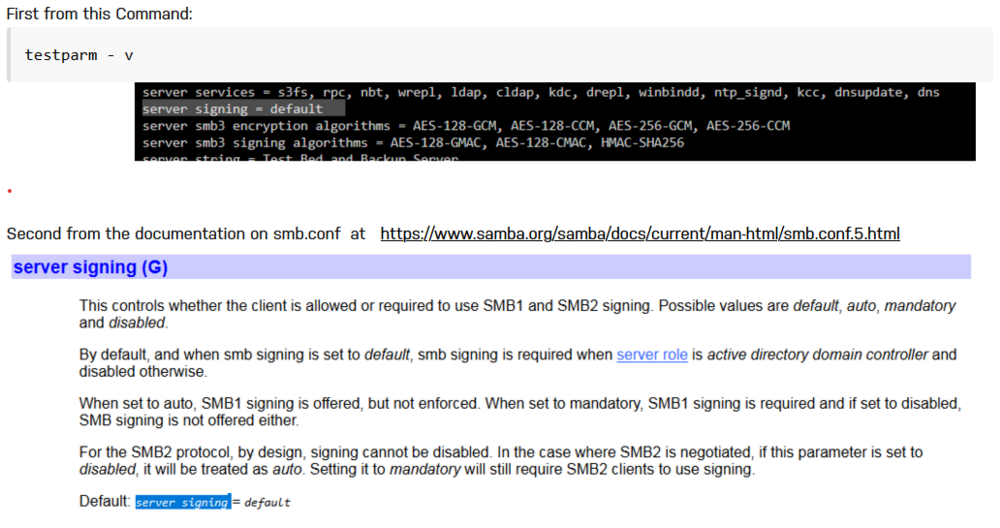
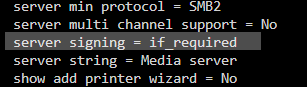
It may not be what you think is happening. This is from a series of private messages from myself to another Unraid user discussing this problem: This message was written on May 31st of this year so the version of Unraid was fairly recent as of that date. You can see that the setting is 'default' and the description form samba.org indicates that signing is only supported in the when the server is in the Active Directory mode which most Unraid users would not be using. With the 'auto' setting in Samba Extras and Unraid version 6.12.14, testparm gives this as the setting: I understand that SMB signing requires substantial CPU overhead and that is why it was not forced previously. However, with the increase in CPU processing power, MS (apparently) was decided that forcing support would not cause a substantial performance hit.
-
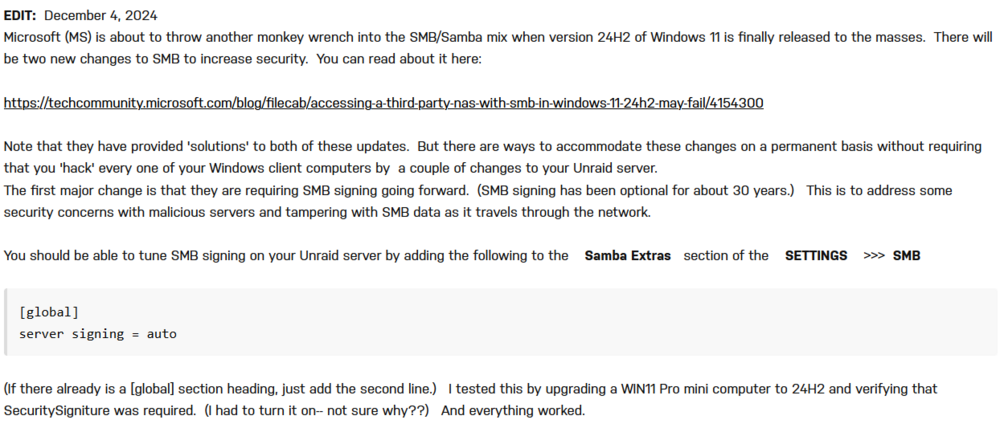
It is a one time setup for each computer. If you have been using PUBLIC access to your Unraid server, you only need to setup one user on your Unraid server--- smbuser for example. After all, the 'user name' is nothing but a set of rules to permit access to your server. You can set those rules to as restrictive as you desire. Then use the name (smbuser) to log on from every client computer. (SMB/Samba will prefix that user name with the name of the client computer. Thus every login to your Unraid will be unique!) SMB signing is easy to enable in Unraid. (LimeTech has plans to implement SMB signing when version 7 is released.) To enable it in earlier versions, you can do this (from my post on setting up a secure server): The first major change is that they are requiring SMB signing going forward. (SMB signing has been optional for about 30 years.) This is to address some security concerns with malicious servers and tampering with SMB data as it travels through the network. You should be able to tune SMB signing on your Unraid server by adding the following to the Samba Extras section of the SETTINGS >>> SMB [global] server signing = auto (If there already is a [global] section heading, just add the second line.) I tested this by upgrading a WIN11 Pro mini computer to 24H2 and verifying that SecuritySigniture was required. (I had to turn it on-- not sure why??) And everything worked for the client computers which are still running WIN11 Pro 23H2. I don't quite understand why folks think they don't need security in this modern age. Most home LAN's will have WIFI set up on them and WIFI is hackable with kiddy-scripts. Many folks will pass out the WIFI credentials to visitors. These credentials may well connect to the home LAN if they have not set up a 'Guest' WIFI network. So you really want all your friends and relatives to have access to your personal and financial information? Once you setup a a Windows credential in Credential Manager for a client computer, you will never have to do anything more to keep it working. Attempting to bypass MS Security updates (to keep a networking setup from the 2010 era) has been a whack-a-mole game for many years and there is no reason to expect things to change.) One more thing, those instructions were for those people running NSA boxes whose manufacturers are not longer supporting them. Unraid and Samba are a supported products and they will support MS current security requirements. The release of 24H2 has been a disaster on MS's part! It still has not been completely released to the general public and every time they try for a general release, another major problem crops up. But I understand it is installed some new computers that are for sale...
-
I do believe there is. But it could take longer than just copying a couple of TB from the old disk back to the new one. You would be adding that old disk to the array as a other data disk and that addition would require a rebuild of parity. @JorgeB can point you to the procedure to do that.
-
Where are the clients located that write to those databases? When the powercuts occur, does your UPS continue to power the entire LAN so that these clients are not dropping the connection to the containers? Is the battery in the UPS capable of powering the full load required? (Don't tell us that the software 'says' that it will! Test it using an actual load to determine the run time to UPS shutdown--- Incandescent lamps are good for doing this.)
-
Look at the backup of one of your Unraid USB boot drives. Contained in the /config folder is basically all of the configuration information for that server. Almost all of the files are user readable/editable except for the super.dat file which contains (as I recall) info about each individual disk and thus is unique for each server. (The *. key which is the Unraid license file for that USB is also there and is unique for that flash drive.) Start there and figure what you have to change for each new install. Then create your own standard Unraid USB files setup so that you can to use for a 'Manual Install' https://docs.unraid.net/unraid-os/getting-started/manual-install-method/ You might need a set of 'short sheets' with the settings that need to be made to tailor the system for final deployment to that customer. If this is not where you are spending your time doing the setup, you will have to provide more info about what packages you are adding to the Unraid basic NAS function.
-
Set up the Syslog Server (I would mirror it to the USB drive) and post it up after the server becomes unreachable.
-
I am not sure. Let me ping @JorgeB and see what he has to say. At this point, don't do anything more until he (or one of the other Gurus) has time to get back to you. It is the beginning of the Holiday season and I believe he is in Europe so it may take some time. You can let the rebuild finish. (You don't need a precleared disk for a rebuild-- it helps if you are adding a new data disk to the array.) Whatever was on that physical before you started is now history...
-
Look for an old diagnostics file or a screenshot/printout of the MAIN tab of the GUI. Anything with a list of the drive assignments. IF that fails, read this section of the Manual: https://docs.unraid.net/unraid-os/troubleshooting/data-recovery/#lost-array-configuration
-
Also this one if you are using ver 24H2...
-
Look here for what all of the rsync options are: https://ss64.com/bash/rsync_options.html The 'X' option is the only one that probably not necessary but (like you) I got those parameters from another source when I was converting data disks formats from Reiserfs to XFS.
-
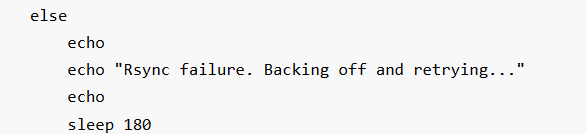
As I look at your script (and it has been may long years since I wrote any BASH scripts), It looks like that is what you wanted: Did you try with just the rsync command to do the copy using just the Command line? I use the following command line to update/backup the new and changed files: rsync -avhPX /mnt/remotes/192.168.1.245_Media/All\ Movies/ /mnt/user/BackupMedia/All\ Movies/
-
I might suggest that you provide the full model number of the drive. (It might provide some clue as to what is going on...)
-
Do you have a recent backup of your Unraid Boot drive? (Try to copy all of the files off it in its 'failed' state. Report of what happens...) Did you get a chance to install that new PSU?
-
Windows SMB is setup to allow only one SMB connection from each Windows client to each individual server. In the past, using the server name and its IP address allowed two connections to a server. I suspect that now MS is attempting to enforce this restriction more vigorously. (I know it does not work on my Network with the version of Windows I am currently using--- Win11 PRO ver 23H2. In my case, I am using the server-name.) The server name is probably the better approach as most folks are using DHCP to get the IP address.
-
Past experience with this setting indicates that it is too large!
-
@ETHREAL1, then check the Minimum Free Space on the Share SHARES >>> {share-name} >>>>>>> Sorry, working two threads at once and got confused. <<<<<
-
Personally, I think the OP now has two problems. The original one is probably in the UPS. One thing I would be looking at is the actual storage capacity of the battery. That server has a CPU with a 145W TDP and 19 drives in it. IF that battery is more than about 18 months old, I suspect it can not power that server as it tries to shutdown and the output of the UPS goes bonky... The second problem is the present running state of the server. It is possible that the UPS wonky output corrupted something on the boot drive or in the Docker or VM configuration files.



