





Frank1940
Members
-
Joined
-
Last visited
Everything posted by Frank1940
-
This is probably a more suitable question for the support thread for the Plex APP that you are running. (I use KODI and I update the shared library manually every time I add new content. I know KODI has a switch to autoscan the media files but I have six clients that would be doing that-- adding to the startup time to perform that scan --so I just manually do it when new content is added. )
-
Sorry, I have not used nfs for a number of years now and the nomenclature has escaped my memory. I was referring to rules that used to are setup to access the servers. And I happened to think of another thing but has been cropping up in discussions over the past few months. Apparently, Unraid and nfs are having issues. See here for one example: https://forums.unraid.net/bug-reports/stable-releases/61214-first-seen-in-61211-nfs3-not-working-properly-because-nfsd-and-lockd-are-not-registered-with-portmapper-r3172/ IIRC, it seems to have affected every release since about 6.12.10 EDIT: and here is another one: https://forums.unraid.net/bug-reports/stable-releases/nfs-mounts-are-gone-after-upgrading-from-61210-to-61214-r3476/
-
Each listing that begins with -rw is a file and they are in English. The Linux/UNIX command cat will list the contents of each file. cat /var/log/docker.log Any of these files can be open in a Linux text editor vi and nano are two such editors that are a part of Unraid. (Not sure what editors are available in Docker Containers. But I would not be that worried at this point about the permissions being wrong. Most of the time, the Docker won't work (or work correctly) if the permissions are wrong and the failure will be be obvious. (The permission errors are usually for the configuration files that the container app needs to run.) For example, in the case shown, if the user 'root' is always accessing these files, even if the user is changed, root will still have access to them! The new permissions will change the permissions to rw-rw-rw- which is less restrictive than the current permissions.
-
In Unraid, the log files are in /var/log For each Docker container, start a console (an option in the dropdown menu accessed by left-clicking on the Docker's icon) and look for that directory in the container file structure. Typical command: ls -al /var/log
-
Show both of the Unraid mount commands (use the 'Code'-- the <> icon --formatting)...
-
One more thing. Make sure that you have locked down your shared files to prevent accidental or deliberate damage. You should probably have all shares set to 'Private' and allow read-only access to those shares unless there is a specific reason why that user needs write access. (Remember that even a trusted client whom you want to have access to your files can become a victim of malware. This danger is elevated when that client is a remote one.) See here for how to do this: https://forums.unraid.net/topic/110580-security-is-not-a-dirty-word-unraid-windows-1011-smb-setup/
-
That may be the one that itr is in because it is used to run the preclear script so that the user can shut down his client computer and not terminate the (often) multi day preclear operation!
-
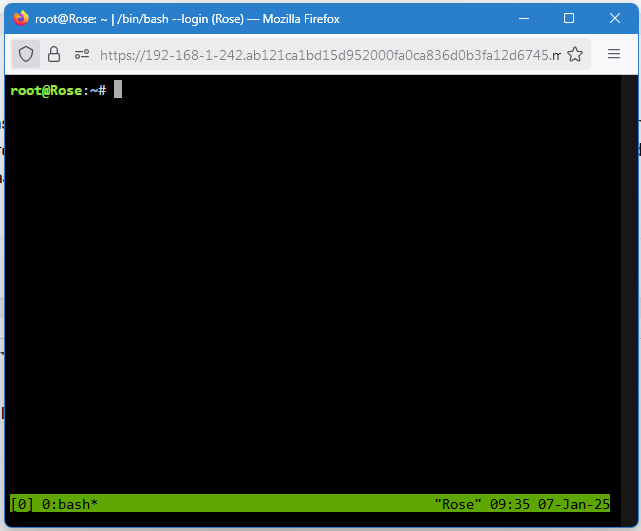
Open up the WebGUI terminal and type tmux on the command line. If it is installed a tmux session will start. It looks like this: EDIT: remember to google for a cheat sheet....
-
Install all the 'Unassigned Devices' plugins. One of them has tmux as an installed component. If you invoke tmux in the WebGUI terminal and run the script in that terminal session, it will not terminate when the terminal is closed on your desktop. It will continue to run even if you shut down your computer. Google tmux cheat sheet to get quick instructions on its use.
-
Yes. However, this is only true if the normal shutdown button on the GUI will shutdown the server cleanly. (That are conditions where the Dock containers, VMs and plugins will prevent the array from being stopped. The shutdown procedure, after a preset time delay, will than force a shutdown which will result in unclean shutdown.) A power button short push is simply an alternative method to starting up the GUI and initiating the shutdown from there. Also, if you can't access the GUI because the server has stopped responding, there is a good possibility that a quick push will not shut it down. At that point, only a long push will shut the server down.
-
If the HBA in question is this one, look at the review ratings. Not what I would would want to use in my server! https://www.amazon.com/StarTech-com-Port-SATA-PCIe-8P6G-PCIE-SATA-CARD/dp/B09FY9FBTN/ Personally, I would be looking for one of the LSI-based controllers on E-Bay. Shop the reputation of the vendors as many of the new cards that are using the older chip sets are counterfeit. By that I mean that even though they carry the LSI logo, they were not made by LSI unless they are being savaged from old server farms--- then they are not new but used. (I am not saying that the counterfeit cards are necessary 'bad' but you are buying a pig-in--a-poke. So you only have the vendor to fall back on if you have a problem. (I have found that many long-time E-Bay vendors really value their reputations as a quality vendor and will bend over to see that you are satisfied with their products.)
-
How stupid of me. Of course, there is not option for a console when the Docker Application is stopped. The console is run inside of the container. (Think of a Docker App as a special type of VM dedicated to running a single program.) That is why you have to get support from the developers of the Docker. I do remember seeing (I think in the Downloads from that site) that they provide a Docker container for this program. I didn't see any place (in my limited browsing) to purchase the program so support might be limited...
-
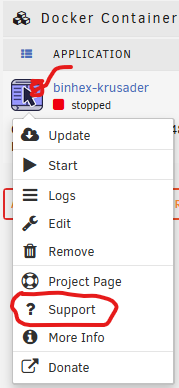
Let's begin with this item that you found in the settings for this Docker. That string is a hash of the password. The hashing function is a one-way conversion. Every password will have a unique hash and the function is not reversible by design. So give that approach up. Look at the Docker container in DOCKER. Left-click on the Icon (To the left of the Docker name). Does it have a Support option? If so, click on that and go to it. Hopefully, the support thread will be useful... I finally did find it listed in the Community APPS plugin and there is a support thread. With a quick search, I did find how to reset the local password. When they are talking about opening up a console, they are probably talking inside of the Docker Container. If there is one provided, it should be listed in the dropdown menu. (The one that I pasted above does not provide console access. There is also a Community forum on that website, so if you can't figure things ask there. )
-
Yes. A quick push of the power (~1 sec.) will initiate the normal shutdown procedure. A long push (>4 sec.) will force a shutdown which will always result in an 'unclean' shutdown.
-
Try to get a Diagnostics files (when all the problems are occurring if possible) to attach to your next post. That might provide clues to the Gurus trying to help you.
-
Try googling agent dvr docker password change
-
I have seen this happen on Windows client computers occasionally. (Many long, long years ago, I had this problem as a constant condition. After updating the Realtek NIC Windows driver, it disappeared.) Remember that Windows has resource priority settings on background tasks. (And file copying is definitely a background task!) I have suspected that other network traffic on the Windows NIC triggers it but I could be wrong. I would suggest, rebooting the Windows computer and run the tests again where the copy operation is only thing running.
-
I'm no expert on interpreting syslogs but I didn't see any glaring problems. But I am wondering about this statement: I don't what this other app is but, if the source is questionable, I would be looking very closely at it. You do realize that 'bad actors' have been slipping mining operations into Windows apps for some time and there is no reason to believe that someone is not doing the same thing with Docker containers... You can also try this command in the WebGUI terminal to see what processes are using up your CPU resources: htop
-
Plus there is all of the disk head movement times between the data writing and file tables areas.
-
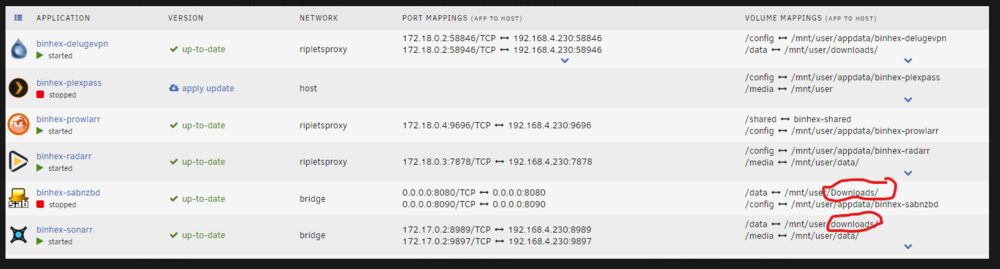
Let me point out one thing. Look at the screenshot below: To Linux, these are two different directories as Linux is case-sensitive! If you intended these to be a single directory, copy the files from the unwanted one to the desired one. Then delete the unwanted directory. (Window is not case sensitive and will display only one of these two directories. Which one to be displayed seems to the one that is found first as the file structure is scanned...)
-
The Diagnostics file from your server would be a help. If only Plex is only thing have instability/usage issues, you should be posting in the support thread for the Plex container that you are using.
-
From the diagnostics file, this item indicates that there is a problem with the NIC, the Ethernet cable and/or the router/switch port. Settings for eth0: Supported ports: [ TP ] Supported link modes: 10baseT/Half 10baseT/Full 100baseT/Half 100baseT/Full 1000baseT/Full 2500baseT/Full Supported pause frame use: Symmetric Receive-only Supports auto-negotiation: Yes Supported FEC modes: Not reported Advertised link modes: 10baseT/Half 10baseT/Full 100baseT/Half 100baseT/Full 1000baseT/Full 2500baseT/Full Advertised pause frame use: Symmetric Receive-only Advertised auto-negotiation: Yes Advertised FEC modes: Not reported Speed: 2500Mb/s Duplex: Full Auto-negotiation: on Port: Twisted Pair PHYAD: 0 Transceiver: internal MDI-X: Unknown Supports Wake-on: pumbg Wake-on: d Current message level: 0x00000033 (51) drv probe ifdown ifup -------->>>>>> Link detected: no <<<<<____
-
Post new diagnostics from after you made the change in a NEW post!!!! .
-
I am going to make an assumption here: From this in the network,cfg, I assume that you are using a static IP address. USE_DHCP[0]="no" The problem with a static IP address is that it should be permanently assigned in the router. How the router knows that which NIC to assign to that address is determined by the MAC address of the NIC. When you changed the MB, the NIC has a different MAC address. You should properly check the router and straighten out things there. The other way to do it is edited that network.cfg file and change that line to USE_DHCP[0]="yes" And restart the server so that the route assigns an IP address using DHCP. (Note that doing it this way, you will probably end up with a new IP address!!) Read your router manual to see how to permanently assign that IP address to that MAC address.
-
This the result of a security update to Windows SMB from Microsoft. It is how Microsoft wants Windows to be configured. They do not want to allow Windows client computers to be able to willy-nilly log onto rogue servers on public WIFI access points. It is not a workaround!



