





Frank1940
Members
-
Joined
-
Last visited
Everything posted by Frank1940
-
I will add this to the mix. This morning, I started up my main Windows (11PRO ver23H2 on most of my windows clients) client computer. After about 20 minutes, I opened up Windows File Manager. There was nothing under 'Network' in the left pane. I click on the '>' before the word. A Windows 'spinner' popped up and about 3-5 seconds later both of my Unraid servers will displayed under it. I will now throw another some more observations: I turned on another Windows client computer. (Many of my Windows computers are setup for peer-to-peer networking. It beats sneaker net and allows for simple collaboration on editing and assembling projects!) Again I have to click on 'Network' and after another short delay both Unraid servers show up. But my main computer does not show up as a server. I waited about twenty-fives minutes. Opened another destination in file manager. Then my main client computer popped up on the list of servers under 'Network'! I go back to my main client computer. I have now waited for more than twenty-five minutes. I can not get that second Windows client to show up in file manager. Finally, I open that client computer's shares by clicking on the shortcut. File manager immediately opens it (showing me the shares) and the computer instantly shows up under 'Network'. On my main client, I have a shortcut to that main computer. If I click on that shortcut and open up the shares in file manager, it instantly pops up under Network. (Remember that computer never shows up on the list of servers under Network. I have never had a client-server show up under Network on it own. I have to force it by clicking on a shortcut. To be honest, I can't think of a possible use for this capability. I can also see where you could do some really stupid stuff like trying to copy a file onto itself.* But it does show that the client and server functions are separate processes under Windows and appear to be independent of each other.) The point I am trying to make is that Windows File Manager can't handle peer-to-peer Windows client-servers cleanly either. So trying to fix this problem from the Unraid side may prove impossible. I also have the feeling that MS does not really care about the peer-to-peer side of SMB. They are interested in selling Windows Server and Active Directory as the networking solution. Plus, I would guess that far less than 2% of all Windows users use the peer-to-peer networking protocol. *I have not try this so I don't know what would happen. If you want to try it, I would suggest a 'test-type' file be created because it would probably get thrashed if Windows permitted it to happen!)
-
Google Access-Control List It an not normally used by Unraid but SAMBA will recognize these rules and will apply them to permit or deny access to a resource. (I originally suspected that they were applied to an Unraid server from someone attempting to fix an Unraid/Windows SMB problem by using the Windows permissions tools. Now I also suspect that a Docker container or a VM might also be involved in some cases.) Note that that they are also on the torrents directory. Have a look at the permissions inside that directory. If they are there, I would suspect that the torrent Docker Container might be doing it. Ask about it in the support thread for that Docker.
-
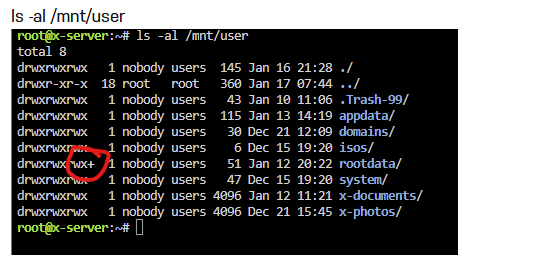
See that x at the end of the permissions for the rootdata share. (that signifies that there are 'Access-Control List' permissions on that share) That is normally not used by Unraid in its normal SMB operation and it has caused problems in the past. Unless, you know of a reason why they are needed, I would suggest removing them. As I recall, running the New Permissions tool against just that share will fix it. If that does not fix it, In Windows, right-click on Z: drive in Windows File Manager and get a screenshot of the top of that window. It will look like this: One question. This Windows computer is not a VM running on your Unraid server, is it?
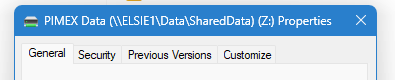
-
Start up the GUI terminal (the >_ icon on the toolbar) and type the following two commands: ls -al /mnt ls -al /mnt/user Post a screenshot of the output of both commands.
-
Basically, it is the Window's side that has bugs/problems in it. It has not worked reliably since SMBv1 was blacklisted. (SMBv1 has serious security issues especially for Home LAN users!!!) I have major problems with 'Network' even finding Windows clients computers on my LAN that are connected using a SMB peer-to-peer network. So it is not a just a problem of Unraid-Windows setups! Here is check list of things that I have found that enable it to work approximately 97% of the time. Make sure that your Windows clients are are setup to be using 'Private' network type for your LAN connection. (For security, when you connect using a 'foreign' network, the connection type should be set to 'Public'.) Make sure that Network Discovery is turned on both the Windows computers (even it you are not sharing from that computer!) and your Unraid server*. (That setting is a toggle under SMB Settings called 'Enable WSD'.) Turning it on for Windows clients is described above in one of my posts above and you can find that post by using the link below. https://forums.unraid.net/topic/185023-smb-shares-won´t-show-up-in-windows-clients-anymore-after-upgrade-to-unraid-700/#findComment-1512087 It has been found that leaving your servers on 24-7 does help. Windows will scan your network for new server only every several minutes (> 5). While new servers joining a network are suppose to broadcast that they have joined, I have long suspected that packet can easily be lost. Since no one is really expecting it, a rebroadcast will not be requested. It also seems that clicking on the 'Network' icon in Windows File Manager will force it to scan the network (this can take a few seconds) and that sometimes works. These are all workarounds and they seem to help but to be brutally honest, setting up a 'Quick Access' Link is probably the best solution for most Unraid users. It will always be there and it always works. On all of the computers where we access my two Unraid servers on a daily basis, I have set up the Quick Access entries for both of my Unraid servers in File Manager. At this point, I never even look what servers are listed under 'Network'. I just automatically click on the server's Quick Access link just as I would for getting to the Documents folder. I did use the 'Network Neighborhood' approach back in the Win 10 days but it has setup issues in Win 11**. (That approach is a 'neater one' if you have many servers on your network.) * Here is the text from that toggle: I underlined how I think it should be read when that client is not sharing resources... ** Point of information, if Network Neighborhood is setup under Win 10 and you upgrade to Win 11, it still works under Windows 11. (This is it the reason I didn't discover that the setup procedure didn't work for Win 11 until someone pointed out they were having issues!)

-
However, this is a security risk. It allows unsecured and unverified connections to malicious servers. This is a particular hazard for laptops connecting to public WIFI hotspots. I normally ignore these posts about doing this type of thing but since this is my thread and it about setting up a secure network that works with Unraid, I am calling you out on it. Doing this type of thing should not ever be considered to be a recommended practice!
-
This has been a problem in Windows since SMBv1 was blacklisted. There are ways around it. I would recommend using the workaround described in the March 15th (2024) edit of this post: https://forums.unraid.net/topic/110580-security-is-not-a-dirty-word-unraid-windows-1011-smb-setup/#findComment-1009109
-
On the Windows client, Settings >>> Network & Internet then click on 'Properties'. Make sure it is set for 'Private network'. (Not sure if this is really required but other folks have found it is necessary.) Another thing you can do on the Windows Client. Open Control Panel. (Use Task Bar search window to find it.) Now click on 'Network and Sharing Center', in left pane, click on 'Change advance sharing settings'. In the 'Private Network' section, make sure that 'Network discovery' is turned on.
-
Most of the folks who recently have needed to run New Permissions have Docker containers that are access the file system using Linux and are not setup with the proper owner (nobody), group (users) and permissions (777 for directories and 666 for files). You are the first person that I have encountered in a long time who has generated a permission issue when they are writing to an Unraid share using SMB. I can only suspect that you are trying to manage permissions by applying permissions using Windows. (Essentially, using Windows File Manager and right-clicking on an Unraid share, selecting 'Properties' and then the 'Security' tab.) If this isn't what you are doing, you are going to have to provide an example (screenshot) of the problem using the Linux ls -al {path-to-problem} command so that we can see what it happening to the permissions.
-
Try this: fred\ wilson The 'backslash' key is an escape character which tells the shell to pass the next character through without interpreting it as a character with a special meaning to the shell. I don't think it is going to work but it is worth a try. These are the Unraid instructions for characters that can being used for a Share Access user: If you google for acceptable character for any Linux 'user' name, you will find that they are identical. I am not a Mac user. In the Windows environment, I would answer your question by suggesting that you setup an Unraid Share Access user for fred_wilson. Then setup a Windows credential for fred_wilson. That bypasses using the Microsoft Account user credentials.

-
Counterfeiting of USB drives is an common occurrence. These counterfeiters often use the same GUID for all of their devices. You can read a bit more about the industry wide problem here: https://forums.unraid.net/topic/119052-psa-on-sandisk-usbs/#comment-1089002 The manufacturers seem to take a live-and-let-live attitude to the counterfeiters. I imagine it to be a whack-a-mole type of problem. You shut one down and two new ones start up...
-
A bit more info about HAMR disks with CMR and SMR: https://www.techradar.com/pro/seagate-quietly-launched-joint-worlds-largest-hdd-with-a-32tb-capacity-but-it-uses-a-controversial-technology The first couple of paragraphs explain it all. With this initial offering, you trade capacity for CMR.
-
At this in the product cycle, I could not find much. I would suggest Google hamr drives advantages and disadvantages. I did not find much hard information or reviews of HARM drives. I would think that the data transfer rates would be faster as the data density in the track is roughly double. With product this new (December 2024 introduction), I would think that the information situation could be changing at a rapid pace. In my google search, I did not find this to be completely true. It is a separate technology. Apparently, it can be used in conjunction with either SMR or CMR technology. So there could be disks with either SMR or CMR.
-
It seems to be working on both of my servers. I would suggest that you post a diagnostics file in a new post.
-
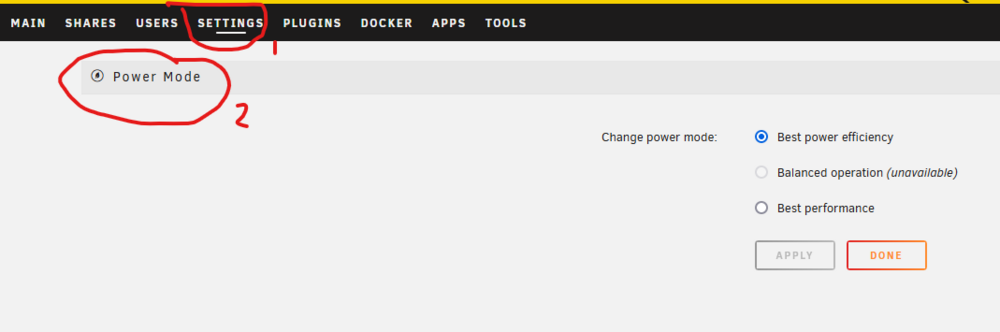
Try here:
-
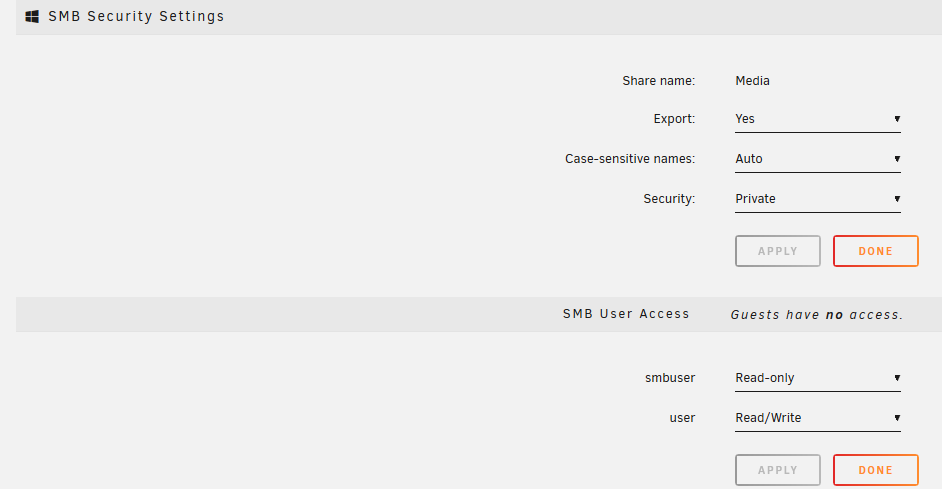
Let's begin that I acknowledge that the SMB configuration that LimeTech is using is not really a standard one. I will give you that. I would never recommend it for a large business environment. It might even not be suitable for a small business situation. It lacks too many tools. I have never tried it in an AD environment but I do know that there folks (few/many, I know don't know!!!) who are using it in that environment and there are some issues. But to be fair, Unraid was never intended for a really secure type of environment. In fact, the biggest headache fro those of us who are attempting to assist in solving SMB issues is for Unraid users who want to use SMB using 'guest' access and SMBv1. (You know a network setup from 2010.) With MS attempting to cut off both of these, there is a whack-a-mole battle ongoing between them and MS. But that is another side. OK---- I don't quite understand what issues you are having. I have two users profiles for SMB on my Unraid system-- user and smbuser with 'user' have superuser privilege of read/write. (I do occasionally turn on read/write for smbuser when it is needed...) All of my shares are Private and this is a screenshot of permissions, owner and group on my Unraid server: Notice that the owner is the client computer that wrote the file initially. (The ones with the owner 'nobody' were created before I set up a more secure environment.) Through a forensic analysis, I have determined that most Unraid access actually comes through the group permissions and that is why the group permissions have to be rw- rather than the standard Linux r--. (Every Share User created via the USER tab is an automatic member of the users group!) I can assure that both users can access any of these files consistent with the permissions granted them through the SMB Security settings: It is fairly easy to set up for the average Unraid user and provides all the security that most of them require. By contrast, setting up thing using Windows side is a complicated task and most businesses end up hiring an IT professional with MS certification to do the job and maintain the system. If you are attempting to set permissions on Unraid files via Windows, you should be looking at the AD environment which means you have to install one of the Windows Server products.

-
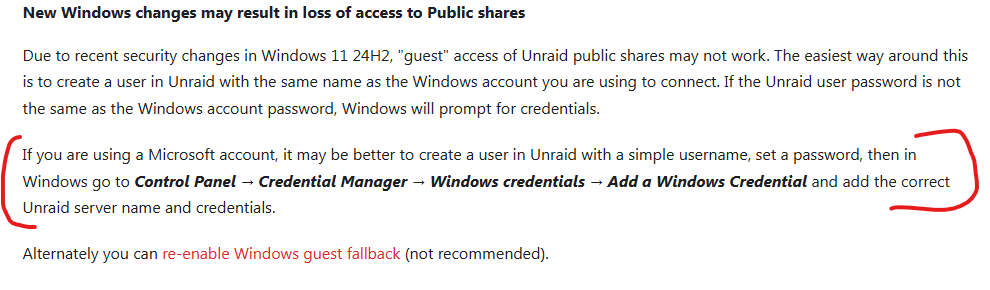
In the release notes: The problem is that the '@' is not an allowed character in Linux login names. Most problems with SMB access are the result of MS actions to increase security-- primarily for government and corporate customers. If you want to read more about setting a Windows-Unraid SMB environment so that it is secure and always works, see here: https://forums.unraid.net/topic/110580-security-is-not-a-dirty-word-unraid-windows-1011-smb-setup/#findComment-1009109
-
Shucked drives have always been both a bit of blessing (because they are cheaper) and a bit of a problem (because they are a way for drive manufacturers to dispose of excess inventory). They can be sold without having to list any performance specifications except for capacity. And they can change the type of drive being used in the enclosure anytime they want without changing the packaging/part_number. So, yes, you do get a break on price but you are buying a pig-in-a-poke ('poke' is slang for a 'paper bag')!
-
What 'file manager'--- Dynamix or Windows or some other file manager? And what was the destination of this download?
-
Do this or replace the CPU cooler. Any fan used in a computer will eventually fail. Usually, they fail to start spinning as the starting torque on that type of motor is very low.
-
As I recall, running this on your server can present the chicken or the egg type of problem. Many folks have avoided this problem by using a Raspberry pi or a mini PC to run pi-Hole.
-
One thought (and not sure it will help). Make sure that your MB is not set up to use a 'Fast' boot.
-
@PassTheSalt, a cautionary note. If you have been inside the server case for any reason, when you are done, double (and triple) check that all SATA data and power cables are fully inserted in their sockets at both ends. It takes very little force to partially disconnect any SATA connection!
-
@supermoocow, You had best be careful if you decide to play around at attempting to remove. You could end up deleting all of the files on your array. I don't think it is. Or it is not behaving like the symlink that I have created for testing purposes...
-
Minus any files that are on cache devices! As I recall, LimeTech marked it 'deprecated' because the the Unraid OS not longer was using it. The announcement was met with a small storm of protest about how it was being used for certain purposes. Apparently, it was decided at that time to just leave it alone for the foreseeable future...




