





Frank1940
Members
-
Joined
-
Last visited
Everything posted by Frank1940
-
No. Viewing = Read. Read Permission on any Unraid share means you are reading if you are seeing. EDIT: A bit of clarification. You will be able to see the name of this share (MainSharedFolder) but not able to see the contents of it. Obviously, any user with read permissions will be able to see the various /MainSharedFolder/Subfolder contents. Most of the time, The Admin1 login would have read privileges to the MainSharedFolder share and all of the sub-folders beneath it. That is the reason why most people setup Admin accounts!
-
This post in a thread about SMB, Samba, Unraid and Windows, is how you setup a user on the Unraid side: https://forums.unraid.net/topic/191221-some-musings-on-smb-and-samba-and-unraid-and-windows/#findComment-1561582 The next post will describe how to use a Windows Credential to automatically log as that user onto your Unraid server. This procedure keeps the Windows login and the Unraid user access login as completely separate items. The Windows Credential manager will handle the login in the background the first time the computer accesses the Unraid server. By the way, once you setup the User name on the Unraid server, you should never change it. Changing the password is another story and a request to unable the Share Access user to be able to change the password would be a reasonable request.. If you are using the Windows Credential manage to handle the login, you would still have two-step operation to change a password! (As a point of information, the Unraid Share User login is not to Samba on the server but it actually logs in as a Linux user. Samba just uses the Linux user credentials to grant file access privileges. There is no real Linux access granted to those users– example, they have no home directory. You should also realize that Unraid only permits one full use Linux login to the server and that is 'root'. )
-
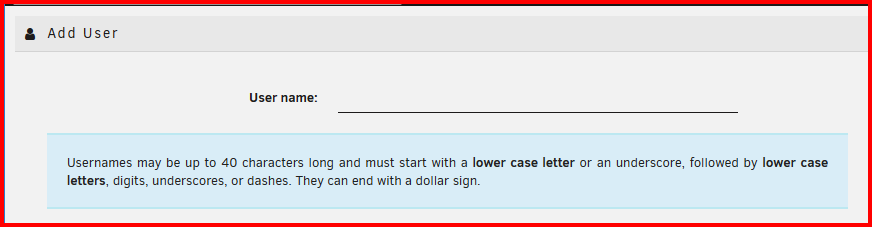
The problem with this suggestion is that there are restrictions on Unraid user names that do not exist for Windows user names. See below: This is the reason that many of us who support Unraid recommend that you not use Windows user names for Share Access user names.
-
Start here and read the next three posts in this thread: https://forums.unraid.net/topic/191221-some-musings-on-smb-and-samba-and-unraid-and-windows/#findComment-1561581 If you are still have problems, post up your diagnostics file in a new post in this thread.
-
I realize that this is an old post. But there is no need to force the nobody:users for most situations. Read this post in a thread where I discuss how SMB, Samba, Unraid, and Windows work together to grant access rather transparently with the default Unraid Samba settings. https://forums.unraid.net/topic/191221-some-musings-on-smb-and-samba-and-unraid-and-windows/#findComment-1561580 Hope this helps...
-
Also google unraid.net 3.3V and hard drives There is an AI summary that details this issue for some hard drive models.
-
If you want more info about the problem, there is an entire thread devoted to it. You can start reading at this post and get a understanding of what has happened over the past few years with USB drive quality. https://forums.unraid.net/topic/119052-psa-on-sandisk-usbs/page/13/#findComment-1603874 There are a lot of us who are using older USB devices that have never had an issue but there are a lot of folks who have the more recent devices who are experiencing drives failures within a very few months of installation.
-
See, using the right incantation does the trick! 😁
-
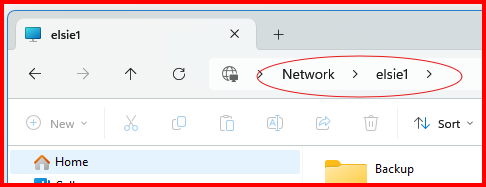
In that thread that I pointed you to earlier is this post: https://forums.unraid.net/topic/191221-some-musings-on-smb-and-samba-and-unraid-and-windows/#findComment-1561585 Now before that, try this in Windows File Explorer> Enter \\{server_name} or \\{IP_address} in the address bar. Try both as one or the other may work. "SMB is more witchcraft than science" (Remembering this phrase will save you a lot of frustration!) PS--- I would post up a screenshot but it ends up looking like this and enter my \\elsie1:
-
What error message are you getting? (A screenshot of the message would be nice!)
-
Post up your Diagnostics file in a new post in this thread.
-
In this thread, start with this post and read the next two: https://forums.unraid.net/topic/191221-some-musings-on-smb-and-samba-and-unraid-and-windows/#findComment-1561581 If you are intersted in why Windows SMB works the way it does, read the whole thread.
-
It is my understanding that MS's Active Directory (AD) will essentially do all of this. It is a business solution intended to control and administer SMB access. What Unraid is set up for is peer-to-peer type access where security is not the primary goal as all the intended users accessing the server are 'trusted'. What the Share User logins and passwords are intended for is to keep out any person who might end up on the LAN who is not a member of that trusted group out.
-
YES!!! All the permissions are 'attached' in that share that you setup using the Custom SMB Shares plugin. The permissions in the other share/path remain unchanged. I realize that it is bit hard for most of us to get our heads wrapped around what is going on in this situation. Let me point you off to another thread which has a bit more information about what is happening behind the scene. https://forums.unraid.net/topic/137806-creat-a-user-share-containing-a-portion-of-another-user-share/#comment-1251067
-
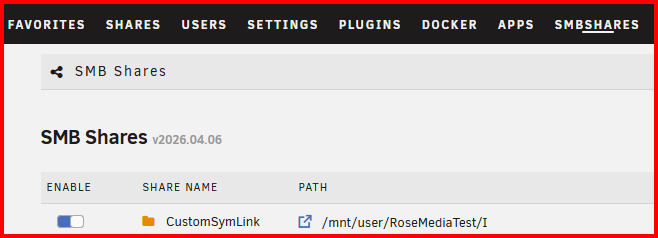
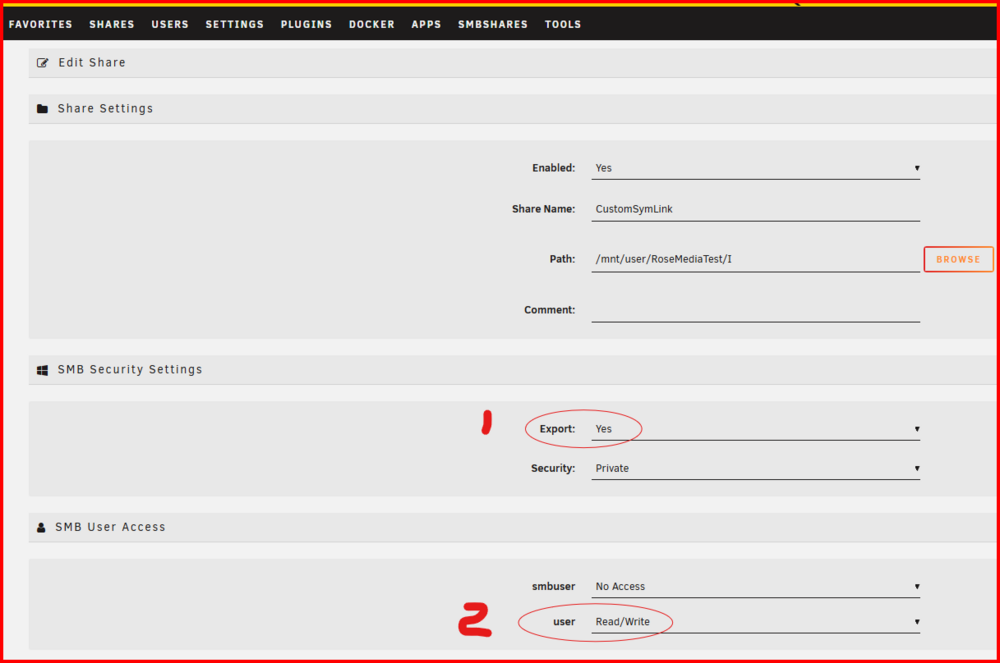
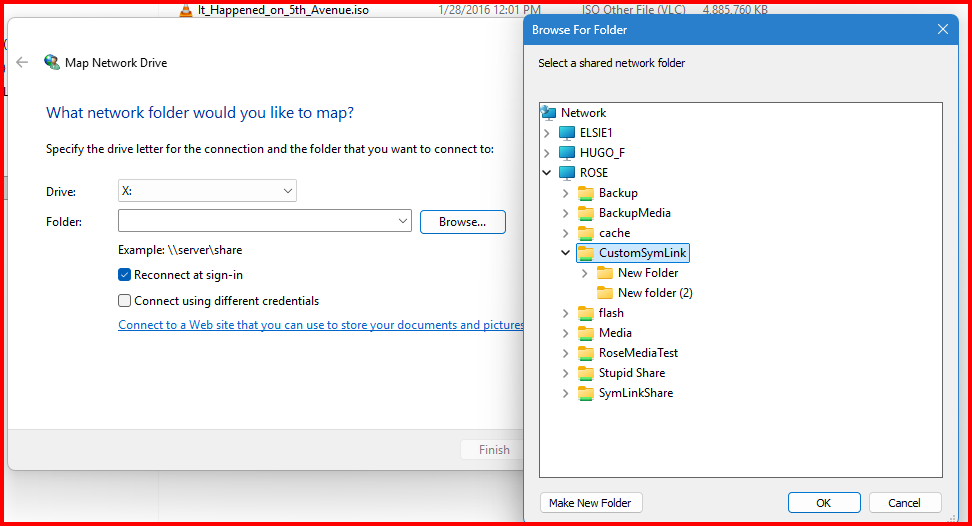
I suspect that you are not setting up the mapping properly. I have a share setup using This plugin as shown in the screenshot. Now to use this share, I have to click on the "Edit" (which is off to the right of the above screenshot. That gives me this screen: I have to export this share (# 1) and set the permissions for the various users (# 2). Then I set up the mapped drive as shown below: Notice that I can see all of the shares which have been exported by this Unraid server and the one (CustionSymLink) created by this plugin is one of the ones listed. If you don't see this share, you can not map to it...
-
This use to be a bigger problem about eight to ten years (as I remember...). It was often 'solved' by using a UBS 2.0 port rather than a USB 3.0 port. I thought that these issues had finally been addressed at the hardware level. BUT...
-
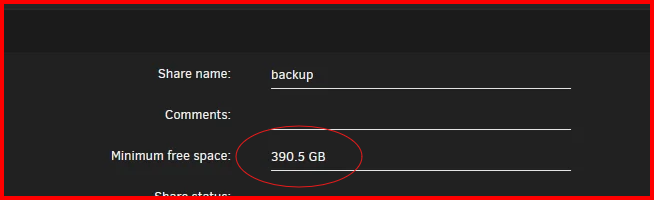
This parameter/variable seems a bit large: This is the Help text for this parameter:

-
post up the diagnostics file in a new post in this thread. (Using a new post indicates that you have provided the requested information. Editing an existing post does not do that!)
-
You should probably be asking these questions in the Support thread for the Docker in question. You can find this by left-clicking on the Docker Icon on the DOCKER tab of the GUI and picking '?Support' from the dropdown list. EDIT: One of the reasons for Containers to use the appdata Share is so that the configuration files and any necessary container data files can have their own permissions governed by the requirements of the Container.
-
I would also look at this share: I suspect its name could be Media and might contain your missing files. As you can see the share has files on eight different disks. I also see this: And the Configuration file for the Share says that the Cache pool for this Share is 'download'. What is going on with the 'ssd_cache' entry?


-
MS added this requirement to help secure the computers that are running Windows. You can read about the problem of security for both Windows and Unraid starting here (and for the next several posts which will help you set up a secure environment for your data): https://forums.unraid.net/topic/191221-some-musings-on-smb-and-samba-and-unraid-and-windows/#findComment-1561580 Your needing to "Allow insecure guest logon" implies that you are allowing 'Public' access to the data on your Unraid server. Do you need to secure the data on your Unraid server? I quote from this thread:
-
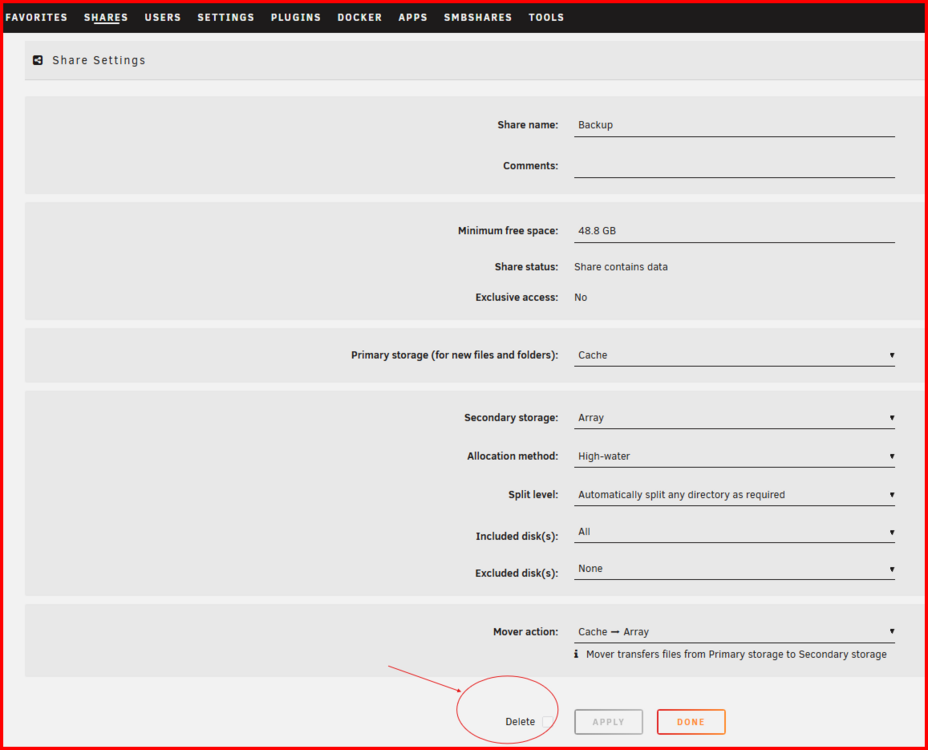
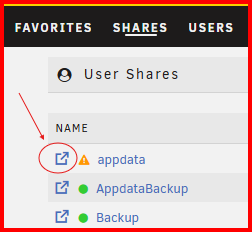
@dodgeman, It appears that the Controller issues are not present in the syslog of your latest Diagnostics file. So, let's begin discussing the issue you have. First thing that I noticed is that you have 70 User Shares on your Unraid server. Only thirty of them have any files physically present anywhere on the server. There is a delete check-box on the Shares page. IF that is available/active, use it and get rid of those unused shares. (I seem to recall that it becomes 'active' when the share is empty.) You have a data share which you say has a sub-directory named media and you also have a share which could be named Media which spans several disks. Have you looked to see what it contains? Another thing, the version of Unraid that you are using has a built-in File manager. You can access it by clicking as shown below: It is not as convenient to use as Krusader but it has built-in safeguards to prevent a lot of cockpit errors and it is completely configured (out of the box) to access and manage all user files on the server.
-
I think that most of what you want to see can be found the in the shareDisks.txt file in the shares folder in the Diagnostics file. I spotted this earlier but I was waiting until the Controller issues were resolved.
-
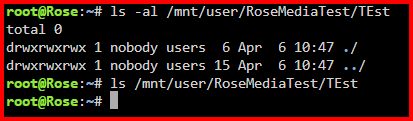
Guys--- This is not what one should see when looking at directory even if it is empty— look below: That 'Input/output error' is our clue!
-
Oh yes, please post up the Diagnostics file in the your next post.




