





SpencerJ
Administrators
-
Joined
Everything posted by SpencerJ
-
I sent the keyfile again and replied via the support ticket. Thanks
-
Thanks- we've tried rebuilding the search indexes and it appears to be an issue with one of the databases. We're switching to an alternate one and rebuilding the data. I'm starting to see activity in the streams but will continue to monitor....
-
Eso^^^
-
Your support ticket has been responded to.
-
This blog features @Hoopster: an outstanding Unraid community member who has helped out countless users here over the past decade plus! Let's give it up for @Hoopster: A true Unraid Community Rockstar🤘
.thumb.png.83c0e92a7d274d2c32fe58f34a50d165.png)
-
Another thing to try is the manual method: https://wiki.unraid.net/Articles/Getting_Started#Manual_Install_Method If you still have issues, please contact support!
-
Blogs with pictures here: https://unraid.net/blog/ssl-certificate-update-2 https://unraid.net/blog/ssl-certificate-update
-
1/18/23 UPDATE: As previously announced, we stopped renewing certificates for the unraid.net domain at the beginning of the year. We had initially expected a grace period of a few months where the certificates would continue to work, but due to some necessary infrastructure improvements, the old unraid.net domain certificates are now invalid and will not work. If you still need to migrate from the unraid.net certificate to a myunraid.net certificate, you may have difficulty accessing your server's webgui. Actions for Unraid 6.10 or Newer: If you can't access the server's webgui, use a local keyboard/monitor or SSH into the server and run 'use_ssl no'. (Note: if the system responds "command not found" then jump down to the section for Unraid 6.9 and earlier.) Then, you can access the server via http://ipaddress (or http://ipaddress:port if you have defined a custom http port). Note: these are http URLs, not https URLs. Navigate to the Settings → Management Access page in the Unraid webgui and click the "Upgrade Cert" button. Click on the Certificate URL and verify you can access the server via the ipaddress.hash.myunraid.net certificate. You can change the "Use SSL/TLS" setting back to Yes or Strict if all is well. Note: if you have a high-end router and previously added an exception to allow DNS Rebinding on the unraid.net domain, you will need to add an exception for myunraid.net. This feature is on/off on most consumer routers, so no additional changes are required to support the myunraid.net domain if the unraid.net domain works fine. Be sure to update your bookmarks! The My Servers dashboard will automatically use the appropriate URL if you use the My Servers plugin. Action needed for Unraid 6.9 and earlier: Older versions of Unraid do not support the newer myunraid.net certificates. You should be able to access the webgui using https://ipaddress (or https://ipaddress:port if you have defined a custom https port). Note that these are https URLs, not http URLs, so you'll need to ignore any browser warnings about invalid certificates. Navigate to Settings → Management Access and set "Use SSL/TLS" to No. Then, open a web terminal (>_) and type: rm /boot/config/ssl/certs/certificate_bundle.pem If you plan to stay on an older version of Unraid, uninstall the My Servers plugin, as it will be dropping support for older versions of Unraid. Warning: these older versions of Unraid are outdated concerning security updates and features, so we recommend taking advantage of our free upgrade policy and upgrading your system to the latest version of Unraid. On Jan 1, 2023, we will stop renewing Let’s Encrypt SSL certificates on the unraid.net domain. If you are still using a hash.unraid.net domain to access your server, please switch to the newer myunraid.net certificates that we provide for free. The URLs used with these new certificates will provide increased privacy, particularly for remote access. Upgrade actions for Unraid 6.10 or higher: Navigate to the Settings → Management Access page in the Unraid webgui. If there is an “Upgrade Cert” button, press it. This will update the certificate and change your URL from hash.unraid.net to ipaddress.hash.myunraid.net. You will need to sign back into the webgui with your root password afterward. Note: if you have a high-end router and previously added an exception to allow DNS Rebinding on the unraid.net domain, you will now need to add an exception for myunraid.net. On most consumer routers this feature is simply on/off so no additional changes are required to support the myunraid.net domain if the unraid.net domain worked fine. Be sure to update your bookmarks! If you are using My Servers, the My Servers dashboard will automatically use the appropriate URL. Action needed for Unraid 6.9 and earlier: Older versions of Unraid do not support the newer myunraid.net certificates, so if you don’t wish to upgrade Unraid you’ll need to navigate to Settings → Management Access and set "Use SSL/TLS" to No. Then open a web terminal and type: rm /boot/config/ssl/certs/certificate_bundle.pem If you plan to stay on an older version you should also uninstall the My Servers plugin as it will be dropping support for older versions of Unraid as well. Warning: these older versions of Unraid are out of date with regard to security updates and features, so our recommendation is to take advantage of our free upgrade policy and upgrade your system to the latest version of Unraid. Then, switch to the myunraid.net certificate as described above. Note: If you are unable to upgrade your certificate by Jan 1, 2023, the unraid.net certificate will continue to work for another 90 days, although at some point during that time it will expire and your browser will warn that it is insecure. On Apr 1 we will shut down DNS for these certificates and the URLs associated with them will no longer work to access your server. We highly recommend that you avoid this by migrating to the new certificate before Jan 1, 2023. If you have any questions on this or need additional help, comment here or contact support!
-
Over 4,400 Unraid users participated in our inaugural customer survey. Thank you to all who participated! Your input is incredibly helpful to our team as we seek to understand our customer's wants and desires more clearly. With your responses and feedback, we have much better clarity on what we need to focus on and prioritize in the months and years ahead! Check out a summary of the results here: https://unraid.net/blog/unraid-customer-survey-results
-
Please contact support with your other account name and we’ll attempt to link them.
-
For display name change requests, please contact support.
-
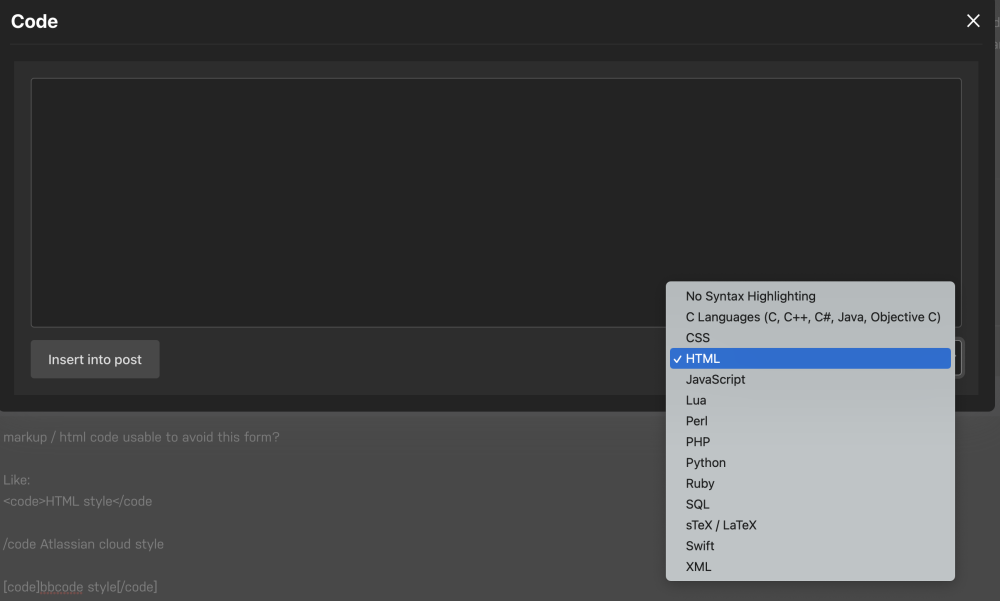
I don't see a way to adjust the code blocks. Given the above, are you saying the HTML drop down doesn't adhere to normal syntax?
-
I have enabled this: Enable BBCode Parsing "BBCode is a legacy markup language that was originally designed to allow users to submit rich content prior to the advancement of WYSIWYG editors. BBCode support is deprecated and may be removed in a future release, and we recommend leaving this option disabled for greater performance and reliability if your community does not rely on BBCode parsing to format posts." Looking into the other settings....
-
Hey there, could you ensure you don’t have any adblockers or vpn’s running? If that doesn’t fix the issue, please contact support to open a ticket. Thanks for your purchase.
-
There's a free, unfettered 30 day trial that can be extended longer! Thank you for considering us. https://unraid.net/download
-
Thank you to all who took time out of your busy lives to take our customer survey. We had over 4,000 responses; a massive response! We'll complete the drawing for the gift cards, contact winners, and post a summary of the results soon. To the best online community around, we salute you!
-
This is intentional. Everywhere I’ve seen that has downvotes is much more of a cesspool than without. Our positive, supportive and helpful community is what sets us apart and we militantly protect the sanctity of these values. If you click the Leaderboard tab, you can find popular and relevant posts and we also routinely “Recommend” all star posts in threads that then show up at the top of threads. Also, for posts asking for answers, we encourage the use of the solved button to more easily find relevant content. Thanks for the feedback. Does that make sense and/or resonate?
-
Hello, Alipay payments can be made, but they must be made from within the OS webgui (not from the website). Please let me know if you need additional assistance with this.
-
-
For privacy reasons, please contact support for licensing assistance.
-
Happy Friday all! https://unraid.net/blog/6-11-2
-
We’ll publish a summary of the results. Thanks very much for your participation
-
Ok, thanks for your feedback. I have added these here: https://forums.unraid.net/forum/101-network-protocol-support/ Please let me know if I can do more to improve the forums!
-
😂😂😂
-
Welcome! Thanks for your post! Your server seems very efficient. 🙂



.png.f5b8b6763d9c5c8a817a6da1610e0f51.png)


