






juan11perez
Members
-
Joined
-
Last visited
Everything posted by juan11perez
-
I only added the vbios on the VM set up tab. And you'll also need to bind that card in tools >> device setting.
-
I'm on this bios: American Megatrends Inc. Version 5843. Dated: 03/11/2021 and have the following: 1st slot Radeon RX 570 which I use for MacOs and Windows VMs 2nd slot GeForce GTX 1650 for Archlinux Vm - daily driver 3rd slot GeForce GTX 1050 Ti - hardware acceleration. i.e plex, zoneminder, mlapi, etc. I'm on Legacy boot. non uefi. In bios I've only modified the following: HVM: Enabled IOMMU: Enabled Memory Freq: 3000 Power state: Power on restart Fans: all at max I think that if you're passing the only GPU you have, you need to add the GPU bios in the vm.
-
I am on 6.9.2 and can passthrough gpu(s). Asus rogstrix 470 MB, Ryzen 3900x.
-
good day, I found a way to get zm back with this post https://forums.zoneminder.com/viewtopic.php?t=29602 however, it doesn't say what's creating it.
-
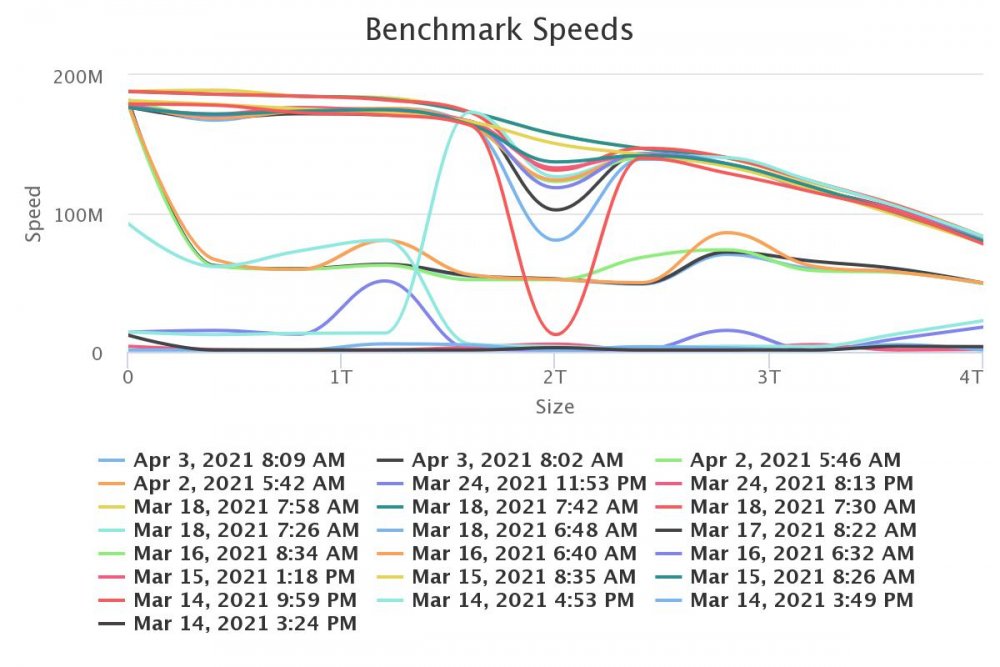
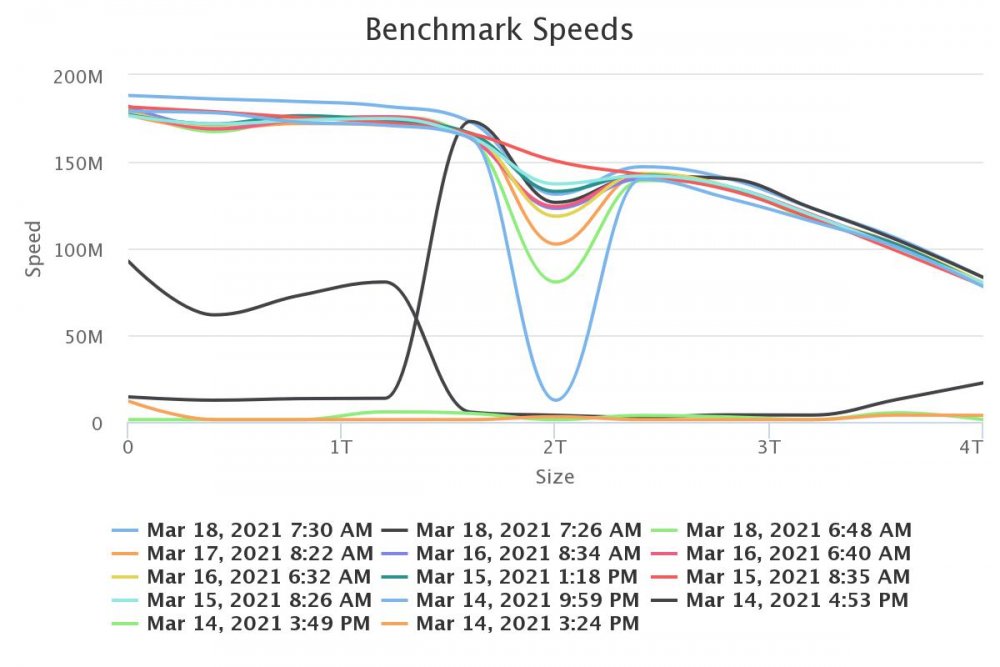
Thank you for your response. In latter tests the drive starts at over 100M and after reaching circa 10% it dives to around 50M and stays there to the end. The middle dip results were produced until about 10 days ago.
-
Good day, so I ended up replacing the drive because it continued to just hang everything. I plecleared it and in theory it "passed" after 56 hours. The diskspeed tests, continue to be very poor. So I think it's failed. Before dispossing of it, i want to confirm my assumptions. Any advise is appreciated. Thank you preclear_disk_WFN13LVC_14630.txt
-
Thank you very much for the advise. I'll look into it.
-
Good day. First thank you for producing this tool. I had been experiencing significant system lagging last week and afer changing sata cables, usb stick, inspecting docker by docker etc I finally came across this tool and tested. These are drive 1 tests over the last few days with services (docker,vms) online. it's all over the place. These are for all drives with all services off. Seems to be ok, or at least not worse than the rest. Any advise welcome. Thank you
.thumb.jpeg.025123bc7ebb02f132591edb5098743f.jpeg)
-
@ElectricBrainUK Thank you for your response. Firing Users Scripts would be more than enough. @Jokerigno For instance firing a script that unbinds a usb device from a running vm and subsequently starting another vm that uses that usb device
-
@ElectricBrainUK I'm not a developer, so forgive me if asking for something unrealistic, but would it be possible to fire scripts from unraidapi. Currently i fire them from Home assistant via ssh and works well, but maybe it can also be done via mqtt? Thank you for this component.
-
@dlandon thank you. I’m reaching out to someone in an earlier post using this config.
-
@PTRFRLL would appreciate it if you could explain how to set up this docker with an external dB. ive tried following the guide in note 1 of this thread but I get a message dB can’t connect and I’m sure is because there’s more steps. thank you
-
@dlandon thank you for your prompt reply. i did follow the guide. Created the 99-.conf file but i kept getting an error saying it cant connect to mariadb I created a linuxserver/mariadb to connect to it. The question was more about do i have to create a separate network and use network_mode: network etc.. I just cant get it to work. reason i want to try an external db, it's because i'm having problems with the internal db. First run it runs fine. Then overnight it crashes and cant connect. Did a bit of reading and I believe i tracked it to adding TZ in the docker as well as ensuring it's aligned in options>settings. That seemed to fix it. But now i have another problem: Aug 6 15:31:28 UNRAID web_php[2319]: ERR [SQL-ERR 'SQLSTATE[42000]: Syntax error or access violation: 1064 You have an error in your SQL syntax; check the manual that corresponds to your MariaDB server version for the right syntax to use near 'DESC limit 20' at line 1', statement was 'SELECT `Id`, `MonitorId`, `Name`, `Cause`, `Notes`, `StartTime`, date_format( StartTime, '%y/%m/%d %H:%i:%S' ) as StartTimeShort, `EndTime`, `Width`, `Height`, `Length`, `Frames`, `AlarmFrames`, `TotScore`, `AvgScore`, `MaxScore` FROM Events WHERE Events.MonitorId = :selector0 ORDER BY DESC limit 20' params:1] Aug 6 15:31:28 UNRAID web_php[2319]: ERR [SQL-ERR dbFetchAll no result, statement was 'SELECT `Id`, `MonitorId`, `Name`, `Cause`, `Notes`, `StartTime`, date_format( StartTime, '%y/%m/%d %H:%i:%S' ) as StartTimeShort, `EndTime`, `Width`, `Height`, `Length`, `Frames`, `AlarmFrames`, `TotScore`, `AvgScore`, `MaxScore` FROM Events WHERE Events.MonitorId = :selector0 ORDER BY DESC limit 20'params: 1] So when I open a monitor i cant see the events list under it. if i click on the events (number) it will take me to events and i can see it. Not sure what's creating all that, but wanted to try external db. I also tried running your .master image. Got it running, no apparent db problems, but couldnt define motion zones as i cant see them in the brower. it shows a blank screen. Any guidance/suggestions are appreciated.
-
Good day, first thank you for this docker. can anyone share steps to configure this docker with an external db. a docker compose would be great. thank you
-
Not sure if I misunderstood you, but you simply add the desired location to the left side of your volume entry, for example - /mnt/user/appdata/joomla:/var/www/html
-
another option is to use portainer. in portainer select stack > add stack and then you can write/paste your docker compose and hit deploy. (limited to docker-compose version 2)
-
docker-compose is available in community applications > nerd pack edit: it's not there anymore ?? anyway adding the below to /boot/config/go will make it permanent COMPOSE_VERSION=$(curl -s https://api.github.com/repos/docker/compose/releases/latest | grep 'tag_name' | cut -d\" -f4) curl -L https://github.com/docker/compose/releases/download/${COMPOSE_VERSION}/docker-compose-`uname -s`-`uname -m` -o /us> chmod +x /usr/local/bin/docker-compose
-
this one works well https://community.home-assistant.io/t/unraid-api-connect-and-control-unraid-servers-through-home-assistant-via-mqtt/154198 docker container publishing unraid info and control to mqtt.
-
@binhex thank you very much for your prompt reply. Have been using the linuxserver/letsencrypt docker for 2 years and habit is hard to break. But i'll give this a go.
-
@binhex thank you. Can you please share your server block for nginx.
-
@comet424 if you’re using the docker and want to see the boot dir you need to sert PID and GID to 0 (zero). Basically root acces. @binhex thank you for your reply: as I said I don’t know enough. However on the other image when you go to iP:5800 you get the gui. No need to add html.? and the rest which I suspect is the reason it complicates the proxy server setup.
-
@binhex first thank you for providing and mainting this docker. I have a request for which I do not understand it's complexity so pardon me if it sounds cheeky. Would it be viable to add a straight webui interface to this docker? The image mentioned earlier (https://hub.docker.com/r/djaydev/krusader) does allow straight webui connection without vnc or anyhting else. However, it lacks some of the functionality present in your image. If this was a not overly complicated modification, it would be a welcome addition. Thank you.
-
Good day, would anyone kindly share their server block for krusader in letsencrypt? this is what Im trying to use, but I get "noVNC encountered an error:" server { listen 443 ssl; root /config/www; index index.html index.htm index.php; server_name subd.mydomain.duckdns.org; include /config/nginx/ssl.conf; client_max_body_size 0; location / { auth_basic "Restricted"; auth_basic_user_file /config/nginx/.htpasswd; include /config/nginx/proxy.conf; proxy_pass http://192.168.1.100:6080/vnc.html?autoconnect=true; } location /websockify { proxy_pass http://192.168.1.100:6080/vnc.html?autoconnect=true; proxy_http_version 1.1; proxy_set_header Upgrade $http_upgrade; proxy_set_header Connection "upgrade"; proxy_read_timeout 86400; } } Thank you
-
Run the beta plugin. Perfect!! I did however pull it from your link as I couldnt find it in Community Applications, Thank you very much.
-
@JTok run the beta plugin. Perfect!! I did however pull it from your link as I couldnt find it in Community Applications, Thank you very much.




.jpeg.fe527ad99f7e4408789bc60586a68bfe.jpeg)