juan11perez
Members
-
Joined
-
Last visited
Everything posted by juan11perez
-
Thank you for the systemd tip. Tested arch, ubuntu all work.!!!! Have you tried running windows? I saw a video, but it involves lxd. Just curious if it'd work.
-
There's now a plugin in CA.
-
Are you using Q35 or i440 in the machine definition? I had much better results with Q35. If you start and it again goes into the shell as per your picture above, type exit on the prompt when possible. It will take you to the bios. Select boot order and then select QEMU. then hit enter repeatedly until you go into installation
-
Type exit. Will go to bios, select the qemu drive as boot media hit enter and it will start. It will spin couple of minutes. Be patient
-
Ok so I got the debian bullseye container to work passing an nvidia gpu and using docker.... :-) It's transcoding plex, frigate and possibly any other container I've tried documenting my procedure in a readme.txt I've also created a script (system_config.sh) to install all requirements. I'm also sharing my container <<dockerhost>> config file. I'm attaching all docs. I'm by no means an expert, I got it working after several hours of trial and error, but I'll try to answer questions. I've included the sources of info in the readme.txt @ich777 thank you again files.zip
-
thank you. I'm just taking the opportunity to learn something new with this plugin. For instance I learned why staic ip instructions in the container conf dont work ------- again the culprit systemd And learned a workaround. interesting! So I'll give it a go with installing the drivers in the container. I haven't. I've not worked out how to do it. I thougut it was with sudo apt-get install -y nvidia-docker2 sudo pkill -SIGHUP dockerd I run docker quite extensively in unraid and have no issues whatsoever. So no urgency or similar. Thank you for taking the time to answer and producing/sharing this component
-
Good day, has anyone been able to run a gpu within the container? I've managed to pass it into the container by following this guide with the addition of an extra parameter: # Allow cgroup access lxc.cgroup.devices.allow = c 195:* rwm lxc.cgroup.devices.allow = c 243:* rwm lxc.cgroup.devices.allow = c 239:* rwm # Pass through device files lxc.mount.entry = /dev/nvidia-modeset dev/nvidia-modeset none bind,optional,create=file lxc.mount.entry = /dev/nvidia-uvm dev/nvidia-uvm none bind,optional,create=file lxc.mount.entry = /dev/nvidia-uvm-tools dev/nvidia-uvm-tools none bind,optional,create=file lxc.mount.entry = /dev/nvidia0 dev/nvidia0 none bind,optional,create=file lxc.mount.entry = /dev/nvidia1 dev/nvidia1 none bind,optional,create=file lxc.mount.entry = /dev/nvidiactl dev/nvidiactl none bind,optional,create=file afterwards running nvidia-smi in the container works. However, when i try to spin a docker container using GPU i get this error: ⠹ Container jellyfin Starting 0.2s Error response from daemon: failed to create shim task: OCI runtime create failed: runc create failed: unable to start container process: error during container init: error running hook #0: error running hook: exit status 1, stdout: , stderr: nvidia-container-cli: container error: failed to get device cgroup mount path: no cgroup filesystem mounted for the devices subsytem in mountinfo file: unknown ⠹ Container jellyfin Starting 0.2s Error response from daemon: failed to create shim task: OCI runtime create failed: runc create failed: unable to start container process: error during container init: error running hook #0: error running hook: exit status 1, stdout: , stderr: nvidia-container-cli: container error: failed to get device cgroup mount path: no cgroup filesystem mounted for the devices subsytem in mountinfo file: unknown I've tried several "recommendations" from the web including this to no avail. This is the sample debian bullseye container. I've also been unable to create a more recent stable ubuntu container. This command creates the container but it doesnt start lxc-create --name docker --template download -- --dist ubuntu --release jammy --arch amd64 Attempting to start it from cli doesnt show any errors. The only other that has worked is the impish release
-
@ich777 when possible, can you share your homeassitant script? thank you
-
Noted. The DebianVNC is running and appears normal. Web browser is ok, windows are responsive.
-
Yes, the cache in /mnt/cache is in my cache pool devices I run unraid 6.10.2 I just tried via terminal and got this: root@Unraid:/mnt/cache# lxc-create --name Debian --template download -- --dist debian --release bullseye --arch amd64 Downloading the image index Downloading the rootfs Downloading the metadata mkdir: cannot create directory ‘//var/cache/lxc’: File exists lxc-create: Debian: lxccontainer.c: create_run_template: 1627 Failed to create container from template lxc-create: Debian: tools/lxc_create.c: main: 317 Failed to create container Debian i checked /var/cache/lxc and got this: root@Unraid:/var/cache# ls cracklib/ ldconfig/ libvirt/ lxc@ samba/ I removed lxc@ (it said it had an invalid link) Attempted creating again from GUI and now no error And it works. container is running!! Thank you
-
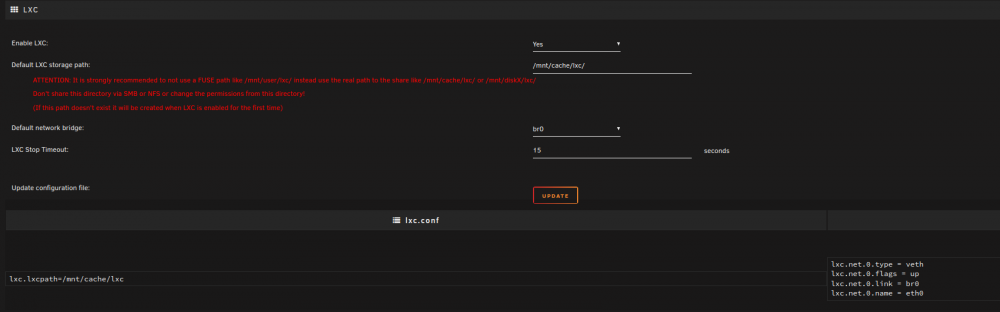
Thank you I've set up /mnt/cache/lxc
-
Good day. Thank you for this component. I've set up per the instructions but when I try to create a container or create vnc container i get 'Something went wrong!'. nothing further
-
@Waddoo I created /mnt/cache/appdata/docker-compose.yaml and run it with docker compose -f /mnt/cache/appdata/docker-compose.yaml --compatibility up -d
-
i've got onedrive and gdrive mounted on my unraid using rclone. There's a space invader video on 'how to'. once mounted you could set up a script to copy your content from the mount to your designated share.
-
If you are open to using docker compose, install the docker compose plug in and create a stack. Once compose is installed you'll have a create stack button at the bottom of the docker tab.
-
Good day, I now have similar error Warning: stream_socket_client(): unable to connect to unix:///var/run/docker.sock (Connection refused) in /usr/local/emhttp/plugins/dynamix.docker.manager/include/DockerClient.php on line 693 Couldn't create socket: [111] Connection refused Warning: Invalid argument supplied for foreach() in /usr/local/emhttp/plugins/dynamix.docker.manager/include/DockerClient.php on line 877 For a while now it's been doing this after a restart, I would then turn off docker then turn it on and it would start Now it will not start. I've restarted the server, turned docker off/on. During start I noticed it says it cant reach some "udp" network. Any help guidance is much appreciated. Thank you tower-diagnostics-20211221-0136.zip
-
thank you. I'm running about 42 dockers and I've applied memory limits to the usual culprits, but i guess it's not enough. I have 64GB but seems insufficient.
-
Good day, I upgraded to 6.10rc2 about 3 weeks ago and since then I've had 3 random crashes. Today unraid became "unavailble" at around 1300 local time. Attached find my logs, Any guidance is much appreciated. log.log
-
Been using the plugin since release. Works perfectly
-
1
-
@primeval_god Thank you for producing this plugin. Works fine for me; new compose is significantly faster and just better. Despite the Switch, there are some changes to the yaml format that need modification. For instance gpu pass through; however, it's all in the excellent documentation.
-
Welcome Nothing in particular other than enabling iommu and smv in bios. I have 3 cards: Nvidia 1650, rtx saphire 570 and nvidia 1050ti. First 2 for vms. Last one for hardware acceleration.
-
I've been running 3900x with rogstrix470f for over 18 months with no issues. arch vm, windows vm, mac vm all run well plus 45 dockers.
-
This is what I did with "user scripts" Created as script, that's simply a place holder for the docker compose binary. In my example it's called "06_docker_compose_binary". Just create it in the web ui. Add nothing. A script that downloads the docker-compose binary, once a month, into the place holder script created in step one: #!/bin/bash #---------------------------------------------------------------------------- # This script will update docker-compose script from github periodically | #---------------------------------------------------------------------------- COMPOSE_VERSION=$(curl -s https://api.github.com/repos/docker/compose/releases/latest | grep 'tag_name' | cut -d\" -f4) curl -L https://github.com/docker/compose/releases/download/${COMPOSE_VERSION}/docker-compose-`uname -s`-`uname -m` -o /boot/config/plugins/user.scripts/scripts/06_docker_compose_binary/script 3. Add to /boot/config/go file: # COPYING DOCKER-COMPOSE ########## cp /boot/config/plugins/user.scripts/scripts/06_docker_compose_binary/script /usr/local/bin/docker-compose chmod +x /usr/local/bin/docker-compose ################################### That's it! It's updated regularly and doesnt need internet on server start. Hope it helps.
-
If you are unable to build your own image and install the plugins via command line, my suggestion would be that you try something else. The shinobi Gui plugin manager doesn't work and in fact the plugins themselves work partially. Take a look at Frigate; it's actively developed and what it currently does it does very well. Alternatively go with zoneminder.