





MyKroFt
Members
-
Joined
-
Last visited
Everything posted by MyKroFt
-
I have 4 Brs that 197 gets errors on - 198 on my windows processes and creates just fine.... Myk
-
My BR drive was recognized out of the box..... Myk
-
Hopefully the plugin gets updated soon Myk
-
Is this still compat with 614 released today? Myk
-
The only way I could get the ip/user/pass to be editable is set both to no, apply, then set 2nd to yes, the ip/user/pass is editable until you hit apply. one apply is hit you can no longer change them. have to set to no, apply, then yes and start over.... bug? Myk
-
Oct 20 12:00:42 Tower kernel: capability: warning: `proftpd' uses 32-bit capabilities (legacy support in use) Got this today when I tried the plugin again Myk
-
looks like there is no b release on your github Myk
-
When I try and manually get it - get the following: root@Tower:/boot/config/plugins/speedtest# wget https://github.com/dmacias72/speedtest/archive/2015.10.18b.tar.gz --2015-10-19 03:25:18-- https://github.com/dmacias72/speedtest/archive/2015.10.18b.tar.gz Resolving github.com (github.com)... 192.30.252.130 Connecting to github.com (github.com)|192.30.252.130|:443... connected. HTTP request sent, awaiting response... 302 Found Location: https://codeload.github.com/dmacias72/speedtest/tar.gz/2015.10.18b [following] --2015-10-19 03:25:22-- https://codeload.github.com/dmacias72/speedtest/tar.gz/2015.10.18b Resolving codeload.github.com (codeload.github.com)... 192.30.252.147 Connecting to codeload.github.com (codeload.github.com)|192.30.252.147|:443... connected. HTTP request sent, awaiting response... 404 Not Found 2015-10-19 03:25:26 ERROR 404: Not Found. Myk
-
getting the following error: plugin: installing: https://raw.githubusercontent.com/dmacias72/speedtest/master/speedtest.plg plugin: downloading https://raw.githubusercontent.com/dmacias72/speedtest/master/speedtest.plg plugin: downloading: https://raw.githubusercontent.com/dmacias72/speedtest/master/speedtest.plg ... done Warning: simplexml_load_file(): I/O warning : failed to load external entity "/boot/config/plugins/speedtest.plg" in /usr/local/emhttp/plugins/dynamix.plugin.manager/scripts/plugin on line 193 plugin: xml parse error Myk
-
Install it, copy what packages you want to your extra folder, then uninstall Myk
-
get the following 2 errors in my syslog upon bootup or array start Sep 29 00:34:27 Tower shellinaboxd: /usr/sbin/shellinaboxd: /lib64/libcrypto.so.1.0.0: no version information available (required by /usr/sbin/shellinaboxd) Sep 29 00:34:27 Tower shellinaboxd: /usr/sbin/shellinaboxd: /lib64/libssl.so.1.0.0: no version information available (required by /usr/sbin/shellinaboxd) Thanks Myk
-
ok, i see you guys did it already Thanks
-
Since 0.8 has now gone into beta, is it possible to get a beta 0.8 docker so we can make a copy of config folder and play with? Thanks Myk
-
Very nice... thanks! Anyone else having trouble changing the banner using the web UI? After dropping the banner, or picking the banner file, after hitting "Apply" it reverts to the surfer default banner... I am on 6.1.3 having same prob, apply reverts back to previous banner Myk And what happens when you clear your browser's cache and reload? Stays on the same banner still Myk
-
Very nice... thanks! Anyone else having trouble changing the banner using the web UI? After dropping the banner, or picking the banner file, after hitting "Apply" it reverts to the surfer default banner... I am on 6.1.3 having same prob, apply reverts back to previous banner Myk
-
Learned alot already - but more to go I love this ZFS - it was exactly what I was looking for to pool my 2 SSDs for docker/vm storage. Couple of bumps and had to rethink and move things around... but I now has a 2 SSD zfspool, and my docker/vm stuff mounted and shared in zfspool/appdisk as /mnt/appdisk and I LOVE IT! Thank you so much for this plugin! Myk
-
ok, figured out the zfs mount -a and zfs umount so i assume i can put the zfs mount -a in the go file but how would do the zfs unmount during shutdown/reboot? Thanks Myk
-
couple of questions: am new to zfs so please be kind..... I am currently storing my docker/vm data (large plex library) on 2 SSD mounted outside the array. I would like to use zfs and make one mount point using the 2 SSD. I understand to create the pool I can use the following: zpool create -m /mnt/disk/appdata appdata /dev/sdb /dev/sdc the 2 SSD always are sdb and sdc because they are on the MB sata and not the 3 8 port sas cards. what I am not sure is what to do when I want to shutdown/reboot the server to 1st unmount the pool and reactivate it upon bootp up Thanks for any info Myk
-
root@Tower:~# depmod root@Tower:~# modprobe zfs modprobe: FATAL: Module zfs not found. Myk
-
Thanks Much Myk
-
Just updated to latest unRAID version and needed to reboot. Swapfile was a disaster. I have my swapfile on a SSD managed by unassigned devices. The plugin needs to start later in the bootup sequence. unassigned devices had this problem as well and moved to a different trigger. essentially - needs to wait until all devices are mounted and available - otherwise it tries to make the swapfile in ram, runs out of space and causes everything else to fail. Had to disable for now Thanks Myk
-
using latest FF, just tried chrome and it does the same Thanks Myk
-
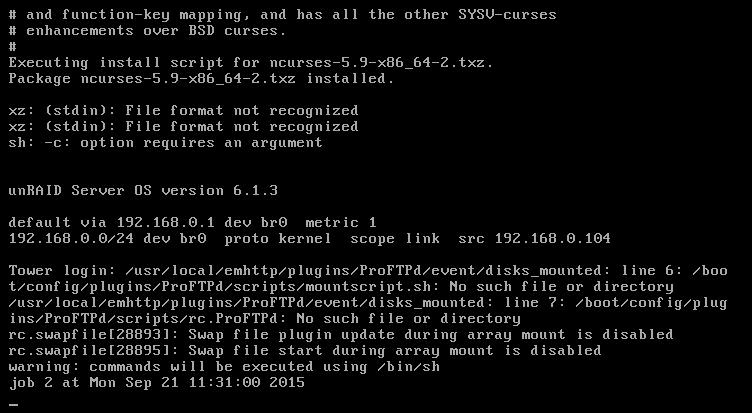
only other thing that is showing up that I noticed today during reboot to latest unraid ver is the following Myk
-
just updated plugin and now all "\" are being stripped: root@Tower:~# \boot\scripts\vlog -bash: bootscriptsvlog: command not found even using the onscreen keyboard they are stripped the "-" does work now btw...... Myk
-
Too bad the dashboard don't show swap status in memory section.... Myk


