





MyKroFt
Members
-
Joined
-
Last visited
Everything posted by MyKroFt
-
Its crashing upon startup, you will need to clear out the session folder..... Myk
-
any know of a option to add to the .rc file to tell rtorrent to log to a file? Am still trying to track down the crashing and need more info. After a crash and waiting for it to restart and fail or restarting the docker and it fails a crashes right away - IF I manualy start rtorrent not in a tmux it starts right up and continues where everything left off. So I am going to ASSUME one of the command line parameters is getting corrupted and rtorrent dont like it - but again and trying to get more log info Thanks Myk
-
I have used Deluge, but like the web interface of rutorrent 100% better - am willing to put up with its problems since it seems to be the program instead of the docker itself. Thanks for looking Myk
-
ok, if I run rtorrent.sh reload and not try and put it in the background during a docker bash shell - it restarts with current session data intact but if I try and run ./rtorrent.sh reload & it stops for some reason Myk
-
I restarted leaving session folder as it - tmux process is not there I restarted clearing out session folder - tmux process IS there something is the session folder either crashes rtorrent on load or is not letting it start is there a log file somewhere from rtorrent? Myk
-
ok, when it goes down and the web ui cannot talk to rtorrent - I executed a bash shell and there is no tmux running - even after manually running a rtorrent.sh reload Myk
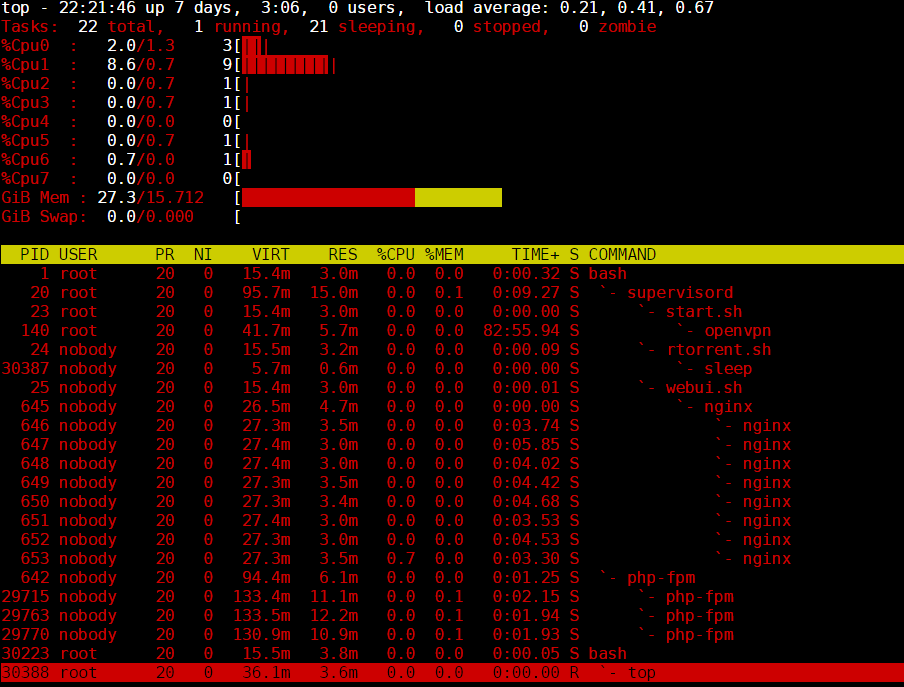
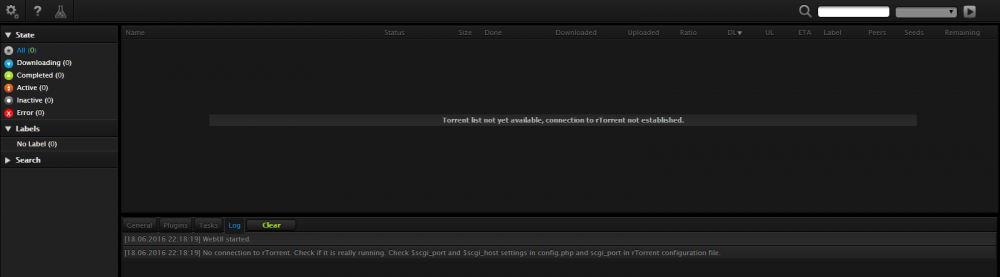
-
Did it again after 40 hrs uptime when it happens the key expire is always in the log on another note - can you add the dependencies of the filemanager plugin (unzip its hollaring about) - am trying to get it up and running Thanks Myk
-
I was working fine for 2 days, came home from work today and the web ui could not talk to rtorrent. It kept attempting to start rtorrent over and over - am not sure why it wont let the web ui reconnect to it. Myk
-
Would also be nice if the 1st page server name/ip would have the background like you do when selected and are viewing drives. Just a suggestion Otherwise nice app Myk Sent from my SM-G920V using Tapatalk
-
Cache pool - 2nd (and beyond I assume only have 2 drives) comes up "NaN undefinesdNaN %NaN" etc Myk

-
I think this is a dockerhub issue. I have 4 unrelated dockers stuck doing this - if I force one to update that there is no update for - then it gets stuck like the other saying a update but nothing is downloaded etc..... Myk
-
could prob edit and comment out line 25 of nginx.conf for the access.log file? gonna try it myself Myk
-
Dunno, think the folding software needs updated in the docker - I cant get any assignments, but my 2 windows machines are working just find - so its not a port issue.... Myk
-
Nice - just changed my graphic Myk
-
ok so quick check, what did you use to edit the file?, did you use notepad?, you need to be careful of line endings, if you use notepad it will save it with windows line endings and this will royally screw up the config file. I used textpad - when doing a save as - it sees the file as a unix file - so that was not the problem.... I cleared the session folder again, started docker back up and web interface connected - just no torrents again Am not sure what to look for - this is a bugger to track down Myk ok so its not that, this is interesting:- The line specific: Sun Jun 12 06:17:04 2016 TLS: tls_process: killed expiring key question is is this tls for the tunnel or for the web interface?, i guess its probably the tunnel, remind me which vpn provider your with again, is it PIA? AirVPN bit of googling on this so far reveals this:- https://airvpn.org/topic/4383-tls-tls-process-killed-expiring-key/ and also https://airvpn.org/topic/16427-high-latency-lost-connection-durring-hourly-tls-rekeying/ you could try the option to disable re-keying in the ovpn file and see if it helps. just to be more clear, im on about adding this option into your ovpn file:- reneg-sec 0 which is actually one of the settings i specify for the pia ovpn file that all pia users use. Ok, added that - will let ya know what happens Thanks Myk
-
ok so quick check, what did you use to edit the file?, did you use notepad?, you need to be careful of line endings, if you use notepad it will save it with windows line endings and this will royally screw up the config file. I used textpad - when doing a save as - it sees the file as a unix file - so that was not the problem.... I cleared the session folder again, started docker back up and web interface connected - just no torrents again Am not sure what to look for - this is a bugger to track down Myk ok so its not that, this is interesting:- The line specific: Sun Jun 12 06:17:04 2016 TLS: tls_process: killed expiring key question is is this tls for the tunnel or for the web interface?, i guess its probably the tunnel, remind me which vpn provider your with again, is it PIA? AirVPN
-
Other in the latest beta release thread are complaining about this same problem with other dockers not even related to yours - so something is goofy in unRAID docker check and not your dockers Myk
-
ok so quick check, what did you use to edit the file?, did you use notepad?, you need to be careful of line endings, if you use notepad it will save it with windows line endings and this will royally screw up the config file. I used textpad - when doing a save as - it sees the file as a unix file - so that was not the problem.... I cleared the session folder again, started docker back up and web interface connected - just no torrents again Am not sure what to look for - this is a bugger to track down Myk
-
Ok, happened again but this time I wanted to change a option in the .rc config file so I selected everything and did a stop - everything looked good went to docker tab, stopped docker, edited the rtorrent.rc file and removed a "#" in front of a option, restared docker come back to web interface and it will not connect anymore - am gonna have to wipe the session folder and readd all torrents to get back up and running again.... here is supervisord.log showing restart of docker after rtorrent.rc file edit.... 2016-06-12 12:50:46,135 CRIT Set uid to user 0 2016-06-12 12:50:46,135 INFO Included extra file "/etc/supervisor/conf.d/rtorrent.conf" during parsing 2016-06-12 12:50:46,138 INFO supervisord started with pid 20 2016-06-12 12:50:47,141 INFO spawned: 'start-script' with pid 23 2016-06-12 12:50:47,142 INFO spawned: 'rtorrent-script' with pid 24 2016-06-12 12:50:47,143 INFO spawned: 'webui-script' with pid 25 2016-06-12 12:50:47,144 INFO spawned: 'privoxy-script' with pid 26 2016-06-12 12:50:47,151 DEBG 'rtorrent-script' stdout output: [info] rTorrent config file already exists, skipping copy 2016-06-12 12:50:47,151 INFO success: start-script entered RUNNING state, process has stayed up for > than 0 seconds (startsecs) 2016-06-12 12:50:47,152 INFO success: rtorrent-script entered RUNNING state, process has stayed up for > than 0 seconds (startsecs) 2016-06-12 12:50:47,152 INFO success: webui-script entered RUNNING state, process has stayed up for > than 0 seconds (startsecs) 2016-06-12 12:50:47,152 INFO success: privoxy-script entered RUNNING state, process has stayed up for > than 0 seconds (startsecs) 2016-06-12 12:50:47,153 DEBG 'rtorrent-script' stdout output: [info] Removing any rtorrent session lock files left over from the previous run... 2016-06-12 12:50:47,153 DEBG 'start-script' stdout output: [info] VPN is enabled, beginning configuration of VPN 2016-06-12 12:50:47,153 DEBG 'privoxy-script' stdout output: [info] VPN is enabled, checking VPN tunnel local ip is valid 2016-06-12 12:50:47,155 DEBG 'rtorrent-script' stdout output: [info] VPN is enabled, checking VPN tunnel local ip is valid 2016-06-12 12:50:47,160 DEBG 'start-script' stdout output: [info] VPN provider defined as airvpn [info] VPN config file (ovpn extension) is located at /config/openvpn/AirVPN_Canada_UDP-443.ovpn 2016-06-12 12:50:47,161 DEBG 'start-script' stdout output: [info] Env vars not defined for remote host, port and protocol, will parse existing entries from ovpn file... 2016-06-12 12:50:47,187 DEBG 'start-script' stdout output: [info] VPN provider remote gateway defined as ca.vpn.airdns.org [info] VPN provider remote port defined as 443 [info] VPN provider remote protocol defined as udp 2016-06-12 12:50:47,198 DEBG 'start-script' stdout output: [info] Default route for container is 172.17.0.1 2016-06-12 12:50:47,205 DEBG 'start-script' stdout output: [info] Setting permissions recursively on /config/openvpn... 2016-06-12 12:50:47,214 DEBG 'start-script' stdout output: [info] Adding 192.168.0.0/24 as route via docker eth0 2016-06-12 12:50:47,215 DEBG 'start-script' stdout output: [info] ip route defined as follows... 2016-06-12 12:50:47,215 DEBG 'start-script' stdout output: -------------------- 2016-06-12 12:50:47,215 DEBG 'start-script' stdout output: default via 172.17.0.1 dev eth0 172.17.0.0/16 dev eth0 proto kernel scope link src 172.17.0.8 2016-06-12 12:50:47,216 DEBG 'start-script' stdout output: 192.168.0.0/24 via 172.17.0.1 dev eth0 -------------------- 2016-06-12 12:50:47,219 DEBG 'start-script' stdout output: [info] iptable_mangle support detected, adding fwmark for tables 2016-06-12 12:50:47,258 DEBG 'start-script' stdout output: [info] iptables defined as follows... -------------------- 2016-06-12 12:50:47,259 DEBG 'start-script' stdout output: -P INPUT DROP -P FORWARD ACCEPT -P OUTPUT DROP -A INPUT -i tun0 -j ACCEPT -A INPUT -s 172.17.0.0/16 -d 172.17.0.0/16 -j ACCEPT -A INPUT -i eth0 -p udp -m udp --sport 443 -j ACCEPT -A INPUT -i eth0 -p tcp -m tcp --dport 9080 -j ACCEPT -A INPUT -i eth0 -p tcp -m tcp --sport 9080 -j ACCEPT -A INPUT -i eth0 -p tcp -m tcp --dport 9443 -j ACCEPT -A INPUT -i eth0 -p tcp -m tcp --sport 9443 -j ACCEPT -A INPUT -s 192.168.0.0/24 -i eth0 -p tcp -m tcp --dport 5000 -j ACCEPT -A INPUT -p udp -m udp --sport 53 -j ACCEPT -A INPUT -p icmp -m icmp --icmp-type 0 -j ACCEPT -A INPUT -i lo -j ACCEPT -A OUTPUT -o tun0 -j ACCEPT -A OUTPUT -s 172.17.0.0/16 -d 172.17.0.0/16 -j ACCEPT -A OUTPUT -o eth0 -p udp -m udp --dport 443 -j ACCEPT -A OUTPUT -o eth0 -p tcp -m tcp --dport 9080 -j ACCEPT -A OUTPUT -o eth0 -p tcp -m tcp --sport 9080 -j ACCEPT -A OUTPUT -o eth0 -p tcp -m tcp --dport 9443 -j ACCEPT -A OUTPUT -o eth0 -p tcp -m tcp --sport 9443 -j ACCEPT -A OUTPUT -d 192.168.0.0/24 -o eth0 -p tcp -m tcp --sport 5000 -j ACCEPT -A OUTPUT -p udp -m udp --dport 53 -j ACCEPT -A OUTPUT -p icmp -m icmp --icmp-type 8 -j ACCEPT -A OUTPUT -o lo -j ACCEPT 2016-06-12 12:50:47,260 DEBG 'start-script' stdout output: -------------------- [info] nameservers 2016-06-12 12:50:47,260 DEBG 'start-script' stdout output: nameserver 8.8.8.8 nameserver 8.8.4.4 2016-06-12 12:50:47,261 DEBG 'start-script' stdout output: -------------------- [info] Starting OpenVPN... 2016-06-12 12:50:47,264 DEBG 'start-script' stdout output: Sun Jun 12 12:50:47 2016 OpenVPN 2.3.11 x86_64-unknown-linux-gnu [sSL (OpenSSL)] [LZO] [EPOLL] [MH] [iPv6] built on May 12 2016 Sun Jun 12 12:50:47 2016 library versions: OpenSSL 1.0.2h 3 May 2016, LZO 2.09 2016-06-12 12:50:47,264 DEBG 'start-script' stdout output: Sun Jun 12 12:50:47 2016 Control Channel Authentication: tls-auth using INLINE static key file Sun Jun 12 12:50:47 2016 Outgoing Control Channel Authentication: Using 160 bit message hash 'SHA1' for HMAC authentication Sun Jun 12 12:50:47 2016 Incoming Control Channel Authentication: Using 160 bit message hash 'SHA1' for HMAC authentication 2016-06-12 12:50:47,265 DEBG 'start-script' stdout output: Sun Jun 12 12:50:47 2016 Socket Buffers: R=[212992->212992] S=[212992->212992] 2016-06-12 12:50:47,382 DEBG 'start-script' stdout output: Sun Jun 12 12:50:47 2016 UDPv4 link local: [undef] Sun Jun 12 12:50:47 2016 UDPv4 link remote: [AF_INET]199.19.94.132:443 2016-06-12 12:50:47,499 DEBG 'start-script' stdout output: Sun Jun 12 12:50:47 2016 TLS: Initial packet from [AF_INET]199.19.94.132:443, sid=d69307eb 3537baf8 2016-06-12 12:50:47,696 DEBG 'start-script' stdout output: Sun Jun 12 12:50:47 2016 VERIFY OK: depth=1, C=IT, ST=IT, L=Perugia, O=airvpn.org, CN=airvpn.org CA, [email protected] 2016-06-12 12:50:47,696 DEBG 'start-script' stdout output: Sun Jun 12 12:50:47 2016 Validating certificate key usage Sun Jun 12 12:50:47 2016 ++ Certificate has key usage 00a0, expects 00a0 Sun Jun 12 12:50:47 2016 VERIFY KU OK 2016-06-12 12:50:47,696 DEBG 'start-script' stdout output: Sun Jun 12 12:50:47 2016 Validating certificate extended key usage Sun Jun 12 12:50:47 2016 ++ Certificate has EKU (str) TLS Web Server Authentication, expects TLS Web Server Authentication Sun Jun 12 12:50:47 2016 VERIFY EKU OK Sun Jun 12 12:50:47 2016 VERIFY OK: depth=0, C=IT, ST=IT, L=Perugia, O=airvpn.org, CN=server, [email protected] 2016-06-12 12:50:48,172 DEBG 'start-script' stdout output: Sun Jun 12 12:50:48 2016 Data Channel Encrypt: Cipher 'AES-256-CBC' initialized with 256 bit key Sun Jun 12 12:50:48 2016 Data Channel Encrypt: Using 160 bit message hash 'SHA1' for HMAC authentication Sun Jun 12 12:50:48 2016 Data Channel Decrypt: Cipher 'AES-256-CBC' initialized with 256 bit key Sun Jun 12 12:50:48 2016 Data Channel Decrypt: Using 160 bit message hash 'SHA1' for HMAC authentication 2016-06-12 12:50:48,173 DEBG 'start-script' stdout output: Sun Jun 12 12:50:48 2016 Control Channel: TLSv1.2, cipher TLSv1/SSLv3 DHE-RSA-AES256-GCM-SHA384, 4096 bit RSA Sun Jun 12 12:50:48 2016 [server] Peer Connection Initiated with [AF_INET]199.19.94.132:443 2016-06-12 12:50:50,436 DEBG 'start-script' stdout output: Sun Jun 12 12:50:50 2016 SENT CONTROL [server]: 'PUSH_REQUEST' (status=1) 2016-06-12 12:50:50,538 DEBG 'start-script' stdout output: Sun Jun 12 12:50:50 2016 PUSH: Received control message: 'PUSH_REPLY,redirect-gateway def1 bypass-dhcp,dhcp-option DNS 10.4.0.1,comp-lzo no,route-gateway 10.4.0.1,topology subnet,ping 10,ping-restart 60,ifconfig 10.4.28.151 255.255.0.0' 2016-06-12 12:50:50,538 DEBG 'start-script' stdout output: Sun Jun 12 12:50:50 2016 OPTIONS IMPORT: timers and/or timeouts modified Sun Jun 12 12:50:50 2016 OPTIONS IMPORT: LZO parms modified Sun Jun 12 12:50:50 2016 OPTIONS IMPORT: --ifconfig/up options modified Sun Jun 12 12:50:50 2016 OPTIONS IMPORT: route options modified Sun Jun 12 12:50:50 2016 OPTIONS IMPORT: route-related options modified Sun Jun 12 12:50:50 2016 OPTIONS IMPORT: --ip-win32 and/or --dhcp-option options modified Sun Jun 12 12:50:50 2016 ROUTE_GATEWAY 172.17.0.1/255.255.0.0 IFACE=eth0 HWADDR=02:42:ac:11:00:08 2016-06-12 12:50:50,538 DEBG 'start-script' stdout output: Sun Jun 12 12:50:50 2016 TUN/TAP device tun0 opened Sun Jun 12 12:50:50 2016 TUN/TAP TX queue length set to 100 Sun Jun 12 12:50:50 2016 do_ifconfig, tt->ipv6=0, tt->did_ifconfig_ipv6_setup=0 Sun Jun 12 12:50:50 2016 /usr/bin/ip link set dev tun0 up mtu 1500 2016-06-12 12:50:50,539 DEBG 'start-script' stdout output: Sun Jun 12 12:50:50 2016 /usr/bin/ip addr add dev tun0 10.4.28.151/16 broadcast 10.4.255.255 2016-06-12 12:50:50,636 DEBG 'privoxy-script' stdout output: [info] Privoxy set to disabled 2016-06-12 12:50:50,636 DEBG fd 24 closed, stopped monitoring <POutputDispatcher at 47013454332344 for <Subprocess at 47013451411752 with name privoxy-script in state RUNNING> (stderr)> 2016-06-12 12:50:50,636 DEBG fd 20 closed, stopped monitoring <POutputDispatcher at 47013454192584 for <Subprocess at 47013451411752 with name privoxy-script in state RUNNING> (stdout)> 2016-06-12 12:50:50,636 INFO exited: privoxy-script (exit status 0; expected) 2016-06-12 12:50:50,636 DEBG received SIGCLD indicating a child quit 2016-06-12 12:50:50,644 DEBG 'rtorrent-script' stdout output: [info] rTorrent not running, marking as first run [info] All checks complete, starting rTorrent... 2016-06-12 12:50:50,645 DEBG 'rtorrent-script' stdout output: Script started, file is /home/nobody/typescript 2016-06-12 12:50:50,662 DEBG 'rtorrent-script' stdout output: Script done, file is /home/nobody/typescript 2016-06-12 12:50:50,746 DEBG 'webui-script' stdout output: [info] rtorrent started, setting up webui... [info] Setting PHP timezone to AMERICA/DENVER... 2016-06-12 12:50:50,761 DEBG 'webui-script' stdout output: [info] nginx cert files already exists, skipping copy 2016-06-12 12:50:50,761 DEBG 'webui-script' stdout output: [info] nginx security file already exists, skipping copy [info] nginx config file already exists, skipping copy 2016-06-12 12:50:50,762 DEBG 'webui-script' stdout output: [info] rutorrent conf folder already exists, skipping copy 2016-06-12 12:50:50,762 DEBG 'webui-script' stdout output: [info] rutorrent share folder already exists, skipping copy 2016-06-12 12:50:50,765 DEBG 'webui-script' stdout output: [info] rutorrent plugins folder already exists, skipping copy 2016-06-12 12:50:50,785 DEBG 'webui-script' stdout output: [info] starting php-fpm... 2016-06-12 12:50:50,801 DEBG 'webui-script' stderr output: [NOTICE] [pool www] 'user' directive is ignored when FPM is not running as root [NOTICE] [pool www] 'group' directive is ignored when FPM is not running as root 2016-06-12 12:50:50,808 DEBG 'webui-script' stdout output: [info] starting nginx... 2016-06-12 12:50:55,676 DEBG 'start-script' stdout output: Sun Jun 12 12:50:55 2016 /usr/bin/ip route add 199.19.94.132/32 via 172.17.0.1 2016-06-12 12:50:55,677 DEBG 'start-script' stdout output: Sun Jun 12 12:50:55 2016 /usr/bin/ip route add 0.0.0.0/1 via 10.4.0.1 2016-06-12 12:50:55,677 DEBG 'start-script' stdout output: Sun Jun 12 12:50:55 2016 /usr/bin/ip route add 128.0.0.0/1 via 10.4.0.1 2016-06-12 12:50:55,678 DEBG 'start-script' stdout output: Sun Jun 12 12:50:55 2016 Initialization Sequence Completed Myk
-
Current version server setup wiki page http://wiki.sabnzbd.org/configure-servers-1-0 Myk
-
Just had it happen again ealier this am - when it happens is the only time I get this type of line in my supervisord.log file: 2016-06-12 06:17:04,542 DEBG 'start-script' stdout output: Sun Jun 12 06:17:04 2016 TLS: tls_process: killed expiring key 2016-06-12 06:17:05,670 DEBG 'start-script' stdout output: Sun Jun 12 06:17:05 2016 TLS: soft reset sec=0 bytes=1935611/0 pkts=18561/0 2016-06-12 06:17:05,933 DEBG 'start-script' stdout output: Sun Jun 12 06:17:05 2016 VERIFY OK: depth=1, C=IT, ST=IT, L=Perugia, O=airvpn.org, CN=airvpn.org CA, [email protected] 2016-06-12 06:17:05,933 DEBG 'start-script' stdout output: Sun Jun 12 06:17:05 2016 Validating certificate key usage Sun Jun 12 06:17:05 2016 ++ Certificate has key usage 00a0, expects 00a0 Sun Jun 12 06:17:05 2016 VERIFY KU OK Sun Jun 12 06:17:05 2016 Validating certificate extended key usage Sun Jun 12 06:17:05 2016 ++ Certificate has EKU (str) TLS Web Server Authentication, expects TLS Web Server Authentication Sun Jun 12 06:17:05 2016 VERIFY EKU OK Sun Jun 12 06:17:05 2016 VERIFY OK: depth=0, C=IT, ST=IT, L=Perugia, O=airvpn.org, CN=server, [email protected] 2016-06-12 06:17:06,297 DEBG 'start-script' stdout output: Sun Jun 12 06:17:06 2016 Data Channel Encrypt: Cipher 'AES-256-CBC' initialized with 256 bit key Sun Jun 12 06:17:06 2016 Data Channel Encrypt: Using 160 bit message hash 'SHA1' for HMAC authentication Sun Jun 12 06:17:06 2016 Data Channel Decrypt: Cipher 'AES-256-CBC' initialized with 256 bit key Sun Jun 12 06:17:06 2016 Data Channel Decrypt: Using 160 bit message hash 'SHA1' for HMAC authentication Sun Jun 12 06:17:06 2016 Control Channel: TLSv1.2, cipher TLSv1/SSLv3 DHE-RSA-AES256-GCM-SHA384, 4096 bit RSA 2016-06-12 06:21:21,074 DEBG 'rtorrent-script' stdout output: [info] rTorrent not running, marking as first run [info] All checks complete, starting rTorrent... 2016-06-12 06:21:21,075 DEBG 'rtorrent-script' stdout output: Script started, file is /home/nobody/typescript 2016-06-12 06:21:21,095 DEBG 'rtorrent-script' stdout output: Script done, file is /home/nobody/typescript 2016-06-12 06:31:24,386 DEBG 'rtorrent-script' stdout output: [info] rTorrent not running, marking as first run [info] All checks complete, starting rTorrent... The line specific: Sun Jun 12 06:17:04 2016 TLS: tls_process: killed expiring key that is when I get problem - and now have to wipe out the session folder to get it back up Aldo the 2016-06-12 06:31:24,386 DEBG 'rtorrent-script' stdout output:[info] rTorrent not running, marking as first run[info] All checks complete, starting rTorrent... repeats over and over Myk supervisord.txt
-
Its not just this container, I have some others that are always stuck on need a update - last time this happened - i had to shutdown all the dockers, remove and recreate the docker.img file, then re download everything and then it seemed fine. At least this is easier with CA's previous app install Myk
-
Anyone still user this docker or has it been abandoned? Myk
-
From the tidbits I am finding - it looks like a socket problem - but am not sure on that Others are having this problem as well Myk
-
Had this same problem happen to me today..... It has something to do with the rtorrent session folder.... I left at 5am headed to work, and according to logs - everything stoped at prox 615 am. If I delete contents of session folder - restart docker, web interface connection - but have lost all current torrents and have to add them back from saved .torrent files..... Myk


