





MyKroFt
Members
-
Joined
-
Last visited
Everything posted by MyKroFt
-
Thank you very much, that is what it was, I was using the external port instead of internal. I am now understanding this much more. Appreciated!
-
Ya I found that as well, but am still at a loss of why I: am getting Bad Gateway, hopefully someone who know more than I do, will see this and can push me in the right direction. Thanks
-
yes I have my own domain name, nextcloud and others are working just fine. I: can access medusa via local ip, but when I try https://medusa.townecrier.domain I get bad gateway
-
ok, please be kind, my brain is moosh trying to go thru 92 pages, and search didnt help either am trying to setup subdomain medusa, there is no sample avail so here is my try, but I am getting bad gateway, I know its something simple., but I Just cant see it atm # make sure that your dns has a cname set for medusa # to enable password access, uncomment the two auth_basic lines server { listen 443 ssl; server_name medusa.*; include /config/nginx/ssl.conf; client_max_body_size 0; location / { # auth_basic "Restricted"; # auth_basic_user_file /config/nginx/.htpasswd; include /config/nginx/proxy.conf; resolver 127.0.0.11 valid=30s; set $upstream_medusa binhex-medusa; proxy_pass http://$upstream_medusa:8082; } } yes, i am using binhex still - but am planing on moving over soon.... Error log shows: 2018/08/14 20:28:11 [error] 386#386: *6 connect() failed (111: Connection refused) while connecting to upstream, client: 192.168.0.1, server: medusa.*, request: "GET /favicon.ico HTTP/1.1", upstream: "http://172.18.0.4:8082/favicon.ico", host: "medusa.townecrier.extensionhidden", referrer: "https://medusa.townecrier.extensionhidden/" Please help me, thanks Myk
-
Another question trying to set this up, what would be the best way to have the unRAID machine and bare metal machine connected to the modem so they can auto switch? Can you put a small switch after the modem and have both hooked up since only one at a time would be trying to connect to the modem?
-
That is what I am hoping, and want to do with my setup
-
Did this video ever get made, this is exactly what i am looking for, I have a seperate 1u box in the rack that is my pfsense, would love to run it in a VM environment. Did you also think of a good way to update the configuration on the physical box? Thanks Myk
-
I know this is old, but ... I am trying this and getting server refused our key. Am trying to use extraputty suggestions?
-
Apparently I am stupid then, when I go there, It wants me to setup billing information. Apparently they are not free anymore after 7/16/18
-
what specific service do we need for the API?
-
Is there a way to install a specific build/ver with ENV VAR?
-
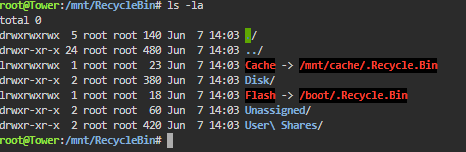
Deleted files do not go to the recyclebin when deleted from share via windows laptop found the below in /mnt dir? 0 space taken up
-
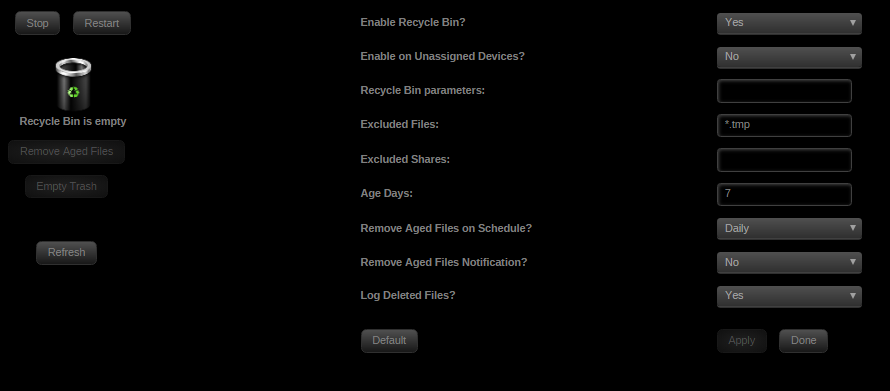
I dont get any error msgs in my logs, this is what is in my smb-extra.conf, let me know what else will help #vfs_recycle_start #Recycle bin configuration [global] syslog only = No log level = 0 vfs:0 #vfs_recycle_end include = /boot/scripts/RootShare.conf include = /etc/samba/unassigned-shares/Crucial_CT240M500SSD1_1332095464B2.conf
-
Am trying to modify the fetch_key to use sftp over ssh with a password .ppk file anyone have a good example? Thanks Myk
-
do we have a fix yet for the changing client ID? otherwise anyone recommend any other dropbox docker?
-
Diagnostics >> Ping >> github.com what do you get? Make sure router is reaching github to start with
-
I don't see where this made it into 6.5? thanks Myk
-
ok, I turned off VPN and web ui shows up - what has changed in the last 2 versions in the last couple of days. It has been working fine for several months and 2 days ago update, and updated again today and when VPN enabled no web ui......? myk
-
I cleared browser cache, cleared out everything in rtorrent session - i still get timeouts trying to connect to web ui..... o even tried firefox on laptop and tablet - get the same thing
-
container has been running fine - got a notification 10 min ago of a new version - did a update - and now the web ui will not load...... what got changed that broke something? Myk
-
CA Resource Monitor Fix Common Problems is hollering: ca.resource.monitor.plg Not Compatible with unRaid version 6.4.0 Minimum OS Version: 6.3.0 Maximum OS Version: 6.3.5 Is it safe to tell it to ignore the problem? Thanks Myk
-
apk not installed
-
will have to run it outside - does not look like python3 is installed in the container root@729a54ad7f7d:/usr/bin# ls -la py* -rwxr-xr-x 1 root root 4123 Dec 10 2015 pyclean -rwxr-xr-x 1 root root 11894 Dec 10 2015 pycompile lrwxrwxrwx 1 root root 8 Dec 10 2015 pydoc -> pydoc2.7 -rwxr-xr-x 1 root root 79 Dec 4 18:11 pydoc2.7 lrwxrwxrwx 1 root root 12 Dec 10 2015 pygettext -> pygettext2.7 -rwxr-xr-x 1 root root 22097 Dec 4 18:11 pygettext2.7 lrwxrwxrwx 1 root root 9 Dec 10 2015 python -> python2.7 lrwxrwxrwx 1 root root 9 Dec 10 2015 python2 -> python2.7 -rwxr-xr-x 1 root root 3492656 Dec 4 18:14 python2.7 lrwxrwxrwx 1 root root 29 Dec 10 2015 pyversions -> ../share/python/pyversions.py root@729a54ad7f7d:/usr/bin# pyversions --installed python2.7 myk
-
is it better to run it in or outside the docker container?
-
ended up running it on unRaid instead of in the docker - since it does not have to be on the same machine, I didn't check if python3 was installed in the docker, but was easy with nerd tools and the user scripts plugin Myk


