





TRaSH
Members
-
Joined
-
Last visited
Everything posted by TRaSH
-
Okay, I think I've figured out the issue I was having, and this could also be the issue for others who experience problems where it appears the mover doesn't work. I couldn't see any single file in my cache that was taking up space, And my 4 TB cache was 90% full. So, something is reserving the space, and it won't be released until you quit qBittorrent. In qBittorrent, disable the "Pre-allocate disk space for all files" option under Settings -> Downloads. I've been testing this option for over 8 days, and it appears to have finally cleared my cache drive.
-
I might have an idea to what it could be related, but i want to test it first before making assumptions
-
I used ncdu, everything was empty in my case But even with ls -alh and what you mentioned it was empty
-
I use a script to pause and resume the torrents that are x days old. But the weirdest part was that i couldn't see any single file on my cache what was taking up the space. And my 4 TB cache was for 90% full So something is reserving the space and it won't be released before you quit Qbt
-
Okay i did some own research, after i disabled the option that the mover button should ignore the settings, i still didn't move all the files, so i was wondering why my cache said it was full when the actual size on the cache used was much smaller. When i decided to stop my Qbt instances for a few minutes it magically released all the space. So perhaps something others want to test
-
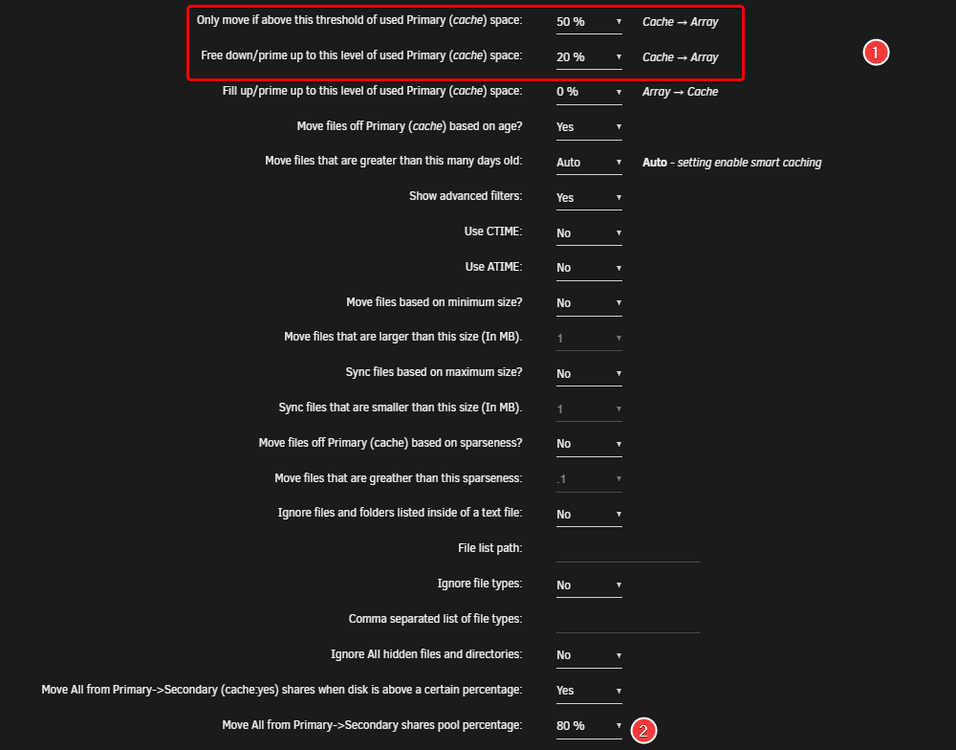
Okay, I've set it to get triggered at 75% and clear till 25% but still nothing gets moved. I wonder if i should just disable the follow rules and just force move everything and then see what will happen
-
1. I changed it to 50/20% 2. Shouldn't this option say: screw it, I'm moving it anyway?
-
@Masterwishx could you also look at this one why it's failing?
-
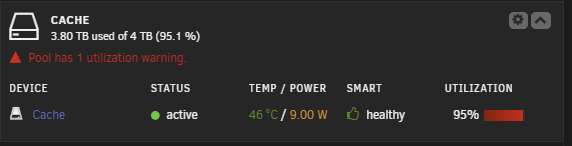
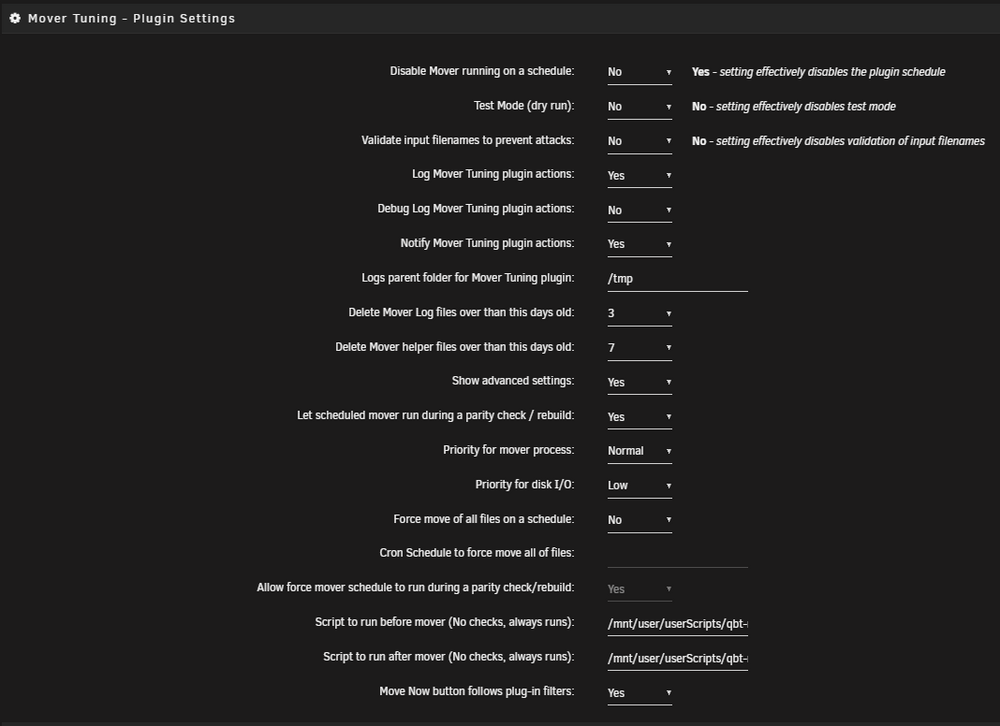
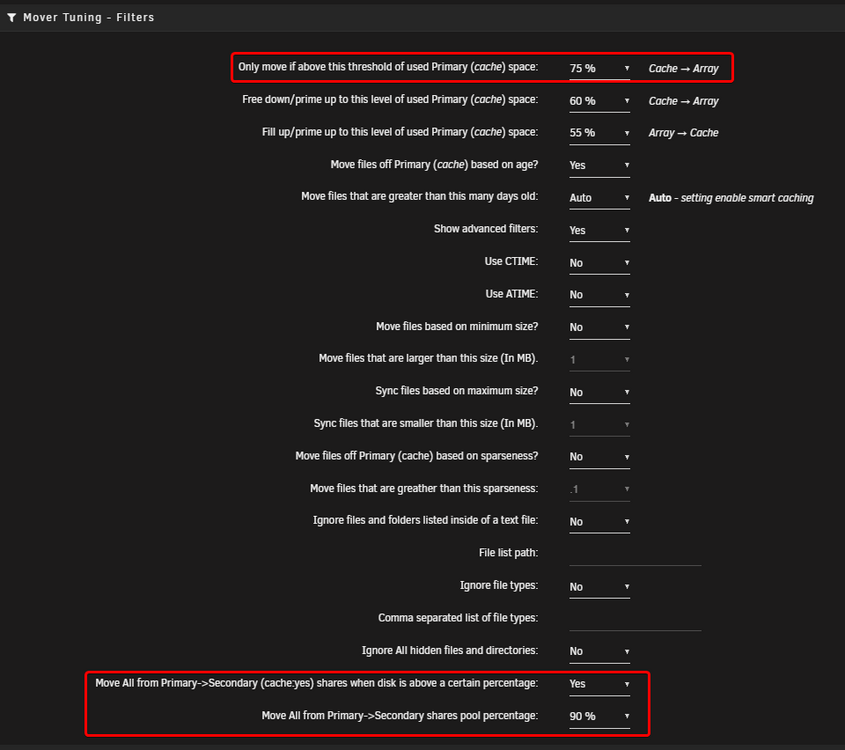
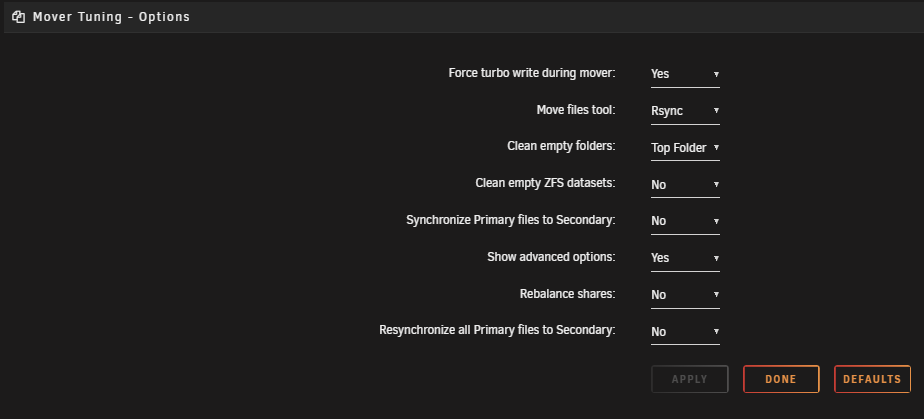
For some reason, the mover isn't clearing my /data share anymore, and my cache drive is at 95% And IIRC, with the following settings, it should clear my cache drive. So I'm wondering why it's not moving the files of the cache drive. Provided also my mover tuning debug ca.mover.tuning-debug-20250908-0131.zip
-
The same happened here after I upgraded, just need to figure out how to downgrade to a working version.
-
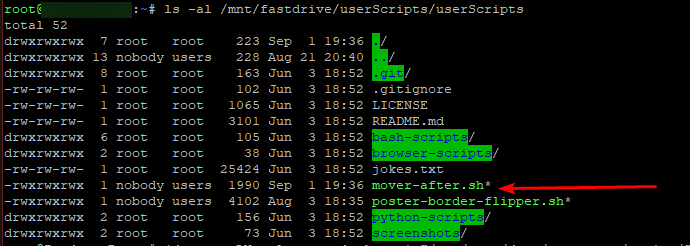
I'm testing something new with this plugin and trying to run a script after the mover tuning started but somehow i get a error that it can't find the script. Fastdrive = another nvme drive i'm using ``` Sep 1 19:46:58 root: Starting Mover Sep 1 19:46:58 root: Forcing turbo write on Sep 1 19:46:58 kernel: mdcmd (92): set md_write_method 1 Sep 1 19:46:58 kernel: Sep 1 19:46:58 root: ionice -c 2 -n 7 nice -n 0 /usr/local/emhttp/plugins/ca.mover.tuning/age_mover start 10 0 0 '' '' '' "/mnt/fastdrive/userScripts/userScripts/mover-after.sh" yes 90 '' '' 30 Sep 1 19:46:58 root: Log Level: 1 Sep 1 19:46:58 root: mover: started Sep 1 19:46:58 root: mover: finished Sep 1 19:46:58 root: /usr/local/emhttp/plugins/ca.mover.tuning/age_mover: line 849: /mnt/fastdrive/userScripts/userScripts/mover-after.sh: cannot execute: required file not found Sep 1 19:46:58 root: Restoring original turbo write mode ``` Solved: CRLF vs LF Left it here for others if they run in to the same issue
-
In my current setup i use bonding (Mode 4 (802.3ad)), main reason was because when I'm doing heavy traffic up/download, i got issues during plex playback because my nic was fully saturated. With these changes i have the feeling i will go back to the same issues before i decided to bond them.
-
I recently upgraded and switched and had exactly the same issue. kinda annoying that the so called not supported nerd tools has a working version and the replacement has a borked version if you still have the old nerdtools installed you can install a version that still works
-
Thnx for this one, wish there was something like this for WD nvme's
-
This should be added in bold text to the changelog including instructions how to load the necessary packages !!!
-
Started fresh after the security issue with rtorrentvpn, also switched to wireguard. When i use my old rtorrent.rc and start rtorrentvpn it connects and i can access the webgui. but when i move my sessions to the new install and start rtorrentvpn i can't access the webgui and get a error, then i tried to rename my rtorrent.rc so it creates a new one, and then i still get the same error. supervisord.log
-
Ahh I think now I understand why yours are called unraid optimized, because you add the actual `/mnt/user/{tv|movies|music}` to it where LSIO and Binhex do have so called consistent path inside the container but let the user choose which path to choose on the host (unraid) Well after they come in to the Radarr discord and we explaining that they use the wrong suggested paths they end up actually changing it. binhex uses inside his container `data` for his download location and `media` for his media location, so when you use all his images they are consistent between each other (the same with LSIO with `tv`, `movies` and `downloads`) but still no instant move and copy+delete. Happy birthday, I will try to figure out something how it can be added. perhaps a warning if they use this path structure they will have copy+delete and higher i/o and no instant move and no hardlink support. and perhaps a link to a guide where it's explained how to set it up for a optimized path structure with the support for hardlinks and instant moves
-
Don't the other Community Developers use between their container images the same path structure ? I know Binhex and LSIO do. It isn't only my preferred way it's the overal proffered way, why would you want slow copy+delete and with torrents double file usage if you could make use of hardlinks ? The overal recommended way would be to use 1 main share with the subfolders under it, this way you would get instant moves and hardlinks working. And you still can lock certain clients to have only access to to certain folders. (like lock your download client to have only access to your download location and plex etc only to your media location) SOURCE That would be for sure the wrong location It would be better to use something like the following => create a share called for example `data` and in that share create sub folder named: `downloads` or `usenet` and `torrents` if you use both, and a `media` folder where you create in the media folder `tv`, `movies` and `music` and use the following Bind mount depending which application you're using for the ARR(S) (Sonarr, Radarr, Lidarr, etc) => `/mnt/user/data/` for your usenet client => `/mnt/user/data/usenet/` or `/mnt/user/data/downloads/` for your torrent client => `/mnt/user/data/torrents/` or `/mnt/user/data/downloads/` for Plex, Emby, JellyFin and Bazarr => `/mnt/user/data/media/` Yeah for new users it could be sometimes a problem to understand. Binhex has the same not recommended path structure as LSIO and yours got. One of the main reason why I started about the path structure thing is because I'm a member of the Radarr support team, and we get allot of unraid users in the discord channel with questions why importing takes that long especially with 4K, and why they have double file usage when using torrents. Or even worse download directly in to their media library and then wondering why Radarr (and the other arr(s) aren't able to import it. And then we need to explain that most of the unraid Community Developers recommend/suggest to use the wrong paths.
-
I see you mentioning "unraid optimized"...in what way would these be optimized compared to the images of other docker maintainers? Another thing I noticed in the used template (and it's a shame others use/recommend this also) Is the NOT recommended (By Radarr/Sonarr Support Team+Devs) way of passing in two volumes such as the commonly suggested /movies and /downloads makes them look like two file systems (Because of how Docker’s volumes work), even if they aren’t. This means hard links won’t work and instead of an instant move, a slower and more io intensive copy + delete is used.
-
Changed it, and i also redownloaded a new .conf file just to be sure. and now it works. Time for me to test it also with rtorrentvpn and then see how the speeds are going
-
I'm trying to get QbtVPN running with Wireguard, My VPN service (Torguard) supports Wireguard and portforwarding. I read the 2 links VPN Docker FAQ and Further Help. I also tried rTorrentVPN and i'm getting the same error. 2020-10-14 20:21:44,495 DEBG 'watchdog-script' stdout output: [debug] Having issues resolving name 'www.google.com' [debug] Retrying in 5 secs... [debug] 11 retries left I've added the supervisord.log that i run with the debug enabled.supervisord.log Also added the docker compose of unraid. Yes I know i don't use the default ports, but it's because i have those ports already in use version: '3.3' services: nginx: ports: - '80:80' - '6881:6881' - '6881:6881/udp' - '8085:8080' - '8119:8118' volumes: - '/var/run/docker.sock:/tmdocker' - '/mnt/disks/VM/appdata/binhex-qbittorrentvpn:/config:rw,slave' - '/mnt/user/data/.torrents/:/data/.torrents/:rw' - /config - /data container_name: binhex-qbittorrentvpn environment: - VPN_ENABLED=yes - VPN_OPTIONS= - 'NAME_SERVERS=209.222.18.222,84.200.69.80,37.235.1.174,1.1.1.1,209.222.18.218,37.235.1.177,84.200.70.40,1.0.0.1' - ADDITIONAL_PORTS= - PUID=99 - DEBUG=true - PGID=100 - VPN_USER=VPN_USER - VPN_PROV=custom - STRICT_PORT_FORWARD=yes - WEBUI_PORT=8085 - LAN_NETWORK=192.168.2.0/24 - UMASK=000 - TZ=Europe/Berlin - HOST_OS=Unraid - VPN_PASS=VPN_PASS - VPN_CLIENT=wireguard - ENABLE_PRIVOXY=no - 'PATH=/usr/local/sbin:/usr/local/bin:/usr/sbin:/usr/bin:/sbin:/bin' - HOME=/home/nobody - TERM=xterm - LANG=en_GB.UTF-8 network_mode: bridge privileged: true restart: 'no,always' logging: options: 'max-file=1,max-size=50m,max-size=1g' image: nginx
-
Using up number it have the error, Using host name and it worked
-
if i use krusader it only shows me the *.tar.gz and when i go in to it it shows me the files. any settings that might got messed up that it's double packed for me ? my settings
-
I was wondering when looking at the following why is the *.tar.gz bigger then the *.tar inside the *.tar.gz ?
-
i'm using the "linuxserver/nzbget" version and i don't have that issue anymore using Currently installed: 21.0 version. i used to have the stuck issue a few times even when i was testing it on my windows machine.




