






Hoopster
Members
-
Joined
-
Last visited
Everything posted by Hoopster
-
He joined the forum on Friday afternoon and called it quits by Sunday morning. Perhaps he felt there was too much to understand with unRAID and bailed for an "easier" option? I am not sure how TrueNAS qualifies as easier (admittedly I have never used it so I am just going off third-hand accounts). It's too bad as he could have have been helped to understand unRAID better and it would have met his stated needs very well.
-
Being a "newbie" here does not mean you are automatically ignored. In fact, this is generally a very helpful forum for all users both new and experienced. I use unRAD for all the things you mention except for Steam hosting. It appears that @trurl has been trying to help you out and provided some useful information. He is one of the "rockstars" in this forum as far as providing useful support. I see where he referred you to the manual and help files not as a "don't bother us with your questions until you read the manual" answer but as a source of additional information. In fact, his last reply to you specifically stated that you should post any questions you have. What additional help do you need? Trurl explained how cache and the Mover work. FYI - support in these forums is overwhelmingly from fellow unRAID users who are volunteering their time to assist. No one is intentionally ignored but help can be dependent on when someone is available to help. For visibility here is Krackster's original request for help if anyone would like to take a crack at further assistance. If TrueNAS is your choice, I hope it meets your needs.
-
Did you recently do the password change after the Plex database hack? Did you select the "logout all devices" option when doing the change? If not, remote users are still logged in under the old password but if they logout, they will be locked out as well. After password change, I had to get a new claim token in order to see my local server. Since it expires after four minutes and I had not used it in that time, my local Plex server was unavailable. I had to get a new claim code and use it immediately to get access.
-
Yep. I had no idea the claim code had an expiration time. 4 minutes, apparently. Sent from my iPhone using Tapatalk
-
What do you have on your flash drive? Mine is 8GB but only 917 MB is occupied and I have lots of dockers, plugins and user scripts. Instructions are here for changing the flash device.
-
Well, that was an adventure getting Plex going again after the password change. Thanks to posts here, I eventually figured it out. I added the PLEX_CLAIM variable and deleted the indicated lines from the preferences.xml and it was a no-go. Server kept being reported as "unavailable" even though it was running fine. Turns out I had to get a second claim code as the first one had expired while I was messing around. This was more difficult than it needed to be. I now have a better understanding of why some people prefer Emby/Jellyfin; they don't have to deal with Plex online login issues. Be that as it may, I still prefer Plex for my overall needs.
-
@robti Very true. I just lumped all of this under my statement "I wanted to be able to handle media types differently for various scenarios." Backup scenarios also come into play for me. I just found it all easier to manage for my use cases with media type having their own share. For others, it will be different.
-
The "recommeded" way is the way that works for your needs. Both of the organization methods you listed above are fairly common. Personally, I organize my shares based on media type (movies, tv, photos, music, documents, backups, etc.) Others prefer to have one top-level folder/share and subfolders for each type. I wanted to be able to handle media types differently for various scenarios and find it easier to do so if they are each their own share. The same could be said for one share with sub-folders for media types depending on what best meets your needs. Just keep in mid that any top-level folder created on a drive in the array becomes a share whether or not you created it as such through the Shares tab in the GUI.
-
From a post earlier in this thread: To be able to use them without a reboot use unraid CLI to navigate where you put the packages and run installpkg <filename> On my server running the 6.11.0 rc3, I have done this with a few of the packages previously loaded via Nerd pack. No reboot required.
-
I set up Nextcloud (probably followed the video) a couple of years ago and found I rarely used it. I no longer have it installed, but everything was working. There are probably others with more current knowledge on getting it set up
-
Have you setup iGPU transcoding per this guide?
-
WireGuard VPN is built into unRAID and is great for remote access. Setup instructions are here.
-
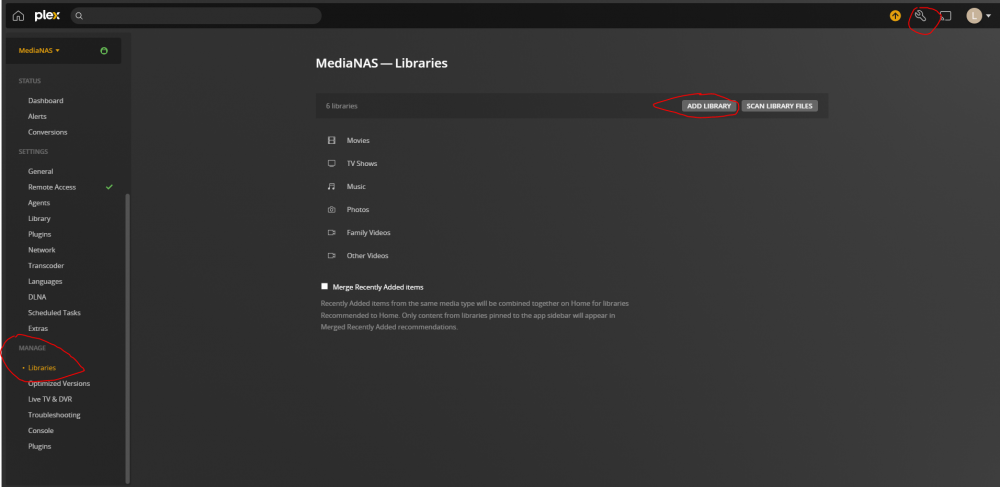
Have you claimed your server, logged in Plex, etc? Yes, the WebUI for the Plex docker containers will act as a client but it also has server management functions. You need to click on the wrench icon (settings) in the upper right corner. Under Manage in the left hand pane, you can add Libraries and link them to content on you unRAID server.
-
The highlighted button in the GUI allows you to view the last lines of the syslog. If you want to view the entire syslog, you can open it in any text editor. If you have the syslog server set up, the syslog could grow to be quite large over time.

-
Thanks. That's what I assumed and have already done this in anticipation of 6.11.0 release.
-
I have a backup script that is dependent on ipmitool from the nerd pack. Is there likely to be a solution for that or do I need to install it manually?
-
And since I have plenty of room behind the server and wanted to avoid the need to open the case to get at the Unraid flash drive, I went with a USB adapter that provided ports on the back. Fortunately, there are both options depending on needs.
-
Although I have WireGuard setup on my Unraid server for remote access, I also have it on a Raspberry Pi with a split tunnel. Here is a good tutorial on setting up split tunnel users on PiVPN. There are several good tutorial online for installing and setting up WireGuard on a Raspberry Pi; Here is one such tutorial.
-
Plex issues related to audio transcoding are often fixed by deleting the codecs subfolder from your Plex location in appdata. This forces Plex to download the codecs again as needed and clears out any corruption that may exist in current codecs.
-
It is not an absolute requirement that you have to use a USB 2.0 port with a USB 2.0 flash device. However, it is often recommended depending on how well USB 3.0 is implemented on your motherboard. My current main server motherboard only has USB 3.0 external ports so I used an adapter that plugs into the onboard USB 2.0 header and gives me 2 USB 2.0 ports on the back panel. What I linked is a 4-port version but I have something similar for 2 USB 2.0 ports. This DOES NOT occupy a PCIe slot. It works great. I imagine what you linked would work equally well but I have no experience with that device. On my backup unRAID server, I have a USB 3.0 flash drive plugged into a USB 3.0 port and have never had an issue with it disconnecting or being problematic.
-
No problem. I am glad you found it.
-
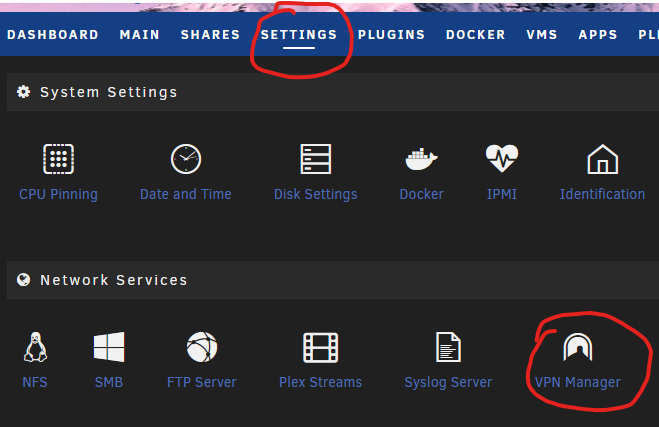
It's not under the Tools menu which you show in the screenshot. As Itimpi mentioned, in unRAID 6.10.3, you should find it in the Settings menu as VPN Manager. It is no longer a plugin so it is not in Plugins either.
-
Perhaps you should post details in the WireGuard thread. It is certainly not "normal" that WireGuard kills your Internet connection.
-
You might need a static route defined in your router (I needed this) to access other devices on the home LAN (including docker containers on a VLAN). This is covered in the Complex Networks section in the link trurl provided. I have WireGuard working like a champ for remote access to my unRAID server, docker VLAN, and other devices on the LAN. I have access from two iPhones and two laptop computers running Windows. Prior to WireGuard built into unRAID, I was using OpenVPN. WireGuard is much simpler and a "lighter" protocol.
-
This is not a direct solution to your problem but three times in the last month and a half I have been on vacation and accessed my sever remotely through WireGuard. Plex is setup for remote access and we have watched many movies from the Plex server at home. I am obviously not using reverse proxy and Cloudflare but Wireguard is very secure and easy to use as it is built into UnRAID. Sent from my iPhone using Tapatalk





