






Hoopster
Members
-
Joined
-
Last visited
Everything posted by Hoopster
-
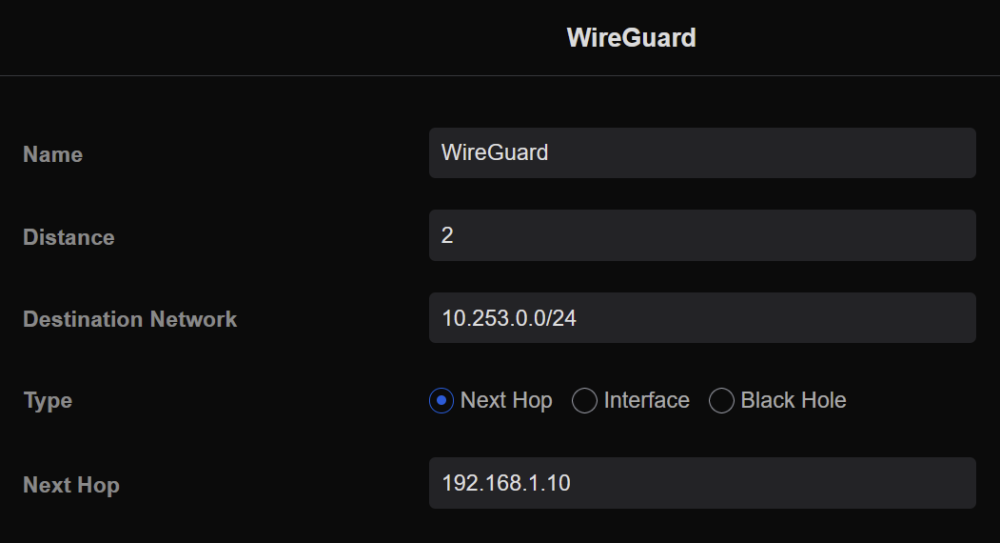
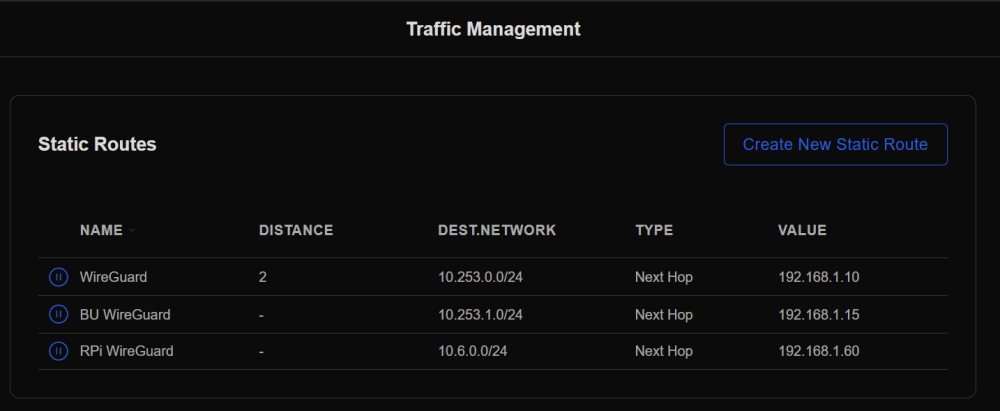
In my router (Ubiquiti USG), the static route configuration looks like this with WireGuard network as Destination Network and unRAID IP address as Next Hop: In fact, I have three different instances of WireGuard on my LAN each with a static route. Is the configuration screenshot from your router a static route or is it some other kind of routing rule?
-
unRAID version 6.11.2 has a bug where it is unable to format drives larger than 2TB. If it can't be formatted, it can't be added to the array. Upgrade to version 6.11.3 where this bug is fixed and try again.
-
Since I have never used anything but unRAID, I am not in a position to compare. All I can say is that in the 11 years I have used unRAID, I have never lost any data except via user error. My wife accidentally deleted an array folder full of thousands of photos. Fortunately, I keep multiple backups and that problem was easily solved. I have been through a couple of rounds of drive replacements/rebuilds with every disk on both my arrays (including cache drives/pools) without a single problem. I am not an unRAID "power user" as I don't run many VMs or take full advantage of all the features of unRAID; however, I am also not a basic user using it only as a NAS. I have a fair amount of Docker containers in active use and run several users scripts. I also use unRAID as the Windows backup location for three PCs in the house and frequently access it remotely. It gets a pretty good workout. I think the more it gets pushed to its limits (I have no idea how you use unRAID), the more likely it is that something "breaks." The good thing in my view is that there are a lot of limits that can be pushed in unRAID and those keep expanding. Yes, it is a double-edged sword. I recognize that you have had legitimate issues with unRAID and am not attempting to minimize that. My one "concern" with unRAID is that it has been growing so fast in popularity lately that many true "noobs" are attracted to it and serious mistakes can easily be made. I started my unRAID journey knowing zero about Linux but at least with some technical background and understanding. It was a simple NAS then and I was able to grow with unRAID as it added new features and functionality. unRAID started out as a "geek toy (not said disparagingly)" and still has some of those roots. Not everything is bullet proof and a lot of bullets get fired by new and, sometimes, even experienced users. I don't know of any OS that is bullet proof. The team at Limetech does a great job listening to users and addressing concerns. Could they be more proactive is preventing issues from occurring in the first place? Perhaps. However, I am satisfied with where unRAID is now and where it is going in the future.
-
Although mine is a very specific use case, I documented my syslog setup in this post. It uses a <custom> syslog location.
-
Are you looking for something other than the syslog server functionality in unRAID? I have a persistent syslog setup on both my servers. They write to a flash drive (not the same one as unRAID boot flash). One of my syslogs goes back almost a year.
-
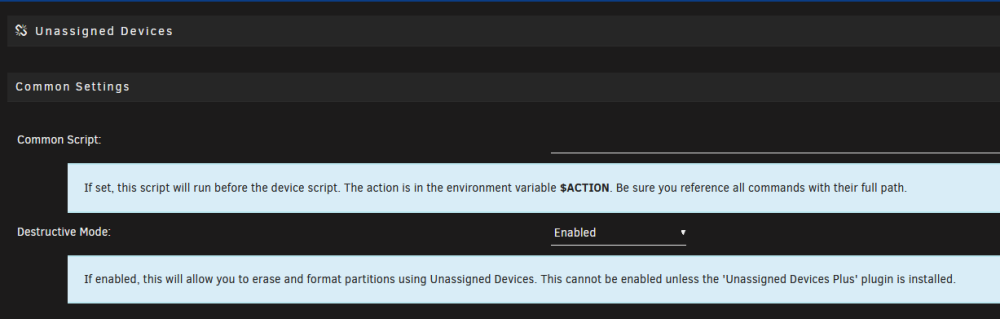
The worst CRC situation I have seen did involve a drive being disabled by unRAID but I was able to recover. Notifications one day indicated CRC errors were growing rapidly on a particular drive and it accumulated over 1100 errors in about 15 minutes. Finally, the drive was red-balled before I was able to get to the server to look at the problem. All those CRC errors eventually resulted in a write error. I told unRAID to temporarily ignore the errors on that drive and rebuilt the drive onto itself after replacing the SATA data cable and making sure it was well connected on both ends. Of course, you cannot reset the CRC count on a drive so it continues to report 1108 CRC errors but it has never increased in more than a year. That is the one and only case in 11 years with unRAID where I "lost" a drive in the array due to CRC errors. In fact it is the only disabled drive situation I have ever seen in my two unRAID systems (knock on wood).Sometimes, the network.cfg and network-rules.cfg can get messed up. It has been known to happen in upgrades. Delete these files from the config folder on your unRAID flash drive and reboot. New default files will be created but your server will get a DHCP address. You can then change network settings if you need to. Alternatively, if you have a flash drive backup from before the problem occurred, you can try restoring these files from the backup.I have this in my go file to limit transcoding to 16GB and to recreate the folder in RAM on reboot: mkdir /tmp/PlexRamScratch chmod -R 777 /tmp/PlexRamScratch mount -t tmpfs -o size=16g tmpfs /tmp/PlexRamScratch Many are using as little as 4GB RAM for transcoding and it works fine. With this, the mapping in the Plex docker container is /transcode to /tmp/PlexRamScratch and /transcode is specified as the transcoding location in Plex.The default Plex transcoding location is {path to Plex folder in appdata}/Library/Application Support/Plex Media Server/Cache/Transcode/ Even mapping /transcode to /tmp can result in your system running out of memory. When recording with the DVR, Plex likes to use a lot of space so you can timeline scrub a show while recording. It deletes nothing until the recording is finished and can use up to 16GB for an hour of recording. Not ideal. I limit the space allocated to transcoding in RAM to 16GB total (out of 64GB on my server) which forces Plex to delete session files that have already been played or recorded since I never watch a show that is currently recording.Thanks for the transparency. Also, a big thank you for identifying and fixing the issue rather quickly. Although I was not impacted by the bug, many new users or existing users building new systems or upgrading disks were impacted. It is easy to see how this particular issue fell through the cracks and went undetected until release; however, as it is now a known scenario hopefully it has been added to future pre-release testing regimens. It's kind of a big deal when a disk cannot be added to an array because it cannot be formatted. 😁UD is the Unassigned Devices plugin. As mentioned, you need to enable destructive mode by first installing the unassigned devices plus plugin (in addition to unassigned devices).
 I agree. That's why my unRAID to unRAID backup is all scripts and command line tested.Glad it is resolved. These forums have helped me numerous times so I am just happy that I was able pass on something I learned here to another unRAID user.For those who may have an interest in the PiKVM, here is a list of international sellers:
 @mMmmmM Also fill out the survey recently posted soliciting feedback for unRAID future development.You should put in a feature request for Checkmk support with your explanation of why it would be useful in unRAID. That way you can be assured it is seen by people at Limetech.You can go either way but the iGPU is sufficient and many of us use that rather the expense (and additional power consumption) of a discrete graphics card. Highly, highly recommended but of course an unRAID server will run without being attached to a UPS. Having a UPS will save you from unclean shutdowns and the resulting automatic parity checks on restart when your server loses power. Size depends on how you intend to use the cache drive. I personally have a 500GB NVMe M.2 SSD as a cache drive but I only use it for appdata storage and some downloads. If you intend to cache writes to the array it may need to be bigger if you typically write large amounts of data to the array in a single data transfer.Shucked drives (especially WD) often do not show up due to the 3.3v reset problem. I have a couple of shucked drives that had this problem and some kapton tape fixed it. Also a Molex to SATA power adapter is another possible solution. Watch the linked video for an explanation.Yes. A parity disk is not required. Its main benefit is to protect from failure of a disk. It is not a backup solution anyway so as long as you are backing up your data and don't care about having to manually recover the contents of a failed disk, parity is not required.Looking forward to your report on how it works for you. It definitely has the advantage of not being tied to a particular computer/motherboard and makes future upgrades more worry (and cost) free!Assuming you are trying to do Plex transcdoing, What is your CPU? Does it have an iGPU or are you trying to use a discrete graphics card for transcoding? If using an iGPU, do you have the iGPU specified as the primary graphics adapter in your BIOS? What Plex docker container are you using? For iGPU, Do you have a /dev/dri folder on you server with the proper contents for transcoding? For iGPU, Have you specified /dev/dri as a device for the Plex container to use? For discrete graphics card, have you setup NVIDIA-VISIBLE_DEVICES variable? In other words, if you are using an iGPU have you done everything specified in this tutorial? If using a discrete Nvidia graphics card, have you done everything in this tutorial?Yes, that information should not have been omitted.The problem @venicenerd was having was resolved by setting up a static route between WireGuard network and unRAID server IP as explained in the Complex Networks section of the first post of the WireGuard QuickstartLogs after a reboot do not usually contain anything useful as anything that was recorded prior to the reboot is lost. You should setup the syslog server which will allow recorded information to survive reboots. After configuring the syslog server, post diagnostics again after you experience another lockup.






