






Hoopster
Members
-
Joined
-
Last visited
Everything posted by Hoopster
-
Attach diagnostics to you next post.
-
@Elmojo My desktop and laptop Windows machines have the same scale and display resolution settings as those noted by @trurl.
-
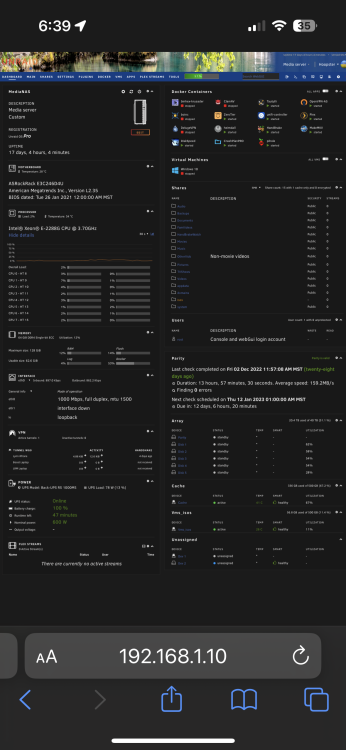
Yes: or IP address of server Nope Same behavior on Windows 11/10 desktops and laptops and also my iPhone 14 (not the best way to access full GUI) and my wife's iPad. Below is iPhone screenshot: Nope. Obviously, you do not see this behavior but it appears to be the "normal" behavior. Something on your system must be preventing it.

-
I tried all three of the above browsers and it works just as @JonathanM described and in the video clip. Narrow the browser window and the GUI resizes to fewer, longer columns.
-
I have never had a PSU issue on an unRAID server but the behavior you describe sounds quite a bit like a failing PSU. I have experienced similar behavior on desktop computers and a PSU swap was the fix in all cases. It does sound like you have a hardware-related issue and these are often hard to track down as usually all you can do is replace suspected components and see if the problem goes away.
-
Some general observations (not direct answers to your questions): 1. I also have Unifi hardware exclusively in my LAN (USG, two switches, five access points) 2. I used to get frequent server crashes (macvlan broadcast call traces) with macvlan (this was years before ipvlan was even an option). 3. The call traces happened when I had docker containers with IP addresses on br0 (no problems if they were in host or bridge mode using server IP address) 4. I created a VLAN (br0.3) in Unifi and unRAID just for docker containers and the macvlan call traces/server crashes disappeared 5. I switched docker network type over to ipvlan as soon as it was an option (although I suspect it was not necessary as I had already resolved the problem with macvlan) 6. As far as I have observed, I have experienced no DNS issues with Unifi hardware and ipvlan but then I am doing nothing in particular with it other than pointing clients to PiHole for DNS 7. I assign IP addresses to docker containers manually and do not have a DHCP pool set for the Docker network in unRAID. The DHCP range in Unifi controller is set to not include the range of addresses I assign to docker containers I cannot answer the questions about how unRAID and its implementation of Docker behaves with respect to network interfaces, MAC addresses, etc. For users experiencing server lockups related to macvlan, the recommendation is to switch to ipvlan and it resolves the issue in most cases.
-
If you are running UnRAID 6.9.x or greater, no go file modifications are needed. See the release notes for the version you are running to see how it deals with i915 drivers. Sent from my iPhone using Tapatalk
-
I image three desktop/laptop computers weekly to my main unRAID server and (as mentioned above) have a second unRAID server that serves as a backup location (drive by drive rsync) for my main server. Parity does a great job recording all those deletion and file corruption actions! I will sure be glad I have it if there is a need to replace or rebuild a failed drive but data backup is not its purpose.
-
My wife unintentionally deleted a whole year's worth of photos from my server. She has no idea how it happened because she did not intend to do it. Since I keep three backups of all the important data on unRAID (external USB drives, second unRAID server with weekly backup, in the cloud), restoring that folder for a whole year of photos was pretty easy. There is no way parity was going to save me (her) from that. Now that I know better, I have told my wife to never accidentally or intentionally delete something again because that has to be a deliberate action even if she claims she does not know how she did it!
-
Yeah, it's borked or everyone stopped posting problems (or anything else) for hours.
-
Can you not change the IP address of the new modem to 192.168.1.1? I have done this with a couple of router/firewall replacements. They came with a different network IP address and I changed them to 192.168.1.1 so as to avoid having to change everything on the LAN to a new network address range.
-
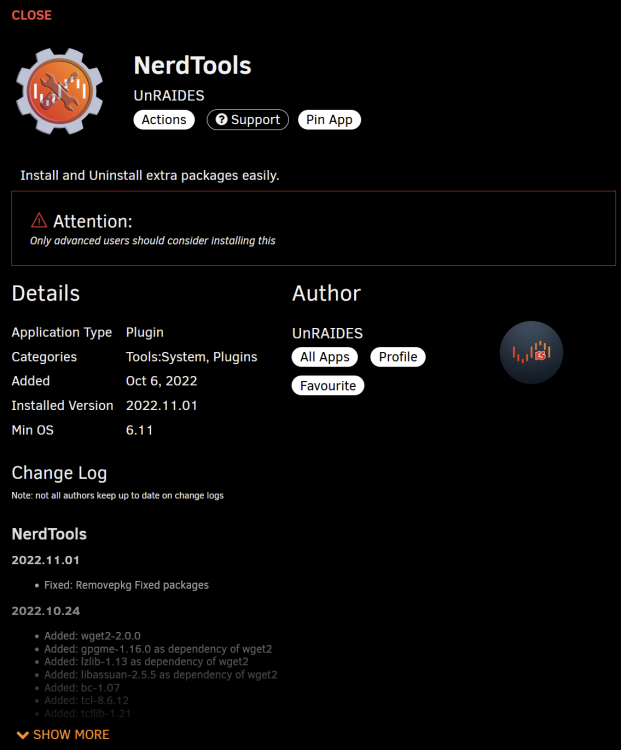
Debido a problemas con compatabilidad con unRAID 6.11.x Nerdpack ya no existe. Se puede instalar Nerdtools que lo reemplaza. No todas las herramientas del Nerpack existen con Nerdtools pero muchas, sí.
-
Can you install 7.2.95 (last known "best" version) with the :7.2.95 tag or will it not let you roll back now that you are on a 7.3.xx version?
-
Updated listing with information about an available Raspberry Pi 4 Model B 2GB RAM kit in the U.S.
-
It is not clear if you are using unRAID but it does not support RAID for array drives. After all, it is "UN" RAID.
-
Avoid anything with a port multiplier (the JMB575 chip on that card). A port multiplier just divides available bandwidth between more ports and performance will suffer when all attached drives are in use, as you discovered. As mentioned in the first post of this discussion there are the 9201-16i, 9305-16i, etc. LSI 16-port cards. They will not be cheap but perhaps you can find a good used one somewhere.
-
@trurl may respond with something else after looking at your diagnostics but I got that same behavior once after a hardware swap because new board wanted to boot in UEFI and my unRAID USB was set to boot legacy. Changing to UEFI (remove the "-" character on the EFI- folder on the unRAID USB flash) allowed it to boot properly after also specifying UEFI:{name of USB flash drive} as the first boot item in the BIOS.
-
2GB is plenty. As noted here and here most pre-assembled PiKVM units include a Raspberry Pi 4 with 2GB RAM. The Geekworm $290 version with a Raspberry Pi 4 with 8GB RAM is an anomaly. And it says this on the PiKVM DIY page: Raspberry Pi board: Recommended: Raspberry Pi 4 (2 GB model is enough) for the best performance. However, the 1GB models will also work.
-
Updated listing to include 16GB MicroSD card with PiKVM OS and battery for RTC. Added a picture of everything included.
-
99.9% of the responses in these forums come from fellow unRAID users and not Limetech employees. The "stubborness" to which you refer is unRAID users giving you the only available solution which is "use a wifi bridge or a powerline adapter." Other than suggesting something that does work, the only other option would be "find a different NAS OS that does support wireless drivers if it is that important to you." No one replying with a suggestion has the authority to commit Limetech to including wireless drivers in unRAID. Limetech has demonstrated no interest in adding wireless drivers to unRAID. This issue has been discussed for years. When Limetech does ask via poll or survey what features users want in unRAID, they never list wireless drivers as an option they are considering. When I wanted to add a backup unRAID server in my basement, I punched a hole in a closet floor and dropped an Ethernet cable downstairs so I could run unRAID there. Not the most elegant solution, but it worked and the cable is mostly invisible. Lacking a direct response from Limetech with any new information, the responses given are just users trying to help and echoing what has been said in the past. It does not appear that wireless drivers in unRAID are even on the roadmap let alone something that will come "soon."
-
And mine just says "custom" on both my server.
-
Not at all. When you are relatively new to unRAID, there are lots of things that if not understood can be frustrating. We all went through it. I have found over the years that there are very few truly unrecoverable situations and those usually come down to hardware failures and often not issues with unRAID.
-
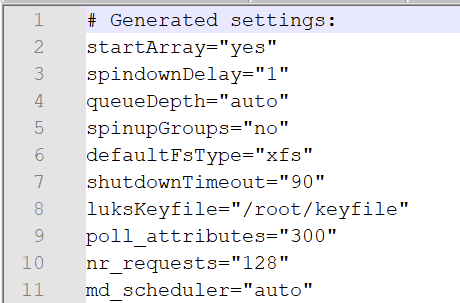
In addition to what Kilrah said, if you have a situation where you need to set the array to not autostart and cannot edit in the GUI, you can just edit config/disk.cfg and set startArray to "no" so it will not autostart on reboot.
-
Memtest is an option on the unRAID boot menu when you reboot the server.
-
Not much to go on unless you post your diagnostics for someone to review.







