






Hoopster
Members
-
Joined
-
Last visited
Everything posted by Hoopster
-
https://community.ui.com/questions/Access-point-is-connected-to-a-PoE-port-incapable-of-providing-enough-power/fbc95e92-38ca-4021-b593-7c0b54e28837?page=1 It's quite the interesting read. The official responses from Ubiquiti all read like "you have been powering your UAC-AC-IW with a switch that does not provide enough power and you are complaining that we are now telling you about it? Go buy some more hardware to fix the problem we caused!" Only if you use the PoE passthrough is it a problem and most (including me) are not using it and have been fine for years yet the 7.3.xx controller releases are effectively making the access point useless because it keeps forcing a restart. Hopefully, that is the short-term fix until they at least give us the option of ignoring the warning and preventing the AP restart loop as many have suggested. The only other option is to buy a PoE+ capable switch or, in my case, rewire that AP to my Ubiquiti 16-port 150W PoE switch which does support PoE+ but is a lot farther away than the 8-port switch. I guess using a PoE injector is another option.
-
Anyone upgrading to controller version 7.3.83 be warned. If you have a UAP-AC-IW access point (and probably other AP models with PoE passthrough) powered by PoE from a US-8-60W switch, it will go into a restart cycle and the log will be spammed with errors saying it is being powered by a PoE port incapable of providing sufficient power. Ubiquiti is now claiming the UAP-AC-IW (and probably others with PoE passthrough) requires PoE+ which the US-8-60W does not supply. Even though I and others have powered this in-wall AP for years from a US-8-60W and their own documentation says the UAP-AC-IW is compatible with the US-8-60W they will not admit it is a software problem and want you to buy a higher cost switch providing PoE+. I had to go through the process of downgrading to 7.2.95 which is not straightforward because of database changes. Fortunately, a fellow Unraid user has posted the process in the Ubiquiti forums because he had the same issue with a prior 7.3.xx version of the controller. After rolling back to 7.2.95, my UAP-AC-IW is happy again. Here is the process to roll back to 7.2.95 from 7.3.xx for those of us running the controller in a docker container: Working solution: What eventually worked (and I'm aware this is not the same situation as some as I'm using a UniFi Controller docker container running on a home server and not a cloud key). I backed up (and downloaded an offline version, specifically one that was <= the version I was targeting) my settings from UniFi Controller, I then also made a backup of my appdata (docker images within Unraid). Shutdown the UniFi container, changed the branching tag from :latest (or 7.3.83) to :7.2.95. Through console renamed the docker appdata from unifi-controller to unifi-controller-backup (again, just in case) and then started up the container again. When starting up the UniFi controller I had the option to setup my network as fresh or restore from a backup file. I uploaded the file I downloaded earlier. And boom, everything fixed, no errors, no rebooting.
-
I also just completed the migration to 7.3.83. A "database migration in progress" message appear briefly when I started the GUI and the re-adoption of all devices (8 in my network; USG, 2 switches, 5 APs) took less than two minutes. All appears to be working well. Oops, spoke too soon. The controller is reporting my IW AP is connected to a POE port incapable of providing sufficient power and that two devices have the same IP address. Neither were an issue before the controller update. Off to troubleshoot.
-
In general USB attached drives are not recommended for permanent array storage with Unraid. For "attached when needed" unassigned devices there are usually no issues. The problem is that USB implementations vary by motherboard/chipset and some are not very stable. They are often prone to random disconnects. If USB-attached drives are in an array, they cause havoc, especially with parity, if they disconnect in the middle of a write operation. Heavy traffic such as large file transfers or transferring a large amount of small files can trigger a USB drive to disconnect. Your mileage may vary and perhaps your hardware is stable enough with USB that it may work for you with Unraid. There is just no sure way to tell before you try it.
-
Copy and paste here. Problem solved. I ignored most of the morse code stuff but I must admit I succumbed a couple of times to curiosity. 😁
-
I seriously doubt Unraid is ever going to move to Ubuntu as its base Linux distro. Of course, I would never say never and I have no inside information. I have no idea why Limetech chose Slackware specifically, but, Unraid is more of a special-purpose appliance OS and is not a full Linux distribution. It is intentionally lightweight and does not include many of the pieces included in a full Linux distribution Unraid loads from the USB drive into RAM on every boot. It was designed at a time when lots of RAM was not a given and it needed to have a small RAM footprint Occasionally, more things are included in base Unraid (such as iperf3 and perl recently), but only when there is a specific perceived need The LImetech team is very small. I don't think they have the manpower or interest in maintaining different Unraid distributions based on scaled-down Slackware and full Ubuntu None of this is intended to argue against Ubuntu. It is simply an explanation based on my understanding of where Unraid is today and why that is the case based on historical need and design philosophy. Limetech does understand the need to go beyond what the base system offers; thus the plugin system and the architectural changes to better support the inclusion of drivers such as the Nvidia graphics drivers. Is it a perfect solution? No, but it gets most people very close to where they want to be with a special-purpose NAS OS. I don't think the intention is to ever make Unraid a full Linux distro.
-
Not likely unless you have a backup of it somewhere outside the array. Parity is not a backup. It has no actual data on it and is just a bit calculation that helps recover a failed disk (also requires all other data disks to be readable and accessible). A format operation also updates parity so parity now thinks disk 7 contains nothing but a file system.
-
I would suspect the PSU has gone bad. Twice I have had similar issues that turned out to be a bad or failing PSU. Fans spin up briefly then system shuts off or system starts completely and then shuts down after running a few minutes.
-
Unbalance plugin is what I suggest. Then set desired shares to only use disk 6 in the share settings.
-
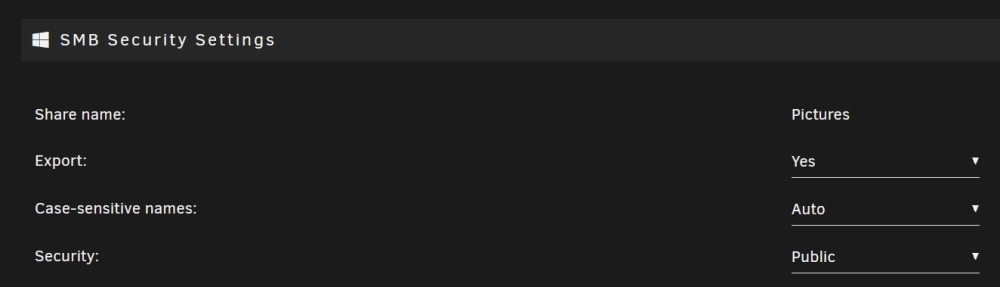
I will let @trurl continue once you post diagnostics, but, for share contents to be accessible on a PC in the LAN, the shares need to be exported with the appropriate sucirty setting. Public is probably easiest until you get thing sorted out. You don't have to map network drives to access shares, but, it is one way of getting to exported shares.
-
From the PC are you trying to 1) just access the Unraid GUI? 2) access the shares and contents of the Unraid array? 3) both?
-
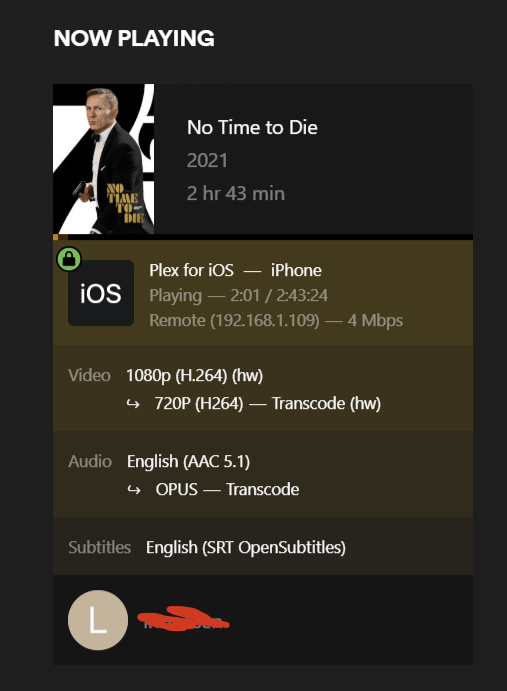
/tmp is often the generic way of specifying transcoding to RAM. I don't know how you have it setup. In my system, I transcode to /tmp/PlexRamScratch which has a size limit of 16GB. While a movie is hw transcoding I see this activity in the designated transcode location of /tmp/PlexRamScratch/Transcode/Sessions Additional plex-transcode files are created as needed. If no other transcode location (RAM, SSD, etc.) is specified, or is improperly configured, in the Plex docker container configuration, Plex defaults to cache\appdata\plex\Library\Application Support\Plex Media Server\Cache\Transcode\Sessions for transcoding which could cause appdata location utilization to get very high. When the transcode ends, the files are deleted and utilization goes back down.


-
When transcoding is taking place., check in whatever location you have transcoding set to (/tmp or wherever the RAM location is). When transcoding is taking place, there will be a Transcode/Sessions folder and the transcoded files are created real time in the sessions folder.
-
That certainly has the grunt to do what you need but, as seen here, even a modern i3 (such as the 12300) may be enough. iGPU/QSV in the modern core processors is much better than it was in the i5-3570K. It is sufficient for Plex even if you have transcoding needs and cannot direct play all content. The 12700K will give you even more headroom, of course, and enough even to run a VM.
-
I get the feeling you could post this every month for a long, long time and it would still be true. Notice how it never shows up as an option for voting in wish lists or feature request polls? It's an often-debated topic in these forums but no one from Limetech has ever hinted that it is even under consideration.
-
Just as an FYI - here is a description of all the cache settings that can be applied to each Unraid user share:

-
Read speeds in Unraid are limited by the speed of the single disk on which the file is stored. It is also possible to configure shares as "cache-only" shares. This means the data lives on a cache drive only and is never written to the parity-protected array. As an example some Unraid users put a copy of some Plex data (most commonly viewed movies or TV Shows, etc.) In a cache-only location. However, management of this is manual. There is no mechanism in Unraid to decide what is most-commonly accessed and to move it automatically to a cache-only share.
-
A cache drive does not function like a cache buffer on a hard drive. Unraid cache is not a location in which frequently accessed files are stored for faster access. The cache drive in Unraid has as one its functions the ability to cache writes to the parity-protected array. Writes to the parity protected array will be slower than to an SSD cache drive. On a share-by-share basis, you can tell Unraid to write the files first to a cache drive. Since the cache drive is not part of the parity-protected array, this initial write to cache does not pay the "parity write penalty." The Mover can then be configured to write the cached files to the HDD array at a low usage time such as 2am. While on the cache drive, files are treated like they are on the array in the designated share and there are no access issues. The "downside" to caching writes is that files on the cache drive are not parity protected until they are written to the array by the Mover. There is an alternative known as "turbo write" which writes files to the parity-protect array much faster than the default read/modify/write method but it does require all array disks to be spun up. There is a also a turbo write plugin which enables/disables turbo write as needed. If you are only getting 7-9 Gb/s on iperf, there are likely some configuration tweaks needed. You are going to be able to take advantage of 10G networking transfer speeds only when writing between fast SSDs on both ends of the transfer. Once you have a mechanical drive in the data transfer path, you will get sub 1G speeds.
-
After a longer time at idle it did dip down to 24 watts. Perhaps something was going on that I did not detect initially after the disks spun down. Sent from my iPhone using Tapatalk
-
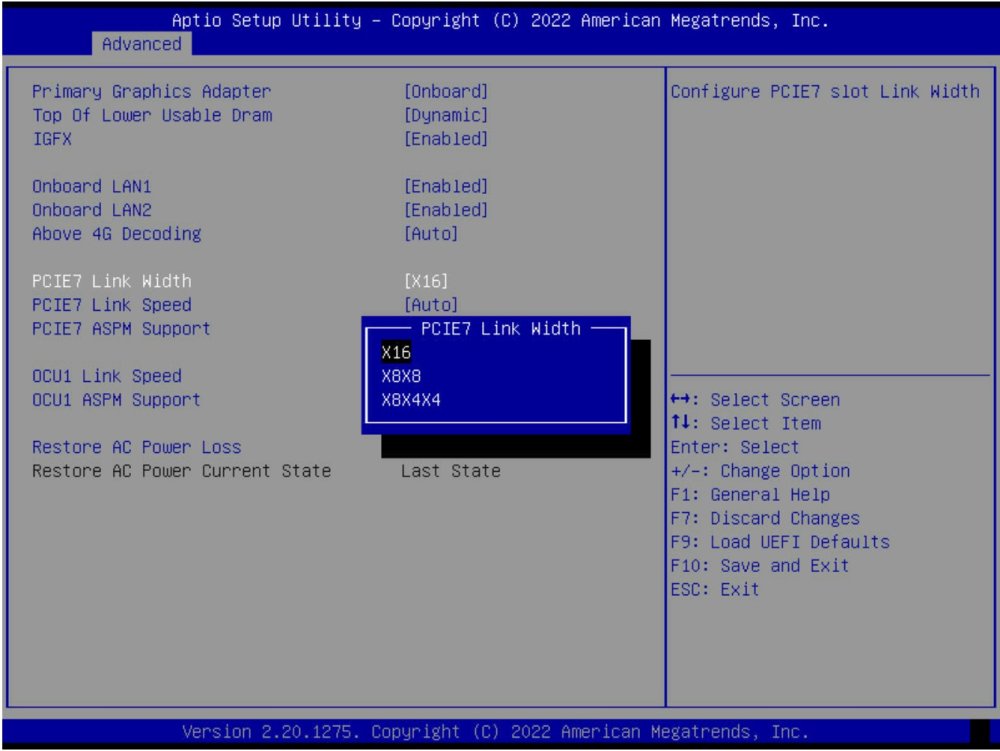
On the Kill-A-Watt, the idle power draw bounces between 31-35 Watts. This is with all six disks spun down and no active docker containers or plugins. I also have no discrete GPU in this system and rely on the iGPU in Xeon E-2246 CPU. Bifurcation on the single x16 PCIe slot in the E3C246D2I Mini-ITX board is the same as the E3C246D4U. Here is a screenshot taken from my E3C246D2I:
-
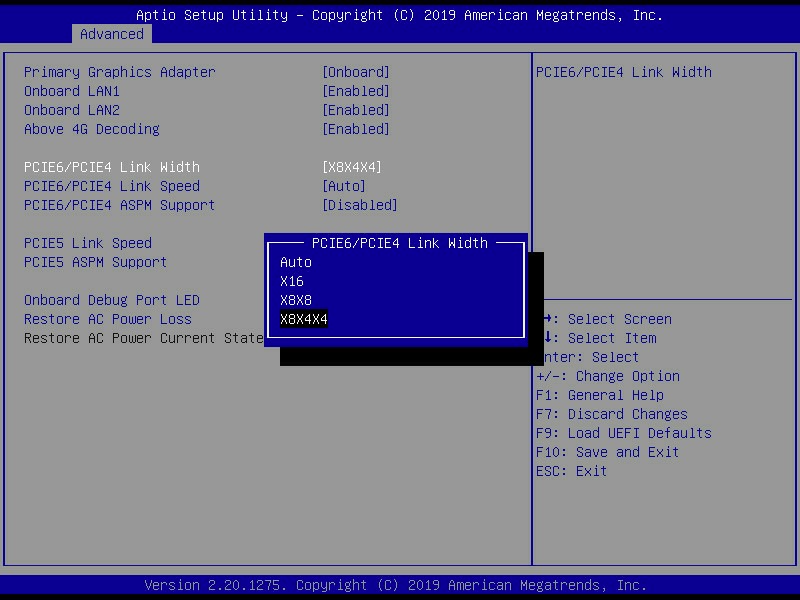
Which one? E3C246D2I Mini-ITX (8 SATA ports; 4 onboard, 4 with OCuLink cable) or E3C246D4U MicroATx (8 onboard SATA ports) Both have IPMI Of course, if you are talking about bifurcation, I assume you mean the E3C246D4U and no the Mini-ITX board with just one x16 PCIe slot. C246 WSI has no IPMI. I have a Kill-A-Watt I could attach to either system. Here are the bifurcation options for the PCIE6/PCIE4 slots:
-
Check into Jellyfin Emby also requires a paid version for hardware transcoding.
-
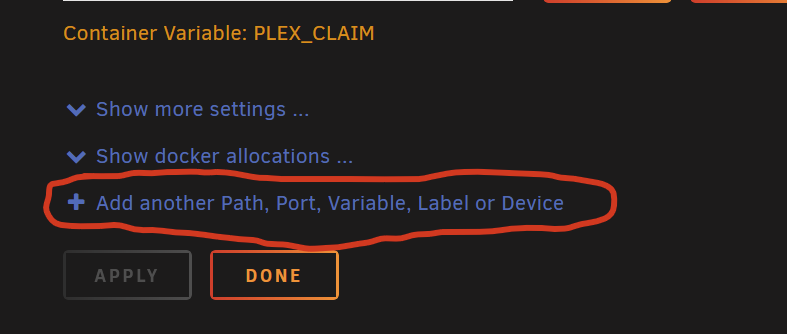
Edit Plex docker container, then add another variable:
-
WireGuard is a VPN protocol. Many of the docker containers that use VPNs can work with a VPN service/provider which may or may not use WireGuard as the VPN protocol. In the example I gave above of DelugeVPN, I use it with the Private Internet Access VPN service over the WireGaurd protocol. The WIreGuard protocol implemented in Unraid will allow you to setup secure remote connection and even route all remote traffic through the WireGuard VPN connection if desired. However, WireGuard is not full-fledged VPN service/provider. Here is a link to an article which mentions which VPN providers use WireGuard.
-
Same thing. Containers that use a VPN (DelugeVPN just as an example) have instructions for how to configure them to use VPN protocols such as OpenVPN or Wireguard. However, you still need a VPN provider such as Private Internet Access, AirVPN, etc. Q21. I now see that you support WireGuard, how do i switch from OpenVPN to WireGuard client? A21. Yes you are correct, all binhex VPN created images now support OpenVPN and WireGuard, for PIA and other VPN providers. If you're a PIA user then please follow this procedure:- Change Docker parameter from --cap-add=NET_ADMIN to --privileged=true (WireGuard requires privileged permissions). Add environment variable and set the Key: (NOT the name) to VPN_CLIENT and set the Value: to wireguard. Start the container with the new parameters. Once the container has started you should then be able to see the dynamically generated WireGuard config file /config/wireguard/wg0.conf. If you wish to change the endpoint (default is nl-amsterdam.privacy.network) then open the file /config/wireguard/wg0.conf and change the Endpoint line to the endpoint you want to connect to (the list of all port forward enabled endpoints is shown in the log /config/supervisord.log) If you're a 'custom or airvpn' VPN user (non PIA) then please follow this procedure:- Change Docker parameter from --cap-add=NET_ADMIN to --privileged=true (WireGuard requires privileged permissions). Add environment variable and set the Key: (NOT the name) to VPN_CLIENT and set the Value: to wireguard. Start and stop the container to force the creation of /config/wireguard/. Copy and paste in the WireGuard configuration file for your VPN provider to /config/wireguard/ Start the container and monitor the log /config/supervisord.log to ensure the connection is established.





