






Hoopster
Members
-
Joined
-
Last visited
Everything posted by Hoopster
-
A little over four years ago, I did what you are thinking of doing. I upgraded my main server and had enough parts laying around that I decided to turn them into a backup server. My setup has been going unattended for a little over four years now. The backup server is powered down until the backup script runs (automated through User Scripts once a week) The backup server is powered on via IPMI. Before I had a motherboard with IPMI in backup server the script just woke up the server from sleep and put it back to sleep when finished The backup performs a disk-by-disk rsync copy of all files that are new or changed since last backup. Before I had the same amount of disks of the same size in both servers, I had the script configured to backup based on shares, not disks. The backup server originally had smaller disks than the main server but over time I have upgraded them to the same size as the main server. The script sends me a summary via email of what was backed up to each disk (used to be summary by share). The backup server is powered down via IPMI to await the next backup. The preparation for this was to get login to the backup server automated via ssh. Here is what my script looks like currently: #!/bin/bash #description=This script backs up shares on MediaNAS to BackupNAS #arrayStarted=true echo "Starting Sync to BackupNAS" echo "Starting Sync $(date)" >> /boot/logs/cronlogs/BackupNAS_Summary.log # Power On BackupNAS ipmitool -I lan -H 192.168.1.17 -U admin -P {password} chassis power on # Wait for 3 minutes # echo "Waiting for BackupNAS to power up..." sleep 3m echo "Host is up" sleep 10s # Set up email header echo To: {my email address} >> /boot/logs/cronlogs/BackupNAS_Summary.log echo From: {sending email address} >> /boot/logs/cronlogs/BackupNAS_Summary.log echo Subject: MediaNAS to BackupNAS rsync summary >> /boot/logs/cronlogs/BackupNAS_Summary.log echo >> /boot/logs/cronlogs/BackupNAS_Summary.log # Backup Disk 1 echo "Copying new files to Disk 1 ===== $(date)" echo "Copying new files to Disk 1 ===== $(date)" >> /boot/logs/cronlogs/BackupNAS_Summary.log echo "Copying new files to Disk 1 ===== $(date)" >> /boot/logs/cronlogs/BackupNAS_Disk1.log rsync -avu --stats --numeric-ids --progress --exclude 'Backups' -e "ssh -i /root/.ssh/id_rsa -T -o Compression=no -x" /mnt/disk1/ [email protected]:/mnt/disk1/ >> /boot/logs/cronlogs/BackupNAS_Disk1.log # Backup Disk 2 echo "Copying new files to Disk 2 ===== $(date)" echo "Copying new files to Disk 2 ===== $(date)" >> /boot/logs/cronlogs/BackupNAS_Summary.log echo "Copying new files to Disk 2 ===== $(date)" >> /boot/logs/cronlogs/BackupNAS_Disk2.log rsync -avu --stats --numeric-ids --progress --exclude 'Backups' -e "ssh -i /root/.ssh/id_rsa -T -o Compression=no -x" /mnt/disk2/ [email protected]:/mnt/disk2/ >> /boot/logs/cronlogs/BackupNAS_Disk2.log # Backup Disk 3 echo "Copying new files to Disk 3 ===== $(date)" echo "Copying new files to Disk 3 ===== $(date)" >> /boot/logs/cronlogs/BackupNAS_Summary.log echo "Copying new files to Disk 3 ===== $(date)" >> /boot/logs/cronlogs/BackupNAS_Disk3.log rsync -avu --stats --numeric-ids --progress --exclude 'Backups' -e "ssh -i /root/.ssh/id_rsa -T -o Compression=no -x" /mnt/disk3/ [email protected]:/mnt/disk3/ >> /boot/logs/cronlogs/BackupNAS_Disk3.log # Backup Disk 4 echo "Copying new files to Disk 4 ===== $(date)" echo "Copying new files to Disk 4 ===== $(date)" >> /boot/logs/cronlogs/BackupNAS_Summary.log echo "Copying new files to Disk 4 ===== $(date)" >> /boot/logs/cronlogs/BackupNAS_Disk4.log rsync -avu --stats --numeric-ids --progress --exclude 'Backups' -e "ssh -i /root/.ssh/id_rsa -T -o Compression=no -x" /mnt/disk4/ [email protected]:/mnt/disk4/ >> /boot/logs/cronlogs/BackupNAS_Disk4.log # Backup Disk 5 echo "Copying new files to Disk 5 ===== $(date)" echo "Copying new files to Disk 5 ===== $(date)" >> /boot/logs/cronlogs/BackupNAS_Summary.log echo "Copying new files to Disk 5 ===== $(date)" >> /boot/logs/cronlogs/BackupNAS_Disk5.log rsync -avu --stats --numeric-ids --progress --exclude 'Backups' -e "ssh -i /root/.ssh/id_rsa -T -o Compression=no -x" /mnt/disk5/ [email protected]:/mnt/disk5/ >> /boot/logs/cronlogs/BackupNAS_Disk5.log echo "moving to end ===== $(date)" echo "moving to end ===== $(date)" >> /boot/logs/cronlogs/BackupNAS_Summary.log # Add in the summaries cd /boot/logs/cronlogs/ echo ===== > Disk1.log echo ===== > Disk2.log echo ===== > Disk3.log echo ===== > Disk4.log echo ===== > Disk5.log echo Disk1 >> Disk1.log echo Disk2 >> Disk2.log echo Disk3 >> Disk3.log echo Disk4 >> Disk4.log echo Disk5 >> Disk5.log tac BackupNAS_Disk1.log | sed '/^Number of files: /q' | tac >> Disk1.log tac BackupNAS_Disk2.log | sed '/^Number of files: /q' | tac >> Disk2.log tac BackupNAS_Disk3.log | sed '/^Number of files: /q' | tac >> Disk3.log tac BackupNAS_Disk4.log | sed '/^Number of files: /q' | tac >> Disk4.log tac BackupNAS_Disk4.log | sed '/^Number of files: /q' | tac >> Disk5.log # now add all the other logs to the end of this email summary cat BackupNAS_Summary.log Disk1.log Disk2.log Disk3.log Disk4.log Disk5.log> allshares.log zip BackupNAS BackupNAS_*.log # Send email of summary of results ssmtp {my email address} < /boot/logs/cronlogs/allshares.log cd /boot/logs/cronlogs mv BackupNAS.zip "$(date +%Y%m%d_%H%M)_BackupNAS.zip" rm *.log #Power off BackupNAS gracefully sleep 30s ipmitool -I lan -H 192.168.1.17 -U admin -P {password} chassis power soft Here is a copy of the summary email I get when each backup completes: Copying new files to Disk 1 ===== Mon Apr 17 01:03:13 MDT 2023 Copying new files to Disk 2 ===== Mon Apr 17 01:03:28 MDT 2023 Copying new files to Disk 3 ===== Mon Apr 17 01:03:32 MDT 2023 Copying new files to Disk 4 ===== Mon Apr 17 01:03:39 MDT 2023 Copying new files to Disk 5 ===== Mon Apr 17 01:05:12 MDT 2023 moving to end ===== Mon Apr 17 01:05:13 MDT 2023 ===== Disk1 Number of files: 146,607 (reg: 145,793, dir: 814) Number of created files: 0 Number of deleted files: 0 Number of regular files transferred: 0 Total file size: 4,980,993,327,789 bytes Total transferred file size: 0 bytes Literal data: 0 bytes Matched data: 0 bytes File list size: 131,071 File list generation time: 0.001 seconds File list transfer time: 0.000 seconds Total bytes sent: 2,442,573 Total bytes received: 1,279 sent 2,442,573 bytes received 1,279 bytes 168,541.52 bytes/sec total size is 4,980,993,327,789 speedup is 2,038,173.07 ===== Disk2 Number of files: 32,838 (reg: 32,110, dir: 728) Number of created files: 0 Number of deleted files: 0 Number of regular files transferred: 0 Total file size: 3,861,096,255,504 bytes Total transferred file size: 0 bytes Literal data: 0 bytes Matched data: 0 bytes File list size: 0 File list generation time: 0.001 seconds File list transfer time: 0.000 seconds Total bytes sent: 576,189 Total bytes received: 870 sent 576,189 bytes received 870 bytes 128,235.33 bytes/sec total size is 3,861,096,255,504 speedup is 6,690,990.45 ===== Disk3 Number of files: 62,940 (reg: 61,611, dir: 1,329) Number of created files: 0 Number of deleted files: 0 Number of regular files transferred: 0 Total file size: 3,328,714,163,265 bytes Total transferred file size: 0 bytes Literal data: 0 bytes Matched data: 0 bytes File list size: 0 File list generation time: 0.001 seconds File list transfer time: 0.000 seconds Total bytes sent: 1,137,723 Total bytes received: 1,580 sent 1,137,723 bytes received 1,580 bytes 151,907.07 bytes/sec total size is 3,328,714,163,265 speedup is 2,921,711.05 ===== Disk4 Number of files: 35,038 (reg: 34,478, dir: 560) Number of created files: 524 (reg: 511, dir: 13) Number of deleted files: 0 Number of regular files transferred: 511 Total file size: 2,747,653,356,727 bytes Total transferred file size: 6,706,090,028 bytes Literal data: 6,706,090,028 bytes Matched data: 0 bytes File list size: 0 File list generation time: 0.001 seconds File list transfer time: 0.000 seconds Total bytes sent: 6,708,322,877 Total bytes received: 10,516 sent 6,708,322,877 bytes received 10,516 bytes 72,522,523.17 bytes/sec total size is 2,747,653,356,727 speedup is 409.59 ===== Disk5 Number of files: 35,038 (reg: 34,478, dir: 560) Number of created files: 524 (reg: 511, dir: 13) Number of deleted files: 0 Number of regular files transferred: 511 Total file size: 2,747,653,356,727 bytes Total transferred file size: 6,706,090,028 bytes Literal data: 6,706,090,028 bytes Matched data: 0 bytes File list size: 0 File list generation time: 0.001 seconds File list transfer time: 0.000 seconds Total bytes sent: 6,708,322,877 Total bytes received: 10,516 sent 6,708,322,877 bytes received 10,516 bytes 72,522,523.17 bytes/sec total size is 2,747,653,356,727 speedup is 409.59
-
Should be fine for 10+ HDDs/SSDs depending on other components in your server. I have a 600W SFX power supply in my server currently; 50A on single 12V rail. Right how it is happily powering 6 HDDs, 3 SATA SSDs, one NVMe M.2 SSD, and the Dell H310 with plenty of power to spare. My CPU has an iGPU so no separate GPU is in the server. My backup server is similarly configured and has a 450W power supply Look at your hard drive active and idle power specs. I use 8TB Western DIgital NAS drives and they use 7-8W in active read/write, ~5W when idle and <1W when sleeping. Peak usage they require about 1.8 Amps. My case has an 8 HDD and 4 SSD capacity and I am sure I would have no problem powering everything at capacity with a 600W PSU. Is there some way to fashion a shelf in the rack for the server to sit on? HDDs are heavy and you plan to add more. I would personally not trust it could be supported long term by just the front screws.
-
I have one of these flashed to IT mode and it works great in my Unraid server. Yes, that should mean it is in IT mode. The PERC H310 is an LSI 9211-8i clone and is normally a RAID controller but IT firmware turns it into an HBA card.
-
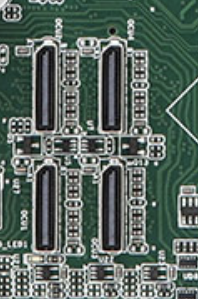
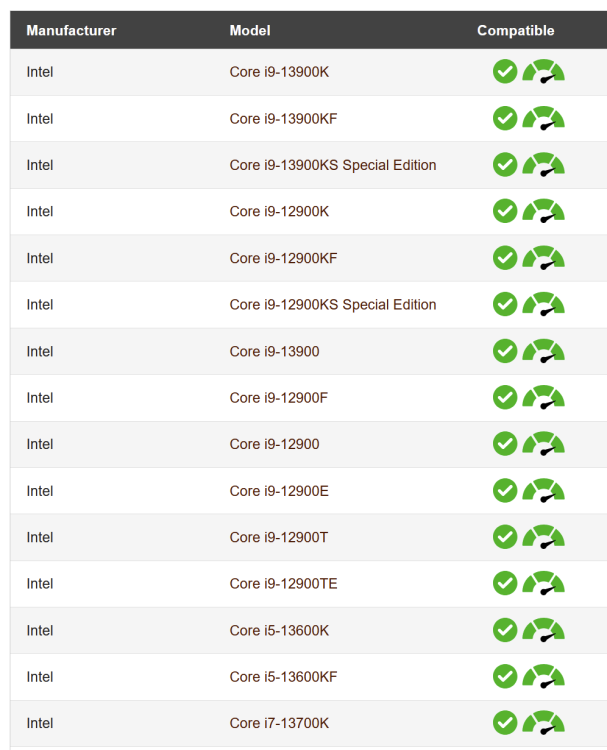
No, the OCuLink cable goes in a special connector on the motherboard. From it, you get 4 additional SATA ports (for a total of 8 with the 4 on the motherboard). No impact on read/write speeds. On the ASRock board I linked, there are actually 4 OCuLink connectors but only one can be used for SATA ports, the others are for PCIe x4 devices. There are many Unraid users with Supermicro-based systems. They specialize in server and high-end workstation motherboards and tend to be on the more expensive side compared to consumer/gaming motherboards Even the ASRock boards are from their server-focused division which is ASRock Rack. They just also happen to make consumer/gaming motherboards unlike Supermicro. In general, water cooling is not recommended on Unraid servers; especially ones that will be in operation 24x7. Water cooling is more susceptible to failure whereas air cooling is considered more reliable even if it does not provide the same cooling power. The 13900K/13700K are 125W TDP CPUs which will dissipate 200-250W under heavy loads. Personally, I plan on using the Noctua NH-D12L air cooler in my server which is in a Silverstone CS380 case. It has a cooler height limit of 146mm and the Noctua cooler is 145mm in height. The specs mention it fits in many 4U cases. This NH-D12L is also rated by Noctua to handle the 13900K and 13700K CPUs even in highly overclocked/heavy load situations.
-
Not in my experience. Speeds are the same whether connected to MB directly or my Dell H310 (LSI 9211-8i clone) HBA.
-
I like the Supermicro X13SAE-F 8 SATA ports IPMI 2.5 GbE 3 M.2 NVMe slots ATX Here is very well-priced combo that includes, MB, I9-13900K CPU, 4U case compatible heatsink, 64GB RAM, 1TB NVMe SSD. I (and many others in these forums) have purchased combos from this seller. Very good and reliable. If you really want/need 10 gig networking, check out the ASRock W680D4U-2L2T/G5 available here. Also here is the dual 1 GbE NIC version which is impossible to find right now. 4 SATA ports onboard; 4 more via OCuLink cable (I use one of these in my backup server and it works great) IPMI 2 1 GbE LAN ports 2 10 GbE LAN ports MicroATX Both boards support DDR5 ECC (and non-ECC) RAM. Hard to find right now but Supermicro has these 32GB ECC modules for only $112 each. NOTE: I do not own either motherboard but they are what I have been researching for next build.
-
I also have Binhex-Krusader and this is the normal container size for that container. A total size of 6.59 GB should not be 83% if you used the default image size of 20GB. Have you noticed the Docker utilization fluctuation up and down or is it always high?
-
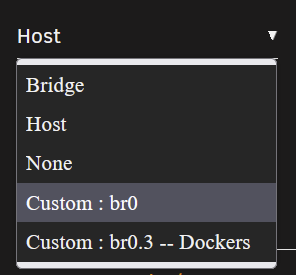
Select Custom: br0 as the network type and assign the desired IP address. If you do not see Custom: br0, you need to enable bridging in Settings --> Network.
-
Default size is 20GB unless you specified a different size. If your docker file is corrupt, you need to go to Settings --> Docker, disable Docker and select the checkbox to delete docker.img. When you enable Docker, a new docker.img file will be created. You can then install new docker containers from the Apps tab or use the Previous Apps option in the Apps tab to reinstall the docker containers you had previously with all their configuration settings intact. With the Previous Apps option, if something was mis-configured before it will still be mis-configured after reinstalling.
-
It likely means that one or more docker containers are mis-configured and are writing data into the docker.img file rather than another storage location. The default 20GB size for docker.img is usually more than enough for many containers. For example, I have 15 active docker containers and am using only 54% of docker.img. Start by clicking on the Container Size button in the docker tab to see if one or more containers appear to be particularly large in size. If so, verify the settings for the container to make sure something is not mis-configured. If in doubt about something post your configuration in the support thread for the docker container so others who use that container can help you.
-
It is very uncommon to need a Docker image file larger than 20GB. I have 15 active containers with only 54% usage in the docker.img. If you get over 50% usage with just one or two Docker containers on a 20GB docker.img file, it is likely you have the problem mentioned above by @itimpi, a mis-configured container that is writing into docker.img. If this is the case, increasing the size of the docker image file is a temporary fix and does not solve the problem.
-
Do you mean you want to create a VLAN for Docker containers? Here is the guide I followed. Don't worry that it says for Unraid 6.4. Most of it is still the same.
-
No - the only thing tied to a license level is the number of connected storage devices when the array starts. Unless you specified a really small docker image size (20GB is typical) and have a lot of docker containers, this is likely due to one or more mis-configured docker containers that are writing into the docker.img file rather than to the "correct" location such as array storage, an unassigned device, appdata, etc. Start troubleshooting by clicking on the button at the bottom of the Docker tab in the GUI and look for one or more containers that are unusually large. They likely have something that is mis-configured and is taking up space in the docker.img. It may also help if you attach your diagnostics zip file to a new post.

-
What are the security settings in Settings --> Unassigned Devices?
-
It's normal if the disc contains multiple copies of the content. MakeMKV will autoselect everything it finds on the disc. You can deselect "extra" copies of video or alternate audio before ripping begins. Often, the additional files are extra content that may exist on the disc and not additional copies of the movie/main feature. I usually look for the largest detected file and leave it and associated audio selected and deselect the rest.
-
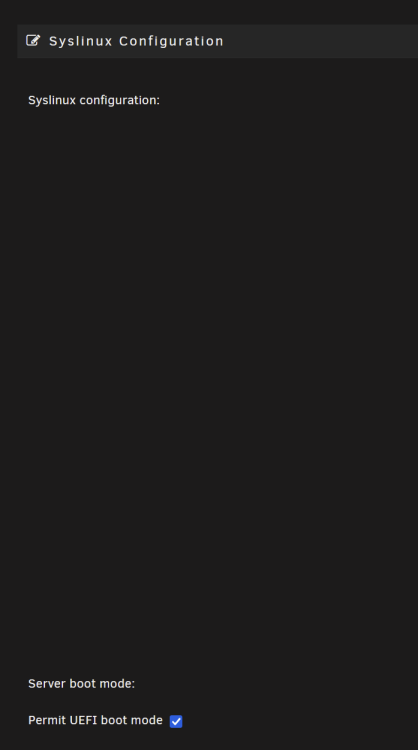
All you need to do is rename the EFI- folder on the Unraid flash drive to EFI (no - character on the end). In the BIOS you may also need to enable CSM but the Unraid side is easy to change. Another way to do this is click on the flash link on the Main page of the GUI and check the "Permit UEFI boot mode" box.
-
Following a suggestion in the Plex forums, I changed the docker networking back to Host from the VLAN on which it had been running fine for years. That allowed the server to be claimed. When I then changed it back to the VLAN, everything seemed to still work except the direct remote access (yes, I changed the router port forwarding every time the Plex container IP address was changed.) For now, I have it back on Host until I can work through any issues that may be preventing the VLAN IP address from working. Other docker containers on that VLAN work just fine.
-
And PC users should never install WIndows, because, gasp, they keep getting hit by ransomware. Not sure what your point is. No Internet-connected OS (and Unraid is not even a full Linux OS) is totally bulletproof and some responsibility will always be with the user to keep their data safe through good practices.
-
Hmmm, updated the Plex container today and now my Plex server and local media library are gone. Settings menu is very limited and no way to add the server. All I see is the screen below when trying to add local media. Not sure I can restore from backup as Appdata backup has been giving me errors lately and I have not tracked down the cause. Any ideas how to get my server back so I can add local media libraries? UPDATE: Uninstalled Plex docker and reinstalled. Logged out and back in. Got a new claim token. Tried a specific docker version prior to most recent. Nothing. Still no server shows up at all. Fixed problems with appdata backup and restored a backup from 10 days ago. Problem persists.

-
This is possible and there are documented ways to get around the "connect to the mothership account" for using Plex locally. However, in my case, where remote use happens frequently by me and other users, there is not a good way around that. Especially after the Plex data breach last year when we all had to reset passwords and reclaim servers (which was not as easy as it should have been), requirements for being logged into Plex account seem to have been strengthened. Again, you can get around it for local access only, but, once you need remote access, you get nagged a lot if you are logged out of the mothership account; at least I do.
-
May be a misunderstanding on my part. I have just read from multiple sources that Plex is "better" than Emby for remote access and that if remote access is needed, Plex is the best option. If it works well in Emby, you are correct, what does "better" really mean? Never having tried Emby, I have no first-hand knowledge of how it works for remote users.
-
If the instructions you are referring to actually says the parity drive(s) cannot be bigger than the data drives, that is incorrect. Parity drive(s) must always be at least as large as the largest data drive. Parity drives can be larger than all the data drives if you wish to leave room for data drive growth. At one time, I had an 8TB parity drive in my system while all the data drives were 3-4 TB in size. This allowed me to replace all the data drives (up to 8TB in size) without replacing the parity drive. Now I have a system with an 8TB parity drive and all the data drives are also 8TB in size.
-
I'm not an Emby expert as I use Plex. It is just my understanding that you do not need to be logged into an online Emby account to access your local media. Emby has local accounts? Perhaps an Emby user can shed more light on this. Since Plex seems to be going in the direction of online/streaming media aggregator, they are forcing server access through your Plex online account, even for accessing local media. It appears they are moving further away from their roots as a personal media server, although that still works great as long as you are connected to the mothership. I stick with Plex because I do have several remote users accessing my server content and I also access it while traveling. Nothing facilitates that as well as Plex.
-
Should be possible since the TerraMaster D5 Thunderbolt 3 has a JBOD mode. A possible concern would be the USB-C Thunderbolt 3 connection to the laptop. Connecting hard drives via USB (any flavor) that are intended to be in the Unraid array has been problematic in the past. USB-connected drives can drop out or not show up in Unraid. This mostly comes down to the reliability of USB in general on the motherboard. It varies by chipset and manufacturer. I personally have no experience with USB-C/Thunderbolt with Unraid so perhaps someone who has can chime in on its reliability for a permanent data connection. As long as Unraid can see the SSDs in the M.2 slots, that should work. Many of us use M.2 NVMe drives as "cache" drives. I have one on each of my Unraid servers.
-
I think that is mostly a matter of preference. Emby does not have the "must be logged into account for server access" requirements Plex has and does not do as many "phone home" type of things. Many choose to use the Kodi client with Emby server. Emby has pretty good plugin environment. Plex is better if you are hosting mobile/remote users. For both, you need to have a paid version for hardware transcoding.





