






Hoopster
Members
-
Joined
-
Last visited
Everything posted by Hoopster
-
I have one and it was cheap ($5) and works on a particular Unraid server when no other flash drive I have would work. I don't know if it is THE flash drive to get for Unraid but it is a flash drive that has a unique GUID and works with Unraid.
-
I don't use Nvidia for transcoding (I have an iGPU) so I don't know if anything is missing above but, did you enable hardware acceleration in Plex?

-
You could have a cache-only share for Lightroom files that lives on an SSD and that would improve things somewhat; however, there is no parity protection for files on a cache-only share. Some Unraid users even do this for Plex files, put the most recent or most popular on a cache-only share for faster access and no disk spinup delay. One of the advantages of Unraid, increasing storage capacity at any time by adding disks of any size, also comes with the single file on a single disk read "penalty." I have never used Truenas so I can't give you a good answer on this, but since it supports RAID configurations in the array with data striping, read times are likely to be faster, but then you deal with RAID when it comes to expanding storage.
-
I don't limit the RAM usage via the container. It is limited by go file entries. mkdir /tmp/PlexRamScratch chmod -R 777 /tmp/PlexRamScratch mount -t tmpfs -o size=16g tmpfs /tmp/PlexRamScratch
-
If you are doing this for HDHomeRun recordings and have /tmp set as the transcode location, it can contribute to out of memory errors. /tmp can just keep filling up until the server is out of RAM. I am using a /tmp location for transcoding but have it limited to 16GB RAM usage. Many do it with as little as 4GB and it works fine. When I first started recording with Plex DVR for HDHR, I would frequently run out of RAM on my server which had only 32GB at the time. HDHR can use up to 16GB RAM per hour of HD recording and it does not reclaim RAM until the recording ends. It creates and keep lots of small files in the transcode location so you can scrub the timelime of an in-progress recording. I never do this, so I force it to reclaim RAM by limiting the /tmp/PlexRamScratch location to 16GB.
-
Use the contact form on Unraid.net and specify licensing as the purpose for contact. Explain your situation and Limetech will help you directly.
-
The Parity drive will have no usable data on it. It also has no filesystem so nothing will read it. The other drive will have your data and has a filesystem. What filesystem format did you use when you setup Unraid with the 8TB drives? Windows cannot read any of the filesystem formats supported in the Unraid array so it is not surprising that it cannot read the drive. It is surprising that the data drive is not mountable in Unassigned Devices. The parity drive, having no filesystem will likely only give you the option to format in Unassigned Devices. You should be able to mount the data drive in UD and copy the data from it to to a new 14TB array drive.
-
There are times, such as parity checks and disk rebuilds, when all drives are being accessed simultaneously. In these situations is when USB is most likely to drop a connection. It could happen randomly on a single active disk, but its more likely to happen when the interface is under heavy load from multiple disks trying to communicate at the same time.
-
Some people have no problems with USB connected disks on Unraid. They are just not recommended because they can be problematic and there is no way to predict if it will work or not without trying it on your hardware. It is highly dependent on how well the motherboard manufacturer implemented USB and it may vary between versions of USB.
-
USB enclosures and USB-connected drives are not recommended for use in an Unraid array. USB connections for "permanent" storage can be very unreliable and will often randomly disconnect. This is not good for parity-protected array. The issue often comes down to motherboard and chipset implementations of USB; they vary widely. For this reason, USB connections for parity and array drives are not recommended. For unassigned devices, it is less critical. Unraid tracks disks by serial number. Some enclosures are known to not present unique serial numbers for each disk in the enclosure. If this is the case, Unraid will not see the individual disks. I have no idea if that is the issue with your My Book Duo, but it is a possibility.
-
Unraid started as a true NAS OS so network file storage and access is a strong point of Unraid; however, you need to be aware that accessing/editing files is at the speed of the single disk on which a file is stored. There is no striping of data across disks in Unraid. Using an Unraid server as a backup location for client machines on the network is a common usage of Unraid. I am backing up two desktop machines and a laptop to Unraid and well as performing server-to-server data backup between two Unraid servers. Media storage and playback via Plex, Emby, Jellyfin, etc. is also another very common use for Unraid. Many people build an Unraid server just for this purpose. For best 4K streaming performance, make sure your local clients are capable of 4K playback for direct streaming and do not need transcoding. 4K transcoding requires a lot of resources. For remote playback (usually requires trandscoding) it is best to have a 1080p content library rather than trying to transcode native 4K content.
-
Coursera has some good basic networking courses. There is also Khan Academy, Udemy or just YouTube channels. Just Google what you are looking for. You'll find a lot of options. Some may have a cost, others are free.
-
You do not have to be a networking expert to get by in Unraid. A basic understanding of networking-related concepts such as DNS (and dynamic DNS), DHCP, subnets, port forwarding, firewall rules, etc. is 99% of what you need to know with Unraid. It does not do anything out of the ordinary when it comes to networking. Docker networking can get a little tricky but there are post in these forums that can help you understand that better.
-
Even though videos may not be your preferred way of learning, the Spaceinvader One YouTube channel has excellent videos on many Unraid topics. He has many videos just for explaining how things work and why. Also, new Unraid documentation became available just yesterday and is well organized and searchable. Unraid.net is a good resource for general information on Unraid functionality and uses.
-
The manual link in the bottom right corner of the GUI now goes to the new docs.
-
These do not exist unless you setup the syslog server. Like the Unraid OS, the syslog is in RAM. A reboot wipes it out which is why anything logged before a reboot is gone unless you have the syslog server running which records it all elsewhere.
-
Very nice. I like it a lot. Having searchable up-to-date information should really cut down on the confusion caused by the old wiki. Most of the support battle comes down to knowing documentation exists and being able to find the information you need.
-
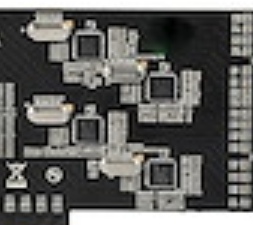
I am not an expert on HBA cards, but here is what I can tell you about the card you linked: It uses the ASMedia 1061 chipset which supports 2 SATA ports. Although the ASM1061 supports port multipliers (bad for use with Unraid) this card does not appear to utilize port multipliers. The card specs state is uses 4 host controllers (ASM1061 chips) onboard which would support 8 SATA drives without multipliers. The card is PCIe 2.0 which means after subtracting 20% for overhead (typical), This PCIe x4 card would have 1600 MB/s available bandwidth for 8 SATA drives or ~200 MB/s per drive when all drives are in use simultaneously (parity checks and disk rebuilds). This is sufficient for most HDDs. You may wish to avoid connecting SDDs to this card although it says it does support TRIM operations (many HBAs do not support TRIM). Bandwidth for a SATA SDD would be limited. Many ASMedia cards are known to work well with Unraid as long as you avoid the ones with port multipliers.
-
An Unraid license is not associated with a particular version of Unraid in any way. I have had the same license since Unraid V5 beta14 and have done countless Unraid upgrades since then.
-
The Unbalance plugin will let you consolidate data from multiple drives onto one or more drives.
-
The shrink array process is designed for this.
-
Hardware transcoding is better than software transcoding (CPU does all the work) IF you need transcoding. The best situation is to have all the media in formats the local clients can direct play. Transcoding is generally needed for remote streaming, to cell phones or for clients with limited content playback support. In this case, hardware transcoding is preferred as it uses the quick sync video capabilities of the iGPU and does not tax the CPU much at all.
-
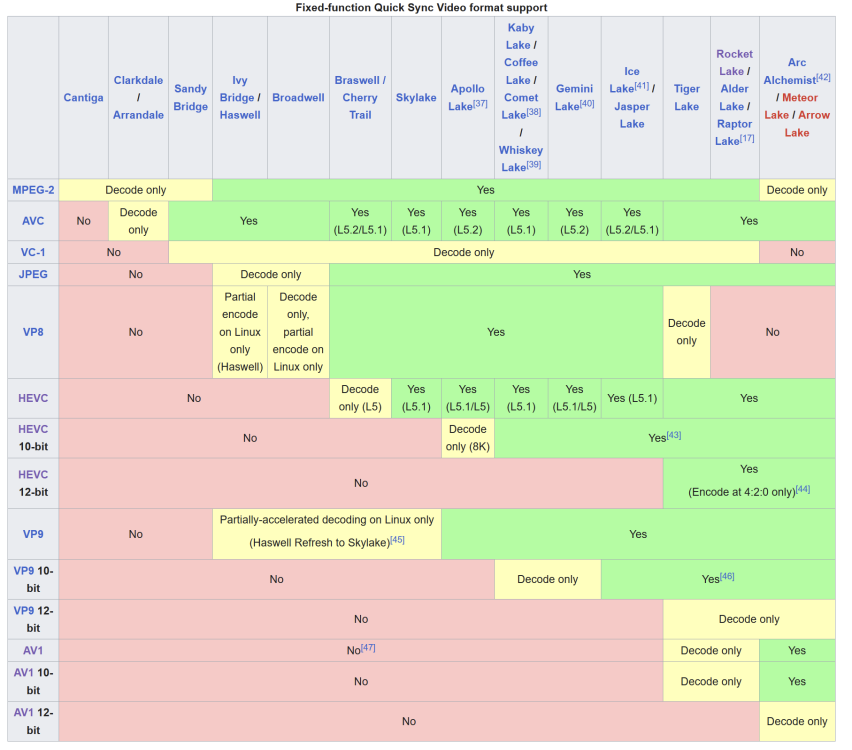
That is a 4th generation Haswell CPU and, as you can see in the chart below, it has very limited Quick Sync Video encode/decode capabilities. Basically, will get MPEG-2 as a format that matter for most movies. Technically, Plex supports 2nd gen. or later CPUs with QSV but they recommend 5th generation or later: From Plex documentation requirements for hardware accelerated transcoding: A recent Intel CPU meeting these requirements: 2nd-generation Intel Core (Sandy Bridge, 2011) or newer (we recommend 5th-gen Broadwell or newer for the best experience; Sandy Bridge, in particular, is known to sometimes have poor visual output on some systems) Personally, and I am not saying this is an issue for you, I could never get things working properly with Intel GPU Top plugin so I uninstalled it and loaded the i915 drivers in the way recommended for the particular Unraid version I was running.
-
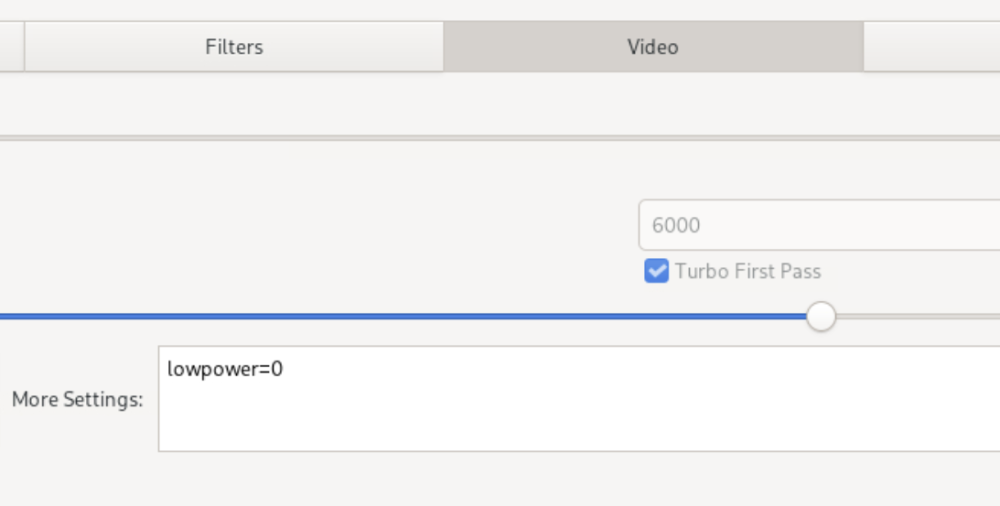
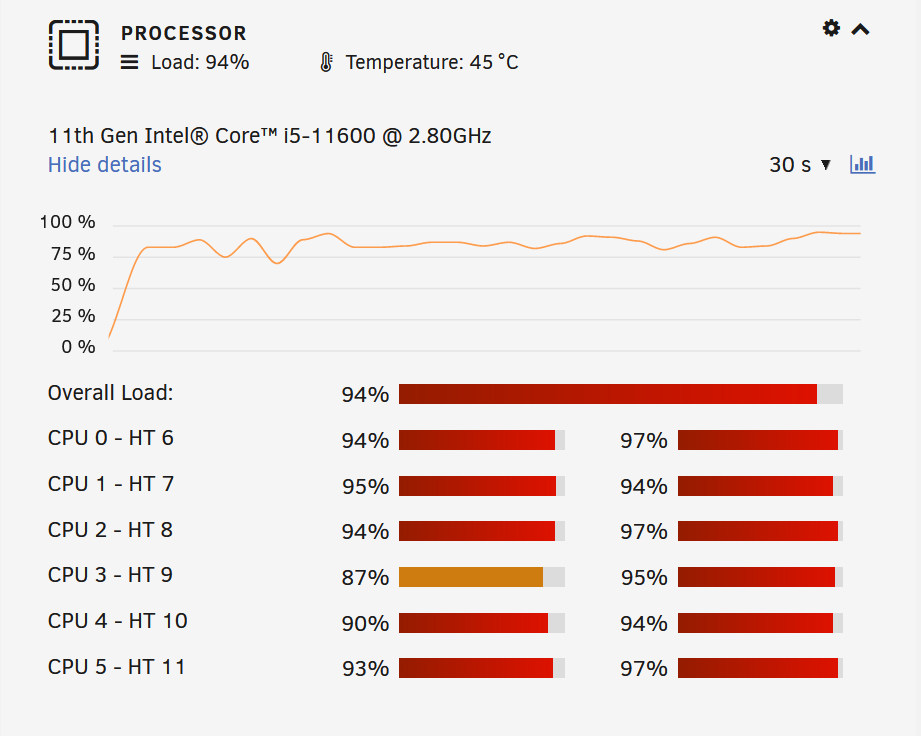
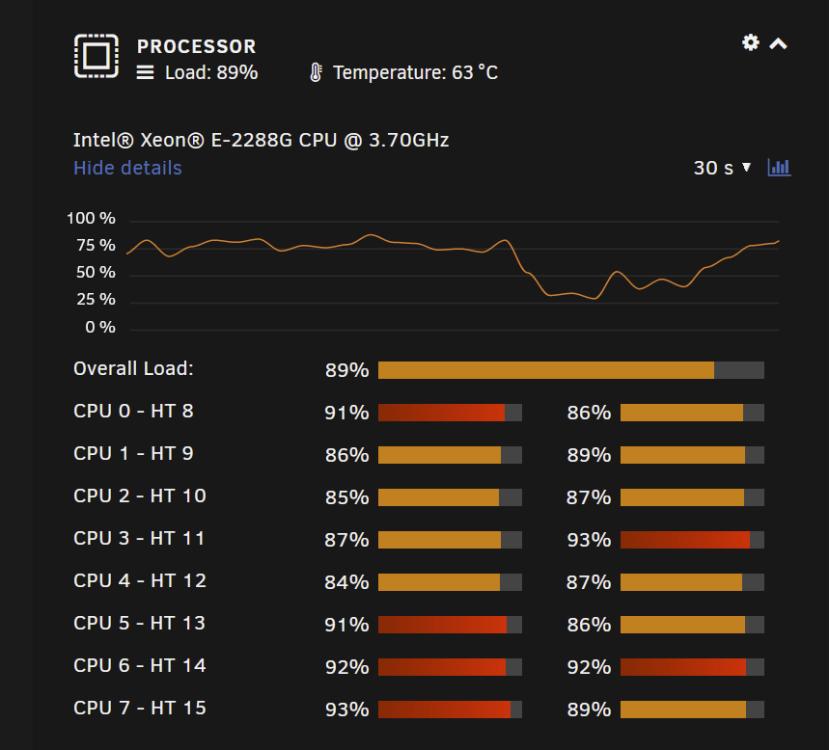
Just got Handbrake setup for Quick Sync Video (QSV) encoding on this system. Encode kept failing with the QSV encoders even though /dev/dri was passed through to the Handbrake container and QSV options appeared in the encoder list. I discovered that Rocket Lake/11th gen. Intel CPU/iGPUs have problems with low power QSV encoding which is the Handbrake default. I needed to add "lowpower=0" to the More Setting box in the Video tab for all QSV presets. They all worked great after that. The highest CPU temp I saw on a 2.5 hour H.265 QSV encode was 46C. Even with QSV, CPU utilization climbs high as QSV does not decode (CPU process) in Handbrake and subtitles are also handled by the CPU. For comparison, here is what the same encode of the same file looked like on my main system with E-2288G CPU (9th generation) - amost 20C hotter (its a 95W TDP CPU and a little lighter on CPU usage due to higher base clock and more cores: The CPU for the first chart is a 2.8GHz base i5-11600 (65W TDP) and I did see it "turbo" up to 3.3 GHz for most of the encode; however, in the BIOS I have it limited to Intel recommended speeds per CPU temp and I do not allow it to run at sustained turbo speeds for a longer time overriding the defaults. I did the same movie with an H.264 QSV encode and it was done in less than 30 minutes compared to 2.5 hours for H.265. Both were 1080p30. I am happy with the performance.
-
According to Intel Ark the i7-9700K CPU supports VT-x and VT-d and the Z390 chipset supports VT-d.







