






Hoopster
Members
-
Joined
-
Last visited
Everything posted by Hoopster
-
UPDATE: Scratch the idea below. I have decided to wait for LGA1954/Ultra 4 in 2027. That socket is being designed to host 3-4 generations of processors instead on changing with every 1-2 generations as Intel famously does. A Core Ultra 5 in the Ultra 4 Nova Lake generation will likely be more than enough for my needs for quite a while and LGA1954 (same cooler mounting pattern as the current 1851) appears to offer the flexibility of support for CPU generations beyond Nova Lake. I am sure it will all be quite costly and I may have to get a HELOC to afford RAM by then. Just out of curiosity, I started looking at a potential upgrade again just because I wanted to be shocked by RAM and other component prices. Here's what I came up with (all other components to come from current build. Who can afford to upgrade SSDs or HDDs?): Asrock Rack W880D4U motherboard ($400) Intel Core Ultra 5 250K Plus CPU ($210) 32GB (2x16GB) DDR5 5600 MHz non-ECC UDIMM ($380 and that's a bargain these days) - Here's the shock factor, 6 years ago I paid about $400 for 64GB ECC DDR4 RAM. Now I get to pay almost that for half the RAM and drop to non-ECC. I really don't need 64GB anymore as I quit running VMs. Still, that's less than the $1099 I paid for the same components in my current build back in 2020 (although it was for 64GB ECC RAM and it did include a 256GB NVMe SSD) I don't think I am really going to pull the trigger even though I think prices will continue to rise. I have no compelling need to upgrade and my primary Unraid server continues to handle anything I throw at it.
-
Thanks, I already got 2 and immediately formatted them to erase whatever was on them from LYTX. At $4, it was kind of hard to pass them up even with no immediate need. They appear to be solid units and will hopefully be good Unraid flash drive replacements if/when my current flash drives fail. All of them have been running multiple years without issue; perhaps that is just a sign they are due to fail soon. I am stubbornly resisting using an internal boot option.
-
I run a parity check once a quarter (Jan, Apr, Jul, Oct). I used to do it monthly but found that the system was stable enough that it never produced errors. Since reducing the interval to quarterly a couple of years ago, only once have any errors been found and I am happy to run parity check at that interval. Both systems on which I have parity have five array data drives and a single parity disk.
-
Although removing Tailscale will certainly solve the problem (if it is related to Tailscale), if you want to keep it installed for possible future use, all you need to do is disable the Use Tailscale DNS settings option on the affected PC. That's what I did when I had this issue from a certain PC.
-
Thanks, just ordered 2. At that price, having some spares with confirmed MLC NAND is too good to pass up even with no immediate need right now.
-
This would me my guess as well. When power supplies start to fail, it is first noticed when the PC is under load. I have had a couple of power supplies fail (never on an Unraid server, fortunately) and, in both cases, heavy graphics load would cause the PC to reboot. I suspect this is what is causing your problem.
-
Well, I talked him into getting Unraid in the first place back in 2017, so, I felt somewhat responsible. He has moved to a new house four times since that initial setup and never really knew what he was doing with Unraid and IT type stuff in general. If there was not a friend or relative at every stop who knew what he was doing, his Unraid server just sat in a corner unused for years. No one had a clue what this server even was, let alone anything about Unraid. He recently moved back within a reasonable distance from my home and asked me to come help him "get all the data off that blue box." He had no idea what to do with it. I asked him to let me take it back to my house (the "IT hospiltal" is what he called it) so I could see what I could do to resurrect it for its original use in an environment I could control. He had no idea where his router was or how to access its admin page so I could see if his server was even getting an IP address. It's a headless box and he had no monitor or keyboard I could use for on-site diagnosis. Turns out it had a static IP address set from long ago that was not on the same private subnet as his current setup (done by his son in law). It's setup for DHCP from the Unraid side now and if I can get him to figure out how to get into his router admin page, I'll setup a DHCP reservation there when I return the patient to him. I'll set it up for Wireguard access so I can get to it remotely when I need to in case he breaks something or forgets how things work. Primarily, he wants it as a Plex media server and a place to store photos. We're both in our mid 60s but "tehcnology" to him is creating a basic Excel spreadsheet. I am doing what I can to "idiot proof" his Unraid server so he does not have to do anything with it and I don't have to be long-term IT support.
-
File system on all array data disks is XFS v5, so, no changes needed. That is sufficient for his uses of this server.
-
Yeah, he was just a few versions behind. His last update was in 2018. 6.5.3 --> 6.9.2 6.9.2 --> 7.0.1 7.0.1 --> 7.3.1 It all went very smoothly with plugin and docker container updates at each step. Of course, I needed to reinstall community apps and some updated versions of some plugins but all seems well now. Plex was a mess, but, that has also been sorted. A little reconfiguration still needs to be done, but, at least he is up to date on everything.
-
@UNPAID Yes. I forgot Tailscale. I have used that as well and it does not require port forwarding like some of the others.
-
There are several ways to do this. Reverse proxy, Wireguard or other VPN, PiKVM (lets you turn Unraid server on/off remotely) with a VPN. In my homes, I have a Ubiquiti UniFi network infrastructure so it is even easier via teleport and SD-WAN, although, I also use all the remote access methods I mentioned. There are many safe Unraid remote access methods and several youtube videos on the subject.
-
Updated three servers from 7.2.6 to 7.3.0. No issues on any of the three have been discovered. I am still using USB boot on all three servers. It isn't broken and I don't yet see a need to "fix" it. Nice to have the option in the future if needed, but, happy to stand pat for now. I skipped the onboarding process on all three upgrades and left everything "as-is"
-
Parity check on my system with 8TB parity and 5 x 8TB data drives takes slightly over 16 hours. Assuming your parity drive is also 8TB, it should be similar.
-
I still have the same build as my main server. It still does everything I need and more. With the prices of RAM, SSDs and HDDs these days, I may be milking it a few more years. I did also build a backup server with a Mini-ITX variant of the MB, the E3C246D2I (details in my signature). That is getting long in the tooth now as well, but it is mainly just for storing disk-to-disk backups of my main server data and as a fallback should the main server have problems. I started looking to upgrade around the time of the Intel 14th generation core processor release; however, the 13th/14th generation Intel processor problems put me off that idea. By the time I was considering it again last year, component prices started their upward climb and there is still no relief in sight.
-
I had the same problem many have reported recently; web GUI would not open. I tried some of the "fixes" mentioned above and none worked. I have PIA and had configured DelugeVPN for Wireguard. The only thing that resolved the problem for me was deleting DelugeVPN and the image, clearing out its appdata folder and reinstalling. I did not use Previous Apps to reinstall. I installed and configured DelugeVPN as if it were the first time I had used it. Success! The web GUI now opens as it should.
-
If the count gets high enough or grows frequently, it can cause a drive to be disabled. This has happened on two of my HDDs in the past. In both cases, the UDMA CRC error count was over 1100 and growing frequently before they became disabled. This usually happened when backing up PCs to the Unraid array. I ended up rebuilding both drives onto themselves as there was nothing inherently wrong with the drive. These errors are usually the result of a bad or loose SATA/SAS cable or MB/HBA port. The drives were fine after rebuild when I swapped cables or attached them to a different HBA port.
-
The two Unifi Cloud Gateways (Network Controller built in) are one each in my two homes 260 miles apart. They are on separate subnets but thanks to the magic of Ubiquiti SD-WAN/Teleport, devices on both subnets are accessible as if they were on the same LAN. It sure makes scripted backup of one Unraid server to another in the other location easy. I have this Unifi Reborn network docker as a backup should a UCG fail and I quickly need to put my old USG back into service temporarily. Before getting the UCG, I used this docker with great success.
-
ITEM: HP v150W USB2.0 STORE: Office Depot WHEN: 2023.03 PRICE WHEN PURCHASED: $5, current price $9 (drive I purchased was labelled as a 16GB flash drive, but, as seen below, it is almost 32GB NOTES: Works great with Unraid Controller: Phison PS2319 Possible Memory Chip(s): Not available Flash ID: 983E9803 76E4 Chip F/W: 10.01.5D Firmware Date: 2022-07-19 VID: 03F0 PID: 2D40 Manufacturer: HP Product: v150w Query Vendor ID: hp Query Product ID: v150w Query Product Revision: PMAP Physical Disk Capacity: 31042043904 Bytes Windows Disk Capacity: 31021137920 Bytes Internal Tags: 2N2P-SX5L File System: FAT32 Relative Offset: 4032 KB USB Version: 2.00 Declared Power: 300 mA
-
Check out the recycle bin plugin in Apps tab.
-
The older HP v150w USB 2.0 flash drives that are available at Office Depot supposedly had either SLC or MLC NAND. Newer ones, just have "standard flash NAND" whatever that means; probably TLC. I bought one about three years ago for use with Unraid and it has been great. I think they are actually made by PNY for HP. I have no idea if this is "old stock" but I doubt they are still manufacturing a lot of USB 2.0 flash drives. They are fairly inexpensive at $9 for a 16GB flash drive. Every once in a while they go on sale. I got mine for $5.
-
Both of my Unifi gateway devices (runs Network on the device) have been on 10.0.162 for a few weeks now with no issues. If there are things that still need to be fixed in Network 10.0.160+ that have not been affecting me. Finger crossed that does not change.
-
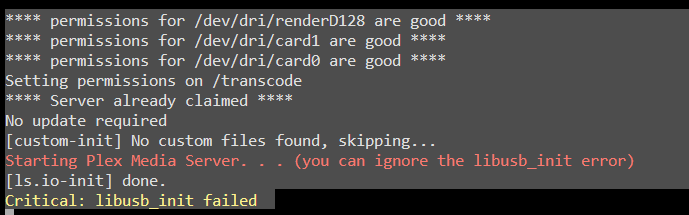
As ConnerVT said, the libusb_init error message can be ignored. The message appears in the logs every time Plex starts (unless you have a usb TV tuner). Note the line in red in my Plex logs. Plex tells you to ignore it.
-
Another option is to enable Turbo Write. This spins up all array disks, but it also significantly speeds up write operations in a parity-protected array. There is also an Auto Turbo Write plugin which manages disk spin up to facilitate Turbo Write and does not require that all array disks always be spun up. Details on Turbo Write:
-
The link referenced here seems to work to download firmware.
-
For the most part, this is true. Unraid runs on just about any hardware. It does not support ARM processors, but it runs without issue on most Intel or AMD based hardware. The Unraid license is tied to the GUID of the USB flash device which also holds the OS files (loaded into RAM on each boot) and the Unraid server configuration. This makes Unraid "portable" if you make hardware changes. I have personally changed motherboard, CPU, RAM, etc. five times on my main server while still using the same USB flash drive to boot Unraid.





