Hoopster
Members
-
Joined
-
Last visited
Everything posted by Hoopster
-
By the way, there is a very useful plugin called parity check tuning that allows a parity check (like @ConnerVT , I do mine quarterly) to be broken up into several increments over a period of days. A parity check on my main server takes approximately 24 hours with a 12TB parity drive and 8TB array drives. I have it set to run in 9-hour increments from midnight to 9am on the second Thursday of Jan, Apr, Jul and Oct. It finishes before the third increment is scheduled to end. Of course, with larger parity drive(s), it could take more increments but you decide how long each increment will last and a parity check will run in those increments until finished. Another useful tip is to enable signatures in your forum profile if you do not see them. A lot of forum users put the hardware details of their servers in their signature. This gives you a good idea of the variety of hardware configurations that can be used with Unraid. There is no "recommended" hardware as Unraid runs on just about anything (other than ARM).
-
No need for the cache as you determined I have an rsync script that runs unattended from User Scripts once a week (could be as often as you like) to backup from main Unraid server to the backup server. It does the following: 1 - power on backup server (this is possible because it has IPMI). Before I had a board with IPMI, it was just asleep and the script woke it up via etherwake commands. Possible also to use a smart power switch I suppose 2 - waits until backup server is up and array started 3 - copies new or modified files from disk to disk. Backup server has the same number of HDDs of the same size as source server. Before it was like this, the script copied from share to share. 4 - emails me the results of the backup with a disk to disk summary of backup (files, overall amount of data copied, time to completion, etc.) 5 - powers down backup server until next backup is needed Script has been running unattended for about 4 years now. Every once in a while, I run a modified version of the script that deletes files from the backup server that no longer exist on the source server. I don't do this with backup script so I can recover "accidentally" deleted files on the source server since there is a good chance they are still on the backup server. Had to do this once when my wife accidentally deleted a full folder of photos and was in panic mode :)
-
What hardware you use for server is irrelevant. License is tied to GUID of USB boot flash drive. It is "portable." I have changed MB, CPU, RAM, etc. five times over the 14 years I have used Unraid and continue to use the same license as I keep the same array/pool drives. Of course, changes and additions can be made but then those are in the config for the next hardware change. I have 12TB parity drive (single parity) and 8TB array drives and a parity check takes about 24 hours. Unraid can reference file locations directly via diskX (/mnt/diskX) or user share (/mnt/user/sharename. Might as well learn this now that you are new to Unraid; NEVER, EVER mix disks and shares when dealing with files in Unraid. This can result in data loss. Details of why this is the case are all over in these forums. Always deal disk to disk or share to share. Copying files via CLI to /mnt/diskX does not bypass parity if it is present. If your goal is to populate the array disks with data at a faster speed (bypass the parity "penalty"), do not have parity disks assigned during the initial large data transfer. Parity can then be enabled and built after the initial data is transferred to the array. Using cache disk/mover is usually not an effective strategy during initial data transfer as the cache will fill up fast and can't be moved to array fast enough to be available for more data caching. Copying directly to disk will avoid the FUSE system (shares) overhead and will be slightly faster but it does not bypass parity. Yes, of course
-
Thanks for the answers @JorgeB I will likely keep booting from the USB flash drive on my main server, but, I have a couple of other servers on which I can experiment more with internal boot. My current USB boot flash has been going strong for over 10 years. Maybe it is bound to fail soon. Having more boot options is great, but, in my case, I don't yet see a compelling reason to use internal boot but the potential redundancy of boot device is nice.
-
Lots of things to consider 1 - my smallest SSD is 500 GB, making an 8GB boot partition would not be a problem, but, if I use the rest of the storage for something else, when will the wear and tear cause the SSD to fail? I've had two fail in my Unraid server after six years of use. 2 - Using two current SSDs in a redundant pool with 8GB flash partitions is certainly something to consider. Can the remaining storage space (492 GB in my case) still be used independently in separate pools? 3 - as mentioned by @tjb_altf4 , I really like the idea of my current USB flash drive as a redundant backup boot device in case of SSD problems and being able to boot from either device. 4 - does moving to an internal boot device mean the license is now tied to some GUID associated with that device? If I change motherboard, CPU, RAM, etc. but use the same internal SSD, I assume that would boot Unraid on the new hardware just like it currently does if using the same USB flash drive? Of course, I assume that moving to internal boot would make the current USB boot flash a non-licensed device?
-
I use Directory Opus to manage my Unraid share (at least the exported public and hidden ones) content across several PCs using an Unraid user account other than root. Of course, I can do similar things with the file manager built into the GUI, but, I prefer to do most things through the dual-pane Directory Opus.
-
You don't say what you mean by it won't boot into Unraid. Do you have a monitor attached? If so, what do you see on the screen? One thing you can check; you did everything in the BIOS to boot UEFI but did you tell the Unraid USB flash to boot UEFI? There is a folder on the Unraid flash drive called EFI- If it still has the trailing - character, the flash drive is trying to boot legacy. To tell it to boot UEFI, the folder needs to be renamed to EFI (remove the trailing - character). If it is currently named EFI and still won't boot into Unraid, this is not the problem.
-
Is there a particular need you are trying to address that may be solved by using Plex on Unraid, or, was it just a general suggestion that Unraid is a good place to run Plex? I have run Plex on Unraid for many, many years; however, there are specific reasons why this works for me. I make my server available 24x7 remotely to all my children and their families. My Unraid server is the repository for the collection of all their DVDs and Blu Ray content I have have a couple of HDHomeRun (6 total tuners) integrated with Plex which allows everyone to watch OTA TV through my Plex server. There are some OTA content they want to watch but some live in poor OTA reception areas. Decades of family videos and photos are stored on Plex I use only the iGPU in my Intel CPU for Plex video transcoding into RAM on Unraid server Remote access, HDHomeRun integration and hardware transcoding require a Plex Pass (I have a lifetime pass) I also do not use any of the -arrs. Unraid shares for me are a repository of DVDs/Blu Ray disc content and recorded OTA programs which are accessible through Plex. I knew nothing about Linux or Docker when I started with Unraid. It is really quite easy to pick up. The Docker logo gives you a good idea what it is all about. The Docker infrastructure is like a container ship. Individual docker "applications" are like containers on the container ship. The contents of one container (Plex, the -arrs,, etc.) can be completely isolated from one another or, they can interact if you want them to do so. The container ship (Docker infrastructure) is on the ocean of the host OS (Unraid or OSes where Docker runs). If a container on the ship breaks open, its impact on the ocean is very minimal or non-existent. Docker helps isolate individual container issues from the host OS. It sounds like your current setup is working for your current Plex needs. Moving to Unraid will give you an easier way to manage it all and a better path to expand easily into other uses should that need arise. I do not think it is imperative to move to Unraid for Plex given your current needs, but, it is a lot more fun and easier to manage.

-
I had tried all of the things you mentioned before I discovered that on that PC only. I had SMB 1.0/CIFS disabled and wanted to keep it that way, but, that was not the problem. Tailscale was enabled on that machine and was messing with DNS names. I could get it to the point that IP address worked, but server name did not. Turning off Tailscale DNS on that machine did the trick.
-
@waymer And then once you have done that, you can move the bottom tile up above the tile you just put above it. Yeah, it's not they way it should work, but, you can get tiles where you want them even if you can't initially move one to the bottom of the column.
-
You don't have to download the plugin. Assuming you are on version 7.2.0 or later, the api is built into Unraid. Just run the command from the Unraid terminal window. It downloads and installs the plugin. unraid-api plugins install unraid-api-plugin-connect
-
No need, really. The appdata and system shares are used by docker containers and VMs. If you are using neither Docker nor VMs (they are disabled), nothing will be written to appdata so it doesn't really matter where it is. If you decide to use docker containers or create VMs in the future, appdata and system will be on cache which is really where they should be.
-
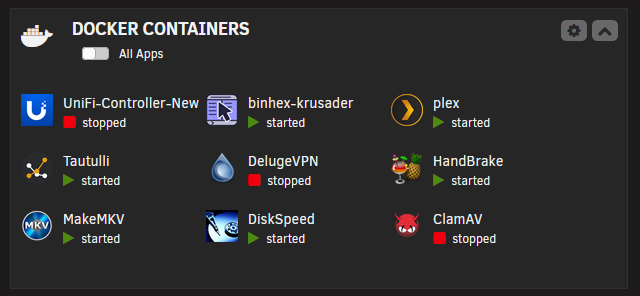
None of the information below is intended to convince you to use cache or Docker. it is just information to help you better understand why they exist. Docker is a system that allows applications or services to run in a self-contained way instead of installed directly in the host operating system. Take Plex for example. It is a Docker application hosted in the docker infrastructure running in Unraid. Here are some examples: Plex, for example, can interact with media on Unraid shares but each has its own file system and management. Docker applications have configuration and other databases, files, etc. (apart from media stored in Unraid shares) and these work best if contained on a "cache" drive that is not part of the Unraid storage array. Using and SSD for a cache drive means it can be accessed by docker applications without spinning up HDDs in the array. If you write large amounts of media to your Unraid array, it is often advantageous to use the cache drive (typically, an SSD) to initially receive those files at a faster speed and then let the Mover move them to the array at a time of minimal load on the server. A cache drive lets you avoid the initial parity write penalty during times of high server utilization. If all you want is a simple file server and have no need for other applications or services, you don't need Docker. If you don't care about write speed to the array, you don't need to utilize the cache concept. Both are very handy and useful if you need them. You can ignore them for now if you have no need; however, knowing what they do may open up possibilities for future use of your Unraid server.
-
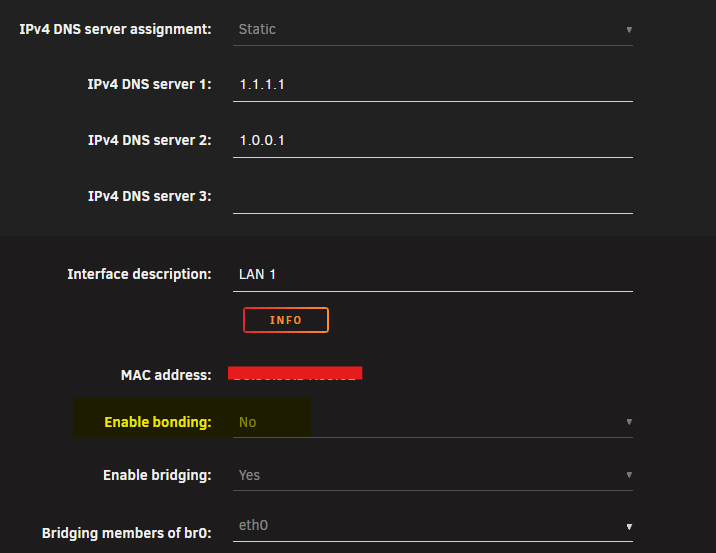
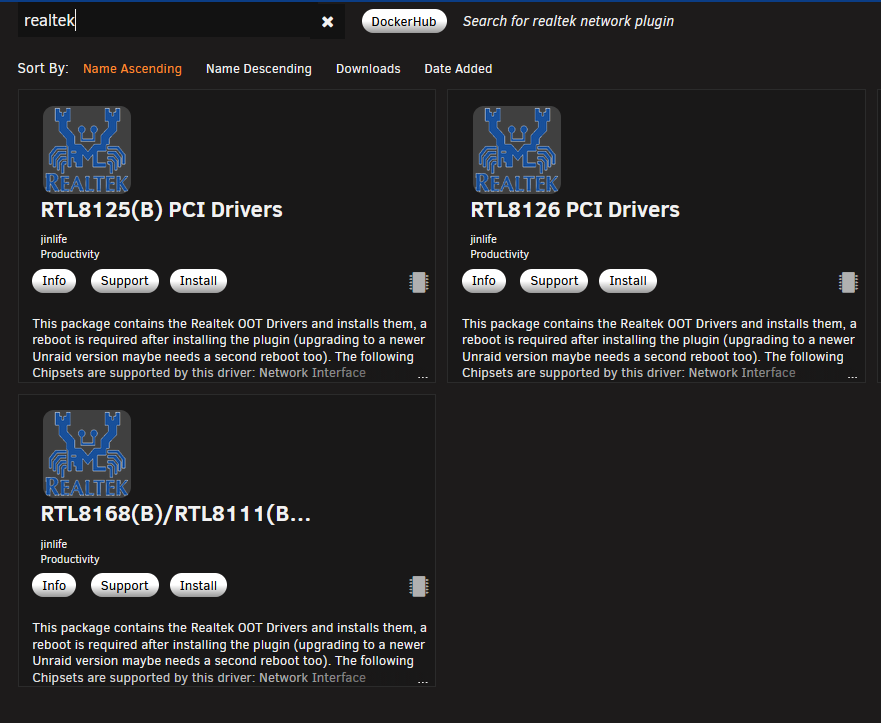
Disable bond in Settings --> Network Settings in the GUI Try Installing the RTL8125(B) drivers plugin from Apps in the Unraid GUI. Then reboot.
-
If you use the same USB flash drive with your current Unraid license with new hardware (assuming you are keeping the same array/pool/cache disks and configuration) it is pretty much a seamless update with no changes. Unraid is not hardware specific in most cases. The only thing that could be a potential gotcha is VMs if you are doing any hardware passthrough with current hardware. That would need to be reconfigured with hardware changes. I have changed hardware 4-5 times (motherboard, RAM, CPU, sometimes PSU) all with the same USB flash drive as it contains your Unraid configuration in the config folder. As mentioned above, everything related to your current configuration is in the config folder on the root of your USB flash drive. The really important things to keep are the *.key (Unraid license) file, e.g Pro.key, and the super.dat which is your current disk configuration. With many configuration files, deleting the file from the config folder will cause it to be recreated with the defaults on the next reboot. Essentially, this is like starting over with that configuration. If you delete network.cfg, for example, you will get the default network configuration with DHCP enabled on the next reboot. There are also subfolders in config for certain things like shares. This is where your current shares configuration is located. If you delete those files, you wont lose the shares, as they will be recreated with defaults on reboot; but, you will lose how those share are configured. The quickest way to "start over" with the Unraid config is to make a backup copy of the current config folder, recreate the flash drive, and then copy your *.key file and super.dat from the backup back to the config folder. This will boot on the new hardware with the current license and disk configuration and everything else will be back to defaults. If you are using the same array/parity disks with the current data, shares will get recreated automatically with default settings as top level folders on array disks automatically result in shares of that name in Unraid. If there are other configurations you know are good and you don't want to redo them, you could copy those .cfg file back into the config folder as well.
-
I know for some, updating to 7.2.3 is an issue; however, for me (on Windows 11 coming from 7.2.2 Unraid), the only problem I had was that I did not update the Connect plugin before attempting the Unraid update on one machine so I got the "error" message indicated in prior posts. As soon as I updated the plugin, the Unraid update proceeded with no issues (no problems with Continue button). Successful update on all three of my Unraid servers.
-
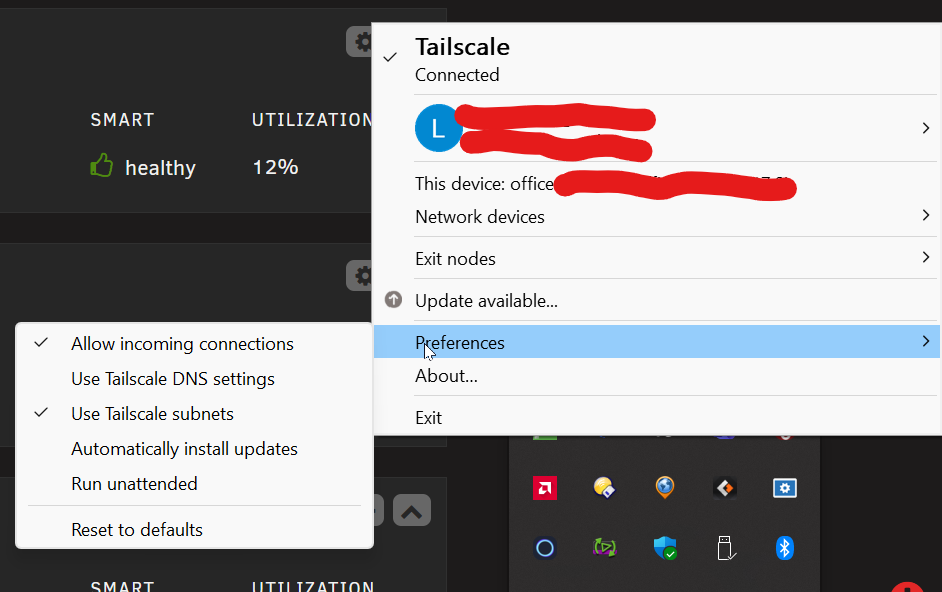
@Frank1940 @Zonediver @JorgeB Thank you for your many suggestions. At long last I have identified the source of the problem and fixed it. I can't believe I did not spot this sooner. Was it a big deal that I could only access the server and shares via IP address and not server name? No; however, I don't like unsolved mysteries and when this started happening four days ago and only on one machine, I had to figure it out! I opened a command prompt and pinged the server by IP address. Success. I pinged the server by name (medianas) and discovered that the reply was coming from the Tailscale network name for the PC on ts.net I checked Tailscale settings on the PC and discovered that it was still connected and was using Tailscale DNS which appends the Tailscale name to the server name I disabled Use Tailscale DNS settings (of course, I also could have just disconnected from Tailscale) Now I can access the Unraid GUI and Unraid shares by server name in browser, Windows File Explorer and my third-party file explorer (Directory Opus). Of course, IP address continues to work without issue. The two PCs from which I had no access problems are not connected to the Tailscale network so it was never an issue for them. I have no idea what changed four days ago on this PC as it was working before and it has been months since I did anything with Tailscale on this or any other PC.
-
As mentioned above, I did modify hosts and that worked for a while in browser only. Several minutes later, the host became unreachable by name in URL and I had to return to IP address. Still stuck at IP address in browser and file explorer as the only way reliably connect to Unraid server or shares on this PC only.
-
I saw that Unraid 7.2.3 had "Samba upgrades for time machine" so, I thought, what the heck, I'll give it a try. I also mucked around in the Windows hosts file for the first time in years and added an entry for MediaNAS. I then rebooted the PC and, voila, I could access the Unraid GUI in a browser by server name but still not in File Explorer other than with the IP Address.
-
Changed name to IMPI-BMC MediaNAS Rebooted Unraid server Restarted router No change.
-
Correct. I'll try changing the name and report back. It's just a name alias in UnifFi Network. This is not an actual computer name in Windows to which I can see the above quoted rules applying. Still baffled why there were no problems up until four days ago and is still works fine on other PCs.
-
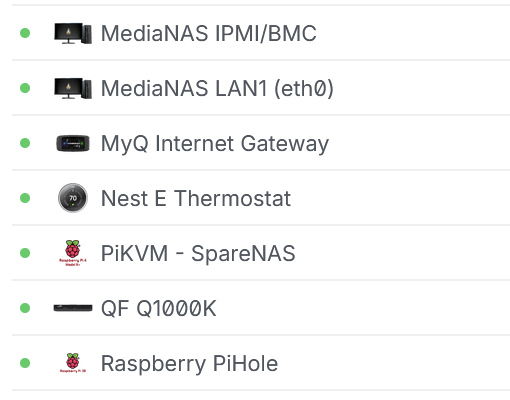
Identical on both PCs. The connected devices table from the UniFi router shows the following from all connected devices: MediaNAS has two connections; MediaNAS LAN1 is IP address 192.168.1.10 (the Unraid server) of course, the other connection, as the name says is the IPMI LAN and has IP address 192.168.1.12
-
I just reinstalled Windows 11 Pro 25H2 from a USB install drive created in early October. I told the install to preserve user files and applications. I told it to not download and install updates. OS Build shows 26200.6584 Network discovery and file sharing is still on for Private networks and off for public Credential Manager has credentials for Unraid server by server name and IP address using the Unraid user "shares" SMB v1 remains disabled Enable insecure guest logins remains enabled but should not be used as I am connecting via the Unraid user name and password The problem remains. I can now consistently connect to Unraid GUI/shares via IP address, but, not by server name. I hope I don't have to go the reformat and reinstall programs route as I have a lot of installed programs. I do need to uninstall a bunch of them, but, would rather no do that in a forced format/reinstall. :(
-
I just rolled back the Windows Security update install on December 15. It seemed like a likely culprit and was about the time the problems started. One of the PCs that works fine has that update installed, the other one does not. No joy. Still cannot connect by server name, but, once again, the connection to Unraid shares via IP address survived the reboot. At least that seems to be consistent now and is what I will have to use until I can get this figured out.
-
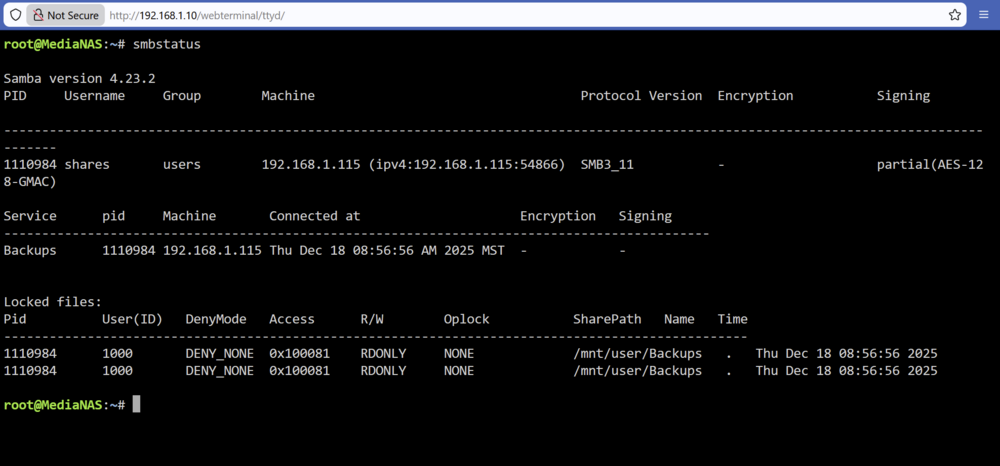
Here is a cleaner smbstatus screen with connection to Unraid via IP address (it survived a reboot) and with the Backups share open in File Explorer. Unraid user name is "shares" so it is connecting via the correct credentials in Credential Manager.