






Hoopster
Members
-
Joined
-
Last visited
Everything posted by Hoopster
-
See this post for several things that can done to improve unRAID stability with a Ryzen (especially 1st gen.) CPU.
-
https://s3.amazonaws.com/dnld.lime-technology.com/stable/unRAIDServer-6.8.3-x86_64.zip
-
There is this video from Spaceinvader One.
-
Yeah, it took me several days to wade through it all and get it to work properly. You will see lots of my posts in that thread. However, once you get it set up it is "set it and forget it." This has been running flawlessly for me for over three years. I'll pm you a copy of the script I use as an example.
-
Works great via User Scripts for unattended weekly backup in my case. I do not remove the content from the source server once copied to the destination server but there is an rsync parameter to do that.
-
@JorgeB is who even other very helpful forum members refer questions to when it comes to disks and controllers. He is like the experts expert for many things (probably not just disks and controllers). I have seen @ich777 go out of his way to try and find solutions to issues raised in this forum. They are among several members of this forum that answer the bulk of all the posted questions. The others being @trurl, @JonathanM, @Squid, @itimpi, @ChatNoir, @SimonF, @bonienl, @Frank1940. Unfortunately, I have probably left a few off that list unintentionally Others such as @dlandon, @binhex, @Djoss, the gang at @linuxserver.io and many others are very active in supporting their plugins and docker containers which are a great addition to the unRAID ecosystem. @ich777 belongs on that list as well. As has been mentioned several times, the community is one of the best things about unRAID thanks to those (and others) mentioned above.
-
No genius here but here is an idea that may work (although I have certainly never tried it): I used to have all my appdata and docker.img on an SSD that was in a front- accessible 4 x 2.5" hot swappable bay in my unRAID server chassis. I have now moved them to an M.2 NVMe on the motherboard. I still have one pool and an Unassigned Devices SSD in the hot-swappable 4 x 2.5" bay. If you have your appdata folder for docker containers and the docker.img (or folders if you are using that method) on an easily removable SSD, you can mirror the docker container setup on an internet connected computer that boots into unRAID. The SSD from your non-Internet unRAID server can be removed (hopefully easily), placed in an external USB enclosure and connected to the Internet-connected computer that boots into unRAID. Even though USB connected drives are not recommended with unRAID, for a short-term use like updating docker containers, there is less risk (although not zero) of disconnection. Again, I have never tested this and perhaps there are reasons it will not work (the true geniuses can chime in on that), but is all I can think of to resolve your docker update issue.
-
From a computer that does have access to the Internet, go to the UnRAID downloads page and download the latest version of unRAID. This will download a *.zip file. If necessary, transfer that *.zip file to a computer that has access to your unRAID server (if the computer from which you downloaded unRAID zip file does not have access to the unRAID server). Extract the zip file and copy all the bz* files to the unRAID server USB flash boot drive overwriting the existing files. Reboot your server and you are upgraded. Unfortunately, this does not help with plugin and docker container upgrades and there is not a similar method for doing these upgrades.
-
Yes, should have called out pools specifically as well. Thanks for the correction.
-
Here is a link to a card the works well and is already flashed with IT firmware.
-
More like very much not recommended as opposed to not usable. Port multipliers multiply the number of ports drawing from limited bandwidth (such as PCIe lanes) but they cannot create additional bandwidth. That may be OK in a PC scenario where all devices are not usually actively reading/writing at the same time, but, in the case of a parity check or disk rebuild, etc. in unRAID, it results in several devices trying to simultaneously use the same limited bandwidth which can cause problems.
-
Any top-level folder on an array disk is automatically a share. Something is creating these folders on an array drive. Check docker containers and plugins to see if one is improperly configured and is creating these folders on the array.
-
In this link is the list of CPUs support by the Gigabyte GA-Z77X-UD5H. I don't see the Xeon 3060 on that list if that is the CPU to which you are referring. The Xeon 3060 (as listed in your signature) is a socket 775 CPU not socket 1155 which is what the Gigabyte GA-Z77X-UD5H supports. However, the Intel DZ68BC is also a socket 1155 motherboard so it is unclear which CPU you wish to use in a different motherboard.
-
I have a 5700G in a desktop machine (not an unRAID server) and it also idles in low to mid 50s. I was also concerned at first and turned off PBO and made other adjustments that did nothing. Research indicated this is normal for this CPU. Interestingly I have a 5600G in another machine and it idles in the high 30s to low 40s. Different MB manufacturer and BiOS so that may have something to do with it. Sent from my iPhone using Tapatalk
-
@DigDug5002 The information above from @G Speed should be taken into consideration. I have never used a Dell server for unRAID but the H310 works fine with my non-Dell hardware. If G Speed has problems with the H310, perhaps one of his other suggestions is a better choice.
-
Yes. That is exactly what I, and many others, use with UnRAID. Sent from my iPhone using Tapatalk
-
RAID controllers are not recommended with unRAID. As the name suggests, RAID is not supported on array data drives. This thread is a discussion of disk controllers that are recommended for use with unRAID.
-
Does not meet your GUI requirement as this runs via script, but once you set it up it is set it an forget it. I have been backing up one unraid server to another this way for about three years now. It is all automated via a User Scripts cron job. Also check out this option with LuckyBackup which is a combination of CLI and GUI: https://unraid.net/blog/unraid-server-backups-with-luckybackup
-
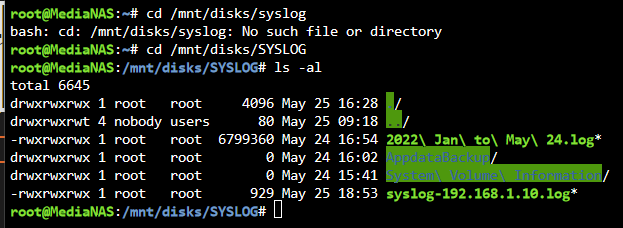
Problem resolved. Something happened during the last appdata backup that resulted in it filling the disk (size was reported incorrectly). Previous backups were much smaller. I have moved appdata backup to a different location with lots of space for troubleshooting and removed it from the SYSLOG location. Syslog is functioning properly now and again writing to the syslog on the Micro SD card. The "no space left on device" errors have ceased.
-
My syslog is written to a flash drive configured as an unassigned device. For some reason it says all space is used when it has very little actually stored on the card. This is a Micro SD card without a lock switch. Since the upgrade to 6.10.0 there have been lots of issues with the syslog. Currently, the syslog in RAM is filling up with the following errors: May 25 04:50:01 MediaNAS rsyslogd: [origin software="rsyslogd" swVersion="8.2102.0" x-pid="26279" x-info="https://www.rsyslog.com"] rsyslogd was HUPed May 25 04:50:01 MediaNAS rsyslogd: rsyslogd[internal_messages]: 552 messages lost due to rate-limiting (500 allowed within 5 seconds) May 25 04:50:01 MediaNAS rsyslogd: file '/mnt/disks/SYSLOG/syslog-192.168.1.10.log'[9] write error - see https://www.rsyslog.com/solving-rsyslog-write-errors/ for help OS error: No space left on device [v8.2102.0 try https://www.rsyslog.com/e/2027 ] May 25 04:50:01 MediaNAS rsyslogd: action 'action-3-builtin:omfile' (module 'builtin:omfile') message lost, could not be processed. Check for additional error messages before this one. [v8.2102.0 try https://www.rsyslog.com/e/2027 ] May 25 04:50:01 MediaNAS rsyslogd: file '/mnt/disks/SYSLOG/syslog-192.168.1.10.log'[9] write error - see https://www.rsyslog.com/solving-rsyslog-write-errors/ for help OS error: No space left on device [v8.2102.0 try https://www.rsyslog.com/e/2027 ] May 25 04:50:01 MediaNAS rsyslogd: action 'action-3-builtin:omfile' (module 'builtin:omfile') message lost, could not be processed. Check for additional error messages before this one. [v8.2102.0 try https://www.rsyslog.com/e/2027 ] May 25 04:50:01 MediaNAS rsyslogd: file '/mnt/disks/SYSLOG/syslog-192.168.1.10.log'[9] write error - see https://www.rsyslog.com/solving-rsyslog-write-errors/ for help OS error: No space left on device [v8.2102.0 try https://www.rsyslog.com/e/2027 ] May 25 04:50:01 MediaNAS rsyslogd: action 'action-3-builtin:omfile' (module 'builtin:omfile') message lost, could not be processed. Check for additional error messages before this one. [v8.2102.0 try https://www.rsyslog.com/e/2027 ] May 25 04:50:01 MediaNAS rsyslogd: file '/mnt/disks/SYSLOG/syslog-192.168.1.10.log'[9] write error - see https://www.rsyslog.com/solving-rsyslog-write-errors/ for help OS error: No space left on device [v8.2102.0 try https://www.rsyslog.com/e/2027 ] May 25 04:50:01 MediaNAS rsyslogd: action 'action-3-builtin:omfile' (module 'builtin:omfile') message lost, could not be processed. Check for additional error messages before this one. [v8.2102.0 try https://www.rsyslog.com/e/2027 ] May 25 04:50:01 MediaNAS rsyslogd: file '/mnt/disks/SYSLOG/syslog-192.168.1.10.log'[9] write error - see https://www.rsyslog.com/solving-rsyslog-write-errors/ for help OS error: No space left on device [v8.2102.0 try https://www.rsyslog.com/e/2027 ] May 25 04:50:01 MediaNAS rsyslogd: action 'action-3-builtin:omfile' (module 'builtin:omfile') message lost, could not be processed. Check for additional error messages before this one. [v8.2102.0 try https://www.rsyslog.com/e/2027 ] May 25 04:50:01 MediaNAS rsyslogd: file '/mnt/disks/SYSLOG/syslog-192.168.1.10.log'[9] write error - see https://www.rsyslog.com/solving-rsyslog-write-errors/ for help OS error: No space left on device [v8.2102.0 try https://www.rsyslog.com/e/2027 ] May 25 04:50:01 MediaNAS rsyslogd: action 'action-3-builtin:omfile' (module 'builtin:omfile') message lost, could not be processed. Check for additional error messages before this one. [v8.2102.0 try https://www.rsyslog.com/e/2027 ] May 25 04:50:01 MediaNAS rsyslogd: file '/mnt/disks/SYSLOG/syslog-192.168.1.10.log'[9] write error - see https://www.rsyslog.com/solving-rsyslog-write-errors/ for help OS error: No space left on device [v8.2102.0 try https://www.rsyslog.com/e/2027 ] May 25 04:50:01 MediaNAS rsyslogd: action 'action-3-builtin:omfile' (module 'builtin:omfile') message lost, could not be processed. Check for additional error messages before this one. [v8.2102.0 try https://www.rsyslog.com/e/2027 ] May 25 04:50:01 MediaNAS rsyslogd: file '/mnt/disks/SYSLOG/syslog-192.168.1.10.log'[9] write error - see https://www.rsyslog.com/solving-rsyslog-write-errors/ for help OS error: No space left on device [v8.2102.0 try https://www.rsyslog.com/e/2027 ] May 25 04:50:01 MediaNAS rsyslogd: action 'action-3-builtin:omfile' (module 'builtin:omfile') message lost, could not be processed. Check for additional error messages before this one. [v8.2102.0 try https://www.rsyslog.com/e/2027 ] May 25 04:50:01 MediaNAS rsyslogd: file '/mnt/disks/SYSLOG/syslog-192.168.1.10.log'[9] write error - see https://www.rsyslog.com/solving-rsyslog-write-errors/ for help OS error: No space left on device [v8.2102.0 try https://www.rsyslog.com/e/2027 ] May 25 04:50:01 MediaNAS rsyslogd: action 'action-3-builtin:omfile' (module 'builtin:omfile') message lost, could not be processed. Check for additional error messages before this one. [v8.2102.0 try https://www.rsyslog.com/e/2027 ] May 25 04:50:01 MediaNAS rsyslogd: file '/mnt/disks/SYSLOG/syslog-192.168.1.10.log'[9] write error - see https://www.rsyslog.com/solving-rsyslog-write-errors/ for help OS error: No space left on device [v8.2102.0 try https://www.rsyslog.com/e/2027 ] May 25 04:50:01 MediaNAS rsyslogd: action 'action-3-builtin:omfile' (module 'builtin:omfile') message lost, could not be processed. Check for additional error messages before this one. [v8.2102.0 try https://www.rsyslog.com/e/2027 ] May 25 04:50:01 MediaNAS rsyslogd: file '/mnt/disks/SYSLOG/syslog-192.168.1.10.log'[9] write error - see https://www.rsyslog.com/solving-rsyslog-write-errors/ for help OS error: No space left on device [v8.2102.0 try https://www.rsyslog.com/e/2027 ] May 25 04:50:01 MediaNAS rsyslogd: action 'action-3-builtin:omfile' (module 'builtin:omfile') message lost, could not be processed. Check for additional error messages before this one. [v8.2102.0 try https://www.rsyslog.com/e/2027 ] May 25 04:50:01 MediaNAS rsyslogd: file '/mnt/disks/SYSLOG/syslog-192.168.1.10.log'[9] write error - see https://www.rsyslog.com/solving-rsyslog-write-errors/ for help OS error: No space left on device [v8.2102.0 try https://www.rsyslog.com/e/2027 ] May 25 04:50:01 MediaNAS rsyslogd: action 'action-3-builtin:omfile' (module 'builtin:omfile') message lost, could not be processed. Check for additional error messages before this one. [v8.2102.0 try https://www.rsyslog.com/e/2027 ] May 25 04:50:01 MediaNAS rsyslogd: file '/mnt/disks/SYSLOG/syslog-192.168.1.10.log'[9] write error - see https://www.rsyslog.com/solving-rsyslog-write-errors/ for help OS error: No space left on device [v8.2102.0 try https://www.rsyslog.com/e/2027 ] May 25 04:50:01 MediaNAS rsyslogd: action 'action-3-builtin:omfile' (module 'builtin:omfile') message lost, could not be processed. Check for additional error messages before this one. [v8.2102.0 try https://www.rsyslog.com/e/2027 ] The flash drive for the syslog is definitely not out of space (it's 32GB) but rsyslogd is not writing anything to the syslog file on the flash drive. I even reformatted the flash drive. Immediately after this, the syslog file was written but it stopped after a few lines and has not been updated in a couple of days. My appdata backup also goes to the same flash UD flash drive and there are no issues with that process. [UPDATE: apparently this was the problem as the last appdata backup went crazy and filled the disk] While running unRAID 6.9.2 the syslog on the flash drive was written to without issue from Jan to May 24 when it suddenly stopped after the 6.10.0 upgrade. [It was the first appdata backup that happened shortly after upgrading that caused the problem so I though it was the upgrade that was the issue.] What could be causing rsyslogd to think the drive is full when it is not and failing to write to the syslog? Permissions look OK? medianas-diagnostics-20220527-0852.zip

-
I just made the jump from controller version 5.14.23 all the way to 7.1.66 in one step. The upgrade went smoothly and everything came back online. This shows it is possible to skip the 6.x.x versions altogether and go straight to 7.x.x if you, like I was, are still running 5.14.23, It will take me a while to figure out where everything is now as things are organized differently. There was no compelling reason to do the upgrade other than fear of being left too far behind and making a future upgrade more difficult.
-
You never met my wife. 😀 Other than that small point, the rest of your post is spot on. I am a firm believer that fewer larger drives is better than many smaller drives. I have consolidated twice. First it was 3TB to 8TB drives and now I am starting to move from 8TB to 14TB and 16TB drives.
-
Not that I know of. The latest firmware that does support the iGPU is L2.35. Look toward the end of the linked thread for one of my posts in which I included the L2.35 BIOS.
-
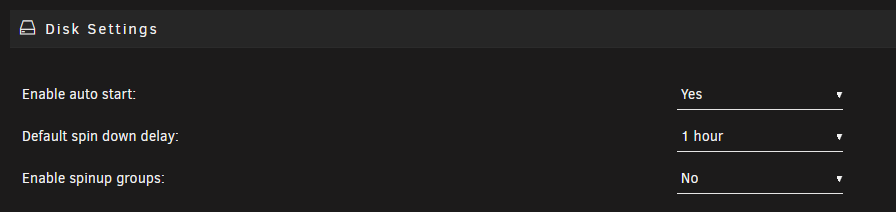
In Disk Setting set auto start to No.
-
Yes, I should have caught that. The configuration of the disk was incorrect in UD after the upgrade. After mounting it manually, I did in fact unplug it without unmounting and removing from historical devices. A reboot of the server cleared everything up and it is working properly now. I was so used to just unplugging it after the backup and automatic unmount that I forgot to manually unmount. Thanks for pointing out the obvious as I missed that. 😀






