






Hoopster
Members
-
Joined
-
Last visited
Everything posted by Hoopster
-
Rsync backup via script failed for me when I upgraded to Unraid 7.x.x due to the loss of support for the Nerd Tools which contained ipmitool. I was using ipmitool to power my destination Unraid server on and off via the rsync backup script. How ipmitool worked on Unraid had also changed (broken dependencies) so the old Nerd Tools version would not work standalone with Unraid. This eventually got resolved when @SimonF recompiled ipmitool for Unraid and I was back on track with rsync backups between Unraid servers. My situation is not the same as yours as I have no Synology NAS invloved. I am sorry I cannot help with the rsync version issue; however, you would think newer versions of rsync would be backward compatible. Maybe the gap between rsync 3.4.x and 3.1.x is too big.
-
Welcome Chris. It's a good thing my wife does not read these forums or she might renew her requests to go dancing from time to time. I convinced her that's not my thing years ago. 😃
-
No. <custom> appears in the drop-down list for syslog configuration on all three of my servers but it is not selectable. On all three servers, I now have to use an Unraid share or pool device I have setup for the syslog. I wish <custom> worked the way it used to but that was broken/changed a long time ago and has never reverted to its former functionality. I even went to the trouble of documenting how to set up the syslog for a local <custom> location on an unassigned devices, but, that appears to be no longer possible.
-
My Unraid journey started in December of 2011 with Unraid 5 beta 14. Unraid 4.7 was the official "stable release" then but V5 was very close to release so that is where I started. Anyone remember unMenu? I was looking for a simple NAS to store tens of thousands of photos and home videos. None of the commercial NAS units were appealing to me (too much money for low-end hardware) and I like building computers. This led me to Unraid and I have never looked back. My first Unraid server was built around an Intel i3-2100 CPU. A couple of years later, Docker and VMs became a thing and I digitized my movies collection and added Plex and several other docker containers. I now have three Unraid servers and have convinced a few friends and family to start their own Unraid journey. All are very pleased with the control it gives them.
-
Yes. Unraid tracks disks by serial number not by SATA port or slot location. The only exception would be if the HDDs were connected to some kind of RAID controller (not in RAID mode) that messes with serial numbers.
-
@NLS I used the Linuxserver UniFi Controller container for years until they decided to require a second, separate container for the database. It seemed less than ideal to maintain two containers in order to run the UniFi Controller. This container maintains the single container approach and has never presented me any problems at all. It was very easy to migrate from the Linuxserver docker container to this one (when that was supported). Ubiquiti finally sucked me into the self-contained Controller world with the UniFi Controller built into the router/gateway I use in both my home locations. Since it is required to use the built-in controller, I no longer use this container, although I do keep it installed and updated on my Unraid servers as a backup.
-
That I do not know but there are some comments in the thread I linked about Dell servers. I don't have any personally.
-
ipmitool previously included in Nerd Pack (which is no longer), does not work with Unraid 7.x. I changed over to ipmipower as documented in this post. Later in that discussion, you will see a comment by SimonF about an updated version of ipmitool which should work with Unraid 7.x
-
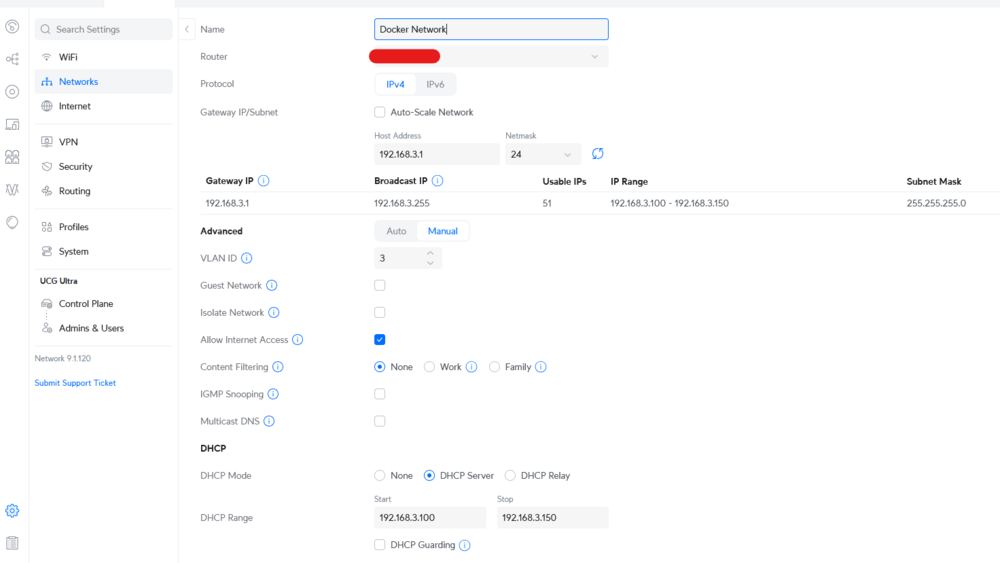
Exactly what I did. I created a Docker VLAN in Unraid (br0.3) and a Docker VLAN in Unifi network. I assigned docker containers an ip address manually in the range of 192.168.3.100 - 192.168.3.150. I did not use DHCP in Unraid VLAN. For setting things up I followed this old post
-
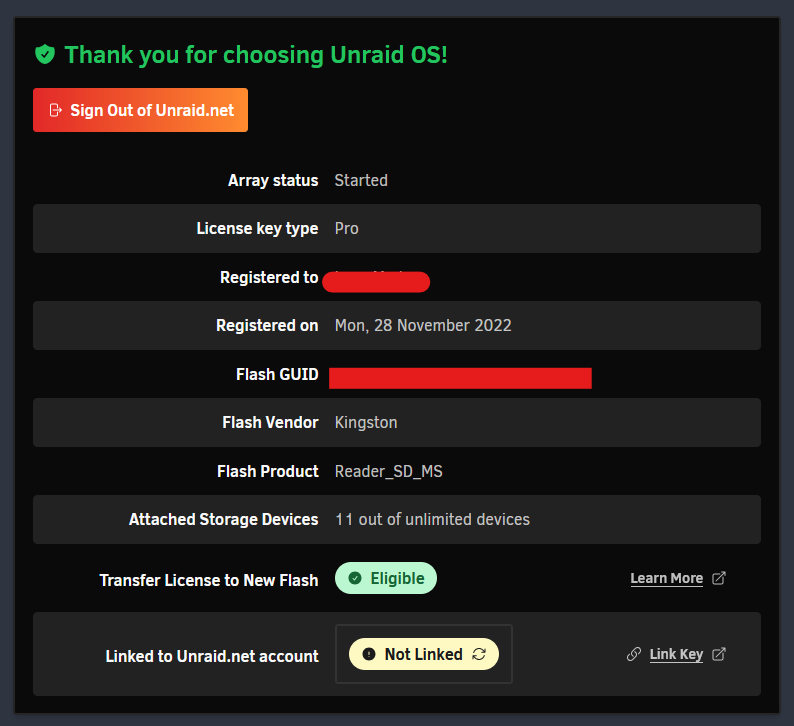
You can use the same USB flash drive in another server. The license is tied to the flash drive and not any other hardware. Since the array/pool drive configuration as well as overall Unraid configuration is on the flash drive, you can just plug it into a new machine and away you go. I have used the same flash drive for over 13 years and it has been through several "servers." At a minimum, I have replaced the motherboard/CPU/RAM three times and changed server chassis twice. The drive configuration stayed the same as in the previous "server" so it was plug and play. Of course, I have changed the array and/or pool configuration over that time but it was always the way I wanted it before each hardware swap. You don't really need to do this unless you really run to license a different USB flash drive with the new Unraid server. Create a new Unraid flash drive Copy over the config folder from the current flash drive to the new flash drive Transfer the license to the new USB flash drive (this will blacklist your current flash drive) through the Registration Key Manager link (Main-->flash-->Registration Key Manager
-
Lifetime updates applies to the legacy Basic, Plus and Pro licenses. The recent email applies to the upgrade price from Basic to Plus or Pro and Plus to Pro. That is going up for those who have legacy licenses (I have two Pro and one Plus license). Legacy licenses of any level have lifetime updates free of charge and that will never change. Basic, Plus and Pro licenses are no longer available. The current Starter and Unleashed licenses include one year of updates free with an "annual" renewal price to continue receiving updates for another year. The Lifetime license receives all updates in perpetuity like the legacy licenses.
-
Don't know about Supermicro but my ASRock Rack server motherboard BIOS has a setting called Primary Graphics Adapter which lets me chose which graphics adapter to use as Primary (GPU 0) if there is more than one, including iGPU.
-
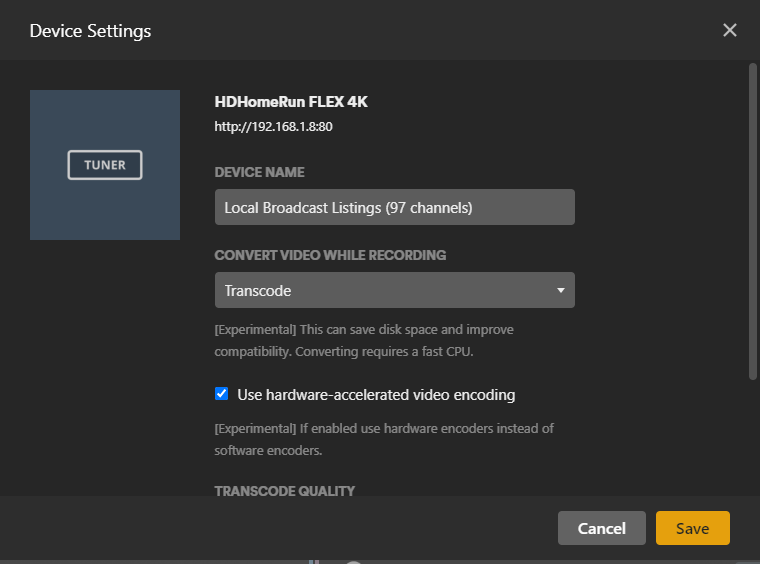
HDHomeRun recording of live HD shows can use quite a bit of RAM so that should be a consideration. Since the HDHomeRun integration with Plex allows for transcoding while recordiing, I have transcoding setup to take place in 16GB RAM. I do not know if Emby has a similar capability with HDHR.
-
Unraid runs on just about any hardware so a lot of it comes down to personal choice and your particular needs. I have two HDHomeRun units (total of 6 tuners) in my network. I run Plex supporting my household and 4 remote households. Streaming to many mobile devices transcodes even if it is local streaming. Even if you think you don't need transcoding, you should build your system to support it. Yes, Intel is better for this and an iGPU is more than sufficient unless you do a lot of 4K transcoding. See my signature below for hardware specs on my three Unraid systems. The CPUs are gen. 9 (the Xeons) and gen. 11 Intel but they still keep up with anything I throw at them. Later model CPUs/iGPUs should do even better. Enable signatures in Account Settings --> Signatures if you don't see them on posts.

-
The key is if the server owner does not have a Plex Pass subscription or lifetime. If the server owner has a Plex Pass, other users of the server can still stream remotely with no charge. From the Plex announcement on the changes: IMPORTANT NOTE FOR CURRENT PLEX PASS HOLDERS: For users who have an active Plex Pass subscription, remote playback will continue to be available to you without interruption from any Plex Media Server, after these changes go into effect. When running your own Plex Media Server as a subscriber, other users to whom you have granted access can also stream from the server (whether local or remote), without ANY additional charge—not even a mobile activation fee. More on that later in this update.
-
Do you have Plex Pass (subscription or lifetime)? If so, this does not affect you. Only the admin user needs Plex Pass and all users can still stream remotely free of charge. Glad I got a lifetime Plex Pass years ago on one of their sales for $75. It's now $250
-
Welcome. Checkout the Spaceinvaderone channel on Youtube. He has a lot of Unraid-related videos. Start with the Unraid Related Tutorials section.
-
I usually look for deals in the US at serverpartdeals.com Here's what the show currently for 18TB drives (a bit more than you have been paying): https://serverpartdeals.com/search?type=product&q=18tb*+hard*+drive*
-
Reviews of the site are generally poor and it has a low trust rating. Here is one review site that gives it low ratings.
-
Not an Unraid feature so, not really something on which Unraid can be sold. This is more appropriate for the Features Requests discussion.
-
Plex sometimes encounters issues with corrupt codecs. Some audio codecs seem particularly problematic. In the Codecs folder in Plex appdata location (\appdata\plex\Library\Application Support\Plex Media Server\Codecs, for example) try deleting the contents of the folder. This will force Plex to download new codecs the next time they are needed.
-
Use the built-in Tailscale VPN. Optionally, you could use WireGuard (Tailscale uses WireGuard under the covers). Both are configured in Settings. VPN Manager is WireGuard. I have both configured although you could pick just one and stick with it. This video is a bit lengthy but it explains well how to use Tailscale with Unraid.
-
Interesting. I have not tried WiFi in 7.1 but if it allows entry of a hidden SSID name, it should allow it to be used. Perhaps a bug?
-
I suppose the only way it would work is the way it does with some other OSes/apps; allow an SSID to be manually entered if you don't want to connect with only the visible SSIDs.
-
Don't think you can limit drives used by subfolders. I could be wrong, but, I don't know a way to do it; maybe something "under the covers". Drive assignments can be done by share. I have created separate shares for media types (movies, TV, photos, etc.) because I like to manage them that way in Plex, I can limit shares to using particular drive(s).




