






Hoopster
Members
-
Joined
-
Last visited
Everything posted by Hoopster
-
Have you tried booting with a new Unraid 7.0.0 vanilla installation on a trial key just to rule out that something is borked with your current Unraid setup?
-
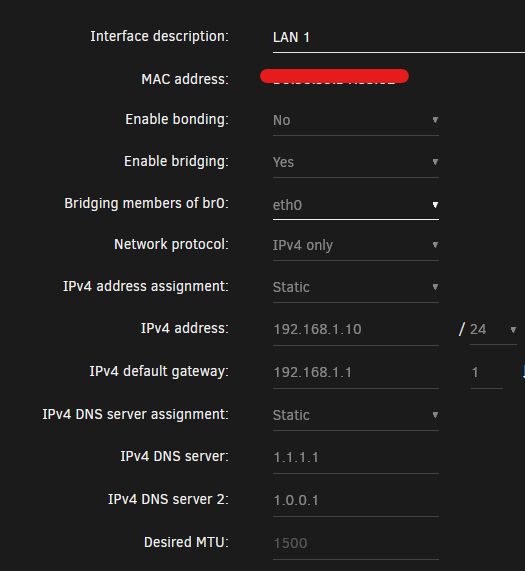
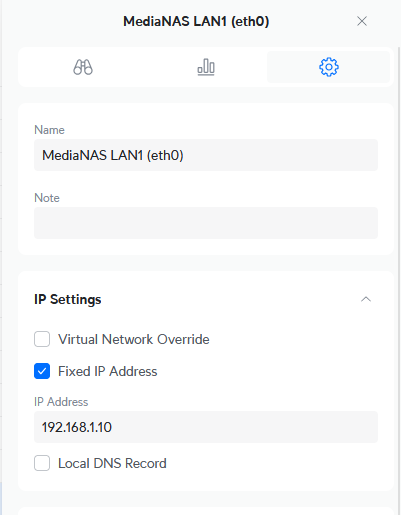
There is nothing inherently wrong with Unraid 7.0.0 networking and UniFi routers/gateways in combination. I have a UniFi Cloud Gateway Ultra at two different locations managing three different Unraid servers which are all running version 7.0.0 since it came out. I have zero issues with IP address and login in or navigating the Unraid GUI in any of the three servers. I can also hit the IPMI/BMC or PiKVM address on each one of them for remote management. I set a static IP address in both Unraid network settings for the server and in UniFi client settings. This is overkill, but I want to make sure I am dealing with a known IP address for Unraid servers. I have also used them all successfully with DHCP. I can also hit the IPMI/BMC or PiKVM NICs for remote or out-of-band management. Obviously, this is no help to you in resolving your issue, but it is not a general problem with incompatibilities. Are you perhaps experiencing IP address conflicts with multiple clients somehow getting the same IP address assignment?
-
I have the X570 Steel Legend (Ryzen AM4) in my desktop PC. It has been very solid. You should like it.
-
My motherboard choice always comes down to: Supports my chosen CPU Has the connectors I need for things like, NVMe SSDs, SATA HDs/SSDs, PCIe cards, USB port expansion, etc. Doesn't break the bank If the ASRock boards you have found meet your needs, get one of those. I have ASRock/ASRock Rack motherboards in all three of my Unraid servers and my desktop PC. They have all been great.
-
Depends on when they were formatted with XFS. I don't remember exactly when XFS started taking much more space than it used to, but it has been about two years, I think. There are some posts in the forums about it as many started noticing what you did; a relatively large amount of space taken on a newly formatted disk.
-
I have two Kingston MobileLites in use on Unraid servers; one G2 and one G3. They both have worked flawlessly for many years. Those are no longer available (not even on eBay last I checked). As to the other card readers that fall under the MobileLite family, some work well with Unraid (unique GUID) and some do not. There seem to be a lot of counterfeit flash drives these days as well and those always seem to have generic GUIDs. It much more of a crap shoot than it used to be.
-
That is just the space taken up by the XFS file system. There is no data on the disk. The file system supports a lot of new features now that take up some space when the disk is formatted.
-
It's not complicated. How did you create the Unraid boot flash?
-
Been posted a few times. Here is the fix, it worked for me.
-
You want AHCI
-
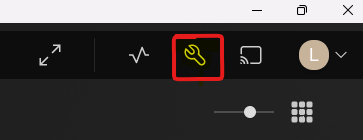
You have to select the setting icon (wrench) first in the upper right corner. Your prior screen shot shows that is there.
-
I don't think so. My Plex installation is working perfectly and it also shows the question marks for Plex in docker allocations.
-
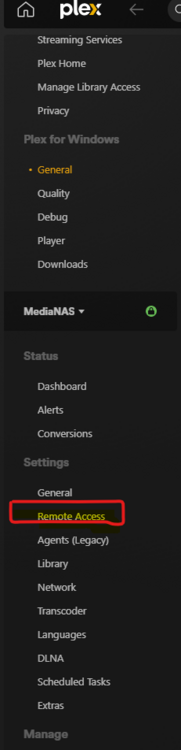
Select the Settings Icon in upper right corner: Then on the left side, you should see a menu like this with Remote Access under Settings:
-
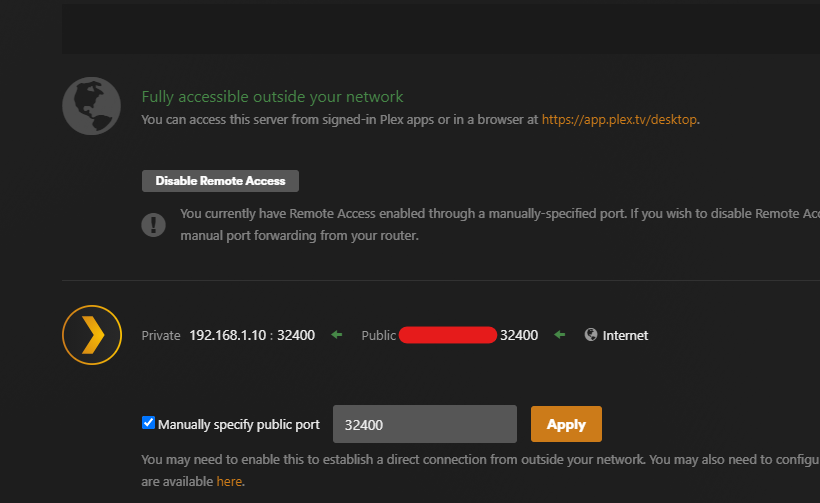
Did you lose local access via the Web GUI, remote access via the forwarded port or both? Does Plex say it is accessible remotely? For better support of a particular Plex docker application, you should post your question in the support thread for that docker application.
-
Thanks. Somehow I missed previous mentions of the issue.
-
A few days ago, I started receiving email messages from Unraid with the following "error." cron for user root /usr/bin/run-parts /etc/cron.daily 1> /dev/null warning: Potentially dangerous mode on unraid-api: 0666 error: Ignoring unraid-api because it is writable by group or others. error: found error in file unraid-api, skipping warning: Potentially dangerous mode on unraid-api.patch: 0666 error: Ignoring unraid-api.patch because it is writable by group or others. error: found error in file unraid-api.patch, skipping I am not sure to what it refers. Is this any cause for concern?
-
@Maximo101 As Trurl has pointed out, Unraid often has issues with SATA cards based on Marvell controllers. It is not just Unraid as it a general issues with Marvell drivers for Linux. I have a 6-port IO Crest SATA card that worked great with earlier version of Unraid but as the kernel changes happened, issues started popping up. That's when I replaced it with the Dell H310 HBA that I got very cheap on eBay.
-
My HDD temps are very good after a few modifications. During parity check or extended disk activity, the hottest temperature I have see on any drive is ~46C. During "normal" use, I see HDD temps from mid 30s to low 40s (36-43C range) See this forum discussion for some worthwhile modifications that increase cooling in the case. I posted a lot in that thread. In addition to the modifications mentioned in the first few posts, here is a summary of what I put in the case. I have been very happy with the case for about 6 1/2 years now. SATA cable to each drive in hot-swap cages connected either directly from motherboard and/or HBA (I have a Dell 310). Power to the hot-swap cages is via Molex power cables from PSU. There is a smaller Silverstone NAS case that had some well-documented cooling issues but the CS380 is not terrible; however, it can be improved with the mods mentioned above. As far as room in the case, I currently have a Micro-ATX motherboard in the case but it can fit a full ATX motherboard. I would not use a motherboard with SATA connectors aligned vertically on the edge of the board. There is little room between the edge of the board and the hot-swap cages. Use a motherboard with SATA ports on the board surface that face upwards.
-
Since you are new here (relatively) it is time to introduce you to the concept of "Soon" The Unraid team never sets release dates for any version of Unraid whether it is a beta or the final release. If you are waiting for something in the future (like 7.1), "soon" is all you are going to get as far as timing. It gets released when the team feels it is ready. "Soon" can be days, weeks, or months.
-
Same here. I see it on boot but it does not get stuck here; maybe 3-5 seconds before it moves on and boots normally. Not much of a solution for the OP, but it seems to be a "normal" error. Getting stuck, of course, is not normal.
-
Docker Image for me. Only once have I experienced a corrupt docker image file requiring deletion, recreation and Previous Apps to bring it all back. I have been using Docker since it was first introduced in Unraid.
-
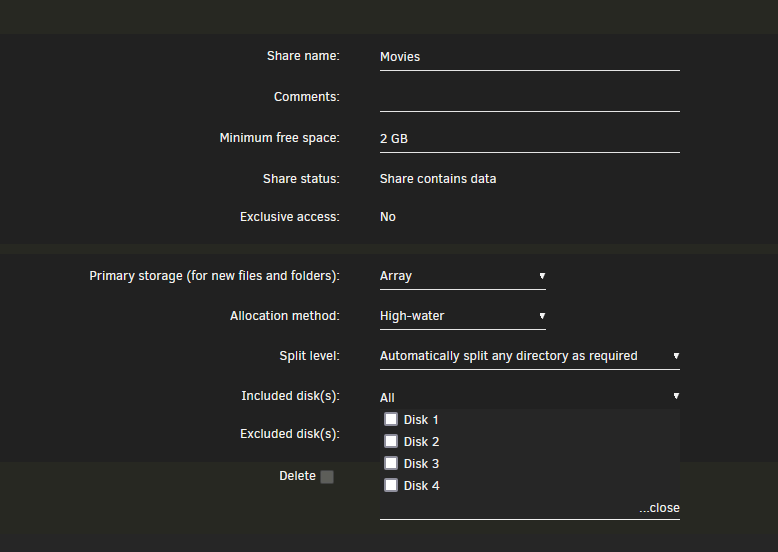
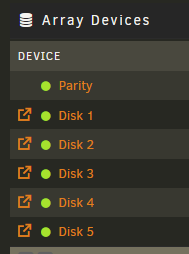
Found the problem. Somehow Disk 5 was excluded in global share settings. Nothing I remember doing, but, that was the case.
-
I have an array with 5 disks. When I go to share settings to set which disks to include in the share, only Disk 1 to Disk 4 appear in the dropdowns for included and excluded disks. Setting a share to All only includes those 4 disks. As seen below, there are 5 disks in the array and all show green balls. There is probably an answer already posted somewhere in the forums but I am being lazy right now as I am headed out the door for a few hours.
-
Because I can 😀 Actually, I just discovered the Site-to-Site VPN capabilities of my routers and set it up just last week. It was super easy and is based on WireGuard. I do not have a lot of experience with it yet but I m about to move my backup server down to our second home this week and I will be trying it out a lot more. I intend to do unattended Unraid to Unraid server backups over Site Magic utilizing User Scripts and the IPMI capabilities of the servers. WireGuard on the 24x7 Unraid server is what I have been using for years for remote LAN access to Unraid and other resources on the same LAN. I also included my docker container VLAN subnet (192.168.3.0/24) in the allowed IP addresses for the WireGuard client devices (phones, laptops, PCs, tablets) from which I access the LAN and VLAN remotely. It works great. WireGuard on a Raspberry Pi in the LAN is my backup entry point in case there is an issue with it on the Unraid server. For this setup, I have two ports forwarded in my router, one for WireGuard on Unraid and one for WireGuard on the RPi. I am not as familiar with Tailscale use as I just started using it recently but it is also based on WireGuard.
-
I currently do it both ways. I am not into the reverse proxy thing like many are but, what I have done so far works well and seems fairly secure. I have had no issues. i started by doing OpenVPN and ZeroTier on the Unraid server. I always seemed to use OpenVPN and rarely used ZeroTier (no particular reason). The past couple of years, I migrated almost exclusively to WireGuard on Unraid setup to allow access to anything on the LAN plus my VLAN (it is in the allowed IP address ranges) on which I put my docker containers. As a backup, I have WireGuard installed on a Raspberry Pi on the LAN in case the Unraid server is down. It is usually on 24x7, but if a power outage occurs, I need to get into the LAN a different way as I do not have the Unraid server set to automatically boot when power is restored. When Tailscale integration with Unraid came along, I set that up as well. Recently, I discovered that my router/gateway (Ubiquiti UniFi Cloud Gateway Ultra) has an SD-WAN site-to-site VPN feature built in so I use that between the networks in my two homes. I can also include the docker VLAN so I can access anything on 3-4 related LANs/VLANs securely. It uses Wireguard tunnels. Basically, I have four ways to access LAN resources and all work great and securely. WireGuard on one of two Unraid servers for LAN-specific access Wireguard on a Raspberry Pi on either LAN for LAN-specific access Tailscale on Unraid servers as well as many other devices for access to resources on either site Site Magic Site-to-Site VPN (WireGuard) on routers for access to anything on LANs/VLANs in two different sites Wireguard requires forwarding a single port and client configuration Tailscale requires no port forwarding but requires "setup" of devices in the Tailscale network Site Magic requires no port forwarding and no client setup




