Hoopster
Members
-
Joined
-
Last visited
Everything posted by Hoopster
-
Yes. In my testing, I created an Unraid user called shares. It is connecting with the proper user name. I can see how that might be confusing, but, since I was testing access to Unraid shares, that is the user name I created for my tests.
-
Yes, I have Network discovery and File and printer sharing turned on under the Private network. They are off on Public networks. Double checked that yesterday. Windows 11 Pro 25H2 Correct. However, it works far more often with IP Address and rarely with server name. On the rare occasion that server name actually connects, the server name then appears in Network in the left panel. Otherwise, it is not there. Credentials for both server name and server IP Address exist in Credential Manager. Until four days ago, none of this was a problem on this PC. Some Windows update must have broken things. It does work fine on other PCs. I have the same problems in Windows File Explorer. In fact, neither server name or IP address works there. In my third party File Explorer (Directory Opus), I did pin MEDIANAS (on one of the rare occasions when server name worked) to its Quick Access list. It does not work there either. Of course, mapping network drives does not work either.
-
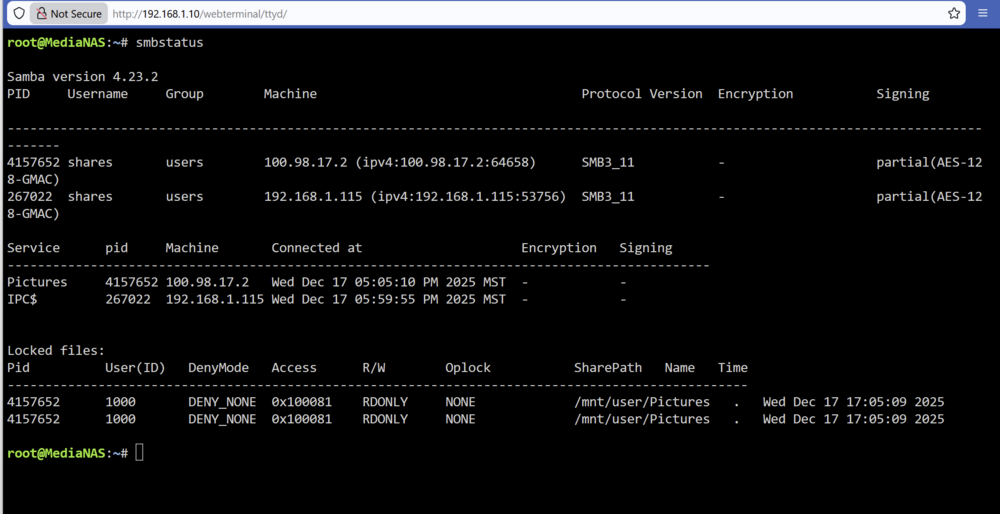
This is a weird one. In the last three days, I started having access problems to Unraid public shares on one Windows 11 machine only; Unraid 7.2.2. It works fine on the other two. I did have allow insecure logins enabled (It still is), but I decided I would try the Unraid user/password route. In File Explorer, I can no longer consistently access the server either by server name or IP address I have created a user/password in Unraid and given the user read/write access to all public shares I deleted all references to the server name and IP address in Windows Credential Manager and created new entries with the Unraid user name and password Server name no longer appears in Network section of File Explorer Every once in a while, I can get the shares to show up when I enter the server name or IP address in File Explorer, but, after a reboot (or even sometimes before if I navigate away) it no longer works If I delete the credentials from Credential Manager, attempting to access the server sometimes brings up a user name and password prompt. I enter these and, maybe, 25% of the time, the connection works and the shares show up (until they suddenly don't any more) Often, entering the credentials again when prompted just results in an error that the network path is not found I can also no longer access the Unraid server by server name in the browser address bar. Only IP address works Below is a screen shot in my dual pane file explorer of it failing by server name and succeeding by IP address; sometimes, even IP address will not work. Clicking on Connect results in nothing unless I delete the MEDIANAS credentials from Credential Manager. It then prompts for user name and password and, far more often that not, still fails to connect. All these shares are Public. Here is what smbstatus shows for the above. I am not sure where the locked files come from and if they are causing problems as I have no shares open at the moment. The 100.98.17.2 IP address is the Tailsclale IP of the Windows 11 machine from which I am having the problems and Tailscale is currently turned off. 192.168.1.115 is the DHCP assigned address for the PC. I have never seen this problem before in 12+ years of using Unraid, especially since two other PC are unaffected. It is obviously a problem on this PC only; however, I'm having a hard time tracking it down. WIndows sucks. :)

-
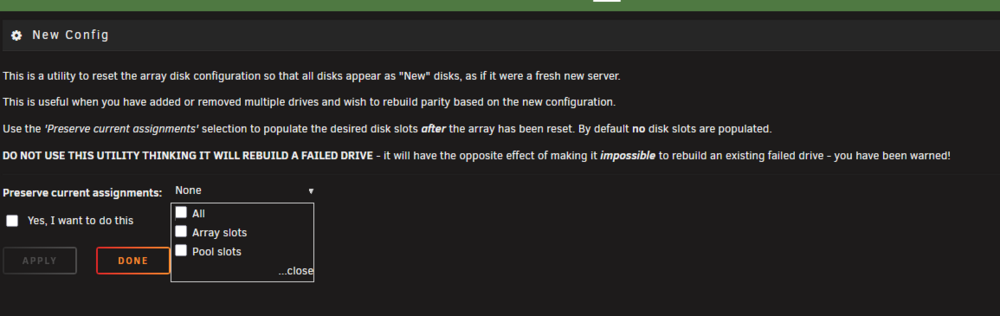
You can use Tools-->New Config and keep all slots as is with current disks and adding the new XFS v5 disk in place of the old drive. This process will let you rebuild parity based on the new disk. You want this so parity knows about the new disk and file system. It will not rebuild the new disk from the old one and you do not want this.
-
Yes, a rebuild rebuild the drive exactly as it was including the filesystem structure and version. Whether you have one or more drives you need to format to v5, you will need to copy all the data each one to another drive, format the target drive to XFS v5 and copy the data back. If you have enough free space on other array drives in the system you can copy the data to one or more array drives with the Unbalance plugin and then reverse the process to copy the data back to the target drive. If you do not have enough space on other array drives, you can add another drive as an Unassigned Device and copy the data there then copy it back after the target drive is reformatted to XFS v5. I did this with 5 array drives a few years ago when I reformatted them to XFS to move off reiser FS.
-
I used to backup most of my Unraid contents to the cloud with CrashPlan (unlimited $10 a month), but, I have never used B2 since with their pricing model, that would cost me over $90 a month. I have a backup Unraid server to which I backed up my main server once a week through an automated rsync script. Since I have now moved that server to a location 260 miles away, it takes the place of my cloud backup. Both locations are on UniFi LANs, and I use the UniFi SD WAN capabilities to see the remote server by IP address just as easily as if it were physically in the same LAN as the local server. The rsync backup script runs unattended once a week and has been doing so for years. I also backup photos and Plex content to an Unassigned Devices external USB drive on demand (automated backup once plugged in) via an Unassigned Devices script. Out of curiosity, I looked at the UNAS but it seemed under-powered to me with an ARM Cortex A57 processor and I prefer the customization capabilities with Unraid; however, as you noted, it takes a bit of manual tinkering, but, I like that. Some Unraid users seem to gravitate to Lucky Backup for server to server backups as it is more GUI driven, but, I don't think that supports B2. I really can't point you to a GUI that helps you backup Unraid shares to B2 as I have zero experience with that.
-
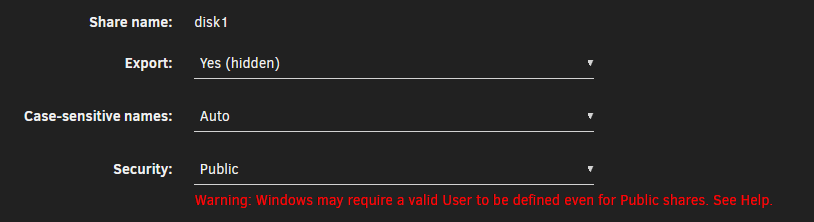
Since your Photos share is only on disk3, the /mnt/disk3/Photos and /mnt/user/Photos paths reference the same location. If Photos share were on more than one disk, the /mnt/disk3/Photos path would reference only those photos on disk 3. There would potentially be a Photos folder on other disks (depending on your allocation and split level settings) and the contents of the Photos folder across all disks would be referenced by the /mnt/user/Photos path. Shares (user or disk) are visible to WIndows if they are set to be exported. Since Windows can see /mnt/disk3/Photos you have disk shares set to be exported. I have five disks in my array and here are the setting for disk1 as an example: Export Yes (hidden) means that the shares are potentially visible in Windows, but, they don't show by default, you have to know and type in the network path in the Windows Explorer. In the case of the disk share above, as you know, I enter /mnt/disk1/ to see folders and files on that disk. You have to be really careful not to mix /mnt/disk paths and /mnt/user paths as this could result in data loss should they reference the same file. A move would copy a file, write it to the new location and then delete it from the original location; however, if /mnt/disk3/Photos/photo1.jpg and /mnt/user/Photos/photo1.jpg are referencing the same file, the result will be that it will not exist in either location as the delete step deletes what was just "moved" on top of itself.
-
Unless you use the --delete option, files that are deleted in the source are not deleted in the destination location The rsync command uses the --delete option to remove files from the destination directory that are no longer present in the source directory. This ensures that the destination mirrors the source, including deletions. You would need to add the --delete option to your rsync command, so, rsync -avh --delete --progress /mnt/disk3/Photos/library "/mnt/disks/4TB Easystore/Immich" mnt/diskX path references a specific disk. If you want to reference the share, which can span disks depending on how you set it up, replace the /mnt/diskX/folder path with mnt/user/Photos. A share can exist across multiple disks. When you setup a share you can limit it to one or more disks if you wish. How is your Photos share configured. Also, do you have the share set to use a cache drive? If so, any files created in the share will actually exist o the cache disk until the mover moves it to the array. Just some things to check with your Photos share.
-
Interesting. The Plex Streams plugin is working great on my main server. It's running Unraid 7.2.2 and there have been no problems for me with Plex Streams for a few years now.
-
Yes. I use the Live TV and DVR function of Plex to record OTA shows from HDHR to a share on Unraid.
-
For me, having the Cloud Gateway Ultra in two different locations, I am easily able to switch between locations in the cloud-based controller. In addition, any device on site A is accessible to devices on site B and vice versa via the SD WAN capability (WireGuard under the covers). This makes it extremely easy to backup my main Unraid server at site A to a backup server on site B via my rsync backup script. If you have just one UniFi system you are managing through the controller, you might not see a lot of difference between the Docker-based controller and the built-in/cloud-based controller in the UnifFi gateway device. They were close to the same version (although I don't remember which version that was as it was over a year ago). The docker-based controller reborn was probably a version or two behind. It's fairly straightforward, not too much to be done. I can't recall exactly what it entailed, but you are guided through what you can do in an offline setup. Yes, after the offline setup, I replaced the UXG Lite with the Cloud Gateway Ultra and restored the backup I had taken from the Docker-based controller.
-
I first went from a USG3 to a UXG Lite a a little over two years ago. That UniFi gateway does not have a built-in network controller so I used the Unifi controller reborn and went through several seamless updates as the controller version changed. A little over a year ago, I upgraded to the Cloud Gateway Ultra which has a built-in network controller which must be used. I have them in both my homes and they work great. Of course there are other models for 2.5G and even 10G networking, but since my Internet speed is "only" 500/500 Mbps, I don't need anything more than the Cloud Gateway Ultra and its gigabit ports. Here is the process I used to go from the UXG Lite/docker-based controller to the Cloud Gateway Ultra and the built-in controller: I had a self-hosted controller running in a docker container with a UXG-Lite gateway. I migrated to the Cloud Gateway Ultra (CGU) using a backup (settings only) of the self-hosted controller. I did the following (not that you have to do it this way): 1 - Changed the Inform host override IP address in the self-hosted controller to 192.168.1.1 (the IP address of the CGU) instead of the IP address of the host running the docker-based controller instance 2 - Made a backup (settings only) of the UniFi network configuration in the docker-based controller 3 - Stopped the docker-based controller instance and set it to not auto start on server reboot 3 - Connected the CGU to my laptop via an Ethernet cable in the CGU WAN port 4 - Did an offline setup of the CGU 5 - Disconnected the UXG-Lite and plugged in the CGU in its place connecting the Internet to WAN port and main switch to adjacent port 6 - Updated firmware on the CGU to latest 7 - Imported the backup from the docker-based controller instance 8 - Waited for all devices (3 switches and 5 APs) to adopt which they did fairly quickly That was it. I am now running the CGU with its built-in network controller instead of the docker-based controller instance with the UXG-Lite. I can access the CGU network controller in a web browser and everything is configured and functioning as it was when running the docker-based controller. The UXG-Lite is now a backup. Both the UXG Lite and the Cloud Gateway Ultra run circles around the USG.
-
On a server with no parity drive assigned, I cannot add an exFAT or NTFS formatted flash drive to an Unraid pool to be used for the syslog. Unraid just complain it is a wrong or unsupported file system. I really wish Unassigned Devices could still be used as syslog location. The only server on which I can get the syslog written to a location other than an Unraid share is using a BTRFS formatted flash drive in a pool.
-
That depends on how you use your server. Virtual machines can have RAM dedicated to them. Some Docker containers let you allocate RAM (and limit the amount) for their use. If you plan to do hardware transcoding in Jellyfin/Emby/Plex, you can do that in RAM and save wear and tear on an SSD. 8GB RAM is the minimum these days for Unraid, but, the uses mentioned above can require more. I have 32GB RAM in my main server and 16GB in the other two. In my main server, I have Plex hardware transcoding in RAM, HDHomeRun TV show recordings using RAM and virtual machines that grab 8GB when running. 32GB is not "too much" for my needs.
-
For some reason the <custom> folder is no longer available for use by the syslog server. This has messed me up as I can no longer use the otherwise unused card reader slot on my Unraid USB flash drive as an Unassigned Device for the syslog. Drives formatted in exFAT can be added to Unraid (with some limitations - see docs). Of course, WIndows can read exFAT natively. I am going to try that on one of the servers that used to be able to use an Unassigned Devices <custom> location. For the cache drive exFAT is not an option so you would have to have some utility to read an XFS, BTRFFS or ZFS device in Windows. I have personally never tried that.
-
So shocked to hear this. His posts helped tremendously when I was going through some networking and VLAN setup issues. His plugins were always on my "check these out first" list. He was a tremendous asset to the community and most of us had no idea who bonienl was in real life. He will be missed for sure.
-
According to Google (haven't tried it myself as I don't use a custom SSH port in my rsync backup script): To specify a custom SSH port number in an rsync backup script, use the -e or --rsh option followed by the SSH command including the port number specified with the -p flag, all enclosed in quotes. Command Line Examples The general syntax for rsync with a custom SSH port is: bash rsync [OPTIONS] -e 'ssh -p PORT_NUMBER' [SOURCE] [USER]@[HOST]:[DESTINATION] Example: To back up a local directory /path/to/source to a remote server remotehost using username user and SSH port 2222: bash rsync -avz -e 'ssh -p 2222' /path/to/source user@remotehost:/path/to/destinatio
-
Most likely. You have a 13th gen Intel CPU which is notorious (as well as 14th gen.) for having stability issues.
-
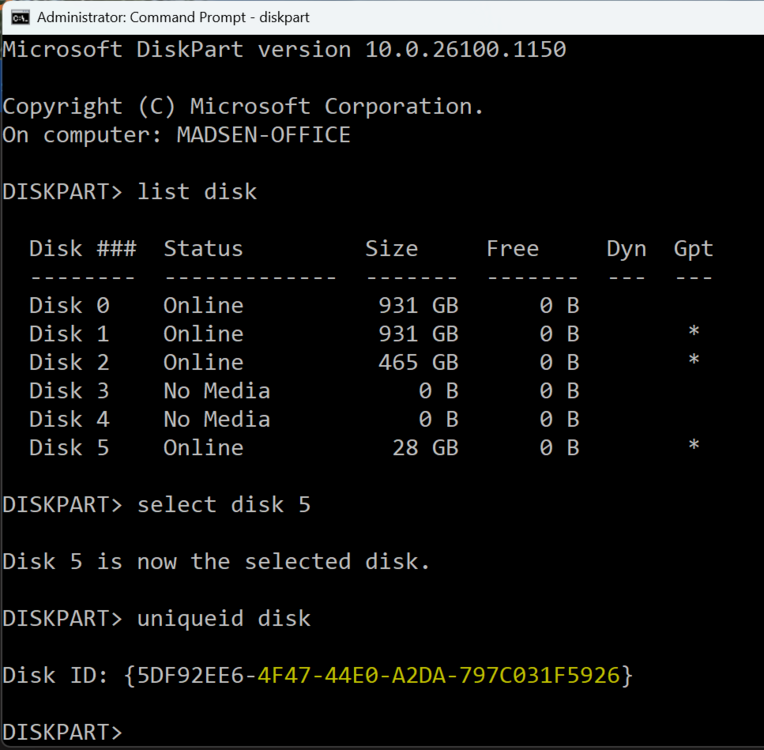
Not necessarily for you but for others who find this thread and want to check if a USB flash drive has a unique GUID, you can check that in Windows by running CMD and then typing diskpart In diskpart do the following: 1- list disk (this lists all disks in the system) 2- select disk # (where # is the disk number of the disk you want to check; 5 in this example) 3- uniqueid disk (shows the GUID of the disk) I did this to check the GUID on a flash drive I am not using with Unraid but to see what its GUID is. The last 24 characters highlighted in yellow are what Unraid would see as the GUID.
-
There are known stability issues with some Intel 13th and 14th generation CPUs. They have released a couple of BIOS/Microcode fixes to address CPU problems, but, many still experience stability issues with these CPUs. Unfortunately, there is no way to test if you have a bad CPU. RMA has been the only fix for some affected users. I am not saying the CPU is a problem; however, if you rule out other hardware and problems continue, you should consider the CPU.
-
"Blacklisted" in this case likely means the flash drive does not have a unique GUID. They probably just have a generic GUID for all their devices. The last flash drive I bought for Unraid (has a unique GUID) is this cheap HP 2.0 USB flash drive
-
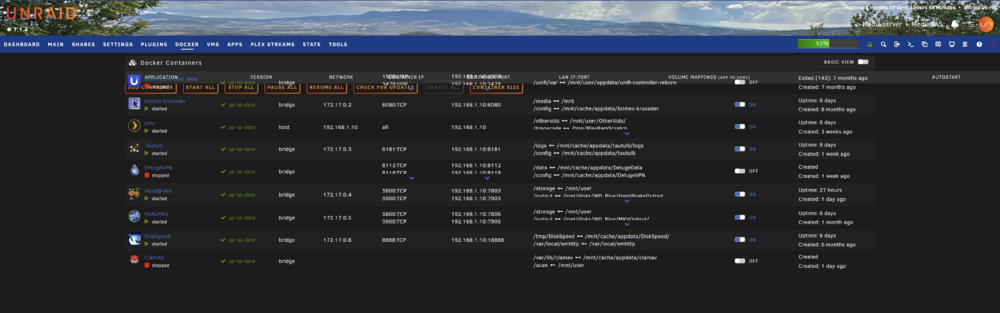
Not that I expected it to be resolved, but, just to confirm, the latest version of Unraid Connect (2025.09.09.1500) has the same display issues as the previous two versions on the Docker page. Removing the plugin resolves the issue.
-
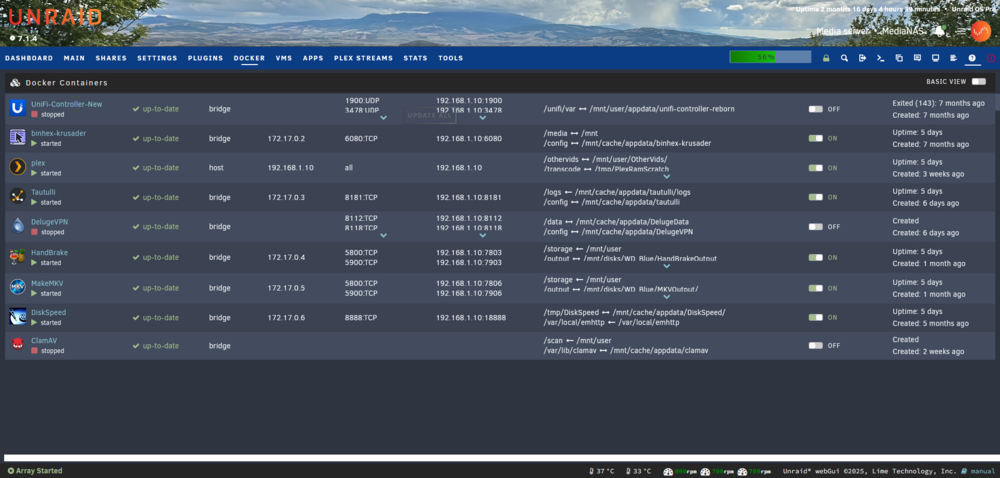
I do not have the folder view plugin installed. Since updating the Unraid Connect plugin yesterday, the Docker tab buttons have disappeared. They flash briefly at the top of the Docker tab when it loads and then disappear altogether. I also updated the Unraid Connect plugin to the latest version available today (2025.09.08.1804) and the problem persisted. I removed the Unraid Connect plugin and the Docker page displayed normally with the function buttons at the bottom of the page and functional. I reinstalled Unraid Connect (2025.09.08.1804) and the Docker page problem returned. This time the buttons don't completely disappear but they are stuck at the top of the page and not functional. Just ghosts.
-
I'll give you a couple of thoughts without making a specific motherboard or CPU recommendation. I have remote management on all three of my Unraid servers. Two have IPMI on the motherboard. One does not have IPMI; however, you can do the same thing with a PiKVM. I use this internal PiKVM which uses a Raspberry Pi 4 Model B. The advantage to this solution is that you are not tied to a particular motherboard with IPMI (or another built-in remote management solution) and it can be used with any future motherboard upgrades. All of my servers have Intel CPUs and motherboards primarily for Quicksync transcoding in Plex. It eliminates the need for a discrete PCIe GPU. If you plan to run VMs and want to do GPU passthrough, that is a different story. Can you do APU transcoding in Plex/Jellyfin with AMD? Some have got it to work but it is just easier with Intel/Quicksync. Yes, the Intel 13th and 14th generation CPUs had some issues and you are right to be cautious. I can't tell you how good the current 15th generation CPUs are as my newest CPU in an Unraid server is 11th generation. In general, when it comes to Unraid, I decide what I want/need (number of SATA ports, PCIe, M.2 slots, transcoding, RAM needs, etc.) and then I go looking for the motherboard/CPU combo that best supports that and the best case to house what I need. I usually over-design for current needs as Unraid is so customizable and flexible that you always find ways to use the extra oomph. I have not upgraded hardware in many years on my servers because they continue to meet or exceed my demands. Have fun. There are many different ways you can go with your build, as you have discovered. Check forum members signatures for hardware ideas. Many include server specs in their sigs.
-
I see something similar since updating the Unraid Connect plugin. It only seems to affect the Docker tab. The function buttons flash at the top of the screen and then completely disappear for me. Same in Firefox and Chrome. Unraid 7.1.4