






Hoopster
Members
-
Joined
-
Last visited
Everything posted by Hoopster
-
These 32GB DDR5 ECC UDIMMs just went out of stock but they might be back in stock soon. They had been available for a while.
-
Yes, that is the problem. According to the Handbrake documentation, at least a 6th generation CPU/iGPU is required for QSV support. From the documentation: Intel Quick Sync Video Supported Hardware and Configurations Intel Skylake (6th Generation Core) CPU or later with Intel HD, Iris Xe or Arc graphics.
-
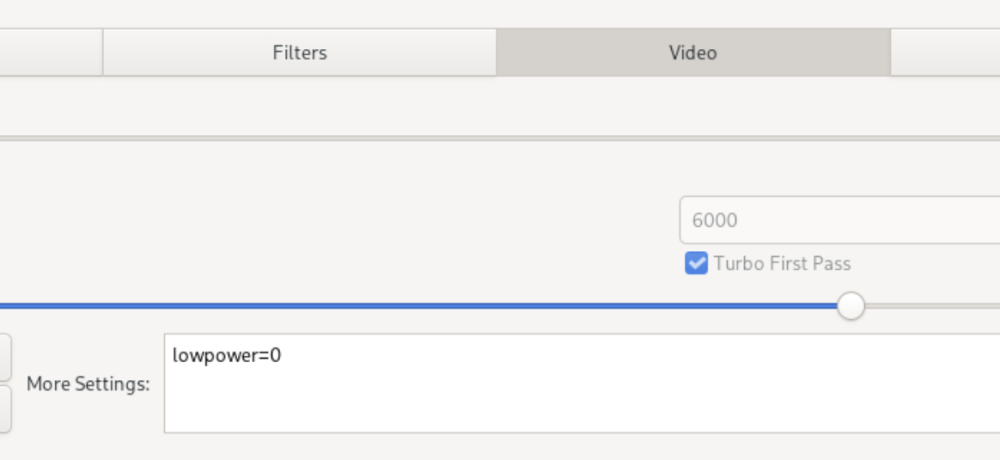
@SRTG Of course, you cannot even get the QSV encoding options to show up, but, when you do, here is another tip should you get encoding failures when attempting QSV encoding in Handbrake: I don't know what CPU you are using, but in examining my Handbrake QSV preset, I remembered a setting I needed to add to get QSV to work with the 11th Generation i5-11600 CPU in that system. Prior to adding this, I would get an "encoding failed" message on all encoding attempts with QSV. Rocket Lake/11th gen CPU/iGPUs had problems with low power QSV encoding which is the default for Handbrake. I had to turn off low power mode in the QSV presets by adding "lowpower=0' to the "More Settings" box in in the Video tab. So I did not have to add this each time, I made sure to resave the Preset with this setting.
-
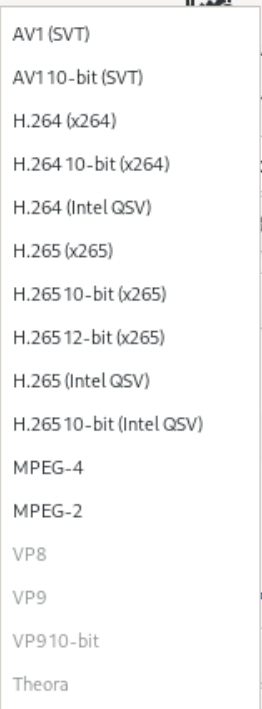
I just built a new server last week on which I installed Handbrake. I am running Unraid 6.11.5 on that server. I noticed I had no QSV Handbrake options on that server. I had no i915.conf file there either; however, I recall that in an Unraid release after 6.9.0 (I do not recall which one), it was mentioned that Unraid would now automatically load the i915 drivers if an iGPU was detected. As a test of that theory, I did not create an i915.conf file via the touch method on this server. The only thing I did to get the QSV encoder options to show up in Handbrake on this new server was to add the /dev/dri device. I am currently running a Fast 1080p30 H.265 QSV encode on that server. My /dev/dri device looks no different than yours, yet it works for me and not for you. Perhaps try posting in the Handbrake support thread?
-
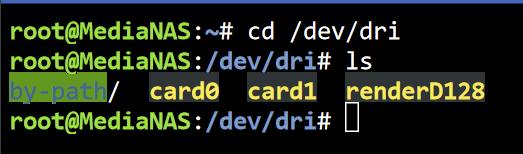
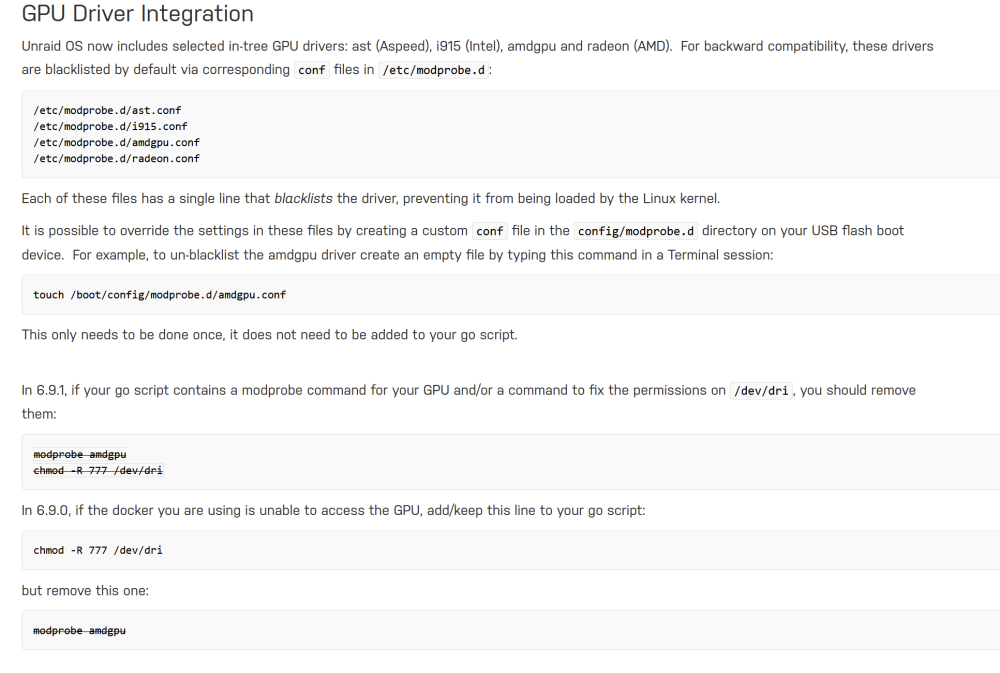
Do you get any errors related to /dev/dri when your Handbrake container starts? Post your docker run command. In a terminal session, if you type the following commands what do you see? cd /dev/dri ls You should see the following (card1 does not need to be there). If you do not see this, your system is not loading the i915 /dev/dri drivers. You do not mention what version of Unraid you are running, but from version 6.9.0 and greater, go file entries for modprobe i915 are no longer recommended.; although, I suppose it may still work. I am using the "touch" method to load i915. See the release notes for more information. For example, here are the 6.9.0 release notes on GPU drivers:
-
You should always start by generating diagnostics and attaching them to a trouble report. Attach those to a new post in this thread so the experts have something to look at.
-
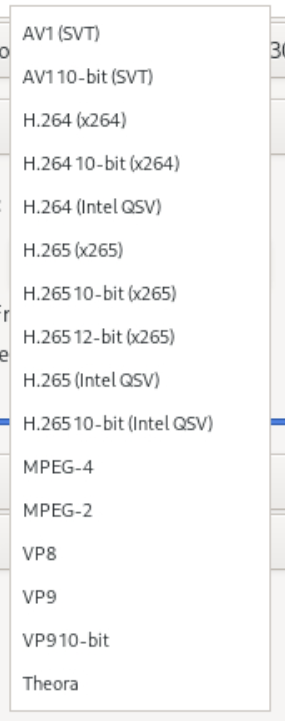
Have you created a preset in HandBrake that uses the QSV encoder? Do QSV encoder options appear in the video encoder list in HandBrake? If not, the container is not setup properly with /dev/dri
-
Here is a great combo for $1000: SuperMicro X13SAE-F W680 Intel i7-13700K 64GB DDR5 ECC RAM Dynatron 3U heatsink/fan
-
@xdriver I have a cross-flashed Dell H310 in my main server (ASRock Rack MB) and it also would not boot with the H310 installed. The tape mod JorgeB linked did the trick for me. The system has been booting now for over three years with the H310 installed.
-
The BMC stopped responding on my E3C246D2I as well. Even reflashing the BMC chip did not help. Fortunately, I put the E3C246D2I (replacing an E3C226D2I) in the Lian-Li case just last year and the server boards have a three-year warranty. ASRock replaced it under RMA. All is well again.
-
I have the NH-D12L cooler in my Silverstone CS380 right now. Can't really hear it except when CPU is under heavy load and even then it is very quiet. There are other noisier things in the room so I have to be real close to the server to hear the fans. I have decided to hold off a bit on the upgrade. There really is no compelling reason for me to do so right now. I may wait until 15th generation on the Intel CPUs. If I were to upgrade today, it would probably be the Supermicro X13SAE-F and an i7-13700K CPU. I am not sure how I feel about a 125W TDP CPU that can dissipate over 250W under load. That seems like a lot of heat.
-
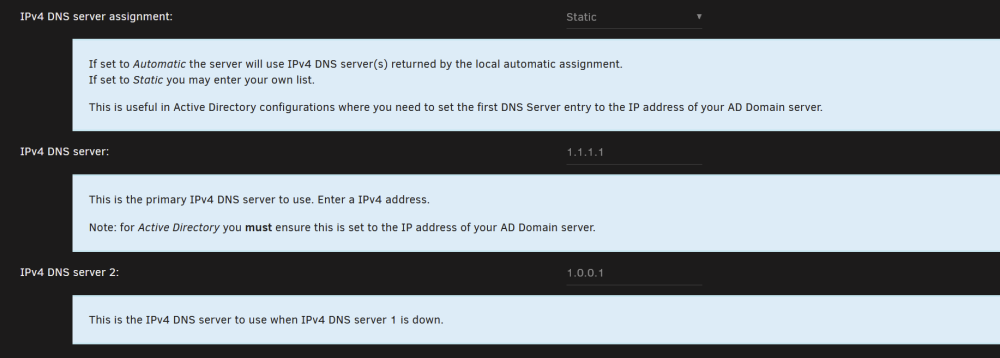
Enabling the Help on the page provides good information. I set DNS server assignment to Static so I can enter the public DNS servers I want to use (Cloudflare) for DNS servers 1 and 2. Automatic will return the DNS from your router or ISP:
-
My main server has a Xeon E-2288G CPU/iGPU and ECC RAM. Granted, it is slightly older tech based on the C246 chipset and 9th gen Intel CPU technology, but it transcodes very well and I use 16GB (out of 64GB) of the ECC RAM as a transcoding location for Plex.
-
Yes, but it may go away in future Unraid releases.
-
/mnt/user is the view of the data via user shares (/mnt/user/photos, /mnt/users/movies, etc. depending on what user shares you may have defined) User shares can span disks if you have set them up that way. /mnt/user0 is the view of the user shares minus whatever may exist on cache pools. /mnt/diskX are disk shares and one exists for each physical disk.
-
Settings --> Network Settings and set DNS servers for eth0 (the interface Unraid uses).

-
It is an optional plugin you need to install from Apps and it has a dependency on the Intel GPU Top or Radeon Top plugin.
-
In the 13th generation of Intel CPUs Intel has opened many Core i3/5/7/9 CPUs up to ECC memory support with the right motherboard chipset. For example, I recently researched a system based on an i7-13700K and as you can see if you follow the link, it supports ECC RAM. Xeon CPUs are no longer needed. For example, the W680 supports ECC RAM with the 13th generation Core CPUs, but the rub is that most W680 boards (assuming you can find one) are expensive and support DDR5 ECC RAM only which is hard to find. Supermicro does have some DDR5 ECC RAM. ECC is not a requirement for Unraid. I have three Unraid servers and only one has ECC RAM. Recently, this thread was posted by someone who got Plex hardware transcoding to work with an AMD CPU/iGPU.
-
Some info on SMR drives and Unraid. SMR drives for parity are usually a very bad idea.
-
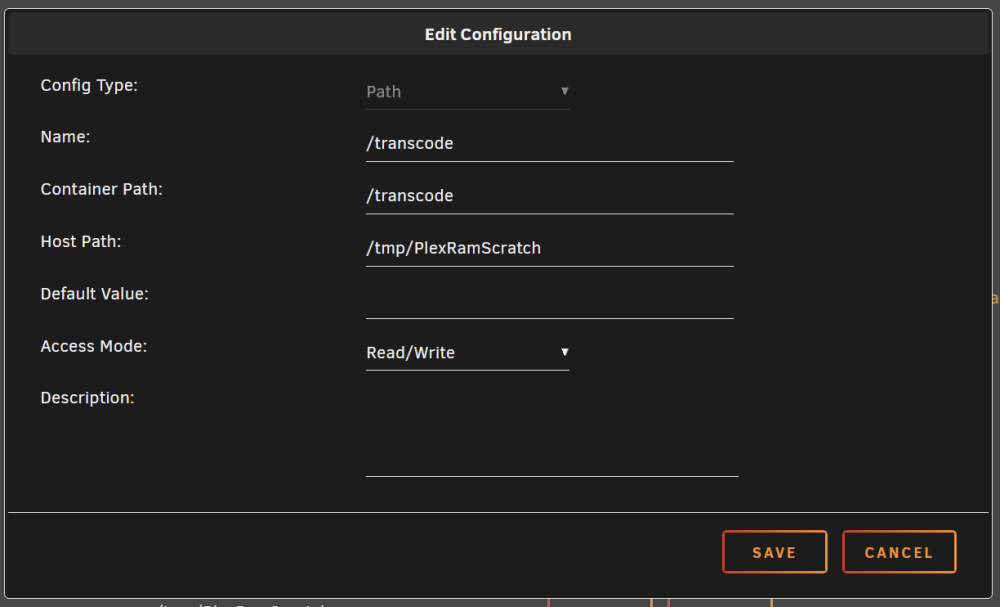
I have this in my go file in the config folder on the Unraid flash drive: mkdir /tmp/PlexRamScratch chmod -R 777 /tmp/PlexRamScratch mount -t tmpfs -o size=16g tmpfs /tmp/PlexRamScratch It creates a PlexRamScratch folder in /tmp which is in RAM. It is limited to 16GB in size. You could make it smaller. I have 64GB RAM on my server so 16GB is not a big deal. Then in the Plex docker container /trancode (container path) is set to /tmp/PlexRamScratch (host path). Of course, in Plex, the transcode location is /transcode
 My system does one short beep every time it boots to indicate the BIOS is initializing. I don't know if it is the same on your system but one short beep for my server is good as it means no errors.One possible cause of the problem; transcoding space. Where is your Plex instance set to transcode? HDHomeRun/Plex transcodes while recording and this process can take up to 16GB per hour of recorded material. If your transcode location is low on space, it will cause recording issues. HDHomeRun takes a lot of space to create temporary files so you can watch a program while it is recording and also scrub the timeline. Personally, I never watch a program while it is recording but it will not clean up after itself until the program finishes recording or until forced to reclaim previously used space by limitations set on the transcode location. I transcode to RAM and limit it to 16GB (many set it to as little as 4GB) You may have plenty of space in the destination shares but may have a problem with space where it is trying to transcode.This is very common. I backup three other computers with an Unraid Backup share as the destination. As far a backing up Unraid array content, I have a backup Unraid server with a copy of main server content, external USB drives and a cloud backup. I am too lazy to rip discs again, so I would rather have them backed up as well. If I lost the 10s of thousands of family photos and videos my wife has taken, she might look for a new IT guy.I am aware of only three ways to update the BIOS on an Unraid server. I use one of these methods on each of my three servers. 1. attached keyboard and monitor (also has IPMI) 2. IPMI (or some other similar remote management facility. I think some ASUS boards have their own IPMI-like management). 3. PiKVM (or similar remote management hardware) The bottom line is you need a way to interrupt the boot process and enter BIOS/UEFI and navigate the menus (keyboard) and a way to see the BIOS menus (monitor). IPMI and PiKVM let you do this remotely from another computer keyboard and monitor not attached to the server.







