






Hoopster
Members
-
Joined
-
Last visited
Everything posted by Hoopster
-
The server will keep functioning normally until the array is stopped. It will not start again on an expired trial license. As long as you never reboot the server (stops the array) or stop the array in the GUI, technically you could run forever on an expired license. Of course, this means you could never upgrade the version of Unraid you are running as that requires a reboot.
-
Probably because you have a sense of humor. Others were not amused (for the record, I was amused). 😀
-
Several people use the LuckyBackup docker container. Here is a tutorial on how to set it up. Personally, I just have Unraid to Unraid backup automated via a User Script. Once a week the script powers on my backup server (it has IPMI) backs up disk by disk (both servers have the same number of disks of the same size - share by share is also possibly), emails me the results and powers off the server. It is all unattended and happens at 1am every Monday but could, off course, be any desired frequency. Another option is to use the Unassigned Devices plugin and backup to portable external USB drives. There is a sample script in the first UD post. I do server-to-server, USB drive and Crashplan Pro backups.
-
Some routers don't deal well with ipvlan as ipvlan assigns the same MAC address to multiple devices on the ipvlan subnet. This confuses the router even though the IP addresses are different. Macvlan does not have this issue. Here is a potential solution.
-
I doubt the Turbo Boost issue will ever be fixed. Socket 1151 boards are fairly long in the tooth now (in computer terms). I am not sure ASRock even recognizes it as an issue. I am on BIOS L2.35 and it still exists there.
-
Here is a discussion of recommended controllers (both PCIe and M.2) that work well with Unraid when you are short on MB SATA ports. You can also get a good idea about hardware that works well with Unraid by looking at post signatures. If you don't see signatures, you can enable them in Account Settings by clicking on your user name at the top of the forums pages.
-
@daytona235 The information above is excellent. I doubt there is much anyone can add. Unraid runs on just about any modern Intel/AMD compatible hardware, exceptions are rare although the advice to avoid very new hardware, just in case, is sound.
-
I have my backup USB drives that mount via UD for backup formatted in NTFS for using natively with Windows. I have no Macs to worry about so NTFS works great. As mentioned above, there are apparently ways to use NTFS with Macs as well.
-
I have had good responses recently using this support form. I don't think you will find any updates for the E3C236D2I. I believe IPMI is Java only on that board as it was on my C226 and C236 boards. I have two ASRock Rack C246-based motherboards (E3C246D2I and E3C246D4U) and both offer HTML5 or Java-based IPMI. HTML5 is so much better.
-
I recently bought my 11-year-old grandson a very expensive Marucci baseball bat. He really appreciates his new bat.
-
So far, so good after two days. Unraid 6.11.5 is all configured the way I had it before and the server has booted up at least 10 times with the HP flash drive with no problems. Since the flash drive I was hoping to use is the Kingston MobileLite G2 reader with SD and MicroSD slots, the latter being used for the syslog, I purchased this small microsd reader and put the syslog card in it. Both the HP flash drive for Unraid and the Sandisk reader for the syslog are working great in the "problematic" server. I'll give it a few more days and will likely end up licensing the HP flash drive for Unraid. It is still strange to me how I had the Kingston Reader (both USB 2.0 and 3.0 versions) working with this server and Unraid 6.11.5 and then no flash drive (other than the HP) would boot anything greater than Unraid 6.9.2. UPDATE: As all continues to work well, I bought another Unraid license for the HP USB flash drive rather than transfer the license. I don't really need three servers now but you never know. I now have a license in reserve.
-
Since I was having issues on one server with it recognizing the UNRAID labelled flash drive, I thought I would try out the HP flash drive linked above by @jtech007 as I have an Office Depot nearby. It works great and is recognized by the server where all the other flash drives in my possession could not boot into anything >Unraid 6.9.2 on this particular server, even though they worked on my other Unraid server. I can confirm what was reported previously. Even though it is labelled as a 16GB flash drive, it is really a 32GB flash drive as it has >28GB after formatting. It is USB 2.0 and appears to have a unique GUID. Regarding the Kingston DTSE9 G2 that I reported as counterfeit from Amazon, Amazon rejected my review as "not meeting their guidelines" when all I did was point out Kingston confirmed it was counterfeit to warn other users. I guess it cuts down on sales when you point out counterfeit merchandise is being sold on Amazon. 😀
-
I am seeing the same issue after updating to the latest UD plugin. I successfully removed a few historical devices yesterday, but today I am seeing the behavior described above. After installing the 2023.03.30 update, UD reports the device has been successfully removed but it remains in the historical devices list.
-
@nik82 @macmanluke Have you seen this post from Bonienl a couple of days ago? Perhaps this would help with your issue. I have experienced no macvlan call traces, server lockups or communications issues for more than two years since I moved my Docker containers to a VLAN. I switched Docker to ipvlan when it became available as an option (although it probably was not necessary) and continue to be problem free on my Unifi LAN. What Bonienl describes is a little different but similar in concept. I moved docker containers to a VLAN and he is describing how to move them to a separate Ethernet NIC.
-
@dcarpenter85 Read this which explains where lscr.io came from and why it exists. It's still the linuxserver.io Plex container, just a different way to get to the repository.
-
This is exactly what I do in addition to backing up shares to external USB drives connected periodically via the unassigned devices plugin. I also have a cloud backup of certain shares. Can't have too many ways to restore your data in case it is lost in one of the many ways that is possible these days.
-
Yes, that is correct. With dual parity, you are protected against two drives failing at the same time regardless of how many data drives you have in the array. A UPS is highly recommended. It has saved me a couple of time from potential array damage in power outages.
-
@inghamio Here is a good Spaceinvaderone video on the subject of Unraid parity.
-
I would consider it overkill, yes. But others may have a different opinion. Parity drives protect against disk failures so one or two parity drives is really a question of your risk tolerance for multiple simultaneous disk failure. Correct. Two parity drives is the current maximum and two parity drives to one array drive would really be unnecessary.
-
I have had two cases of random lockups (from several hours to several days) on Unraid. I did have the macvlan issue with custom IP addresses on br0 and ended up creating a Docker VLAN to solve that. For many, ipvlan is the solution (not for you, apparently) The second was an issue with some plugins not playing well with my iGPU. When I uninstalled the Intel GPU Top and GPU statistics plugins, the lockups disappeared. These random lockups can have several contributing factors and usually do not come down to just Unraid/Linux kernel. It is usually the interplay of several things that cause problems and that is often very difficult to troubleshoot. Syslog may show something and it may not, especially if it is hardware related.
-
There is no hard and fast rule on this but many consider 8+ data disks a good threshold at which to start considering a 2nd parity. Personally, I have two Unraid servers with 5 data disks and they are both single parity systems. Only once in the 11 years I have been using Unraid have I had a disk red-balled. That happened because of a bad SATA connection that eventually resulted in write errors which disabled the disk. I did not replace the disk. I just fixed the cabling issue and rebuilt the disk back onto itself and all has been well for a couple of years.
-
I have made some progress. After trying at least 5 flash drives in my possession, none of which could boot into anything beyond Unraid version 6.9.2, on a whim I purchased this flash drive from a nearby Office Depot. It was mentioned by another user in the Sandisk PSA discussion. What the heck, for $5 it was worth a try. USB 2.0, 16GB (although really it is 32GB as it shows >28GB when formatted) and appears to have a unique GUID. I installed Unraid 6.11.5 on it and it booted right up and has continued to boot up Unraid 6.11.5 through several reboots (warm and cold). I got a trial license to make sure it will continue to work over the next 30 days. And, yes, this one when successfully booted also has the LABEL_FATBOOT="UNRAID" in blkid Unraid did not seem to like it when I copied over the /config folder from a backup. However, I reassigned the same disks in the same slots and started the array indicating parity was valid and it came right up. This is a backup server so not a lot was installed and configured on it. I will just slowly redo the config over the next few days while doing several reboots just to make sure the server and Unraid really like this USB flash drive. I will admit, I am puzzled that a random flash drive boots Unraid 6.11.5 when none of the others would; especially since all of the others booted just fine in another Unraid server. Of course, I'll take it even if I do not fully understand what is happening. 😀

-
I have about 20 docker containers and the docker.img is 20GB with only 56% utilized. In most cases, you should never need an docker image file larger than 20GB A docker.img that keeps growing and needs to be made bigger from time to time is an indication that one or more containers have improper path mappings and is writing data into the docker image. You should start by clicking on the Container Size button at the bottom of the Docker page to see the current size of each container. If one or more appears to be unusually large, start looking at the path mappings you have for the container and post them in the support thread for the container where you can get some help to see if anything is mapped incorrectly.
-
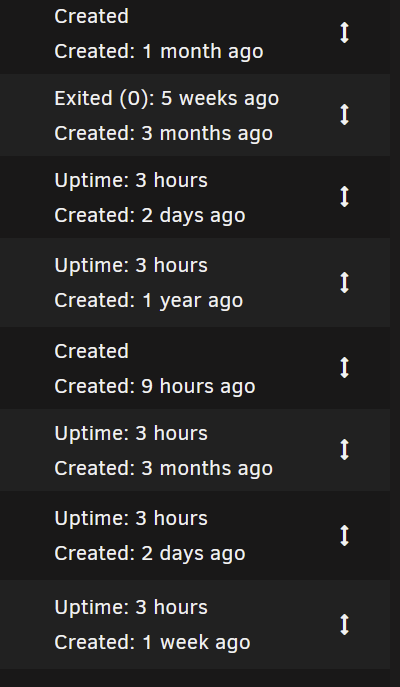
Containers are started in the order in which they appear in the Docker tab. There is no way to automatically sort them alphabetically (AFAIK) but you can manually reposition them in any order you want by grabbing the up/down arrow on the right of each container and dragging it to where you want it in the list. Just remember, they will be started in the top to bottom order.
-
Here is a difference I see in the system that can boot Unraid 6.11.5. Results of blkid show LABEL_FATBOOT="UNRAID" before LABEL="UNRAID" I do not see the LABEL_FATBOOT entry for blkid on the system that cannot boot Unraid 6.11.5. I am not sure what that means. System that cannot boot to Unraid 6.11.5 show this (booted to Unraid 6.9.2): According to Limetech, 6.9.2 used udev to identify the device labeled UNRAID and 6.11.5 uses blkid.








