






Hoopster
Members
-
Joined
-
Last visited
Everything posted by Hoopster
-
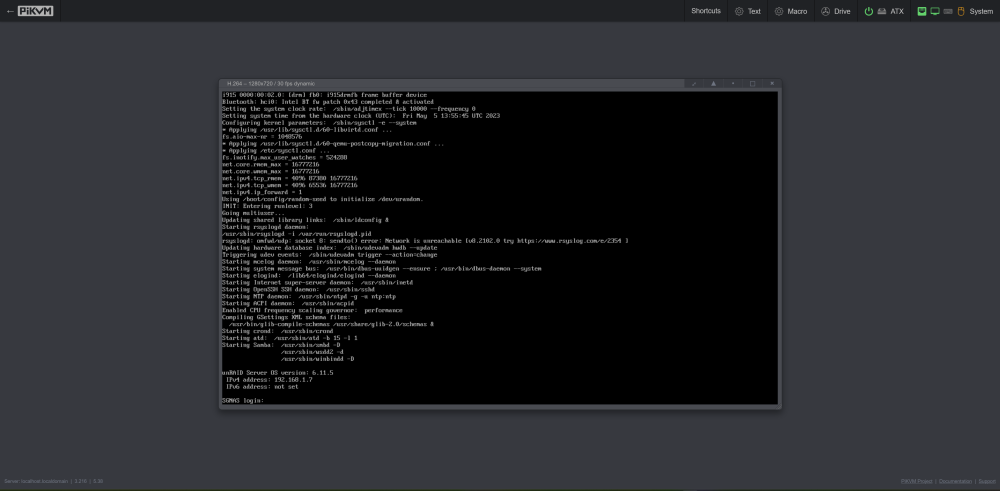
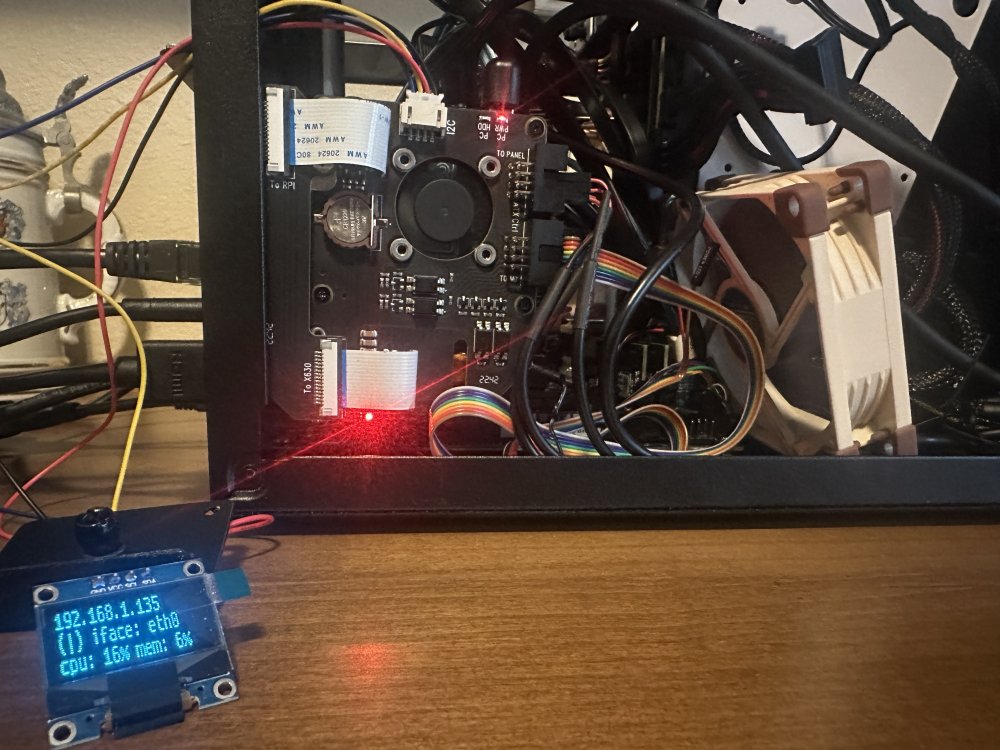
I got the system assembled and data transferred to the array. All is working well. This week I have been playing with the PiKVM. It is the internal model that installs inside the case. It is installed and hooked up to HDMI video, power, LAN, OTG keyboard/mouse, OLED display and ATX power control. Everything is working great. I installed Tailscale on the PiKVM this morning for remote access and tested it from my phone over the 5G network (WiFi off). All is well. I have tested powering the server on and off several times via the PiKVM. I even entered the BIOS a couple of time while booting to make sure that would work. The Unraid Server as seen via PiKVM in a browser: The PiKVM installed in the Fractal Node 304 case (yes, I have a little cable management to do): Should be a decent setup for the vacation home with non-IPMI remote management via the PiKVM/Tailscale.
-
Agreed.
-
No No New Config lets you reset disk assignments in the array. It will have no impact on preclear status, license, plugin or docker configuration.
-
Will the Users Scripts option "At Startup of Array" work for this if you have the array set to autostart on a server boot? As to starting the docker container, I don't have any thoughts on that.
-
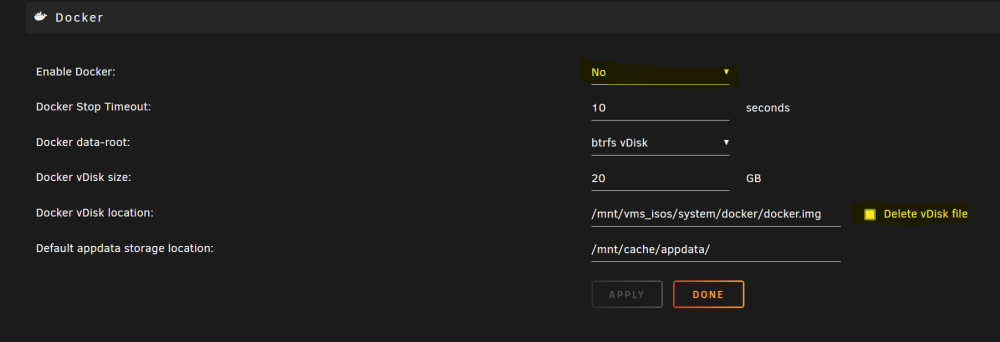
You need to stop the docker service before you can delete docker.img. You likely have a corrupt docker.img and deleting it is what you need to do. A new one will be created when you restart the docker service.
-
I'm doing a low-cost Mini-ITX build right now but with non-ECC RAM. Both of my existing servers have server motherboards that support ECC; however, this new build is intended sporadic use in my vacation home. Details here. And I just added component prices. If you really want ECC RAM, some W680/Z690 based boards support ECC RAM with 13th generation Intel Core (i5/i7/19) processors.
-
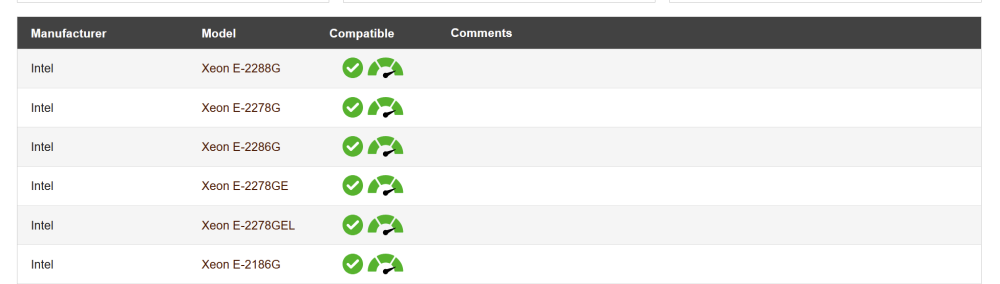
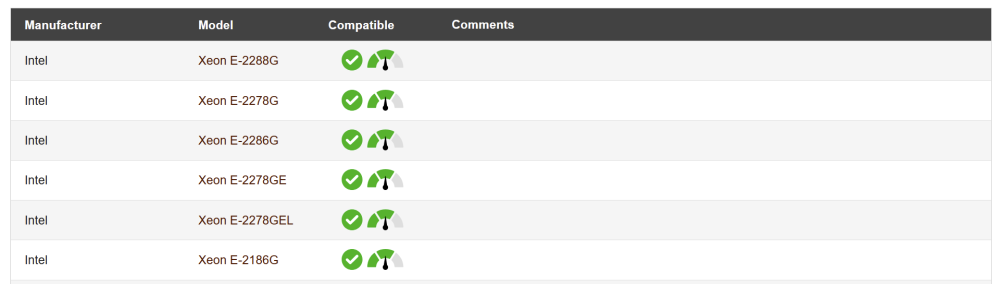
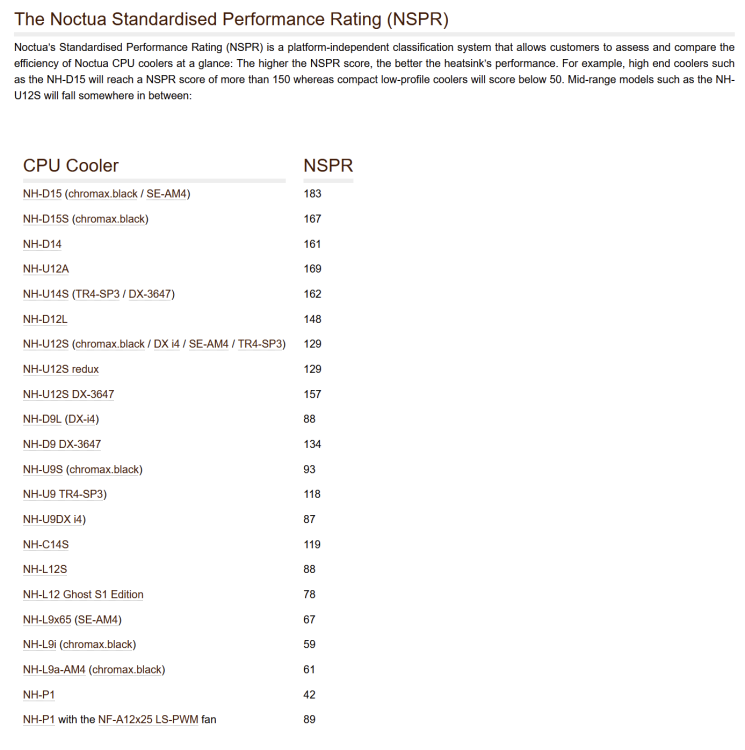
Here is some information from Noctua that helps explain the difference in temps noted in the prior post: The NH-D12L is rated best for overclocking/turbo with the E-2288G (arrow to the far right) as seen below The NH-U9S is rated for moderate overclocking/turbo with the E-2288G (arrow in the middle) as seen below In the NSPR scale Noctua uses to rate cooler performance (rather than a TDP rating), the NH-D12L scores a very respectable 148 and the NH-U9S is rated much lower at 93.
-
PSA for those who have a case that limits CPU cooler height. I recently discovered the Noctua NH-D12L CPU cooler which has a 145mm height and fits many 4U cases. Up to this point, the best I could do was the Noctua NH-U9S with a 125mm height and 92mm fans. My Silverstone CS380 case has a cooler height limit of 146mm. I installed the NH-D12L on my E3C246D4U/E-2288G system and saw immediate results. Idle temps are 3-5C lower and under heavy load, CPU temps are up to 15C lower than with the NH-U9S cooler. That 120mm fan makes a difference. 😀 At US$90, it is an expensive CPU cooler but the results are worth it for me.
-
That depends on whether or not you need to do hardware video transcoding and what media management software you are using. I use Plex and it supports the Intel iGPUs such as the iGPU in the Pentium Gold G6405 but it does not support AMD/Ryzen iGPU like in the 3200G. If Jellyfin supports the 3200G then it is a good option if you need hardware transcoding. I don't know much about Jellyfin. Check CPU comparison sites to compare two CPUs side by side. Here is one comparison. Look for which CPUs gives you the most of what is important to you.
-
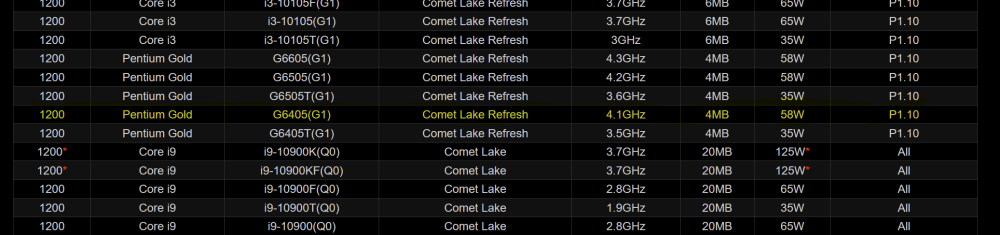
Look for motherboards that have socket 1200. Generally, these are MBs that support 10th and 11th generation Intel CPUs. I am currently putting together a build with the Asrock H510M-ITX/ac motherboard which list the Pentium Gold G6405 as a supported CPU (with BIOS revision P1.10).
-
I think he is looking for a USB port on the motherboard for internal storage of the Unraid flash drive. @tortufo That board has 2x USB 2.0 headers on the motherboard. If you don't need both for something else, you could attach something like this adapter to one of the USB 2.0 headers giving you two internal USB 2.0 Type A ports.
-
I missed that was linked. Since you only mentioned the RAM overclocking, I was unsure if you were aware of the C-States tweaks.
-
I can't spend a significant amount of time somewhere without an Unraid server, right? No need to break the bank so, here is the build I am putting together now for the vacation home, primarily for hosting Plex and as a backup: Fractal Node 304 case ($100) Asrock H510M-ITX/ac motherboard ($138) Intel i5-11600 CPU ($164 on eBay - CPU is new) Noctua NH-U9S CPU cooler borrowed from another server and replaced there with a Noctua NH-D12L cooler Silverstone ST45ST 450W SFX PSU ($82) 32GB Kingston DDR 4 RAM (2x16GB) ($78) Samsung 970 EVO Plus 500GB M.2 NVMe SSD for appdata and other stuff ($40) Crucial MX200 250GB SATA SSD I have laying around (some kind off Unassigned Devices use) Geekworm PiKVM-A8 internal PiKVM with RPi 4 model B for remote access and management ($99 + cost of RPi) 8TB, 4TB and 3TB HDDs I have laying around No parity disk. I will just backup from time to time to a 16TB external USB drive. Could I just access Plex server at primary residence remotely? Sure, but what is the fun in that? Should all be up and running tomorrow.
-
You need to provide a lot more information than just "SMB is broken" to receive any informed help in resolving your issue. How is it "broken?" Also, it is a good idea to post diagnostics when seeking help as that provides additional information about system configuration.
-
Here is some general information on improving Ryzen stability with Unraid/Linux.
-
From a Limetech perspective, S3 Sleep (or any sleep state) is not supported in Unraid because it is very dependent on how the motherboard/BIOS implements it and the Linux kernel version. It can work perfectly on given hardware with one version of Unraid/Linux kernel and not work on the same hardware with a different version of Unraid/Linux kernel. Any sleep function for Unraid is provided by plugins and not considered part of the core product considering there is no way to guarantee it will work. I am not at all associated with Limetech and do not speak for them, but this has been a point of discussion over the years. I have been through at least seven different motherboards with Unraid. S3 sleep worked perfectly on some, not at all on others and only partially on yet others. I had one motherboard on which the system would go to sleep without problem but would then hang and not fully wake up. Everything but video output seemed to come back from sleep. The only way I could get it working again was to reset the CMOS. I even contacted the board manufacturer who said S3 and other sleep states were guaranteed to work only under Windows and Linux was not officially supported. It was just their way of saying "Sorry, you are running Linux on this motherboard? If something doesn't work, we are not responsible!" Personally, I gave up on S3 sleep with Unraid long ago as, in my opinion, there are too many variables to ensure it will work properly. Since I could not rely on S3 sleep always working across Unraid/Linux kernel versions on the same hardware, I could not rely on it as part of my workflow. I went the IPMI route for servers that are used lightly and, through User Script automation, they are powered on and off automatically when needed. My main server I just run 24x7 and spin down the disks when inactive. Not the most power efficient solution but the server is available when it is needed without worrying if it will wake up from sleep. The bottom line is that on some systems sleep works perfectly and other others it is problematic. There is a reason it is not supported in core Unraid; too hard to keep track of the hardware/Linux kernel combinations that are problem free and defeats the "Unraid works on almost any hardware" goal.
-
I have several WD white label drives that needed the Kapton tape fix in order to be recognized. Kapton tape is not risky at all and is an easy solution (as are the Molex to SATA adapters) which can also easily be reversed. At least it is nothing as drastic as the "snip the wire/remove the pin" solutions.
-
The Unraid license is tied to a USB flash drive for several reasons: As explained above, many flash drives have unique identifiers (GUIDs) which makes it possible to associate the Unraid license to only the flash drive and no other hardware A flash drive is easily portable to another machine or an upgraded machine should you wish to run Unraid on different hardware. The license and configuration live on the flash drive A flash drive is easily replaceable at little expense should the originally licensed flash drive fail The archives needed to load Unraid into RAM when the server boots require very little storage space making a flash drive the preferred "OS" storage medium rather than an SSD on which the great majority of its capacity would be wasted Some Unraid users have installed internal USB headers (some motherboards may already have an internal USB port) such as this so they can have the Unraid flash drive inside the case.
-
I will admit, I don't often think about power consumption as much as I should. My area has some of the lowest electricity costs in the United States so cost is rarely a concern (although power consumption should be). I pay about $0.11 per KWh. The case has two 5.25" bays so I put a 4x SATA 2.5" SSD adapter in one and the optical drive in the other.
-
Ich habe das E3C246D4U-Motherboard (nicht die Version mit den 10-GbE-NICs) und ja, ich verwende damit nur 6 HDDs, aber der Server enthält auch 3 SATA-SSDs und ein optisches SATA-Laufwerk (für MakeMKV). Mit nur 8 SATA-Anschlüssen auf dem Motherboard musste ich den HBA hinzufügen. Ich habe auch Platz für zwei weitere HDDs und eine weitere SATA-SSD, die schließlich hinzugefügt werden, wenn der Speicherbedarf wächst. Ich hoffe, Google Translate hat eine anständige Übersetzung ins Deutsche geliefert.
-
The only devices that count against the license limitations are storage devices attached to the server when the array is started. For example, my server has: 1 parity drive 5 array data drives 3 cache/pool drives 1 Unassigned Devices SSD 1 flash drive for Unraid (but it happens to be a card reader with an SD slot for Unraid and a MicroSD slot I use for the syslog) I have 11 devices that count against the license. The Unraid SD flash device does not count but the MicroSD for Syslog does count. I also have an external 14TB USB drive I use for backups. If that is plugged in when the array starts, it would count against the license limitations. If I plug it in to do a backup after the array has already started, it does not count against the license limitations.
-
That's it! That's what I used to wake from sleep before I had IPMI. By the way, I have also seen unattended backup solutions that used a smart power switch to turn the backup computer on and off when needed.
-
IIRC, when I was just sleeping/waking the server before I had IPMI I was doing the following: "echo 3 >/proc/acpi/sleep" to put the server to sleep at the end of the script. This can be "iffy" depending on the motherboard/NIC I found some command line options involving the IP address and MAC address I could run in the script to wake the server. Cannot remember exactly what that was Maybe there are some useful hints here. IPMI is just so useful, I can't remember fully what it was like before I had it on my backup server motherboard.
-
If all the drives/data are the same and you will have the same cache/pool drives as well, you technically do not even need to do a new config. Of course, you can delete and recreate docker.img and start over completely with docker containers or, install just the ones you want from Previous Apps in the Apps tab. Unraid does not need to be "re-installed" if you are using the same licensed flash drive and just moving it to a new machine with all the same disks. If you do need to change some disk confguration, then yes, you can do a new config and assign all the disks you are keeping to the same disk slots they are in currently. Be especially careful to make sure parity disk(s) are properly assigned and you don't accidentally assign a data disk to parity.
-
The script I posted above does not delete anything from the backup server so the backup server is my fail safe against something that is accidentally deleted on the main server. Once, accidentally of course, my wife deleted and entire year's worth of photos. No problem, back they came from the backup server. Every few months, I run a clean up script. This is identical to the one above accept it adds the "--delete-during" parameter which deletes files on the destination which are no longer on the source. I also backup key shares (between 10-11TB of data) to external USB drives via Unassigned Devices.







