






Hoopster
Members
-
Joined
-
Last visited
Everything posted by Hoopster
-
I use the built-in WireGuard in Unraid and not the WireGuard Easy docker container so I do not know what you can do with it. You might want to ask the question in WireGuard Easy support forum. I am fairly certain other containers do not just use WireGuard by default without some configuration if it is supported.
-
The WireGuard Easy docker container is not associated with WireGuard built into unRAID. No unRAID WebUI VPN Manager settings will have anything to do with the WireGuard Easy docker container you have installed. Yes, you can use the Wireguard Easy docker container and get the same benefits as the built-in WireGaurd but you can also just use the built-in WireGuard and configure it through VPN Manager settings without having the docker container installed. I am personally not a fan of WOL as it can be flaky and is highly dependent on the motherboard/chipset supporting it and implementing it correctly. If your motherboard does not have IPMI, I would much prefer to use a true remote power on/off solution such as a PiKVM. Yes, it is additional hardware but it just works. There is even an internal PiKVM solution.
-
I never had a server "die." I have upgraded main hardware components (MB, CPU, RAM) about every 3-4 years and sold the old parts. Even my disks have been swapped out for fewer larger disks a couple of times. I have one 24x7 server and one backup server that gets powered on via IPMI once a week to backup the main server. They are very similar, though not identical, in hardware but the data is identical. If the main server fails, I can quickly switch to the backup. I also agree that I would not attempt to replace 5+ year old MB or CPU if it died. For me, that would call for new hardware.
-
Well, at least you got my age right. I work in front of a computer all day and there is always a browser tab with the forums open. When I need a break from real work, I just check what is going on in the forums. I can't help on a lot of deeper topics but I figure I can help out by picking off some of the easier things and freeing up the real rockstars to do their thing more. 😀
-
Glad to hear it, it's a great board. Mine is still going strong as well but I have a mere 40TB of storage. 😀
-
@Oedzesg Here is the discussion I mentioned earlier about getting the iGPU to work on a Supermicro X11 board. Somewhere in there, if I recall correctly, they discuss the proper BIOS setting. Things may have changed on X12 but it is likely similar.
-
IPMI does not use the iGPU. It uses the VGA output associated with the ASPeed AST BMC chip on the board. There is a discussion in these forums about what owners of Supermico X11 (C246 chipset) did in the BIOS in order to use the iGPU for hardware transcoding in addition to the IPMI video output. I have two ASRock C246 based boards with IPMI and Xeon E-22xx CPUs. One required a special BIOS provided by ASRock and the other supports the iGPU in addition to IPMI in the public BIOS. I have no experience with Supermicro X12 boards but it should be possible to use both based on prior generation support for both.
-
Waiting is not a problem. As I said, no compelling need to upgrade right now. I was just curious what a potential upgrade may look like and was surprised by current prices. Hopefully, as you say, things will improve later this year.
-
Hopefully, @trurl or @JorgeB will be able to look at your diagnostics soon and steer you in the best direction. They are more expert in disk rebuild situations than I am and this appears to be a tricky situation.
-
The personal parts are anonymized. Even full user share names are not shown in diagnostics.
-
Post the entire diagnostics zip file. That's much easier than trying to determine which parts you think may be needed.
-
I guess it will be a few more years before I upgrade based on current prices. Not that I expect prices will go down but nothing is really compelling me to upgrade now and if I am going to pay current prices there needs to be a good reason. Current hardware continues to serve me well. My last upgrade I got what was "state-of the art" then for server-grade hardware and it cost about $1000 for MB, CPU and RAM. Now I am looking at ~$1500-$1600. Granted, there are hardware improvements, more cores in the CPU, etc. but there have been some hefty price increases. DDR5 ECC RAM = $$$$$$
-
Yeah, I am not arguing that they can't or shouldn't change it; just that, so far, they have stuck to a particular model. Who knows what the future may bring?
-
It would be a departure for unRAID technically and philosophically. The unRAID array has always been about single disks with independent file systems that function together and have some RAID-like parity protection. Traditional RAID implementations have not been supported in the main array. RAID-Z seems to fall in the traditionally-unsupported category. I have zero insight into what may or may not be supported with ZFS in unRAID.
-
Most consumer-grade CPUs/Motherboards only support 24-28 PCIe lanes. In the AMD world, you will likely need to go to Threadripper (64 PCIe lanes) or Threadripper Pro (128 PCIe lanes). In the Intel world it is the datacenter-focused Xeon CPUs (Silver, Gold, Platinum, etc.) and MBs to get more PCIe lanes.
-
From the documentation. See link to manual in bottom right corner of GUI. Specifically read the Port Mapping section of https://wiki.unraid.net/Manual/Docker_Management
-
You can also look into the Unbalance plugin to move data already transferred to other disks.
-
Recently announced his intention to step away from UUD development It's been a couple of years since he visited the forums Not sure what his story is
-
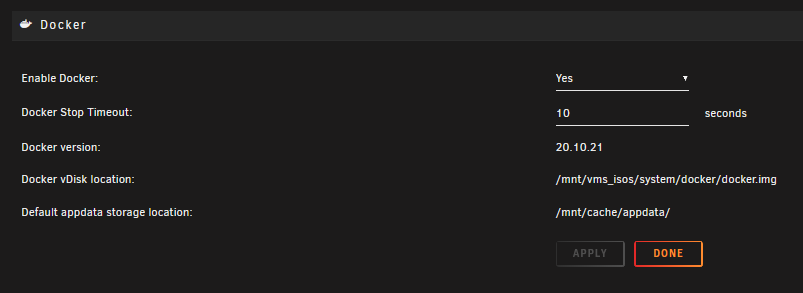
In Settings --> Docker what is your path to docker.img? In my example below vms_isos is a named cache pool SSD other than Cache (which also exists)
-
NerdPack is deprecated; NerdTools (mostly) replaces it.
-
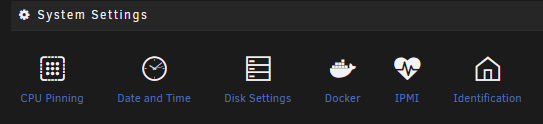
He is referring to the plugin which is the topic of this thread in which you posted (see very first post): When installed, you will have an IPMI option in Settings --> System Settings ipmitool in NerdTools is a command line interface for certain IPMI functions.
-
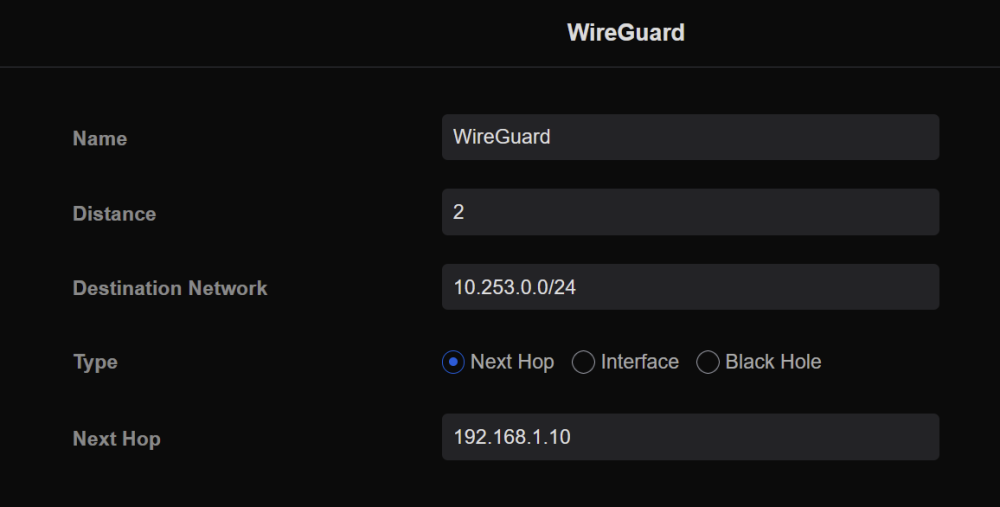
It's not so much a change in the WireGuard configuration as it is the router configuration. I have most of my docker containers on br0.3 (dedicated Docker VLAN) and I needed the static route (as explained in the Complex Networks section of the WireGuard Quickstart linked above) to be able to access the WebUIs of docker containers on br0.3 via WireGuard. Here's what it looks like in my router config:
-
Not for unRAID as WireGuard is built in and does not need additional plugins or docker containers. WireGuard configuration in unRAID is all in Settings --> VPN Manager.
-
I installed WireGuard on a Raspberry Pi and the instructions were the same; generate a peer configuration for each peer device. I think WireGuard in general want a different peer configuration for each client device.
-
Perhaps the Unassigned Devices plugin is what you are looking for. It will support NTFS and FAT32 formats for access in Windows or under Unassigned Devices.


