






Hoopster
Members
-
Joined
-
Last visited
Everything posted by Hoopster
-
Really unless you are doing a new UnRAID array configuration, not necessary, disk slots don’t really matter either as disks are tracked in UnRAID by serial number. Sent from my iPhone using Tapatalk
-
Yes. License is tied to the USB flash drive not any other hardware. Unless you are running VMs with hardware passed through, a change of hardware is fairly trivial. If you do have VMs with passed through hardware, you will ikely need to do some VM reconfiguration. Also, if you have dual-parity make sure to note the current drive slots in the array for all the disks.
-
Newegg in the US has the ASRock Rack E3C246D2I for $260. Mini-ITX, socket 1151 (Xeon E-22XX or 9th generation Core), 8 SATA ports (4 onboard, 4 via OCuLink cable), IPMI, etc. The C246 WSI is the workstation version without IPMI. I got my E3C246D2I earlier this year from Nextwarehouse for a little less but it looks like they are currently out of stock. This is the same motherboard in my backup server. The OCuLink cable works very well for four additional SATA ports, but, yes it is an additional expense. I got one for $25 on eBay. The Lian-Li PC-Q25 Mini-ITX case (I wish it were still available) has room for 7 HDDs and a 2.5" SSD so I have a bit of room to grow in that case. I have really not been impressed with the current offering of server motherboards that support socket 1200 and socket 1700. They are very, very expensive and hard to find. For example, the mATX socket 1700 W680D4U is $479. That's $200 more than what I paid for the E3C246D4U currently in my main server. Fortunately, both of my systems based on C246 chipset socket 1151 motherboards have plenty of horsepower for my current and short-term future needs. It used to be fairly easy to find several good current-generation motherboards readily in stock and at a decent price whenever one went looking. That task is a lot harder now.
-
unRAID boots only from a USB flash drive because that it what the license is tied to. Many motherboards have internal USB A ports so the USB flash drive can be placed inside the case where it is less prone to tampering or removal. Even if the motherboard does not have an internal USB A port there are devices such as this that plug into the 9-pin USB 2.0 header on the motherboard and provide internal USB ports.
-
Right. Fan control for PWM fans (4-pin) is dependent on them being plugged into motherboard fan headers. Fan speed control won't work with Molex. I don't know how fans would work with the adapter shown in the second picture. I doubt 5 fans plugged into the same motherboard fan header can be controlled independently unless there is some kind of control circuit built into that adapter. If you want them all triggered by the same temperature sensor perhaps that is not a problem. My CPU cooler has two Noctua fans and they are plugged into the same motherboard CPU fan header by a Noctua Y cable. That works because I want them to have the same speed settings based on temp.
-
UnRAID does not support WiFi directly. It MUST have a wired connection. However, you can use a WiFi bridge device (plug in a cable to server and other end to bridge) or a powerline adapter which plugs into a wall electrical outlet and has an Ethernet port for connecting the server. The linked items are just examples and not necessarily recommended devices.
-
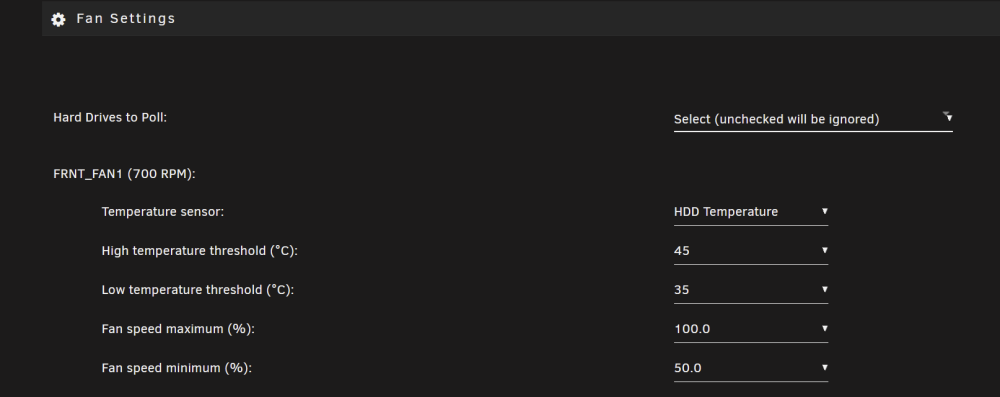
Check out the System AutoFan plugin. Look for the installation URL in the linked post. Your BIOS likely also has some type of fan control. If your motherboard has IPMI (as mine does), a better option is the IPMI plugin. Here are my Front Fan1 settings from the IPMI plugin (50% while HDD temps remain under 35 C then increasing as temps rise up to 100% fan speed at 45 C): CPU fans and other case fans have similar controls based on either CPU or HDD temps.
-
I have had two Mini-ITX builds (including my current backup system), both from ASRock Rack, that have had/support 8 SATA ports. They do exist. However, I have not researched pricing and availability recently. Pricing has certainly gone crazy in the last couple of years. I agree with everything you said above. My main server is in a case that accommodates mATX/ATX motherboards and has room for 8 HDDs. Smaller Mini-ITX only cases are certainly more limiting but I really like the Lian-Li PC-Q25 case (no longer available) that houses my backup server. My prior Mini-ITX build was in a Fractal Node 304 case with which I had no issues.
-
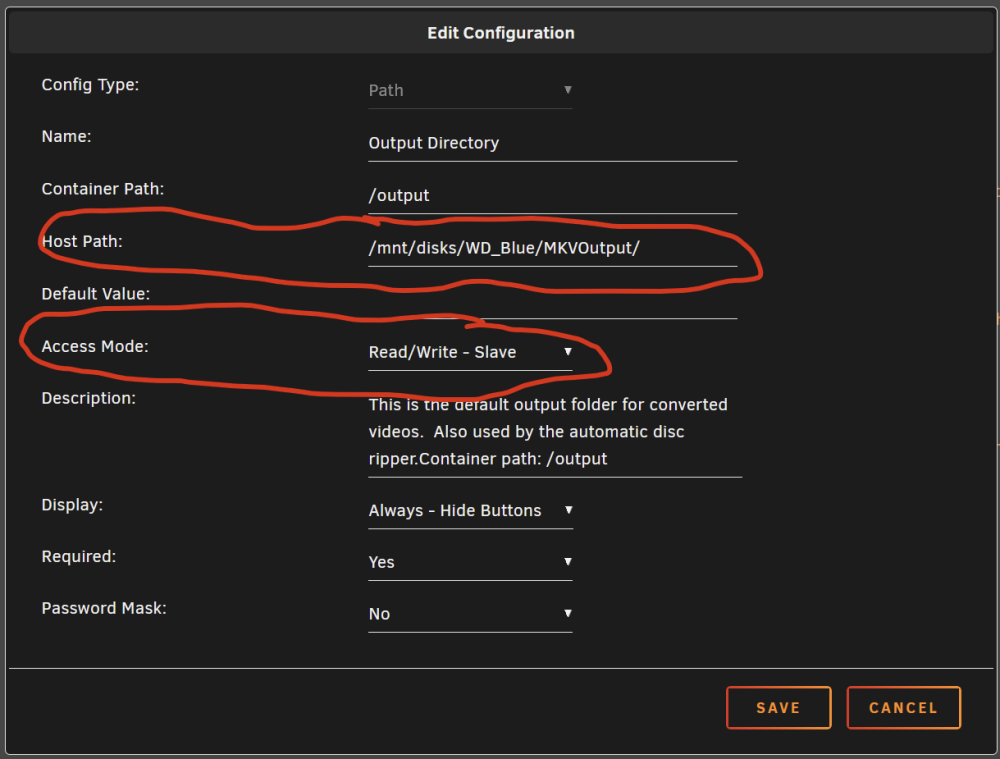
Below is what you should see for reference. This is a mapping to a UD location for my MakeMKV container that uses a UD location for its output folder. The path is the UD folder and it is set to R/W Slave access mode. I know you are having problems but something like this is what you need to get to. Here are the settings for the Unassigned Device called WD_Blue:

-
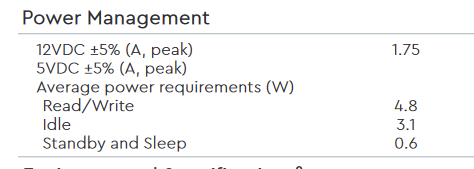
No, there are separate rails for 3.3V and 5V. It's more an internal circuit thing in the PSU than a wires thing coming out of the PSU. Hard drives will usually provide power draw specs such as these: While reading or writing it draws ~5W. Although not stated here, the largest power draw is usually on startup. When unRAID boots, it spins up all disks. Lets say it may draw 7-8 watts on startup. Unless you have a very large number of HDDs in your array, the amount of power the disks draw is usually not as big a consideration as the CPU and GPU(s) which are a lot more power hungry.
-
This is an Unassigned Devices disk path so it will not show up in user or disk shares. A disk share shows up under /mnt/disk# A user share under /mnt/user/{sharename}
-
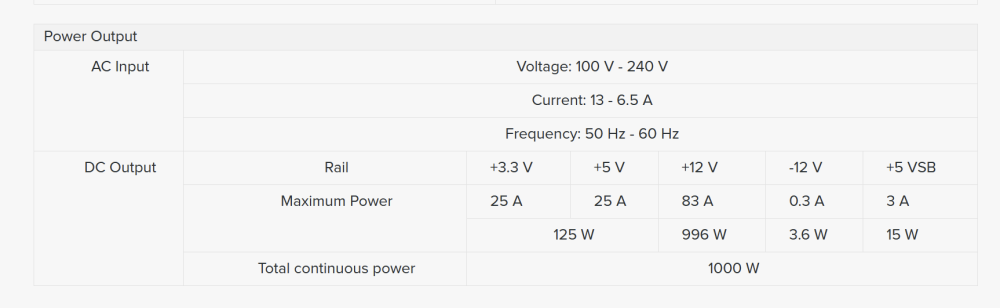
Depends a lot on your power supply and if it has a maximum power draw rating per cable. My case has an 8 HDD hot-swap cage and it recommends that the power to the cages be from two different PSU Molex cables. Molex (4-pin peripheral provides power to the cages where each drive plugs into a SATA power connector in the cages. It also depends on how many amps your 12v rail supports. For unRAID and lots of HDDs, it is better to have a PSU with a single 12v rail that supports the combined power draw of all the drives, CPU and GPUs on startup . Here is an example from a Seasonic PSU (83 amps on a single +12v rail for a total of 996 W):
-
See help notes on Auto (does it apply in your case?):

-
Then you don't have disk shares enabled.

-
USB-connected hard drives are best used as unassigned devices rather than members of the parity-protected array for reasons Kilrah mentioned.
-
PCIe revisions are backwards compatible with prior versions. For HDDs, PCIe 2.0 bandwidth is sufficient. I have a Dell H310 (LSI 9211-8i equivalent) in my server and it is only PCIe 2.0. The PCIe slots on the motherboard support version 3.0. PCIe 2.0 is more than enough for the 8 HDDs that can be attached to the Dell H310.
-
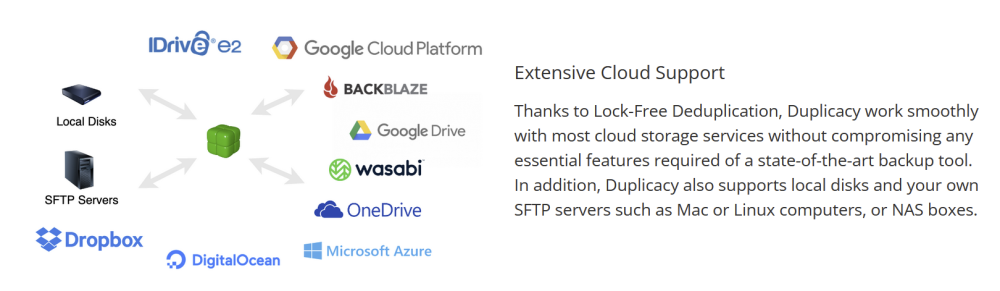
Duplicacy, and probably some others (available as a Docker container in Apps) will backup to Google Drive.
-
All good on 6.11.5 for me. Can't comment on earlier versions.

-
Yes, you should be good with the SATA ports if that applies specifically to SATA M.2 devices only. My motherboard has the same situation where one SATA port is shared with an M.2 slot. However, it says the following in the manual so I lose a SATA port regardless of SSD type if the M.2 slot is occupied: The M.2 slot (M2_1) is shared with the SATA_0 connector. When M2_1 is populated with a M.2 SATA3/ PCIE3.0(x4 or x2) module, SATA_0 is disabled.
-
That depends on how you want to use unRAID. If you just want to use it as a pure NAS with only a few clients accessing it, faster CPUs with more cores are not needed. If you want to host virtual machines then, yes all that CPU horsepower can be put to good use. If you won't be creating VMs but want to run a lot of Docker containers for things like Plex/Emby/Jellyfin, backup to the cloud, media downloading, etc. then a mid-range CPU will probably be sufficient. Intel vs. AMD often comes down to whether or not you want a CPU with an integrated GPU and whether or not you want to do media transcoding with the iGPU. Intel is better supported by the apps that do this although some have been able to get AMD integrated GPUs working as well. In general, Intel CPUs are a little less problematic with Linux/unRAID than AMD although most of the AMD problems are in the past now and there are workarounds for those that remain. You will find lots of unRAID servers happily running on AMD hardware so it is more a matter of choice than necessity.
-
[DEAL NOW EXPIRED] Details here.
-
The Container Size button in the Docker tab seems to be a good choice. 😁

-
I don't know what version of Plex was used in the video you referenced. Port 32400 is the default so no need to change it unless you want another port. Click the Show more setting... link at the bottom of the Linuxserver Plex docker Edit page if you want to see the port assignments. Personally, I have most of my docker containers assigned to a custom network VLAN (br0.3) so each can have its own IP address. Plex is on a different subnet than unRAID itself. It works great as my router passes traffic between all LANs/VLANs by default. Your router may require specific rules to allow this.
-
unRAID itself certainly does not need Pi-Hole as its DNS. What Ads do you need to block on unRAID? The most common usage of the Pi-hole container is to set its IP address as the DNS in the router for network-connected clients and to set the DNS for unRAID itself to something like Google or Cloudflare. Ideally, if you are running Pi-hole on unRAID, it should have its own IP address. I used to run Pi-Hole as a container on unRAID, but the problem with that is that if unRAID is down, you have no Pi-hole DNS on the network (you should specify secondary and tertiary DNS in the router) so I moved Pi-Hole to a Raspberry Pi where it have been running for a couple of years.
-
Support in these forums. Linuxserver.io containers are supported here. For support on Official Plex container you must go to Plex forums. Sent from my iPhone using Tapatalk






