






Hoopster
Members
-
Joined
-
Last visited
Everything posted by Hoopster
-
From the first post in the WireGuard Quickstart: Complex Networks The instructions above should work out of the box for simple networks. With "Use NAT" defaulted to Yes, all network traffic on Unraid uses Unraid's IP, and that works fine if you have a simple setup. However, if you have Dockers with custom IPs or VMs with strict networking requirements, you'll need to make a few changes: In the WireGuard tunnel config, set "Use NAT" to No In your router, add a static route that lets your network access the WireGuard "Local tunnel network pool" through the IP address of your Unraid system. For instance, for the default pool of 10.253.0.0/24 you should add this static route: Network: 10.253.0.0/24 (aka 10.253.0.0 with subnet 255.255.255.0) Gateway: <IP address of your Unraid system> If you use pfSense, you may also need to check the box for "Static route filtering - bypass firewall rules for traffic on the same interface". See this. If you have Dockers with custom IPs then on the Docker settings page, set "Host access to custom networks" to "Enabled". see this: https://forums.unraid.net/topic/84229-dynamix-wireguard-vpn/page/8/?tab=comments#comment-808801
-
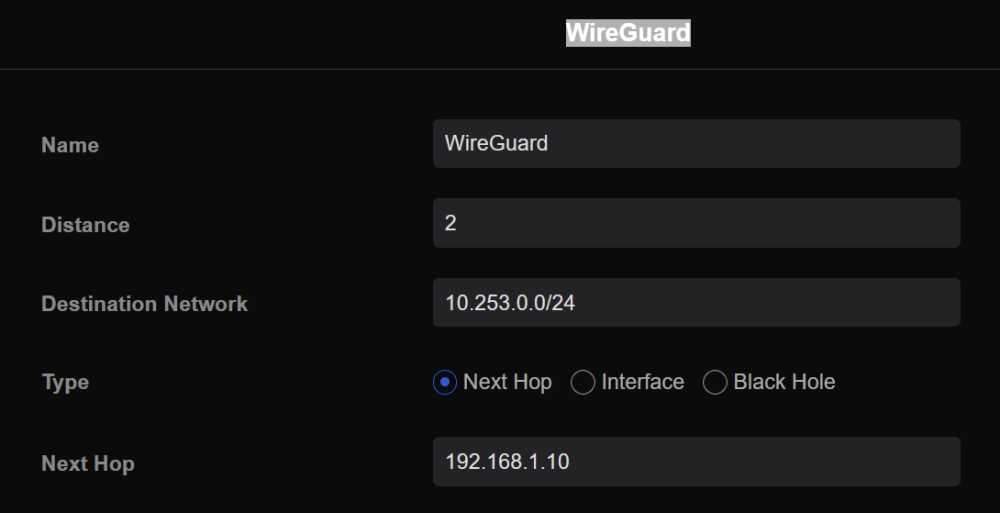
Did you setup a static route between WireGuard and IP address of unRAID server? IIRC, I had to do this to access Docker containers I had assigned to my VLAN (br0.3). My static route looks like this (destination network is the WireGuard LAN and Next Hop is my unRAID server IP address: Here is a tutorial I put together of everything I did to make all my host/bridge and custom network containers on a VLAN accessible via WireGuard. Perhaps something there may be of use to you. NOTE: some things in my tutorial may be outdated now as I believe Docker can now be configured for access to the host network. That did not matter in my case as I had a separate VLAN for docker containers.
-
Have you posted your diagnostics to see if someone in the forums can diagnose the problem(s)? If not, upload your diagnostics in a new post.
-
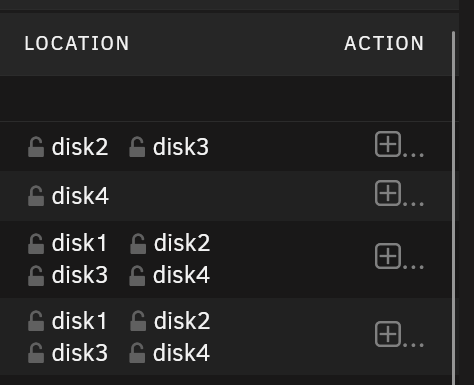
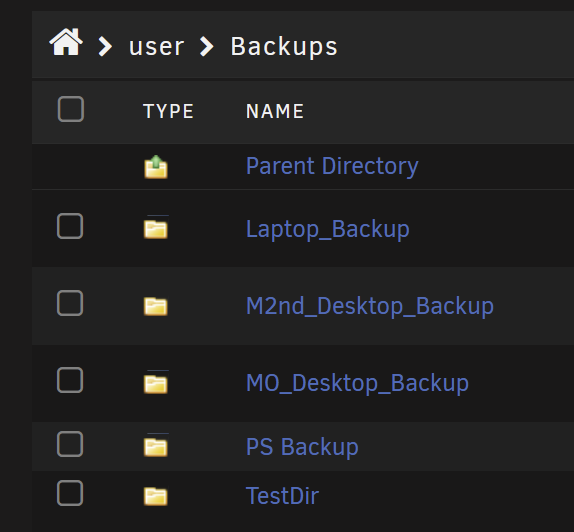
File Manager plugin does that from the Shares tab. View of disks in a share: View of folders in a share (my backup share) across disks: Click a folder to see files in the folder.
-
See this forum post for tips on how to improve unRAID/Linux stability with Ryzen-based system. First generation Ryzen is particularly probelmatic.
-
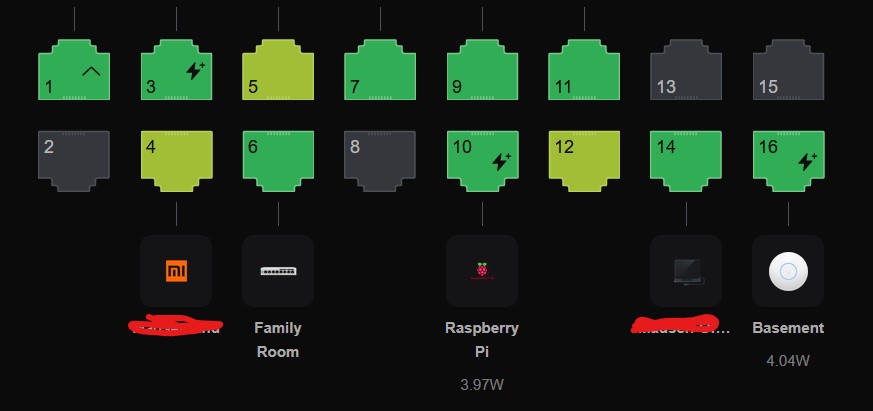
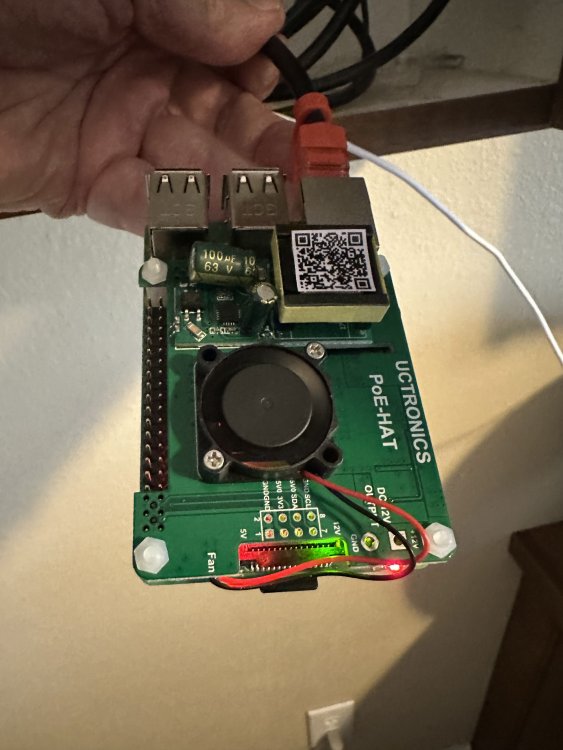
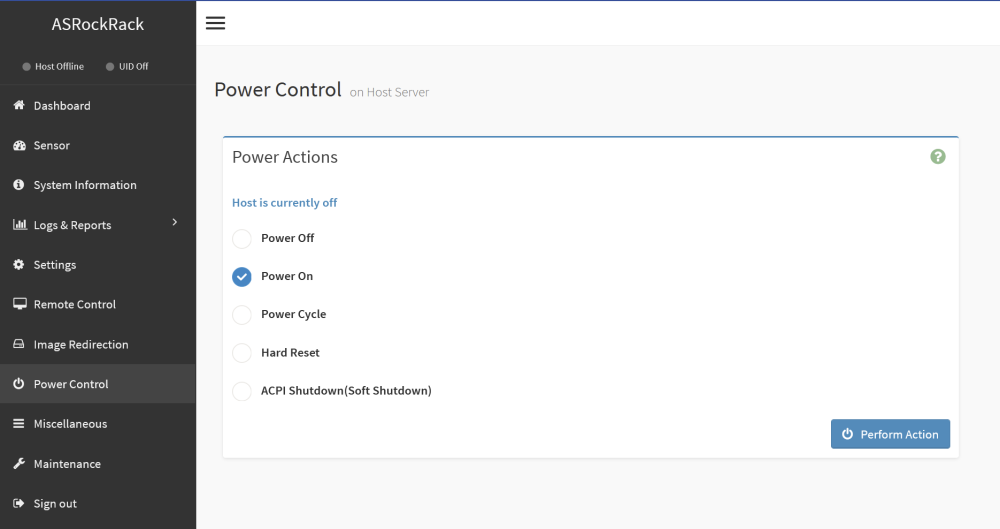
Several times, I have found the unRAID implementation of WireGuard very useful when traveling. I have been able to access server resources and perform server maintenance without issue. However, WireGuard in unRAID is not very useful if the server is powered off as recently happened when there was a power outage at my home while I was traveling. My server is on a UPS and shut down gracefully, but, of course, it did shut down. Some BIOS/UEFI do allow for automatic restart when power is restored. My BIOS may have that setting but I prefer not to use it as I prefer to monitor my server a bit more closely after a power outage. Since my server motherboard does have IPMI, I simply needed a way to access the server remotely when the server is down. I already had a Raspberry Pi 3 B+ on my network running Pi-Hole and I thought "why not add WireGuard to it as well?" I did so following this guide. It was very easy and worked just as outlined. I have successfully tested remote access to my server GUI and the IPMI admin page from my phone and laptop via WireGuard on the RPi. IPMI is a wonderful thing for remote management. But what if your server does not have IPMI? If this is the case, you might want to consider a PiKVM. The PiKVM is a nifty little box built on a Raspberry Pi (included) which provides remote server management, even powering it on and off. In many ways it is superior to IPMI and allows you to do more. The linked page primarily discusses assembling a PiKVM yourself as a DIY project but you can also buy one pre-assembled here in the U.S. If you prefer an inside-the-case solution there is this kit if you have a Raspberry Pi 4 and this one that uses a Raspberry Pi Compute Module 4. Both require you to purchase the RPi boards separately. Taking it one step further, I decided I wanted to make sure the RPi also powered up automatically when power was restored so I installed a PoE (power over Ethernet) HAT (Hardware Attached on Top) on the Raspberry Pi. This provides power to the device through the Ethernet cable. No external power supply is needed. There are many PoE HATs available but they are supported by the Pi 3 B+ and Pi 4 models only. They may also support different PoE standards. My Unifi switch supports PoE so I enabled it on the port to which the RPi is connected. As seen below, it is drawing about 4 watts from the PoE switch. But what if your switch does not support PoE? In this case, you can use a PoE injector such as this one (there are many others): Here is the RPi powered on with only an Ethernet cable connected to it: Some Raspberry Pi power supplies, like mine, have a switch that requires the switch to be toggled in order to power on the unit. Others will power it on automatically if it is plugged into the RPi and there is power. PoE for me is simply more reliable. If the switch has power, the RPi has power. Since the PoE HAT I installed has a fan that is positioned right over the RPi CPU, the CPU temp has dropped 10C from where it used to be. A nice added bonus.
-
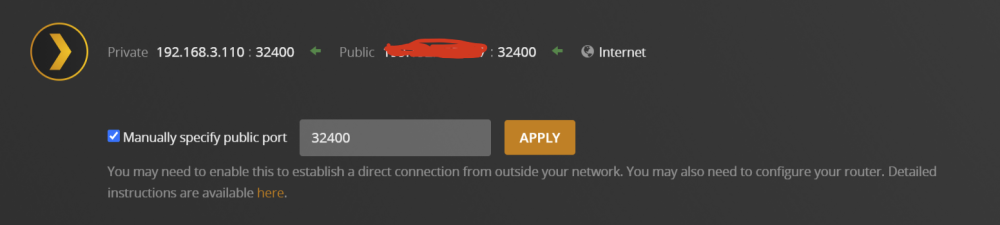
I have created a VLAN just for Docker containers. This VLAN is 192.168.3.x. My unRAID server and many other devices in my home are on the 192.168.1.x subnet. UnRIAD server IP is 192.168.1.10 As long as this VLAN is something unRAID knows about and is visible in the docker container configuration page as a custom network (br0.3 in my situation), nothing special needs to be done to "connect" the Plex docker container on the 3.x subnet to the unRAID server on the 1.x subnet. Plex clients Because the router is configured to pass traffic between all LANs/VLANs automatically, Plex clients local and remote connect to 192.168.3.110:32400 without issue. Here is the remote setup. To get it all set up properly, I followed this guide. There is also a video explaining it here. Caveat: your router and switch(es) must support VLANs (apparently yours do since you have a VLAN). Full disclosure: I have not watched the entire video but I assume it will get you where you need to be just as the forum discussion will.

-
Your system will continue to run normally when the trial expires. Technically, as long as you never stop the array or reboot the server after a trial has expired, it could run forever in trial mode. Your data is not touched in any way when a trial expires.
-
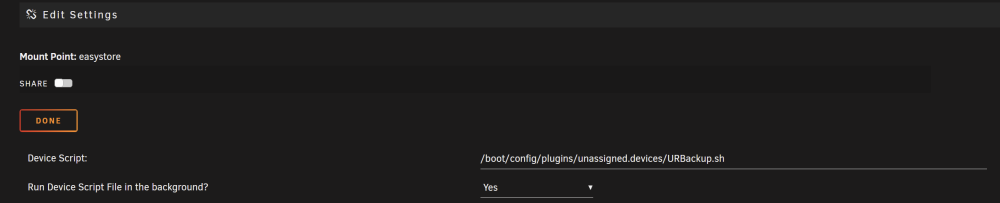
See the backup script example in the first post of the unassigned devices plugin discussion thread. I have and external 14TB USB drive as an unassigned device and use this script (modified for the four shares I wish to backup) to back them up automatically when the external USB drive is plugged into the server. Since you can assign a device script to be run when the device is mounted, this makes it real easy.
-
Per the unRAID 6.11.0 release notes: "Included perl in base distro." No need for it in Nerd Tools as Nerd Tools is only needed for 6.11.0+
-
FYI - If you have been having trouble assigning static IP addresses to devices via the unifi controller (I have had this problem with 7.2.94) version 7.3.76 (beta) is out now which supposedly fixes this. I will wait for it to be officially released to try it but at least a fix is supposedly coming soon.
-
The first suggestion is to post your diagnostics in case they contain any useful information. The second suggestion is to set up the syslog server so the syslog information survives reboots. I imagine you have to reboot after every crash. Without syslog server anything pre-reboot will no longer be in the syslog.
-
Check your docker run command for the container. If set up properly, you will see it there. You just need to set Privileged to On with the toggle switch in the container config For reference here is my docker run command for DelugeVPN using wireguard for PIA: docker run -d --name='DelugeVPN' --net='bridge' --privileged=true -e TZ="America/Denver" -e HOST_OS="Unraid" -e HOST_HOSTNAME="MediaNAS" -e HOST_CONTAINERNAME="DelugeVPN" -e 'VPN_ENABLED'='yes' -e 'VPN_USER'='xxxxxxxx' -e 'VPN_PASS'='xxxxxxxx' -e 'VPN_PROV'='pia' -e 'VPN_OPTIONS'='' -e 'STRICT_PORT_FORWARD'='yes' -e 'ENABLE_PRIVOXY'='no' -e 'LAN_NETWORK'='192.168.1.0/24' -e 'NAME_SERVERS'='192.168.1.60,209.222.18.222,8.8.8.8,209.222.18.218,8.8.4.4' -e 'DEBUG'='false' -e 'UMASK'='000' -e 'PUID'='99' -e 'PGID'='100' -e 'VPN_CLIENT'='wireguard' -l net.unraid.docker.managed=dockerman -l net.unraid.docker.webui='http://[IP]:[PORT:8112]/' -l net.unraid.docker.icon='https://raw.githubusercontent.com/binhex/docker-templates/master/binhex/images/deluge-icon.png' -p '8112:8112/tcp' -p '58846:58846/tcp' -p '58946:58946/tcp' -p '58946:58946/udp' -p '8118:8118/tcp' -v '/mnt/cache/appdata/DelugeData':'/data':'rw' -v '/mnt/cache/appdata/DelugeVPN':'/config':'rw' --sysctl="net.ipv4.conf.all.src_valid_mark=1" 'binhex/arch-delugevpn:latest'
-
I know some unRAID users keep part of their Plex library (most often watched/favorite/recent content, etc.) on cache-only SSD shares. No spinning disks required. With Plex on SSD appdata share and some content (may require some manual maintenance) on SSDs, you never have to spin up hard drives to watch Plex content. Sorry for your electricity cost situation. Fortunately, I still am paying only about $0.12 - $0.13 per kilowatt hour in my part of the U.S.
-
My favorite SPX Labs tutorial/video is backing up one unRAID server to another via LuckyBackup. Even though I don't use this method (already had it setup via scripts), I have seen a lot of new unRAID users asking for something like this (especially with some sort of GUI) so I imagine this is a very useful tutorial.
-
Every time I have experienced this (random lockups or reboots) on any computer, unRAID or not, it has been because of a failing power supply. Not saying that is the problem, but, if you have another power supply you can put in the server, it would be worth testing.
-
I used to have an unRAID server that would enter and exit S3 Sleep several times a day and it never resulted in an unclean shutdown. Now I just run my main server 24x7 and let the disks spin down when not in use. The other server has IPMI and powers on and off via user scripts when it is needed for backup or other purposes. UnRAID has never officially supported sleep functions because how well it works is highly dependent on the motherboard. There is an S3 Sleep plugin that many (including you, I assume) use and it works well (with the proper motherboard support); however S3 sleep should not result in the power being turned off and, thus, a dirty unRAID shutdown.
-
More memory is usually better if running VMs to which you want to dedicate a certain amount of RAM. Also if you are running a lot of Docker containers, more RAM can be good. If you have neither VMs nor a lot of Docker containers, 16GB could be sufficient depending on your needs. If you are going to set Plex to transcode in RAM, you need to have enough RAM to do that efficiently for multiple streams if you will have multiple users accessing Plex simultaneously and the media needs to be transcoded. There are ways to limit the amount of RAM Plex uses for transcoding. Most say that 4GB is sufficient for transcoding but I personally have 16GB allocated to Plex transcoding simply because I have the RAM available in my 64GB server. My backup server has only 32GB RAM. You will likely not notice much difference between 2666 and 3200 RAM speeds unless you are running a VM or Docker container for which RAM speed is important. For basic unRAID NAS functions it wont matter much.
-
Sometimes this happens if you are booting in legacy mode and the combination of new Linux kernel and your motherboard now wants to only boot UEFI. Is there an EFI- folder on your unRAID flash drive? If so, rename to EFI (without the '-' character at the end), reboot and see if it makes a difference. You may also try going from UEFI to legacy boot (folder rename to EFI-) to see if legacy boot works when UEFI does not.
-
Welcome. As most people here will tell you, the forums are one of the best "features" of unRAID. You will find answers to virtually any unRAID-related question here and there are many patient and knowledgeable experts willing to help with even the most basic questions.
-
Mine are both still showing as is the program guide (which I just successfully refreshed) and I have access to all visible channels. I also have a scheduled recording in progress now. Must be something specific to your network.
-
Many use dummy plugs to get around this issue. Fortunately none of my motherboards have required that. Sent from my iPhone using Tapatalk
-
Usually means that it is not enabled in the BIOS. On many systems "Onboard graphics" or something similar must also be set as the primary graphics adapter in order for the /dev/dri directory and contents to be created.
-
Depends on your needs and what you value most. Two SSDs in a pool can provide a RAID 1 mirror so if one fails, the other acts as a backup. They can also be added without RAID 1 to increase capacity of the pool. Two pools with one SSD each, lets you assign a different pool to different shares (but no redundancy). SSDs can also be used as unassigned devices not in the array or in a pool. I have three SSDs in my main unRAID server. One is an M.2 PCIe NMVe that I have in a cache pool and use for appdata share. One is a 2.5" SATA SSD that I use for VMs and ISO files. The third is a 2.5" SATA SSD which I have as an unassigned device for downloads, MakeMKV and HandBrake output.
-
This is almost always related to a hardware or configuration issue; obviously this is not "normal" unraid behavior Not sure what this means. Could be related whatever problem is causing the system to freeze in general. That is s subjective call. Not sure what you find "complicated" True; unraid must format hard drives before they can be used in the array. Currently, only XFS and BTRFS are supported with native ZFS coming in the future (supported currently by plugin) I don't know what you mean by this The forums are usually very helpful if enough information is provided to troubleshoot a problem. Unraid is not for everyone and if it does not meet your needs, I hope you find another solution that does meet your needs






