






Hoopster
Members
-
Joined
-
Last visited
Everything posted by Hoopster
-
You can edit the network .cfg file in the config folder on the unRAID USB boot flash and change the assigned IP address. Alternatively, you can just delete network.cfg (and network-rules.cfg if it exists) and unRAID will regenerate default files using DHCP.
-
What is the format of the digital files it created? Can you play them in VLC media player or some other player on Windows?
-
The only DSM 7 I know of is the Synology Disk Station Manager. How are you trying to rip the movies on DVD/Blu-ray? Personally, I use the MakeMKV Docker container and it works great. I have ripped hundreds and hundreds of disks without issue that are now happily under the management of Plex. You could also use MakeMKV on a PC and rip movies to an Unassigned Devices drive on unRAID. I have a DVD/Blu-Ray drive in both my unRAID server (using the MakeMKV docker container) and one in my desktop PC running MakeMKV for Windows. WIth both I can rip disk straight to unRAID unassigned devices storage. From there, I transfer the files to unRAID shares being managed by Plex libraries.
-
And if you already have a Raspberry Pi 4 B you can use for a PiKVM, there is this internal version from Geekworm.
-
PCIe version 3.0 is fine. In have a PCIe SATA controller that is only PCIe version 2.0, so half the bandwidth of 3.0. However, that is more than enough for the 8 drives I can attach to the card because it is an x8 card which leaves me with 400 MB/s for each drive. It would not be great for SSDs but only attach HDDs to the controller. In your case, if you really want to attach 16 drives, you need to be looking for at least a PCIe 3.0 card that is x4 or greater. PCIe 3.0 x4 would give you 4 GB/s (figure 3.2 GB/s after overhead) which is 200 MB/s for each of 16 hard drives. See the forum discussion linked above by @ChatNoir for recommended controllers.
-
Yes, it is cheap and your performance will be very poor with multiple hard drives attached. One PCIe 3.0 lane split among however many drives are attached 1 GB/s bandwidth (PCIe 3.0 x1) total in the best case Figure a 20% loss due to system overhead leaving you with 800 MB/s actual available bandwidth. If you have even 8 drives attached to that controller that is 800/8 = 100 MB/s per drive. Most modern HDDs are capable of ~200 MB/s When you are doing a parity check, disk rebuild, etc. all drives will be active simultaneously and if you have 8 drives attached to that controller, you will be getting a max of 100 MB/s on each. If you have more drives, then even less. 16 HDDs attached would give you a maximum of 50 MB/s My last parity check completed at an average of 159 MB/s and it started at close to 200 MB/s. As mentioned by others, port multipliers (JMB575 chip on that card) are not recommended for use with unRAID and that card has four of them.
-
Very easily done. UnRAID tracks disks by serial number not by controller connection or SATA port. You should keep any SSDs attached to motherboard SATA ports for TRIM support unless your PCIe controller supports this; most do not. Unless your new PCIe controller does something to mess with the disk serial number reporting (some RAID cards can do this) you should not have any issues. When I bought a PCIe controller, I just removed HDD SATA cables from the motherboard ports and plugged a forward breakout cable from the the PCIe controller into the SATA ports on the HDDs. The array configuration did not skip a beat. If you have dual parity, there may be some other considerations (I am not an expert on this) but with single parity it is very straightforward to just move the connections.
-
Nope. UnRAID does not care about the CPU other than knowing what it is and how to use it. Nothing needs to be changed in advance of the CPU swap. Same with a motherboard and RAM swap. There are others using the 5600G with UnRAID. I have one in a desktop machine. Great CPU. Sent from my iPhone using Tapatalk
-
The easiest way is to configure WireGuard (Settings --> VPN Manager) which is built into unRAID. Then just generate peer profiles an install them on devices (phones, laptops, tablets, computers, etc.) from which you wish to access the unRAID webUI remotely.
-
Similar issues reported here. I linked to the reported solution for making remote access stable. The discussion of that user's issues in the posts preceding the solution.
-
Added all recommended essential additional items to make it a complete, ready-to-go solution.
-
This is exactly what I eventually did. I started with Pi-Hole as a Docker container. Even though I generally run my server 24x7, if it is down for whatever reason, there is no Pi-Hole for the networked-connected clients. Of course, they would fall back to Cloudflare (the secondary DNS configured in my router). I switched Pi-Hole over to a Raspberry Pi almost 3 years ago where it has happily been running without interruption. I also recently put WireGuard on the same Raspberry Pi as a fallback for remote LAN access if the UnRAID server with WireGuard is down for whatever reason and I am not home to take care of it. I do have a Pi-Hole docker container still on unRAID (stopped by default). I have a dedicated Docker VLAN for all of my containers and also have ipvlan (previously macvlan) configured as the Docker custom network type. No problems when I start it up on unRAID 6.11.5.
-
Yes, I misunderstood what you are trying to do. Personally, I have all my docker containers on a VLAN (br0.3) with separate IP addresses for each.
-
When I ordered another UnRAID license recently the order confirmation email said this: “This is your order receipt, a link to your key will arrive in a separate email.” I take it you got no such link? Sent from my iPhone using Tapatalk
-
Have you seen this topic? Are those the instructions you used in the Secondary NIC is Available section?
-
Do you have a backup of your flash drive? It is highly recommended you do this anytime you are making major changes. If you have a backup, restore the config folder to your original USB flash drive If you have the original email received when you purchased your license, it should have a link to your license which you can reinstall in the config folder on the original flash drive you licensed. If no backup and no email with license, you can license a new flash drive following these instructions.
-
I have an LSI 9211-8i clone (the Dell H310) with the same SAS2008 chip. According to the specifications for the LSI 9211-8i, the power draw is as follows: - nominal - 8.04 Watts - worst case - 14.63 Watts I do not have the maximum 8 drives connected the the card (only 4 right now) and I have not noticed it drawing significant amounts of power in my server, especially compared to other components. However, I do not know what you consider to be "power-efficient."
-
You do not have to setup a VPN but it makes things very easy. WireGuard is built into unRAID and configuration is rather easy. On the client side, you do need the WireGuard client with access profiles generated from the server. I also use No-IP with a ddns name for the server. Another alternative is SWAG for reverse proxy. What you do not want to so is port forward key ports such as 443 and 80 in your router to open up your server to the outside world. This is asking for trouble. A VPN or reverse proxy are the secure ways of getting remote access to the server and docker container webUIs. You do not have to reconfigure docker containers. They could be setup in host or bridge mode using the server IP address:port# for GUI or they could have a separate IP address on br.0 or a VLAN with a different br.# designation. Mine are on a VLAN (br0.3 docker network). If using WireGuard you just have to make sure everything is configured properly for the right access method.
-
I use transcoding a lot (with Intel iGPU) because I have remote users to whom I stream Plex content. Locally, everything is direct stream with no transcoding required.
-
Here are my setting for static IP and Docker VLAN (eth1 not currently used). # Generated settings: IFNAME[0]="br0" DHCP_KEEPRESOLV="yes" DNS_SERVER1="1.1.1.1" DNS_SERVER2="1.0.0.1" DHCP6_KEEPRESOLV="no" BRNAME[0]="br0" BRNICS[0]="eth0" BRSTP[0]="no" BRFD[0]="0" PROTOCOL[0]="ipv4" USE_DHCP[0]="no" IPADDR[0]="192.168.1.10" NETMASK[0]="255.255.255.0" GATEWAY[0]="192.168.1.1" METRIC[0]="1" USE_DHCP6[0]="yes" VLANID[0,1]="3" DESCRIPTION[0,1]="Dockers" PROTOCOL[0,1]="ipv4" METRIC[0,1]="2" VLANS[0]="2" IFNAME[1]="eth1" PROTOCOL[1]="ipv4" METRIC[1]="3" SYSNICS="2"
-
Just tested a previously UD formatted NTFS drive with Windows 11. No problems at all and everything shows up that I expected to be there, 10TB of data in 4 folders. The drive mounts fine in UD to run the backup script and shows up in Windows as it should. This drive was formatted NTFS with UD about a year ago. There could be a problem formatting with a recent version of UD, I suppose.
-
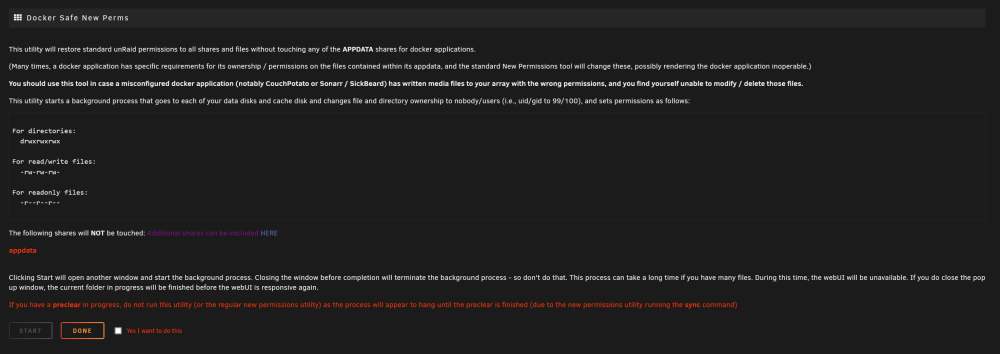
Probably Tools --> Docker Safe New Perms
-
Have you tried setting up WireGuard VPN which is included in unRAID? I use it to remotely access the unRAID GUI and the GUIs of all my docker containers (some on a VLAN with a different subnet than unRAID). If you have a situation where the docker containers are on a different subnet/VLAN see the Complex Networks section of the WireGuard Quick Start.
-
Unless you can get Jellyfin to use the integrated GPU in the Ryzen 5600G. Some claim to have made AMD iGPUs work with Jellyfin, so, perhaps it is possible. If not, you will need a discrete GPU if you want to do hardware transcoding. Of course, you can always let the CPU do the transcoding but it puts a load on the CPU. Technically, the 5600G could handle up to 8 simultaneous 1080p transcodes in software with the CPU as it has a passmark score of 19848. 2000 passmarks are recommended per 1080p transcode with another 2000+ for unRAID overhead.
-
@Ronan C I agree with this. You really do not even need to consider dual parity until at least 8 data drives, unless of course you really want dual-parity protection with fewer drives. I have 5 data drives with single parity and have never had an issue with a drive failing. I did have one get disabled because of a write error but I was able to rebuild it onto itself. It was a cabling problem. Use one of your 12TB drive for parity and make the other three array data drives.



