






TDA
Members
-
Joined
-
Last visited
Everything posted by TDA
-
Hello, I just saw that there is also an update available (don't know it has a relation) As for docker logs do you mean this one? ErrorWarningSystemArrayLogin | | ___ _ __ | | / __| | | / \ | | \__ \ | | | () | |_| |___/ |_| \__/ Brought to you by linuxserver.io ------------------------------------- To support LSIO projects visit: https://www.linuxserver.io/donate/ ------------------------------------- GID/UID ------------------------------------- User uid: 99 User gid: 100 ------------------------------------- [cont-init.d] 10-adduser: exited 0. [cont-init.d] 30-config: executing... setting up sudo access adding abc to sudoers setting sudo password Enter new UNIX password: Retype new UNIX password: passwd: password updated successfully [cont-init.d] 30-config: exited 0. [cont-init.d] 98-powershell: executing... Installing PowerShell Get:1 https://deb.nodesource.com/node_12.x bionic InRelease [4,584 B] Get:2 https://dl.yarnpkg.com/debian stable InRelease [17.1 kB] Get:3 https://deb.nodesource.com/node_12.x bionic/main amd64 Packages [764 B] Get:4 http://archive.ubuntu.com/ubuntu bionic InRelease [242 kB] Get:5 http://archive.ubuntu.com/ubuntu bionic-updates InRelease [88.7 kB] Get:6 http://archive.ubuntu.com/ubuntu bionic-security InRelease [88.7 kB] Get:7 https://dl.yarnpkg.com/debian stable/main all Packages [10.0 kB] Get:8 http://archive.ubuntu.com/ubuntu bionic/main Sources [1,063 kB] Get:9 http://archive.ubuntu.com/ubuntu bionic/restricted Sources [5,823 B] Get:10 http://archive.ubuntu.com/ubuntu bionic/universe Sources [11.5 MB] Get:11 https://dl.yarnpkg.com/debian stable/main amd64 Packages [10.0 kB] Get:12 http://archive.ubuntu.com/ubuntu bionic/multiverse Sources [216 kB] Get:13 http://archive.ubuntu.com/ubuntu bionic/main amd64 Packages [1,344 kB] Get:14 http://archive.ubuntu.com/ubuntu bionic/multiverse amd64 Packages [186 kB] Get:15 http://archive.ubuntu.com/ubuntu bionic/restricted amd64 Packages [13.5 kB] Get:16 http://archive.ubuntu.com/ubuntu bionic/universe amd64 Packages [11.3 MB] Get:17 http://archive.ubuntu.com/ubuntu bionic-updates/universe Sources [371 kB] Get:18 http://archive.ubuntu.com/ubuntu bionic-updates/main Sources [408 kB] Get:19 http://archive.ubuntu.com/ubuntu bionic-updates/restricted Sources [8,394 B] Get:20 http://archive.ubuntu.com/ubuntu bionic-updates/multiverse Sources [7,152 B] Get:21 http://archive.ubuntu.com/ubuntu bionic-updates/main amd64 Packages [1,228 kB] Get:22 http://archive.ubuntu.com/ubuntu bionic-updates/multiverse amd64 Packages [20.1 kB] Get:23 http://archive.ubuntu.com/ubuntu bionic-updates/universe amd64 Packages [1,385 kB] Get:24 http://archive.ubuntu.com/ubuntu bionic-updates/restricted amd64 Packages [73.6 kB] Get:25 http://archive.ubuntu.com/ubuntu bionic-security/main Sources [192 kB] Get:26 http://archive.ubuntu.com/ubuntu bionic-security/multiverse Sources [3,232 B] Get:27 http://archive.ubuntu.com/ubuntu bionic-security/restricted Sources [5,992 B] Get:28 http://archive.ubuntu.com/ubuntu bionic-security/universe Sources [217 kB] Get:29 http://archive.ubuntu.com/ubuntu bionic-security/restricted amd64 Packages [59.3 kB] Get:30 http://archive.ubuntu.com/ubuntu bionic-security/multiverse amd64 Packages [8,815 B] Get:31 http://archive.ubuntu.com/ubuntu bionic-security/universe amd64 Packages [854 kB] Get:32 http://archive.ubuntu.com/ubuntu bionic-security/main amd64 Packages [931 kB] Fetched 31.9 MB in 3s (9,908 kB/s) Reading package lists... Reading package lists... Building dependency tree... Reading state information... The following NEW packages will be installed: libicu60 libunwind8 0 upgraded, 2 newly installed, 0 to remove and 0 not upgraded. Need to get 8,101 kB of archives. After this operation, 32.0 MB of additional disk space will be used. Get:1 http://archive.ubuntu.com/ubuntu bionic-updates/main amd64 libicu60 amd64 60.2-3ubuntu3.1 [8,054 kB] Get:2 http://archive.ubuntu.com/ubuntu bionic/main amd64 libunwind8 amd64 1.2.1-8 [47.5 kB] debconf: unable to initialize frontend: Dialog debconf: (No usable dialog-like program is installed, so the dialog based frontend cannot be used. at /usr/share/perl5/Debconf/FrontEnd/Dialog.pm line 76, <> line 2.) debconf: falling back to frontend: Readline debconf: unable to initialize frontend: Readline debconf: (This frontend requires a controlling tty.) debconf: falling back to frontend: Teletype dpkg-preconfigure: unable to re-open stdin: Fetched 8,101 kB in 1s (7,820 kB/s) Selecting previously unselected package libicu60:amd64. Preparing to unpack .../libicu60_60.2-3ubuntu3.1_amd64.deb ... Unpacking libicu60:amd64 (60.2-3ubuntu3.1) ... Selecting previously unselected package libunwind8:amd64. Preparing to unpack .../libunwind8_1.2.1-8_amd64.deb ... Unpacking libunwind8:amd64 (1.2.1-8) ... Setting up libicu60:amd64 (60.2-3ubuntu3.1) ... Setting up libunwind8:amd64 (1.2.1-8) ... Processing triggers for libc-bin (2.27-3ubuntu1) ... [cont-init.d] 98-powershell: exited 0. [cont-init.d] 99-custom-scripts: executing... [custom-init] no custom files found exiting... [cont-init.d] 99-custom-scripts: exited 0. [cont-init.d] done. [services.d] starting services [services.d] done. info Using config file ~/.config/code-server/config.yaml info Using user-data-dir ~/data info code-server 3.4.0 69ad52907e8ea109345831d29da5425cb2a55047 info HTTP server listening on http://0.0.0.0:8443 info - Using password from $PASSWORD info - To disable use `--auth none` info - Not serving HTTPS [cont-finish.d] executing container finish scripts... [cont-finish.d] done. [s6-finish] waiting for services. [s6-finish] sending all processes the TERM signal. [s6-finish] sending all processes the KILL signal and exiting. [mod-init] Attempting to run Docker Modification Logic [mod-init] Applying linuxserver/mods:code-server-powershell files to container [mod-init] linuxserver/mods:code-server-powershell at sha256:e790ad46e3ae13cfe0ddcb7553a57e423e36060ed9127abea180a3df097ea2b9 has been previously applied skipping [s6-init] making user provided files available at /var/run/s6/etc...exited 0. [s6-init] ensuring user provided files have correct perms...exited 0. [fix-attrs.d] applying ownership & permissions fixes... [fix-attrs.d] done. [cont-init.d] executing container initialization scripts... [cont-init.d] 01-envfile: executing... [cont-init.d] 01-envfile: exited 0. [cont-init.d] 10-adduser: executing... usermod: no changes ------------------------------------- _ () | | ___ _ __ | | / __| | | / \ | | \__ \ | | | () | |_| |___/ |_| \__/ Brought to you by linuxserver.io ------------------------------------- To support LSIO projects visit: https://www.linuxserver.io/donate/ ------------------------------------- GID/UID ------------------------------------- User uid: 99 User gid: 100 ------------------------------------- [cont-init.d] 10-adduser: exited 0. [cont-init.d] 30-config: executing... setting up sudo access setting sudo password Enter new UNIX password: Retype new UNIX password: passwd: password updated successfully [cont-init.d] 30-config: exited 0. [cont-init.d] 98-powershell: executing... PowerShell already installed, skipping [cont-init.d] 98-powershell: exited 0. [cont-init.d] 99-custom-scripts: executing... [custom-init] no custom files found exiting... [cont-init.d] 99-custom-scripts: exited 0. [cont-init.d] done. [services.d] starting services [services.d] done. info Using config file ~/.config/code-server/config.yaml info Using user-data-dir ~/data info code-server 3.4.0 69ad52907e8ea109345831d29da5425cb2a55047 info HTTP server listening on http://0.0.0.0:8443 info - Using password from $PASSWORD info - To disable use `--auth none` info - Not serving HTTPS [cont-finish.d] executing container finish scripts... [cont-finish.d] done. [s6-finish] waiting for services. [s6-finish] sending all processes the TERM signal. [s6-finish] sending all processes the KILL signal and exiting. [mod-init] Attempting to run Docker Modification Logic [mod-init] Applying linuxserver/mods:code-server-powershell files to container [mod-init] linuxserver/mods:code-server-powershell at sha256:e790ad46e3ae13cfe0ddcb7553a57e423e36060ed9127abea180a3df097ea2b9 has been previously applied skipping [s6-init] making user provided files available at /var/run/s6/etc...exited 0. [s6-init] ensuring user provided files have correct perms...exited 0. [fix-attrs.d] applying ownership & permissions fixes... [fix-attrs.d] done. [cont-init.d] executing container initialization scripts... [cont-init.d] 01-envfile: executing... [cont-init.d] 01-envfile: exited 0. [cont-init.d] 10-adduser: executing... usermod: no changes ------------------------------------- _ () | | ___ _ __ | | / __| | | / \ | | \__ \ | | | () | |_| |___/ |_| \__/ Brought to you by linuxserver.io ------------------------------------- To support LSIO projects visit: https://www.linuxserver.io/donate/ ------------------------------------- GID/UID ------------------------------------- User uid: 99 User gid: 100 ------------------------------------- [cont-init.d] 10-adduser: exited 0. [cont-init.d] 30-config: executing... setting up sudo access setting sudo password Enter new UNIX password: Retype new UNIX password: passwd: password updated successfully [cont-init.d] 30-config: exited 0. [cont-init.d] 98-powershell: executing... PowerShell already installed, skipping [cont-init.d] 98-powershell: exited 0. [cont-init.d] 99-custom-scripts: executing... [custom-init] no custom files found exiting... [cont-init.d] 99-custom-scripts: exited 0. [cont-init.d] done. [services.d] starting services [services.d] done. info Using config file ~/.config/code-server/config.yaml info Using user-data-dir ~/data info code-server 3.4.0 69ad52907e8ea109345831d29da5425cb2a55047 info HTTP server listening on http://0.0.0.0:8443 info - Using password from $PASSWORD info - To disable use `--auth none` info - Not serving HTTPS warn discarding socket connection: vscode is not running warn discarding socket connection: vscode is not running [cont-finish.d] executing container finish scripts... [cont-finish.d] done. [s6-finish] waiting for services. [s6-finish] sending all processes the TERM signal. [s6-finish] sending all processes the KILL signal and exiting. [mod-init] Attempting to run Docker Modification Logic [mod-init] Applying linuxserver/mods:code-server-powershell files to container [mod-init] linuxserver/mods:code-server-powershell at sha256:e790ad46e3ae13cfe0ddcb7553a57e423e36060ed9127abea180a3df097ea2b9 has been previously applied skipping [s6-init] making user provided files available at /var/run/s6/etc...exited 0. [s6-init] ensuring user provided files have correct perms...exited 0. [fix-attrs.d] applying ownership & permissions fixes... [fix-attrs.d] done. [cont-init.d] executing container initialization scripts... [cont-init.d] 01-envfile: executing... [cont-init.d] 01-envfile: exited 0. [cont-init.d] 10-adduser: executing... usermod: no changes ------------------------------------- _ () | | ___ _ __ | | / __| | | / \ | | \__ \ | | | () | |_| |___/ |_| \__/ Brought to you by linuxserver.io ------------------------------------- To support LSIO projects visit: https://www.linuxserver.io/donate/ ------------------------------------- GID/UID ------------------------------------- User uid: 99 User gid: 100 ------------------------------------- [cont-init.d] 10-adduser: exited 0. [cont-init.d] 30-config: executing... setting up sudo access setting sudo password Enter new UNIX password: Retype new UNIX password: passwd: password updated successfully [cont-init.d] 30-config: exited 0. [cont-init.d] 98-powershell: executing... PowerShell already installed, skipping [cont-init.d] 98-powershell: exited 0. [cont-init.d] 99-custom-scripts: executing... [custom-init] no custom files found exiting... [cont-init.d] 99-custom-scripts: exited 0. [cont-init.d] done. [services.d] starting services [services.d] done. info Using config file ~/.config/code-server/config.yaml info Using user-data-dir ~/data info code-server 3.4.0 69ad52907e8ea109345831d29da5425cb2a55047 info HTTP server listening on http://0.0.0.0:8443 info - Using password from $PASSWORD info - To disable use `--auth none` info - Not serving HTTPS [cont-finish.d] executing container finish scripts... [cont-finish.d] done. [s6-finish] waiting for services. [s6-finish] sending all processes the TERM signal. [s6-finish] sending all processes the KILL signal and exiting. [mod-init] Attempting to run Docker Modification Logic [mod-init] Applying linuxserver/mods:code-server-powershell files to container [mod-init] linuxserver/mods:code-server-powershell at sha256:e790ad46e3ae13cfe0ddcb7553a57e423e36060ed9127abea180a3df097ea2b9 has been previously applied skipping [s6-init] making user provided files available at /var/run/s6/etc...exited 0. [s6-init] ensuring user provided files have correct perms...exited 0. [fix-attrs.d] applying ownership & permissions fixes... [fix-attrs.d] done. [cont-init.d] executing container initialization scripts... [cont-init.d] 01-envfile: executing... [cont-init.d] 01-envfile: exited 0. [cont-init.d] 10-adduser: executing... usermod: no changes ------------------------------------- _ () | | ___ _ __ | | / __| | | / \ | | \__ \ | | | () | |_| |___/ |_| \__/ Brought to you by linuxserver.io ------------------------------------- To support LSIO projects visit: https://www.linuxserver.io/donate/ ------------------------------------- GID/UID ------------------------------------- User uid: 99 User gid: 100 ------------------------------------- [cont-init.d] 10-adduser: exited 0. [cont-init.d] 30-config: executing... setting up sudo access setting sudo password Enter new UNIX password: Retype new UNIX password: passwd: password updated successfully [cont-init.d] 30-config: exited 0. [cont-init.d] 98-powershell: executing... PowerShell already installed, skipping [cont-init.d] 98-powershell: exited 0. [cont-init.d] 99-custom-scripts: executing... [custom-init] no custom files found exiting... [cont-init.d] 99-custom-scripts: exited 0. [cont-init.d] done. [services.d] starting services [services.d] done. info Using config file ~/.config/code-server/config.yaml info Using user-data-dir ~/data info code-server 3.4.0 69ad52907e8ea109345831d29da5425cb2a55047 info HTTP server listening on http://0.0.0.0:8443 info - Using password from $PASSWORD info - To disable use `--auth none` info - Not serving HTTPS I then access the coder server through https with a reverseproxy.

-
Docker logs or app logs?
-
Hello, After updating the Code-Server I get following error: "The terminal shell path "opt/microsoft/powershell/7/pwsh" does not exist" The Docker is configurated with "linuxserver/mods:code-server-powershell"
-
Hello, I'm trying to get the thing working but I've encountered a Problem. As suggested I've started the installation of WORDPRESS after creating the SSL Cert and the ReverseProxy Setting. So far so good - BUT when I get to the WordPress page - I get the warning from the browser that NOT ALL CONTENT IS SECURE - and this lead to: a) strange display of the page b) untrusty website. Also if someone has a "step by step" to configure HTTPS on Wordpress in this constellation - I would really appreciate it 🙂 (I'm using Nginx Proxy Manager )
-
Hello everyone, After a couple of retries I finally managed to get SONARR&DELUGE to work together. Now Download&Import are working just fine. What I can't accomplish is to DELETE the download from DELUGE once it's imported. I set the option in SONARR, but unfortunately it doesn't do a thing. Need I to configure something else?
-
I've tried to copy them here: /mnt/user/appdata/onlyofficeds/fonts/truetype Didn't work Then I've tried to copy them here: /mnt/user/appdata/onlyofficeds/fonts And unfortunately also there it hasn't worked. As said I've always run "documentserver-generate-allfonts.sh" but Calibri didn't appear.
-
Hello, I've tried what you suggested (apart from clearing cache --> which cache? how? 🙂 ) The mapping is like this: /mnt/user/appdata/onlyofficeds/fonts I've copied my CALIBRI fonts under : /mnt/user/appdata/onlyofficeds/fonts/truetype/custom Typed the command to generate the allfonts.json - but the font is still not there
-
Hello, Probably is a dumb question - but I wondered how to implement FONTS inside OnlyOfficeSRV. I copied it under the fonts/truetype folder - restarted the container but they don't appear (I've tried with CALIBRI). What am I missing here
-
Ah cool. I will wait till it's online and then I'll check how to implementate it, cause I use VSCode mainly for PowerShell scripts 🙂
-
That's exactly what I've asked - if someone knows how.
-
Hello, Probably a dumb question - but how do I install extensions? I've tried to install the POWERSHELL extension directly throuhg VSCODE - apparently it was installed, but after a reload of the page: "Unable to find PowerShell. Do you have PowerShell installed?" What is the correct way to install this extension? Thanks in advice! EDIT: So after reading it TWICE... problem isn't the extension itself.. but that POWERSHELL is missing. How can I integrate it?
-
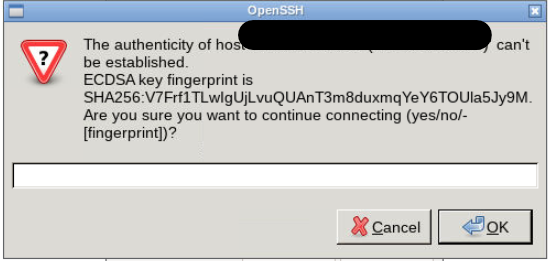
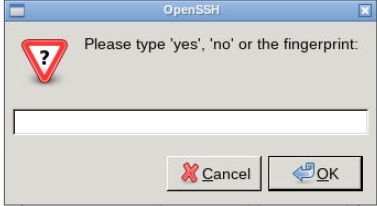
Hello, I've installed netcat-openbsd and tried to connect. Unfortunately when I try to connect I get: If I write YES an error appears saying it can connect. If I write my root password I get this screen: If I type yes and then OK - I get that it can connect. What I'm doing wrong? EDIT: Probabily isn't possible with my setup ; I've setup that SSH is only possible with a SSHCert.
-
Hello Everyone, I wanted to ask the community if someone managed to use Secrets File with Docker. I saw that on some Images (for example the one of linuxserver.io) there is the possibility to use secrets. From my understanding to make it work - I'll have to modify the variable which need the password adding at the beginning FILE__ and as value the filepath of the secretfile. But, since I'm here - obviously I haven't get it to work. Someone is using secrets with docker images of linuxserver.io ? Glad for any help. Cheers
-
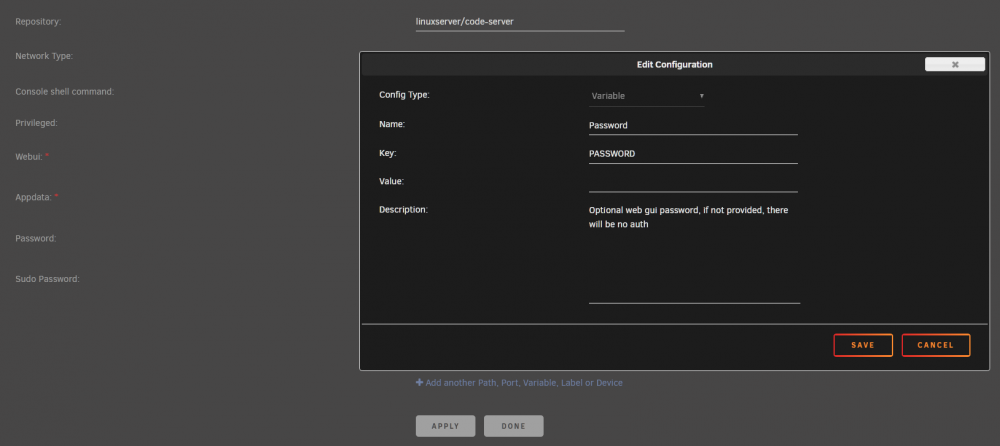
Hello, but Docker secrets aren't only for swarm? And with your Template - how I have to pass the variable? This one is the Variable that come with the template.
-
Hello, Do you know how to implementate it inside Nginx Proxy manager ? (if not - not a problem at all, I'll ask in another post). I've a second question, I've not understood how to implement the FILE__PASSWORD inside your dockers (in uNRAID)
-
Hello, I wanted to configure external access to the container through reverseproxy ... but it won't work, I get to the "LOGIN PAGE" but after login I see only a blank page. Does someone knows how to fix it?
-
It wasn’t enabled before upgrade. i saw that a new feature was that now is integrated, so I have tried. i upgraded from the webgui
-
Hi, I've recently UPGRADED to version 18.0.2 and tried to enable ONLYOFFICE. I've enabled "Community Document Server" and the "OnlyOffice" App. I can create a document but when I try to open it I get: "ONLYOFFICE cannot be reached. Please contact admin" What I'm missing here?
-
Ah well! I didn't know there was a designed way to use it - cause as said, it has worked one time (with Collabora and Nextcloud); and I reinstalled it through the search 🙂 But trying from the installed tab definitely works! Thank you for the help!
-
Hello, I've tried SONARR (linuxserver) displayed.json
-
Hello, Since the reinstall isn't working anymore, is there something I could check/analyse to find a solution? I really need the ability to install the same docker multiple times. (i.e: BETA version of a docker, multi instance of BW, ... ) Cheers
-
I've only problem when I try to reinstall something. Bitwarden & Collabora (the two I've tested). Installing is working just fine.
-
https://ipaddress:4443/Apps Is the same as I always had.
-
Hello, I had version when I first noticed: Version: 2020.02.01 Now an Update popped out, so now I've version: 2020.02.05a Problem still here.
-
Hi, The error show up as soon as i click the reinstall default icon.


