





ghost82
Members
-
Joined
-
Last visited
Everything posted by ghost82
-
your gpu is flagged as boot vga and it's not isolated, that's why it probably doesn't show. Attach it to vfio and use vbios file. Adding kernel parameters to syslinux conf may be required too.
-
Thanks for pointing it: it should be something introduced in newer os, as I always had a popup, but this happened in Catalina if I remember well. Weird that the code doesn't popup with a gui.
-
Seems related: https://www.reddit.com/r/FlowZ13/comments/vplgfg/tutorial_compeletely_get_rid_of_the_dumb_cpu/ that was for a z13, it could be the same issue.
-
If you are unsure if the issue comes from vm configuration or from a hardware failure I could suggest to test the card bare metal.
-
Yes, it's still necessary, so it should be: <hostdev mode='subsystem' type='pci' managed='yes'> <driver name='vfio'/> <source> <address domain='0x0000' bus='0x43' slot='0x00' function='0x0'/> </source> <alias name='hostdev0'/> <rom file='/mnt/user/domains/Windows 10/Asus.EditChapel.GTX1050Ti.4096.171212.rom'/> <address type='pci' domain='0x0000' bus='0x05' slot='0x00' function='0x0' multifunction='on'/> </hostdev> <hostdev mode='subsystem' type='pci' managed='yes'> <driver name='vfio'/> <source> <address domain='0x0000' bus='0x43' slot='0x00' function='0x1'/> </source> <address type='pci' domain='0x0000' bus='0x05' slot='0x00' function='0x1'/> </hostdev> Attach a diagnostics zip just after you start a vm that hangs. Was the vbios working correctly with 3 monitors?Attach the vbios too. The only thing I could suggest to see if the issue is caused by the vm or by the gpu is to try to install windows bare metal with all the drivers on a spare hd and check the 3 monitors.
-
I would try all the combinations of a dual monitor setup instead of 3...could well be a hardware issue, like a short...As a first try I would try hdmi+displayport. As far as the balloon driver, you should locate under device manager --> system devices, a pci standard ram controller; click on it and manually update the driver pointing to the virtio iso. Or it could be listed as Virtio balloon driver, in system devices. Note that if you run the virtio win guest tool exe file inside the vm instead of manually update the drivers, it should update all the drivers automatically. If no balloon driver is installed it could be located in unknown devices.
-
I tried to add this just to experiment, but for some reason it doesn't work in my case in windows 11. With this, smbios info should be read directly from the host, but HWiNFO64 reports ovmf or something similar for the bios. In my case it works with smbios mode sysinfo and manual input of all the fields.


-
Agree, e1000 was necessary when the virtio driver was not working quite well (2-3 years ago?). With updates to the virtio driver virtio network is recommended. vmxnet3 is still not recommended. As far as little snitch the software is well supported and if there is an issue it will get fixed with an update.
-
the cpu is perfectly capable of running Ventura, so the issue is somewhere else. Did you upgrade opencore and kexts to support ventura?How old is your efi folder? Try to boot with basic hardware, i.e. if you have wifi remove it from xml, if you have additional usb controllers remove them, same for ethernet passed through, etc. Moreover with Ventura usb port mapping becomes very important.
-
Note that clover was needed to boot windows 10 installed on a nvme drive because when windows 10 was released it did not have any nvme driver and the official bootloader couldn't boot the os. Clover, which is an alternative bootloader, had the drivers, so the workaround was to use it instead of the microsoft bootloader. But now things have changed and you should be able to boot your windows 10 even without the clover img file, i.e. by using microsoft bootloader.
-
I really don't know how to fix this, sorry...all I can say is that vfio and new kernels are bugged as hell...so I suppose this is related to the kernel and vfio, rather than qemu/libvirt. I don't have the fenvi, on another linux host I have no issues with kernels 5.10, 5.15 (which is the kernel I'm currently using) and 5.17; kernel 5.18 and 5.19 worked quite ok but usb mouse started to lag in the first minutes after starting the mac os vm. Kernels 6.0.x have serious problems with vfio and video framebuffers (host seems to hang, but it's not, it simply doesn't output any video when vfio is loaded). Didn't try 6.1 RCx, but I imagine nothing has change looking at the changelogs.
-
virtio drivers are not for proprietary gpus. You need to install nvidia drivers: https://us.download.nvidia.com/Windows/526.47/526.47-desktop-win10-win11-64bit-international-dch-whql.exe
-
The rom I attached in the previous post which worked for you was taken from the release package which was compiled on December 8th 2020. However, other commits were added after this release, fixing various issues, but the author never attached new release packages. I compiled the latest master version with included 2022 commits, based on edk2 202011 stable: it was not possible to compile with newer versions of edk2 because they changed several things and compilation fails without modifying the i915ovmf code, but at least it contains i915ovmf new commits which is the most important thing. You should try this attached vbios and report back if it works. If it doesn't work simply switch back to the older one. i915ovmf.rom
-
It seems there's an issue with dns or with internet connection; to check if it's a dns issue ping an ip and ping an hostname, for example: ping 8.8.8.8 ping google.com If only the first one is success you have issue with dns. If both fail you have issue with connection.
-
Same symptoms as this one? https://forums.unraid.net/topic/129032-connecting-to-wifi-crashes-macos-vm-fenvi-t919-bcm94360cd/#comment-1175435
-
nice, it's taken from here: https://github.com/patmagauran/i915ovmfPkg I don't think it can be easily dumped within a os from the igpu itself, but I think it could be extracted from the motherboard bios file. Anyway, it seems that the extracted vbios needs some modifications to make it work with ovmf, read the link for more info. I don't have any igpu, just knew how that works for that igpu
-
If it's running on a vdisk: 0. Shutdown the vm 1. Copy and backup the vdisk image somewhere 2. from unraid terminal, increase the space of the vdisk (in this example, +10 Giga): 2a. If it's a qcow2 image: qemu-img resize /path/to/vdisk.qcow2 10G 2b. if it's a raw image: qemu-img resize -f raw /path/to/vdisk.img 10G 3. Download gparted live iso: https://downloads.sourceforge.net/gparted/gparted-live-1.4.0-5-amd64.iso 4. Create a new vm booting the iso you downloaded, add the vdisk you resized as a secondary sata disk to this vm 5. Once booted in gparted it should detect the vdisk and you should see unallocated 10 Giga space 6. merge unallocated space to the partition that needs space (search google/youtube if you need step by step instructions about gparted, but it's quite straightforward) 7. shutdown the gparted vm and start your original vm with the vdisk resized and with allocated space
-
Ok, now it's more clear what you want to do. I really have some doubts that it could work and other doubts about how to set this thing..You should suspend the vm (identified by a domain) and wake it up (from another domain), and I really don't see how you can do this. If I were you I would go with the route of gpu passthrough, vnc server inside the vm (so, no vnc set in xml, nor qxl or other virtual vga settings), and suspend/resume commands from the host. The idea is to have a vm always with gpu passthrough when it runs, but free the resources when the vm is suspended (to disk). About suspend/resume commands (you can implement scripts) 1. enable in the guest xml suspend to disk and suspend to mem: <pm> <suspend-to-disk enabled='yes'/> <suspend-to-mem enabled='yes'/> </pm> 2. suspend the guest to disk via unraid terminal with command: virsh dompmsuspend domain disk replacing "domain" with the name of the vm domain. When the guest is suspended to disk libvirt should report the vm as shutdown, so the attached gpu should be released and resources released. 3. resume the vm via unraid terminal with command: virsh dompmwakeup domain replacing "domain" with the name of the vm domain.
-
Take into account that the virtio repository doesn't have only the virtio drivers, but all related to virtio; here you can see all the repositories, included that of the virtio installer: https://github.com/orgs/virtio-win/repositories 0.1.225-1 was released on october 20th, 0.1.225-2 was released on october 24th, so if you look for commits in every repository between these 2 dates, you will find what changed. https://fedorapeople.org/groups/virt/virtio-win/CHANGELOG Anyway, this was only to give some more additional information, and very happy that in some way, as you said, who knows..., a new installation fixed your issues.
-
I switched from bare metal to vms on my 2 servers 5 years ago and I never regret it; note that this is valid for any linux host running qemu/libvirt/kvm for virtualization, with unraid only being much more user friendly. The switch allowed me to: 1. install a mac os vm with gpu passthrough that works a lot better than the old genuine macbook pro 2. install windows 11 on an unsupported hardware, thanks to tpm emulation build in qemu 3. run whatever os I want: at the current time I have a windows 11 vm (work and gaming), a mac os vm (work) and a kali linux vm (programming) About your hardware it's perfectly fine for virtualization, with that 11700K you should have no issues in passing through the secondary 3070 gpu to vm(s). Unraid needs at least one array to work: this means that one hard drive is dedicated to the array: since you only have one hd, the nvme drive, you are somehow limited in dedicating that nvme drive for the array, and save and run virtual disks for vms on the array. To start experimenting this is enough. In my case, at the current time, in one of my server, I have: 1. a motherboard with 2 sata controllers built-in 2. 4 hard drives: 3 rotationals (1 for array, 2 for smb shares), 2 ssds, one for windows 11, one for mac os); linux vm is installed on a vdisk on the array (I don't need too much performance for this vm); the 2 ssds are attached to the 2nd sata controller which is passed through to the vms; the hd array and the other 2 rotational drives for smb are attached to the 1st sata controller I have 2 pcie gpus, one dedicated for the host (it's a very old nvidia gpu) and one 6900xt which I'm passing through to vms. But this only because I don't have an igpu, this is not your case. As far as performances I'm getting quite close to bare metal ones.
-
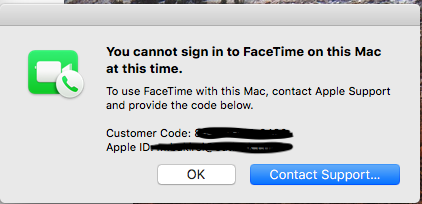
This is the case only if you when login you get a popup like this: It happened to me too and had to call several times apple to get it fixed. 1. First time I gave permission to remote access 2. Second time I sent diagnostics data to apple saved from a software they ask to download and they did not fix it because booting with opencore 1 and 2 made by the same person, took weeks to end with a reply they were not able to fix. 3. Third time a kind man fixed it in 10 seconds I never hid to apple to use a sort of hackintosh, but...you may have more luck if you don't say it explicitely This happened because 4 years ago, when I started to play with mac os vms, I changed too many times the smbios data and logins were recorded in apple servers: I had too many devices saved in apple server, had to remove all the unused devices and then call apple. No need to call apple if you don't have a "customer code", issue is somewhere else.
-
Stability and non rolling release I think.
-
The os will use the virtual video adapter by default.
-
Looking at the github commits, the only thing that changed from 225-1 to 225-2 is a patch for the viostor driver, for changing the discard sector alignement if not explicitly set, so I don't think your installation issues were fixed by this new version.
-
I think this is totally feasible. I didn't try it directly but I know that: 1. several users have 2 versions of a vm pointing to the same vdisk, one with gpu passthrough, the other with vnc; for example with mac os vms, users use the vnc version for mac os updates (otherwise during automatic reboots the mac os vm will kernel panic) and the gpu passthrough version for everyday use. 2. I changed the number of cpu cores for a vm and I didn't have any issue in starting the vm from the same vdisk. Moreover, if you think about a bare metal system: 1. you can change the gpu with another without reinstalling the os 2. you can add/remove ram modules without reinstalling the os 3. you can change the cpu without reinstalling the os It happens that simply drivers will be installed in the system and they will be used or not depending on the attached hardware. By spinning down the hard disk you mean the physical disk, because obviously you need to shutdown the vm n.1 and start vm n.2. Another thing you may want to consider is to have only the passthrough version of the vm and access the vm with a vnc client to a vnc server installed inside the vm (leaving the "unraid" novnc).



