





ghost82
Members
-
Joined
-
Last visited
Everything posted by ghost82
-
No useful info here, post diagnostics
-
Check with any latency monitoring software. Use msi utility, to switch from irq to msi if you have irq conflicts: https://forums.unraid.net/topic/76035-help-struggling-with-nvidia-audio-passthrough/?do=findComment&comment=1076592
-
memory allocation seems correct.. Make sure you set multifunction for 2e:00.0 and 2e:00.1, iommu groups 37 and 38 are correctly bound to vfio (in the win 10 new vm it's not set as multifunction, see my post above). If it still outputs a black screen but the vm seems to run I would: 1. go back to vnc and enable remote desktop inside the vm 2. set again gpu passthrough and connect to the vm from another device with remote desktop (so you connect directly to the vm) 3. see device properties and check if the gpu is listed or not 4. install the drivers for the gpu Remember to run the commands you wrote to unbind gpu video from efifb, before starting the vm with gpu passthrough, or add video=efifb:off to your syslinux configuration and reboot.
-
boot partition is not mandatory in ubuntu so probably you installed everything in the root partition /. Difficult to say, if in your fstab file you have errors=remount-ro for the root partition, something happened (inconsistency in the filesystem) when the os was live, or in an attempt that failed to mount the root partition, or if the filesystem check failed during boot and according to your fstab the system entered read-only mode to try to save what it could save. Fixing the corrupted filesystem fixed it. Possible causes: power failures, vm force stopped, updates applied without rebooting, failing/failed hd. I would bet on an improper shutdown since you had that inode 7078004 had zero dtime
-
Look at the output of cat /proc/iomem and find what is using memory addresses in the range 0xd0000000 - 0xdfffffff. then disable what is using them.
-
You can use same hardware. Unraid needs at least 1 disk in its array, so if you want to boot separately your work hd and unraid with its array I would suggest 2 disks, one for the array, one with your os you use to work. If you want to boot unraid, just plug in the usb key and from the bios boot from usb. The disk with your work os can be an unassigned device in unraid and moreover you can create a vm in unraid and passthrough that disk to run your os work inside a vm in unraid. This is not clear...server hardware is the lower level, on that hardware it runs unraid (the os), inside unraid qemu and libvirt run your virtual machine. With vt-d enabled you can passthrough to the vm hardware to have near native performance. For mac os the important thing is to passthrough a gpu otherwise without video acceleration the os will be crap. This is true, you should have apple hardware to virtualize apple software. Some interpret the policy as you can run a virtualized mac os 'somewhere' if you have another mac, in real I think that you can virtualize it only on apple hardware, so yes, I think I'm breaking the policy, even if I own a macbook pro. However Apple seems to not care about it, I also helped in fixing some bugs with apple support and I had no problems in telling them that I was running their os on a vm on non apple hardware. But yes, take into account that everyone doing this is most probably breaking the official policy. As far as I know qemu is the most or one of the most advanced software to run virtual machines, a lot lot better than virtual box, parallels, fusion, etc. I was using vmware in the past and migrated all to qemu vms: mac os vm for everyday use, windows 11 for work on 3d cad and cfd and gaming (with a racing simulator attached), kali for programming. Each vm has the same gpu passed through, usb controllers, audio and other peripherals, like in bare metal; I can only see slight performance degradation only if I push my cpus to 100%, in cfd calculations for example. However having 3 machines in one is a lot better all in all. I was running this setup in 2008 Advanced virtual machines is the way to go nowadays. I can say that qemu vms with passthroughs are equivalent to bare metal hackintoshes, with the advantage of less headache of compatibility. Agree, laptops in general, unless they are workstation laptops, could be quite limited, but this depends from case to case. -- I'm still running all of this on a 2012 workstation hardware (apart the gpu), 2x xeon e5-2687w (v0), 64 Gb ram, 6900 xt gpu on a asus z9pe-d8 ws mb: not recent but still fast and powerful! Moreover, qemu advanced vms allowed me to install the latest version of mac os monterey 12.3 on my old hardware without any compatibility issue and install the latest version of windows 11 with emulated tpm, even if I don't have a real tpm in my motherboard. Worth spending some time to study how all of this work!
-
Don't be so rude with yourself Failures due to cables are difficult to see, especially if they look good from the outside, one should always have spare cables (I don't) to try.
-
VL805/806 chipset can be problematic for passthrough, especially in linux, but some users here had it working in windows vm. Did you look at the logs in your diagnostics to figure out if it's something happening on the host side or inside the vm?
-
Hi, the vm setup seems ok to me. I noticed some errors in the libvirt log: virNetClientProgramDispatchError:172 : internal error: No open log file /var/log/libvirt/qemu/Macinabox Monterey.log virNetClientProgramDispatchError:172 : Unable to write to file /var/log/libvirt/qemu/Macinabox Monterey.log: No space left on device Since logs are written to ram, maybe you run out of memory? Apart the hash mismatch error, which could require a reinstallation, try this:
-
With a lot of imagination I think he thinks to have a 1:1 backup of the parity drive in case it's the parity that fails, so to be able to swap it soon: never had a parity so I don't know if it will work to change the parity drive with another with the same content. But if it's the parity drive that fails he can rebuild from valid datas on array...anyway, if he wants to have a backup... oh and yes I see now what you mean, the moment you add a file or modify something into the array the parity backup will no longer be valid...so 100% useless
-
diagnostics
-
You mean a 1:1 copy of the parity disk disconnected and stored in its box somewhere? Just clone it as you can clone any disk, you can use dd command. dd if=/dev/sdX of=/dev/sdY Where X is the source drive and Y is the target drive. You can append to that command also bs= to specify block size (no option defaults to 512 bytes)
-
sdh drive seems to have issues: Mar 28 06:52:02 BlackBox kernel: mpt2sas_cm0: log_info(0x31080000): originator(PL), code(0x08), sub_code(0x0000) ### [PREVIOUS LINE REPEATED 10 TIMES] ### Mar 28 06:52:02 BlackBox kernel: sd 1:0:4:0: [sdh] tag#3285 UNKNOWN(0x2003) Result: hostbyte=0x00 driverbyte=DRIVER_OK cmd_age=7s Mar 28 06:52:02 BlackBox kernel: sd 1:0:4:0: [sdh] tag#3285 Sense Key : 0x5 [current] Mar 28 06:52:02 BlackBox kernel: sd 1:0:4:0: [sdh] tag#3285 ASC=0x21 ASCQ=0x0 Mar 28 06:52:02 BlackBox kernel: sd 1:0:4:0: [sdh] tag#3285 CDB: opcode=0x8a 8a 00 00 00 00 00 00 00 00 c0 00 00 00 40 00 00 Mar 28 06:52:02 BlackBox kernel: blk_update_request: critical target error, dev sdh, sector 192 op 0x1:(WRITE) flags 0x0 phys_seg 8 prio class 0 Mar 28 06:52:02 BlackBox kernel: md: disk3 write error, sector=128 Mar 28 06:52:02 BlackBox kernel: md: disk3 write error, sector=136 Mar 28 06:52:02 BlackBox kernel: md: disk3 write error, sector=144 Mar 28 06:52:02 BlackBox kernel: md: disk3 write error, sector=152 Mar 28 06:52:02 BlackBox kernel: md: disk3 write error, sector=160 Mar 28 06:52:02 BlackBox kernel: md: disk3 write error, sector=168 Mar 28 06:52:02 BlackBox kernel: md: disk3 write error, sector=176 Mar 28 06:52:02 BlackBox kernel: md: disk3 write error, sector=184 This can be cable, but also the disk itself, or the controller.. Reseating the cable is the first thing to do.
-
it's an html, and it's content is the unraid login page Last one is ok

-
Hi! What do you mean?From what I can see it's fine, installed file are in a virtio block device, installation media (Base system) is attached to a virtual sata controller. If you are experiencing crashes or if you are forcing reset this can happen; disk1s5 should be the monterey system disk and probably something is corrupted. As far as the other things we cannot say anything, try to attach diagnostics, maybe lack of system resources? I would try to clean macinabox and start from the beginning, without having any docker or other things running to test resources.
-
Mount the efi partition inside mac os, open /EFI/OC/config.plist with a plain text editor, search for showpicker and set it to true. I think you can try to repair the disk also within mac os, without booting recovery, just run disk utility from Applications/utilities...worth a try...
-
the extension doesn't matter, but I would prefer a .qcow2 extension, just to recognize it.
-
It's very simple to convert, just use: qemu-img convert -f raw -O qcow2 /path/to/vdisk.img /path/to/vdisk.qcow2 Then you need to change in the xml the disk type, from raw to qcow2 and point to the file vdisk.qcow2 Backup the vdisk.img in case something goes wrong.
-
I don't think so, my test is pretty clear, you read a value but we need to know from what command it is derived. In my opinion it's only a cosmetic issue. The windows vm uses a qcow2 image not an img, even if the extension is .img, that's why values are different. If you want you can convert the img to qcow2, but it will change near nothing about the real free space, apart fixing that cosmetic issue.
-
I deleted my post above because I'm not sure if what I wrote was correct. Anyway, apart the GB values you are getting in the gui (which I don't know from where they come from), you need to consider the 'disk size' value reported by 'qemu-img info' as the real size occupied on the disk. Look at the test I did: - physical disk is a 6 TB hd - I created a raw img hd (test1.img) with 'qemu-img create' with a size of 8000G (8 TB) --> this is the virtual size, I did it on purpose to exceed the size of the physical disk, and formatted with gpt partition table, linux filesystem - ls -la shows the 8 TB size (virtual size), but du test1.img shows the real size (40 Kb), qemu-img info reports the same (real) disk size Only 40 Kb are really occupied, obviously not 8 TB. Only when you start to write to the vdisk space is allocated to the real disk; when you remove something from the vdisk if trim/discard is enabled then the space is unallocated again (host syncs with the guest); this doesn't happen if trim/discard is not enabled. As far as trim/discard is enabled for the vdisk, the real occupied size on the physical hd is that reported by du or qemu-img info (disk size) Can you run qemu-img info /path/to/windowsvdisk.img on the windows vdisk and report the output please? My thought is that the windows vdisk has a virtual disk size of 36 GB..
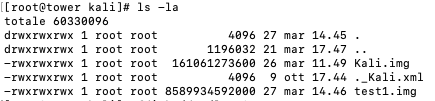

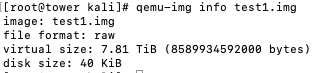
-
You can say this, as I wrote: So, software side (as you said monterey related); this simply means that your hardware is no more 100% compatible with monterey.
-
From the log I can't see anything unusual for trim. kernel: (apfs) spaceman_scan_free_blocks:3154: disk1 scan took 3.423224 s, trims took 3.198372 s The reported 100GB is correct, but there is virtual disk size and disk size (you have a sparse image). To double check and see if trim works: 1. shutdown the vm 2. open unraid terminal and run: qemu-img info /mnt/user/domains/macOS/macOS_disk.img Virtual size should be about 100 GB Write down or memorize the 'disk size' 3. run the vm 4. copy to the vm a 'large file', such as a 4-5 GB file and shutdown the vm 5. run again from unraid terminal the same command: Virtual size will be always the value as before. Disk size should be increased by 4-5 GB 6. run the vm and delete the 4-5 GB file you copied before, shutdown the vm 7. run again from unraid terminal the same command: Virtual size will be always the value as before. Disk size should be decreased by 4-5 GB, same value as step 2. Trim is needed to sync the free space from the guest to the host, if trim doesn't work, the non free space will continue to increase on the host side, even if you free the space on the guest side.
-
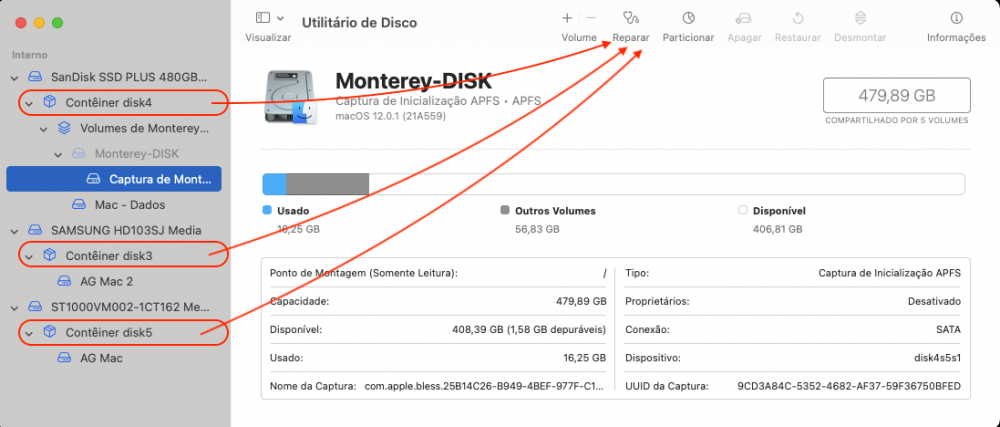
No, it has nothing to do with trim. Try to boot into recovery, keep '0' pressed on vm boot (if you don't see the bootloader gui - opencanopy) and choose 'recovery'; once booted into recovery choose disk utility; select 'show all disks/devices', select each container and run repair, such as in the following picture:
-
First error happens when you shutdown the vm and it's a not fatal error: on sigterm qemu closes the monitor, libvirt doesn't expect it and throws the error. A patch for libvirt was introduced to mask this error, but it was reverted, so this is expected behavior. Second are not errors but warnings, 'tainted' means you are running the vm with a custom config, perfectly fine. This sounds like amd reset bug. Unraid 6.10 RCx includes the patch in the kernel, if you are not on 6.10 you can give it a try. You must always isolate all the components of the gpu (attach to vfio). You should always pass all the components of the gpu to the vm, and set them in a multifunction device; some drivers don't like device with missing components or components in different slots/buses.
-
Yes, possible but I never used igpu. Apart isolating it and passing it through successfully you could need to play with whatevergreen kext and framebuffers to have a video output. Not so simple I think for you: https://github.com/acidanthera/WhateverGreen/blob/master/Manual/FAQ.IntelHD.en.md Refer to comet lake. Replied in the other thread. Yes, after changing the xml, in both cases depending on your unraid version, you need to enable trim in mac os. It means trim/discard is not enable and you should enable it.



