adminmat
Members
-
Joined
-
Last visited
Everything posted by adminmat
-
Thanks. Mine still says it's expiring in a few days. Any idea how to force the renewal or check when the chron job is set to run?
-
Thanks for the info. Is there a way to manually confirm that your cert is up to date?
-
No. It does a Backup / Restore every night that shuts down the containers around 4 AM EST
-
I'm getting alert emails that my letsencrypt cert is expiring. I restarted the Swag container but I'm still getting the alerts. Is there something more I need to do? This is for Nextcloud.
-
I always thought you had to update containers from within unRAID. So how specifically do we update to Nextcloud 21? Thanks.
-
Well this news is pretty exciting. Apparently Nextcloud 21 is said to be twice as fast. Should we really expect to see these kind of results in real world use? I'd love to see faster load times. Although 2 X as fast means my text document load in 6 seconds instead of 12. Still an improvement! https://www.zdnet.com/article/nextcloud-21-arrives-with-ten-times-better-performance/
-
ok. So those process are still running but just not consuming as much resources when showing the basic view. So I guess nothing to be concerned about. I probably check my logs for errors a little too much. This was actually the first time I've run an htop... when I was troubleshooting the wsdd network today issue that had one CPU core at 100%.
-
Found a few of these listed when running an htop: containerd --config /var/run/docker/container/containerd.toml --log-level error unraid Not sure if it was of any concern but it did cost about 4% of my CPU. Switching to basic view immediately remedied this. Thanks for that. But is that "error" process an issue?
-
I JUST noticed that this was logged at the same time mine was !
-
Also have a couple instinces of this in my log: Feb 14 04:40:01 Tower apcupsd[26901]: apcupsd exiting, signal 15 Feb 14 04:40:01 Tower apcupsd[26901]: apcupsd shutdown succeeded Feb 14 04:40:04 Tower apcupsd[6799]: apcupsd 3.14.14 (31 May 2016) slackware startup succeeded Feb 14 04:40:04 Tower apcupsd[6799]: NIS server startup succeeded Maybe this happened when the apcupsd plugin was updated? Did you find anything out?
-
When you reboot the Wireguard gets switched to Inactive.
-
My goal is the set up a remote backup server at a friend's house on a Raspberry Pi and connect to it via Wireguard. I have Wireguard working in unRAID which I use with the Android and windows clients but I'd like to set up a rasPi as a remote peer where I can access the local network at the remote location from my local network. To do this would I add a new Tunnel in unRAID Wireguard settings, then create a config file and share that with the RasPi? Or would I just share the keys with the RasPi? Would LAN to LAN work for this config? Or do I create the config in the rasPi and share that with unRAID? Has anyone set this up? It seems like it could be a very useful, inexpensive way to have a remote / off-site backup.
-
After Preclearing an Easystore 8TB still in it's USB enclosure I noticed the log being spammed by a repetitive message. I believe this started after I clicked the red X to "stop preclear." Note I have to click that X every time even after I'm alerted that pre-clear is finished. Here is the message. It added about 1Mb to my syslog. 2021-01-16T23:00:03-05:00 Tower preclear_disk_375347564C4C5743[7 /usr/local/emhttp/plugins/preclear.disk/script/preclear_disk.sh: line 478: /tmp/.preclear/sdg/dd_output_complete: No such file or directory 2021-01-16T23:00:03-05:00 Tower preclear_disk_375347564C4C5743[7 /usr/local/emhttp/plugins/preclear.disk/script/preclear_disk.sh: line 475: /tmp/.preclear/sdg/dd_output_complete: No such file or directory 2021-01-16T23:00:03-05:00 Tower preclear_disk_375347564C4C5743[7 /usr/local/emhttp/plugins/preclear.disk/script/preclear_disk.sh: line 475: [: -gt: unary operator expected
-
Maybe try a different phone? Or another remote client?
-
When I set mine up I forwarded a port in my router to the wireguard port. I set "Local server uses NAT:" to No and followed this troubleshooting tip: ( In the WireGuard config, set "Use NAT" to No In your router, add a static route that lets your network access the WireGuard "Local tunnel network pool" through the IP address of your Unraid system. For instance, for the default pool of 10.253.0.0/24 you should add this static route: Network: 10.253.0.0/24 (aka 10.253.0.0 with subnet 255.255.255.0) Gateway: <IP address of your Unraid system> On the Docker settings page, set "Host access to custom networks" to "Enabled". see this: https://forums.unraid.net/topic/84229-dynamix-wireguard-vpn/page/8/?tab=comments#comment-808801 ) This is the only way I could get it to work. Maybe it was my router specifically causing the issue. I'm also using Remote Access to Lan which works as you are hoping. And if you make any changes to configurations on the server or wireguard settings then you have to delete the peer from your client (android phone) and set up again in the client by scanning the QR code again.
-
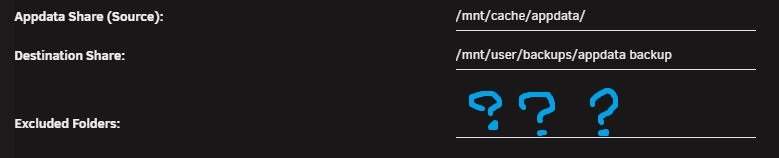
Anyone know what Plex folders can be excluded in CA Backup / Restore application? I heard that you don't need to back up the entire Plex appdata directory. It takes quite a while to do a backup now and I suspect that the Plex files are responsible.
-
I ran the Scrub on the Cache drive. These instructions are a little outdated when using 6.9.0-rc2. I assume now you just click "Scrub" and that's it. I don't see this option on the Cache 2 drive so I assume when scrubbing Cahce it does both? The "Check" button is greyed out and says "Check is only available when array is Started in Maintenance mode" which is in conflict with the Wiki instructions for BTRFS. Also, do I need to run the Balance? I've not done this before.
-
@JorgeB is there a way to check for file corruption before I do a backup of all my appdata etc?
-
Right. So I set up the rsyslog server on another server (Ubunt in ESXi) and it's currently mirroring the log. And a thank you to @Frank1940 for the help too. If anyone has additional thoughts as to why it would crash please let me know.
-
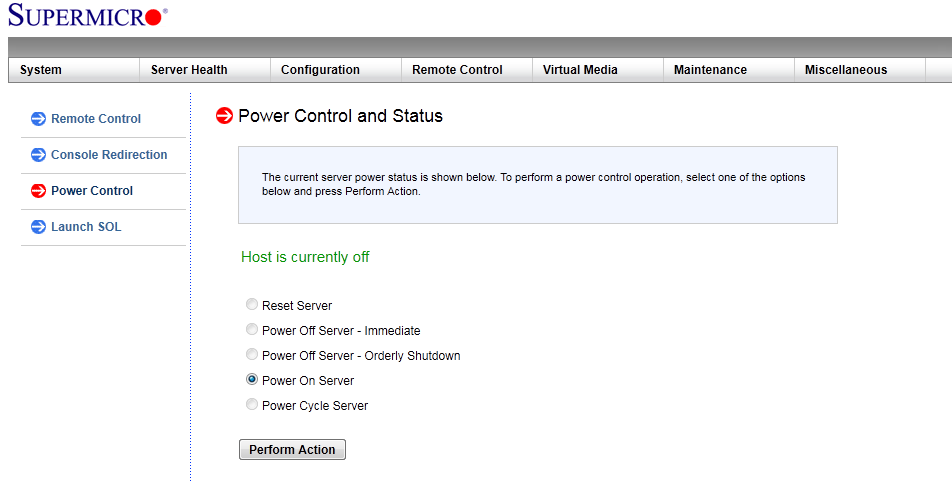
Thanks Jorge. When it crashes does it risk the data on the disks? Or does it gracefully shut them down? Is there something I can do to make sure the disks are stopped properly when I reboot? I get the option to "Power off - Orderly Shutdown" with my motherboard BMS
-
Thanks. I'll add that there was one movie stream running from plex at the time and I think it crashed right as I opened a 2nd plex stream for Live TV tower-diagnostics-20210107-1111.zip
-
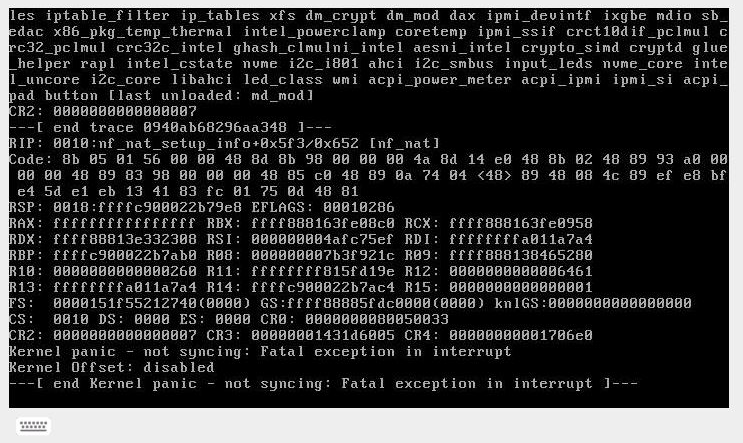
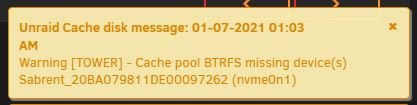
I noticed my server was not responding. I went in via IPMI and saw this so I rebooted. The GUI is up and I'm logged in. This is freaking me out. I rebooted and when I started the array I got this message, But the NVME Cache drive seemed to mount ok. Any Idea what caused this? Really appreciate some help. Should my next step be a MemTest? tower-syslog-20210107-0522.zip
-
go to your Shares tab and click on "compute." This will show you what disk is being occupied by some file on that particular share. regarding spin up and down: I spent a lot of time worrying about this and I found some post on Servethehome explaining that if your HDD was spinning up like 2 times per day it would take nearly 300 years before it would wear out according to most manufacturer specs. So I let mine spin down after a few hrs.
-
I don't think this script stops the Plex Container. I noticed the CPU usage was very high, ~ 90% at times. I have limited knowledge in this area but my theory it was tying up some hardware (CPU or MOBO disk controller etc) while it was reading / comparing the data for the rsync copy? It continued to tie up Plex even when it was just reading a disk that's only used for photos and documents. (I was watching the disk's transfer rate on the Main tab) Here is the script: BackupOne.sh This is to sync the backup share (Disk 1 & 2) and my Documents and Photos shares (Disk 3) and I assume this is normal when the mover is running as others have said in this thread. So I schedule the mover for 5:00AM.
-
I ran an rsync backup script today and immediately got a call from a plex user that it stopped streaming. I assume this is just the expected behavior? Any workaround? running Version: 6.9.0-rc2