





Everything posted by wirenut
-
right, its logging fine, just not rotating. Any ideas to help trouble shoot?
-
@trurl here and thanks. What am I doing incorrectly?
-
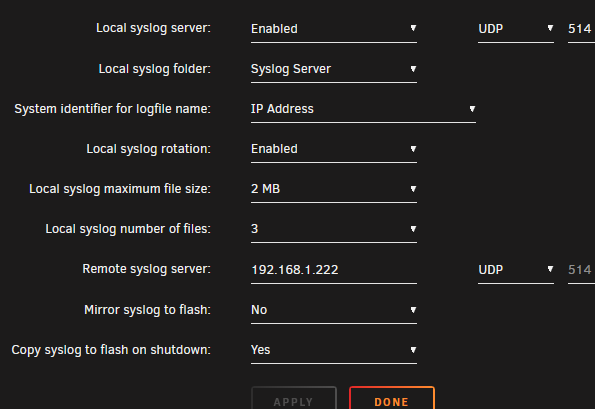
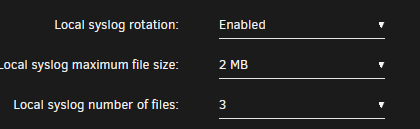
I am using syslog server and have enabled log rotation with the following settings: I have discovered the log file is not rotating every 2MB and is currently 98MB. Am i misunderstanding how the above settings work? I would think that every time the file size hits the 2MB threshold size, it would stop and create a new one, and on and on and on. Is this not correct? tower-diagnostics-20250213-0840.zip
-
Kudos! @SpaceInvaderOne well deserved!!
-
Thanks. Looking forward to the fix
-
I've upgraded to official Unraid 7, learned i had the old version of the plugin, upgraded to this new version. mover moves file from cache to array just fine but leaves the empty folders on the cache drive. I see the setting to 'clean empty folders' and have tried it set to yes and no with same result. Am i missing a setting somewhere or it this a known issue?
-
Towers and drive cages just not to be reasonably found anymore. Time to start looking at a rack solution I guess. Found this on Newegg: $499.99 KCMconmey 4U 25.6 24 Bay 2.5 / 3.5 SATA / SAS Hot Swap Server Rackmount Chassis. SFF-8643 Backplane. MB EEB / CEB / EATX / ATX / MATX / ITX. PSU ATX / 2U Redundant / 2U Single. Full Height PCIe Case. Anyone have any knowledge or reliability experience with brand?
-
-
Attached is the extended smart test report. I can see where it logged the initial errors, but if i read it correctly it passed the extended test?? @JorgeB can you take a look and give advise? Appreciate the help.ST4000VN000-1H4168_Z.txt
-
Thanks for the response JorgeB. Looking ahead, say parity check completes OK, Extended SMART test completes OK, and error count does not increase, would you consider the disk safe to continue using or should I consider replacing it anyway?
-
Monthly parity check kicked off this morning. About 2 hours in i get a warning email about disk errors. Main tab shows disk 10 with 19 errors. Parity check still running and shows sync errors detected as zero. What is suggested course of action at this point? tower-diagnostics-20241106-0902.zip
-
FYI: Does Hide Me support port forwarding? We offer dynamic port forwarding (UPnP) and it is available in the Premium plan.
-
Thank YOU! This was the solution. Followed the steps in the link, all dockers re-installed properly. This has been frustrating me for for a while now.
-
Update went smooth. Booted right up. Systems driver screen opens right up again. Still have my docker container show update available after updating situation, but that issue is posted in the docker engine thread.
-
updated unraid to 6.12.10, situation persists.
-
Are you running Avast on a machine that's on the same network as your unRaid server?
-
If there is any logs or other info I can provide to troubleshoot this let me know.
-
Just read this and thought, huh, let me try. So i did. I have the same result.
-
Built in, installed via community apps. binhex - Krusader and now binhex - preclear. I've also had the same issue with linuxserver - tautulli docker, but that one will correctly finish after trying 2 or 3 times when it happens.
-
On 3/18/2024 at 8:41 AM, binhex said: sorry dude but there is nothing i can do about this as it's an unraid related issue, the image is accessible and for me i cannot reproduce the issue you are seeing. you could try deleting the container completely, then re-create it, this may fix it *shrug*. An FYI, with the update last night the situation has returned. Interestingly it also now effects your preclear docker for me. Over 200 views in my docker engine post, but unfortunately no help. For what its worth, I have updated to unraid 6.12.9. If you have any other ideas I could try, suggestions appreciated.
-
Future version of which, docker or unraid? because I have updated to unraid 6.12.9 and the issue persists. As of today, I now have the issue with two containers. This is definitely not my issue as I get a notification that auto update has done it thing overnight as scheduled, then get a notification in the morning that an update is available. log into server, go to docker tab, run update, same issue. So, docker page isn't open for any period of time other than to run the update.
-
Well... thanks again. I removed the container, deleted the app data folder and installed fresh. The whole process took about 10 minutes to complete but it installed and is no longer showing update ready. I'll see how goes it as time passes. Attached is the info from the install command window if it may be of some use to you? And again, Thank You! binhex-krusader install 2024.03.18.txt
-
Thanks for the suggestion, but its been there a few days with over 100 views showing and not one reply. I see you mention a couple posts up about a new build coming. I guess i will wait for that and see if it changes anything for me.
-
I also have a docker that is persistent with this issue. I have posted in the docker support thread and was assured that the container is fine and this may be an unraid docker engine related problem and to post the issue there. I did this two days ago but have not yet received any feedback. Maybe my post details aren't clear? They are here if you wouldn't mind taking a look: Thanks in advance!
-
ok Done. Thank You binhex

