





Espressomatic
Members
-
Joined
-
Last visited
Everything posted by Espressomatic
-
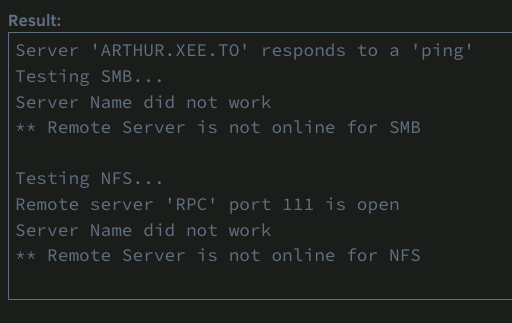
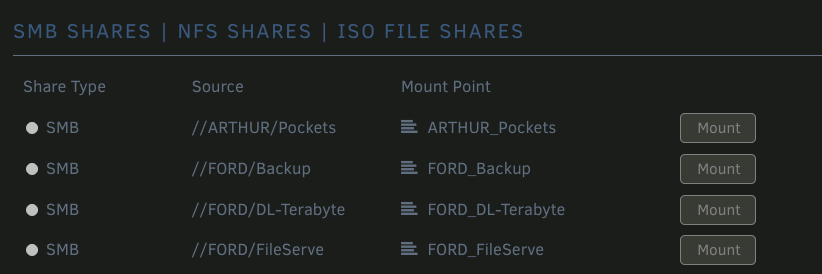
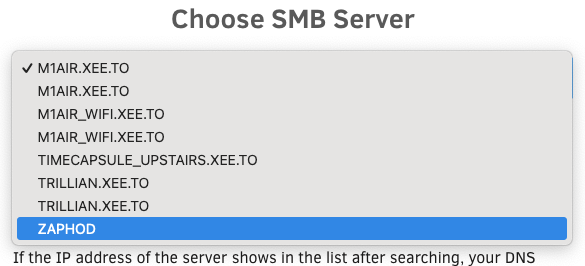
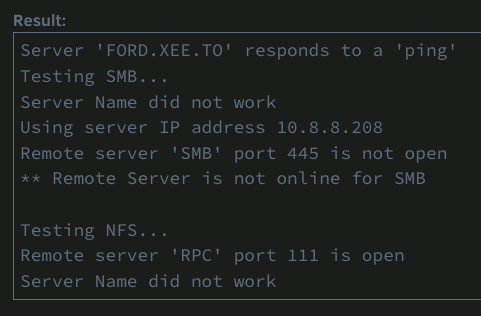
ISSUE below has been resolved: Can anyone think of any reason that the shares of 2 of 4 Unraid systems would stop working? This resolved the issue: Stopped array on systems not sharing Turned OFF SMB Started Array Stopped Array Turned ON SMB Started Array The two affected systems started showing up again, along with their shares. Weird? Ya. Original issue for reference: ----------------------------------- All 4 systems should have identical SMB settings and no manual changes have been recently made to any of the systems that I can think of. Neither UD nor my Mac can see shares on the two systems, FORD and ARTHUR 4 running Unraid systems, all on 7.0beta4, all with plugins up-to-date.
-
How is this ever going to resolve private host names ("other devices on the subnet by hostname" - not mDNS) when the container is pointing directly to outside upstreams instead of a local resolver? I'm no expert, but IMO that won't (shouldn't) work. IMO, devices and hosts on the LAN should only point to a single LAN-based address. The device/service at that address can then be responsible for upstream forwarding to any of n-number of external resolvers, while handling private addresses via its own hosts populated by dhcp and/or some manual list (like Unbound overrides, PiHole A-records, etc.)
-
I've gotten the webUI for Invidious up using the CA release as per this thread. However, I had to comment out the "Configuration for using a HTTP proxy" or the container will never work. Doesn't get the IP address I set, can't view logs, nothing. Logs also had to be enabled in the config file.
-
Can anyone confirm if the Netbird client for iOS now works for iPhone and iPad? The last two times I tried it, going back a few months now, it was impossible to connect an iOS device.
-
Yes, everything the same as I outlined above. The exception is that if you're not *also* using an upstream local DNS resolver or forwarder for LAN/private name resolution, you'll have to create your local mappings in AdGuard Home using ReWrites, so when you visit myservice.mylan.tld it can send you to the IP for NPM.
-
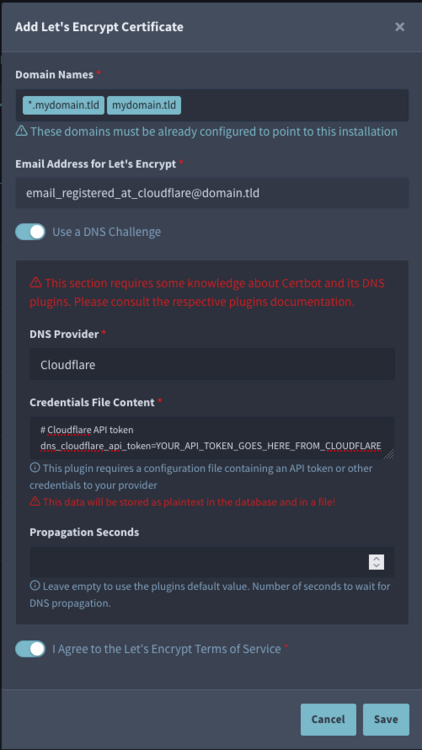
You start first by getting cert for your base domain and wildcard on same domain - you can use that cert for any subdomain. If you also want additional unique certs by subdomain, you can also do those separately after, the same way. Your domain(s) need to have DNS set up with a provider that accepts DNS challenge for validation. If your DNS is not currently with someone that supports a challenge for Let's Encrypt, then you'll need to make those changes first. Otherwise you will have to do HTTP validation which requires a connection into your domain, which means opening ports, etc. NOT RECOMMENDED. For example, if your domain is registered but not currently in use, you open account at Cloudflare (for example) and then set its DNS servers in the DNS record for your domain using your refgistrar's control panel. If the domain is already in use like for an external site, then you will also need to make settings at Cloudflare (or elsewhere) to migrate the DNS setup from your web/mail/whatever hosting company so all that keeps working. That's outside the scope of the info I'm giving here. The form in NPM should be filled out exactly like this. Substitute your domain(s) and email, plus select the provider of your DNS. I use Cloudflare and a couple of others - for no particular reason.
-
If that's the case, I'm not sure where you mentioned that. I just re-read your posts again quickly and I don't see an obvious indication where you mention that you've swapped the systems for BOTH OSes. I see clearly you mentioned you have two instances of the same hardware, but only that one runs OMV full time without issue. It's possible that 1 or 2 people have found a deep rooted software issue that causes complete USB corruption on a regular basis and that the other few thousand installations that don't exhibit the issue have just been super lucky. Or maybe it's more likely that the thousands of installations are the rule rather than the exceptions, and that 1 or 2 people have some hardware issue causing their problems.
-
You don't need to touch firewall settings. You might have to turn on Websockets, depending on what's implemented on the destination page. You should always clear your computer's DNS cache and the browser's cache. In most cases, cached DNS is responsible for the issues. If you see a NPM congratulations page, your NPM is working. When you try the IP:Port in the browser it should show the same result as going to the FQDN. Some services require additional settings within the own config to allow proxies - for example, Home Assistant, QBittorrent, etc. Otherwise they will block the incoming connection. If you're troubleshooting the proxying, it's a good idea to try without SSL to make sure the basics are working.
-
That is the correct way to do it. I also run a lot of my docker services on br0 so they can have their own IP, including my AdGuard instance. I found myself following a long thread the other day about something technical and just when I thought I was starting to comprehend the solution, I realized that it was all written in German and I don't read German. 🤣 For anyone interested in Tailscale ONLY, I apologize for the side-tracked post. But all these services and technologies tie together and it's difficult to get all the info in one place in a forum. This can easily be repeated in an NPM and/or AdGuard Home and/or Unbound/pfSense thread. I swear this is going to dovetail with Tailscale in a minute... AdGuard Home's primary purpose is to act as a DNS black hole, to help limit ads and tracking on devices where you can't install a browser-based ad-blocker like uBlock Origin. For it to work, it has to sit between your devices and any outside DNS servers. So typically, yes, you would set the AdGuard IP as the primary DNS in your router so that it will automatically be assigned to any device connecting to that router by DHCP. On the router you must not specify any other DNS servers, only AdGuard's IP. In AdGuard's settings you then need to specify so-called UPSTREAM DNS server(s) - the upstream will be responsible for the next step in name resolution, which can include additional internal private domains (you use a local DNS resolver like Unbound for this), and eventually must include outside domains (so a public DNS resolver like Quad9, Cloudflare, OpenDNS, Google, etc.) If you don't use a local resolver (Unbound), then you will set AdGuard's Upstream to one or more public DNS resolvers as mentioned above (9.9.9.9, 149.112.112.112, 1.1.1.1, etc.) If you do use Unbound, then you will set only the Unbound IP and then configure Unbound to use the public addresses after it finishes all local/private resolution. That's a big discussion on its own and for a much bigger big-picture thread. In using Tailscale, you still want to use your AdGuard black hole, so you also set Tailscale's Global DNS to your AdGuard IP. Alternatively, you can set Tailscale to use a device's local/default DNS and/or turn off Tailscale DNS entirely. The problem with this is, that if you use it on a mobile device, when you are outside your home, your device is going to use the DNS server assigned by your mobile operator - unless you override that manually with your AdGuard's IP I guess.
-
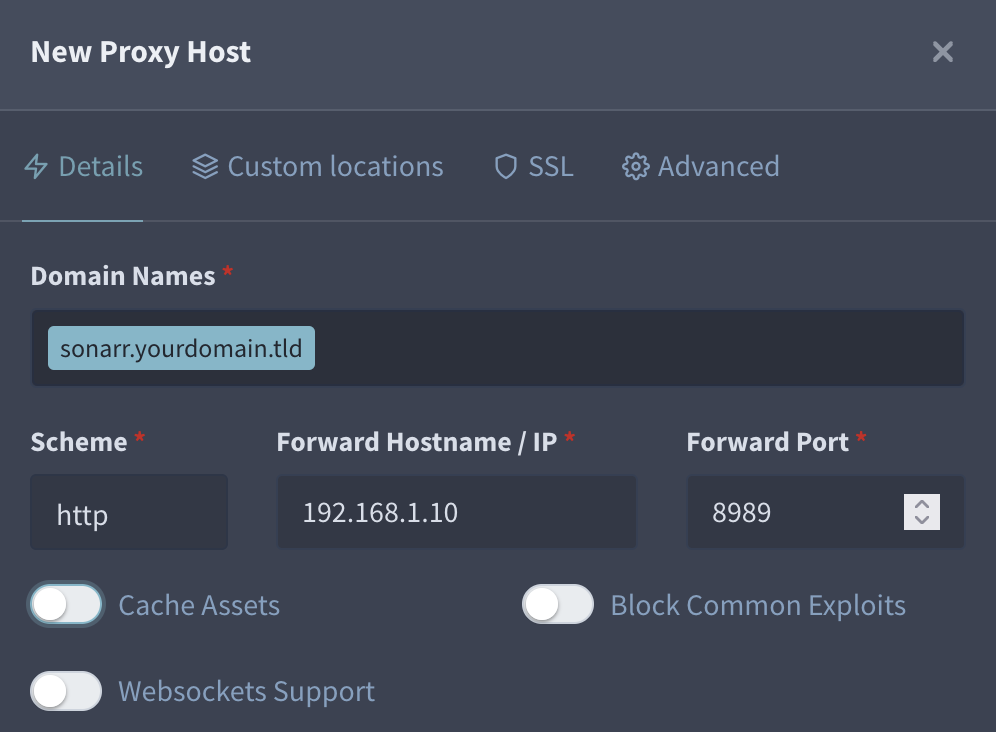
Like this: You can also change your AGH webUI port number to 80 if you want, as nothing else is on that IP. Or you can leave it and just set 3000 as the port when you make a proxy host config for it in NPM.
-
In my experience, USB 2 or 3, port or drive, has made no difference. They all work well on all my systems. Exactly my point - hardware issues are almost always first thought to be caused by software. The issues you're seeing however, are not caused by Unraid. Want a sure-fire way to prove this? You said you have two identical systems. Swap the OSes on those systems. Put Unraid on the other system and OMV on the crashing system.
-
Except your Unraid system has one or more hardware issues - I don't normally bet, but I'm like 99.99999% confident in this. Bad RAM, bad USB ports, etc. It's pretty common to attribute hardware issues to software. Your Unraid crashes are the effect of the issue, not the cause.
-
As Docker, it would be Custom br0 for its own IP within your subnet. That way it can use ports 80 and 443 without any conflicts. I ran it this way for most of this year working very reliably. AdGuard Home also runs on br0 on a different IP. What I don't do is to any rewrites with AGH - it sends upstream to Unbound and I use Overrides on that to send FQDNs to NPM. I only moved away from Docker when I also set up Tailscale with it.
-
NPM has to listen on 80 and 443. You need to change the ports used by Unraid, and then create an entry in NPM to point to Unraid. This "catch-22" is why I put NPM on its own IP - and easily sharing that with Tailscale is why I didn't use the docker.
-
I've been running v20.18.0
-
Yes. I'd probably uninstall the container and then reinstall to see what's what.
-
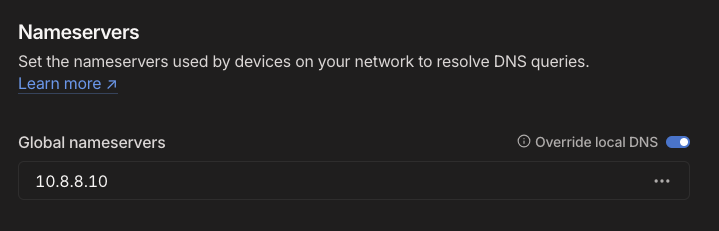
No need to use exit nodes for basic use. Exit nodes designate a machine to go to the internet, so setting one up is a way to proxy your traffic over the secure VPN connection. A local exit node is used/useful when you're connecting from the outside, and a remote exit node would be used/useful when you're connecting from you local network (just like any other commercial VPN let's say). If you're running NPM on a bridge network, using the IP of the Unraid machine itself, it should "just work" - if instead you're using a custom network with a unique IP in the subnet, it probably won't. As I recall, this was the impetus for me to run NPM in LXC, where I also installed another Tailscale client instance. For DNS, I exclusively use my own service (on my local subnet), normally handed out by DHCP to all clients and also set in Tailscale's Global DNS settings. The IP is that of my AdGuard Home instance which then connects to Unbound. If you're running your own DNS services, I suggest you also set Tailscale's Global DNS setting to its IP and also enable it to override local if you have or plan to connect machines that might default to some other DNS (for example, I have a couple of remote systems that would otherwise get some other DNS) - plus mobile devices that would get a random (unknown) DNS when outside the LAN). Tailscale Admin panel, DNS tab: I also keep Magic DNS turned OFF, because IMO, it just doesn't work the way I want it to. As I can't specify the root domain for it, I don't want it creating BS records. I already have DNS entries for all machines and services on my network, handled by Unbound (some of which are also proxied by NPM). With the Global DNS set, you can use Tailscale's DNS if you wish (setting on clients), as it'll forward to that global. Don't forget to create DNS entries in your forwarder or resolver (or hosts files) to send the required FQDNs to NPM's IP, otherwise it won't ever get connections to proxy.
-
I can't think of anything, but someone familiar with the workings of the WebUI hopefully chimes in. At the same time, MacOS has had its share of bugs, so it's possible an update to Safari fixes the issue. For instance, the version on MacOS 15.2 (beta 2) is 18.2 (20620.1.15.1) - and beta 3 is available for update today.
-
I'll have to check on that specific machine again, but I believe it defaults to ON with some settings preventing it from achieving the higher states. Enabling those is what caused the system to lock up about once every 12-24 hours. It was on the machine I've dedicated to routing/firewall, so I didn't have the patience to do much testing once I set it back.
-
This is the only way I've ever had Unraid crash on me (regularly and repeatedly) since 2018. I put the BIOS on that machine back to its defaults and plan to never touch those settings again.
-
Flawless WebUI performance in MacOS using Safari or Floorp (Firefox) or Chrome here for me. MacOS 15.2, Unraid 7.0beta3 and 7.0beta4 You might want to post version numbers for MacOS and Unraid. Also try a different browser as well as Unraid in Safe mode.
-
You can check the folder within your share via Unraid's GUI. As long as your permissions are as below (default) it should work as expected. You may have another issue not related to folder permissions - the immich log should offer some ideas.

-
Currently running 1.8.5 Never any issues with Homebridge, but honestly, it's been so long since I first installed it and having migrated servers, I have no idea which repository my installation is based on.
-
ssh [email protected] password: ******** tower$ tailscale --help
-
NPM Plus is in Community apps and is regularly updated. Here's the github, just to make sure you find the right one: https://github.com/ZoeyVid/NPMplus



