





kennymc.c
Members
-
Joined
-
Last visited
Everything posted by kennymc.c
-
Unfortunately a bit annoying that the primary text color also applies to the server name and the description above the menu bar. The secondary text color should rather apply for this, because the background color underneath is the same and can also be a different one than the one under the menu bar.
-
I already saw that post but my question was referring to the stable versions of 6.12 and if this could potentially be fixed.
-
@mgutt Were you able to test this with one of the 6.12 releases?
-
Hat hier schon jemand das aktuelle RAM-Disk Skript aus dem Thread unten mit 6.12 bzw. 6.12.1 Stable im Einsatz? Mit den letzten RC-Releases soll es wohl Probleme gegeben haben:
-
Where do you see an update? It is still v1.4 which seems to have problems with 6.12 or at least rc6
-
Der Fix ist jetzt mit drin im aktuellen Pull Request von mir auf Github. Müsste also mit dem nächsten Update gelöst sein. Die Pluginübersetzung selbst hab ich mir noch nicht angeguckt aber die anderen noch vorhandenen Erwähnungen des deutschen Namen ergeben im Kontext zumindest Sinn.
-
Wenn es um die namensgebenden unassigned devices, also die nicht zugewiesenen Datenträger geht, kann man das meiner Meinung schon eindeutschen. Wenn es um den Pluginnamen geht, macht es natürlich nicht so viel Sinn. Leider fehlt bei der Übersetzung oft der Kontext und man weiß nicht immer wo genau der String benutzt wird. Manche Plugin-Entwickler schreiben aber zumindest Kommentare zu einzelnen Sektionen. Ich vermute, dass es um die Einstellungsseite geht? Hier würde der Eigenname tatsächlich mehr Sinn ergeben. Ich hab da einen String in der settings.txt gefunden. Im Dashboard passt wiederum die Übersetzung besser.
-
Does the above mentioned problem still occur with 6.12 stable or do we have to wait for an update of the script? Unfortunately, the root issue itself still seems to be successfully ignored by @limetech
-
I also have this problem. Possibly it has to do with a DNS server running at the same time via Docker.
-
Since I had the same problem again after a reboot last night, I did some more research and think I at least understand what is happening here. Dnsmasq seems to launch with the VM service and tries to occupy port 53 on virtbr0 (192.168.122.1). Since the Docker service is probably started first, port 53 is already occupied by AdGuard/PiHole on all interface and the mentioned dnsmasq error messages occur. As soon as the Docker container is stopped by the backup during the night and afterwards an attempt is made to restart it, dnsmasq has already taken over the port on virtbr0 in the meantime and the container cannot be restarted. Therefore, dnsmasq and thus also the VM service must be stopped. Then AdGuard/PiHole can use port 53 again. However, after restarting the VM service, the libvrt error message occurs. Instead of deleting the image or loading a backup, you can simply restart the Docker service. Apparently though, after restarting the docker service, the virtbr0 interface disappears and needs to be restarted manually via a terminal command. This causes the dnsmasq messages to appear in the log again. This also explains why I have the problem only after a reboot, because virtbr0 simply no longer runs and restarts only automatically after a restart of the server, because here also the vm serivce is restarted. I found about the disappearance of the virtbr0 interface here, but unfortunately the reason for this has not been found out yet: Then I read this thread wich advices to run DNS servers via Docker on br0 with its own static IP address instead of Bridge or Host because these will occupy the containers ports on all interfaces which includes virtbr0 as well that is needed for vms.
-
I also had this issue this night after the AdGuard container was stopped during a backup and did not started again. I restarted the server the Day before and also noticed this strange log message a few times during the first 30 minutes after the restart : "dnsmasq[14644]: failed to create listening socket for 192.168.122.1: Address already in use". Also in my network this address was not in use and also in a subnet, which i don't use at all. After I disabled the VM service and activated it again, I was able to start the AdGuard container again. I haven't had a VM running for a while and they don't use the IP address mentioned. Unfortunately, I now get the following message on the VM page: "Libvirt Service failed to start". If I delete the existing Libvirt image via the settings and restart the VM service, I no longer get an error message, but all my VMs are now gone. I then restored the libvrt image from a backup but then this error reoccurs. Update: I found an old backup I made via VM Backup and could replace the content of the xml and the .fd file. Fortunately I had changed only a few small things in the vm config in between.
-
Ok, ich finde die persönliche Anrede mit "du" auch passender.
-
Mir sind sowohl Übersetzungen mit "du" als auch "Sie" aufgefallen. Da "Sie" deutlich häufiger Sie benutzt wird, gehe ich davon aus, dass das bevorzugt benutzt werden soll? Außerdem wäre es hilfreich, wenn auf der Seite der fehlenden Übersetzungen eventuell auch die Zeilennummern hinzugefügt werden könnte. Dann kann man die Strings viel schneller in den Textdateien finden. Strings mit Sonderzeichen werden dort leider auch nicht aufgeführt. Wahrscheinlich, weil sie schon standardmäßig eine Übersetzung mit den Sonderzeichen haben, die aber auf Englisch ist. Diese übersieht man sehr leicht. Ich denke längerfristig würde es für viele auch einfacher sein Dienste wie Crowdin, POEditor oder Weblate für die Übersetzung zu nutzen. Ich vermute, dass viele potenzielle Übersetzer, die nicht in der Softwareentwicklung arbeiten der Workflow über Pull Requests auf GitHub etwas abschrecken könnte. Außerdem lassen sich über die anderen Plattformen wesentlich einfacher in sich konsistentere Übersetzungen erstellen z.B. durch ein Glossar.
-
After certain actions like copy, move or rename, creating a new folder or changing permissions or the owner, the create and upload buttons are greyed out until I reload the page. Is this a known bug? Also, the editor close button looks like this:

-
I can confirm this bug
-
+1 There have been several cases where this would have saved me time
-
The ACE editor settings appearance bug was recently fixed in Dynamix File Manager but unfortunately these settings cannot be saved permanently. Maybe someone here knows if and how this is possible.
-
Thanks! Since the User Scripts plugin is also affected I will asked there if someone knows how to save the settings permanently.
-
But when you remove a plugin, its settings are lost. Yes, you can make a backup before, uninstall it and then restore the backup when reinstalling but exactly this process could be simplified with a disable button. Especially because not everyone knows how to create a manual backup and restore it. Another variant could be a promt before the removing process to keep all settings of that plugin. When you reinstall this plugin all settings will be loaded automatically from last time it was installed. Maybe CA could also ask if you want to use the old settings.
-
Even though this feature request is quite old, I think it is still relevant. But you should also be able to disable plugins temporarily during normal operation without a reboot just like it works with install/uninstall.
-
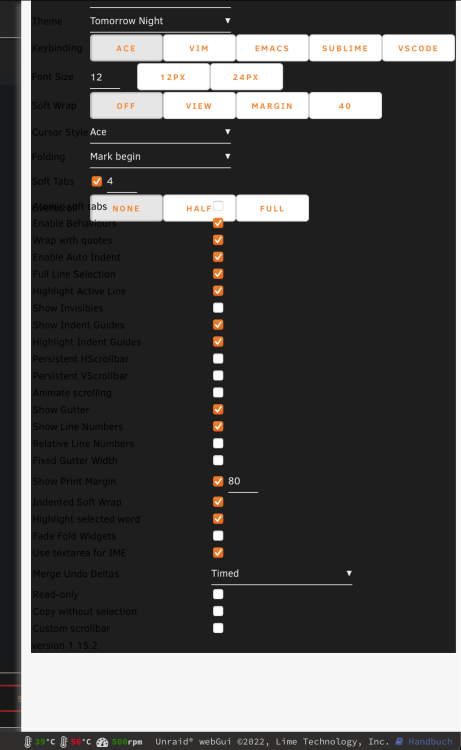
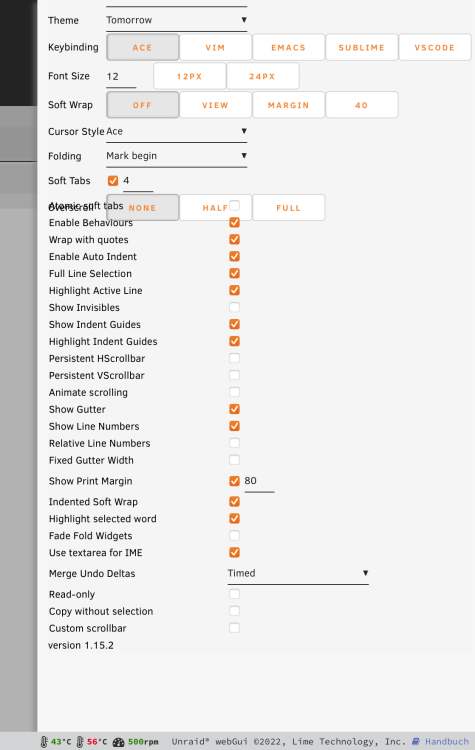
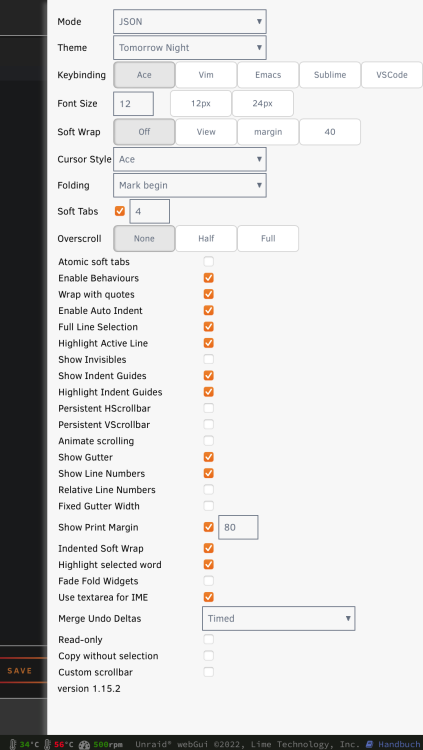
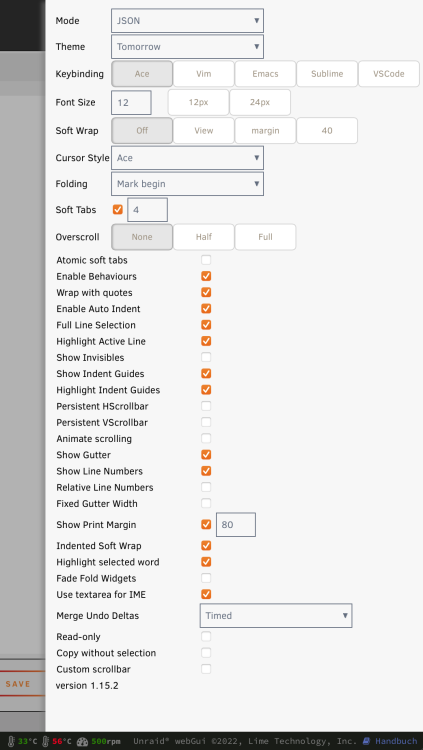
How do you change the editor settings? There is no specific saving of settings and each time a new editor is opened it uses the predefined settings. I assumed that if I change something in this menu it is not only temporary. Can the predefined settings be changed somehow? Preferably also globally for all plugins that use the ACE editor. I don't see any problems with these themes. What browser and resolution are you using? Please post a screenshot of the "problem". Here's what it looked like with Chrome, Firefox, Safari, and Edge on Windows and macOS with the Black and White theme (ad-blocker disabled): And this is how it looked with the Grey and Azure Theme:
-
@bonienl Are you able to reproduce this?
-
Could anyone reproduce this?
-
But this way also someone else with access to my mail account can get the token to deactivate MFA. This person could also already have the password of the account. That would defeat the whole purpose of MFA.
-
I noticed that the ACE Editor settings (Ctrl+,) like theme or text size are not saved. As soon as you exit the editor and open it again, the default settings are loaded again. There are also display problems with the Black and White Base Themes. Themes with a vertical menu bar like Azure and Grey are not affected. The problem also affects other plugins that use the ACE editor, like User Scripts.





